What Is Portable Delivery Intelligence? A Plain Guide for Agency Owners

Portable Delivery Intelligence is the approved client context, work rules, and sign-off requirements I carry across AI tools. I keep them in 1 agency-owned record, then load the parts each task needs into ChatGPT, Claude, or Gemini so each draft starts with the same client facts and limits.
The lesson: more drafts do not mean more capacity. I need less rework, not more output to review. Saved prompts guide tasks. A current client record guides the whole handoff.
Here is how I put that record to work:
- Store brand voice, goals, approved claims, channel rules, QA checks, and reviewer roles in Markdown.
- Assign 1 owner and check the version before drafting.
- Keep <u>human review and final approval</u> in place.
- Run a 30-day pilot. Track first-pass approval, review minutes, and revision rounds before adding accounts.
Agile Growth Labs (AGL) sets a target of 18 to 25 accounts per manager, compared with its stated baseline of 4 to 8. That is a target, not a promise. I use review time and quality to judge whether my team can carry more work.
For the term’s definition, see the AGL glossary.
- Run the free Capacity Leak Calculator to see how many more accounts your team could carry.
- Want help? Bring 1 client account to a free mapping session.
How to Give AI Agents Enough Context to Be Useful
sbb-itb-9cd970b
What Portable Delivery Intelligence Includes
Portable Delivery Intelligence is the approved client record and the rules for using it across tools. It gives the agency a reusable delivery record that moves between ChatGPT, Claude, and Gemini, so each tool gets the same client context, delivery rules, and approval requirements.[1][2][4][6]
The record works only when all 3 parts stay current.
3 Parts: Client Context, Delivery Rules, and Approvals
Client context covers positioning, audience, offers, goals, voice, priorities, and past decisions.[1][5][6]
Delivery rules cover voice limits, banned phrases, disclaimers, and channel formatting.[1][3][4][6]
Approval requirements name who signs off and what needs human review before work ships. A checklist is not approval.[1][3][4][6]
What Goes in a Reusable Client Record
Build the record from small, reusable modules, not 1 oversized prompt.[3][4][6]
Keep each client’s files separate so details from 1 account do not slip into another. Update the record when an offer, brand rule, or approved standard changes.[3][4][7]
Module Purpose Agency artifact Brand voice Define how the brand sounds Voice guide with 3–5 adjectives, a 1–5 formality scale, and approved examples Campaign objectives Tie work to current goals Current campaign brief with goals and active work Approved claims Separate facts from unsupported promises Approved offer facts, pricing, guarantees, and disclaimers Channel rules Set format and CTA requirements Channel-specific formatting and CTA rules QA checklists Check context, tone, evidence, and format QA checklist for each asset Approval maps Route work to accountable reviewers Named reviewer roles and approval gates
Load the record before drafting. A saved prompt or chat history alone cannot replace it.
Why Prompts and Chat Histories Fall Short
Saved prompts tell a tool what to do. Chat histories keep past discussions, which may contain old assumptions. Neither automatically gives the agency a current, approved client record that it owns.[3][6][8]
| Dimension | Portable Delivery Intelligence | Saved prompts | Isolated chat histories |
|---|---|---|---|
| Scope | Client context, rules, and approvals | Task instructions | Conversation fragments |
| Ownership | Agency-owned record | User-maintained library | Tool- or workspace-bound discussion |
| Updates | 1 maintained source | Changes repeated per prompt | New messages may contradict old decisions |
| Approval control | Named reviewers and approval gates | Only if included | Conversation alone does not establish approval |
The next step is to load the right record before drafting.
How to Move Client Context Across AI Tools
Move client context across AI tools by keeping 1 approved record in agency-controlled storage and loading the parts each task needs. Treat each tool’s copy as a working copy, not the master record, and check its version and rules before drafting so the agency stays in control.[3][4][6]
Keep 1 Approved Source of Truth
Store the approved context pack in agency-controlled storage. Assign 1 owner and give each revision a version ID. Keep campaign direction separate from lasting account rules so a short-term choice does not become a permanent rule.[3][4][6]
Tool copies are working copies, not separate sources of truth. Portability does not sync copies automatically. Write approved corrections back to the central record and update its version.[6]
Load the Right Context Before Drafting
Load the right context before every draft. Include only what the task needs: approved context, task requirements, and quality rules. Use 1 session per client.[3][5][7]
Before drafting, ask the tool to name the loaded version, repeat the restrictions, and mark missing facts with “ASSUMPTION:”. Tools differ in context limits, retrieval, and chat history. The same inputs do not guarantee the same drafts.[3][5][8]
Portable Context vs. Built-In Tool Features
Built-in features help tools use context. The agency still manages updates and approvals through its delivery record.[2][3][6]
| Approach | Portability | Governance | Approval controls | Cross-tool reuse |
|---|---|---|---|---|
| Portable Delivery Intelligence | Agency-owned files outside the model platform | Named owner and central version record | Defined human approval gates | Load the parts each tool needs |
| ChatGPT project instructions | Applies within ChatGPT | - | - | Copy and verify elsewhere |
| Claude project knowledge | Applies within Claude | - | - | Re-upload source files elsewhere |
| Tool-specific memory or project features | Applies only inside that tool | - | - | Manual copy or re-upload required |
Loading the same approved context each time can shorten review and reduce rework. Fewer revisions leave the team more time to handle client accounts.
How Consistent Context Can Increase Delivery Capacity
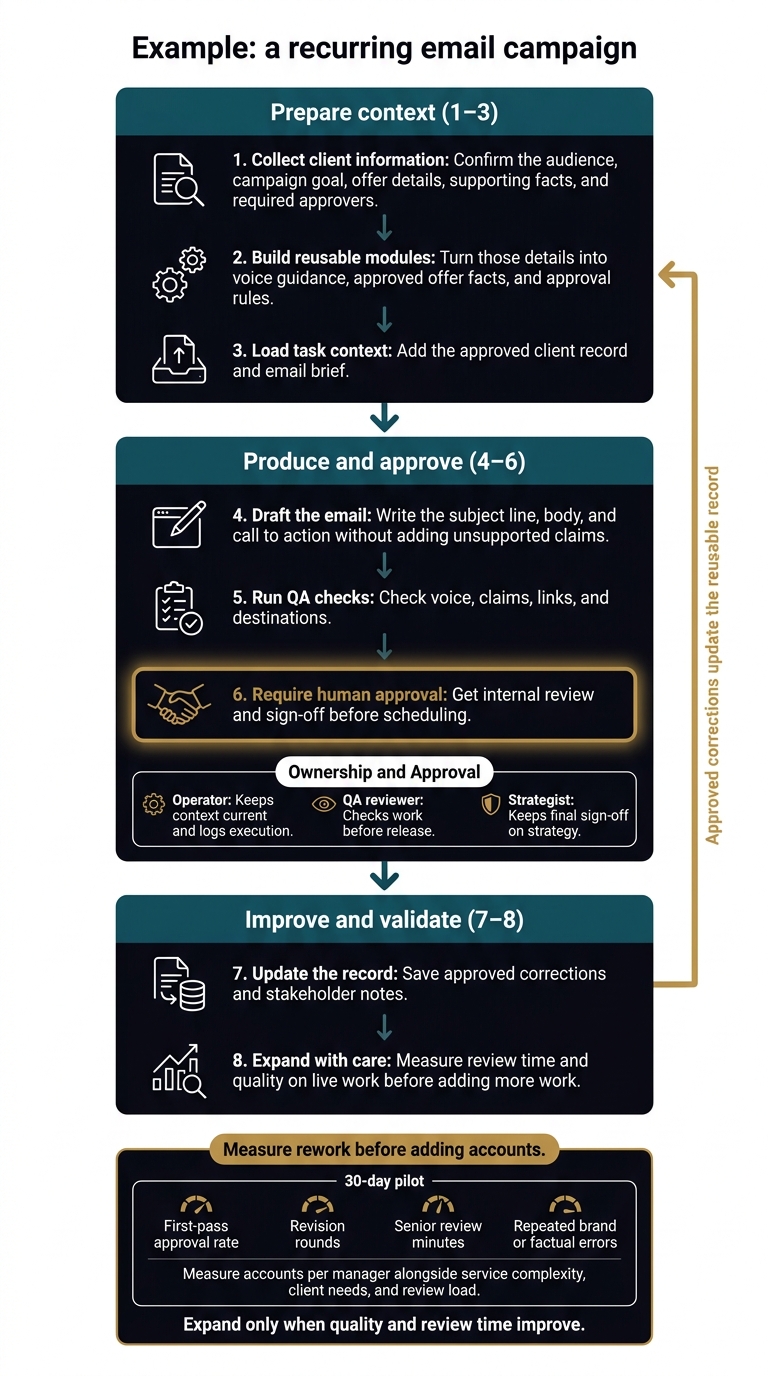
Portable Delivery Intelligence: From Kickoff to Approval
Consistent context increases delivery capacity by cutting time spent on briefings, Slack searches, rewrites, and senior review, rather than by producing more AI drafts with Copy.ai. The gain comes at the handoff: when client facts and approval rules travel with the task, managers spend less time fixing work and can carry more accounts.[1][4]
AI is not the bottleneck. Context is. More drafts do not help if each handoff forces someone to find the facts again. Shared context means less rework, faster approvals, and more deliverables per manager.
From Client Kickoff to Approved Work
The process turns client facts into reusable context, then carries that context through drafting, checks, and approval.
Example: a recurring email campaign.
- Collect client information: Confirm the audience, campaign goal, offer details, supporting facts, and required approvers.
- Build reusable modules: Turn those details into voice guidance, approved offer facts, and approval rules.[3]
- Load task context: Add the approved client record and email brief.
- Draft the email: Write the subject line, body, and call to action without adding unsupported claims.
- Run QA checks: Check voice, claims, links, and destinations.[3][4]
- Require human approval: Get internal review and sign-off before scheduling.[6][7]
- Update the record: Save approved corrections and stakeholder notes.[1][7]
- Expand with care: Measure review time and quality on live work before adding more work.[1][7]
Measure Rework Before Adding Accounts
Run a 30-day pilot using comparable recent work to check whether reusable context cuts rework.[1] Track first-pass approval rate, revision rounds, senior review minutes, and repeated brand or factual errors.[1][3]
Measure accounts per manager alongside service complexity, client needs, and review load. Draft counts alone do not show how much work the team can carry.
More drafts or automation can create more rework when context is out of date, standards are unclear, or no one owns the task. Poor version control and skipped approvals add to that load.[1][3][4] If quality and review time improve, the same delivery layer can support more accounts without new hires.
How Agile Growth Labs Installs the Delivery Layer
Agile Growth Labs (AGL) installs 1 service, connects reusable client context to existing tools, and tests live work in a 30-day pilot. The pilot sets clear roles for execution, review, and final sign-off, then measures whether the delivery layer is ready for more work.[1][7]
The operator keeps context current and logs execution. The QA reviewer checks work before release. The strategist keeps final sign-off on strategy.[7]
Setup Checklist and Key Takeaways
Start With 1 Recurring Service
Use the record and loading process above to test 1 recurring service with 1 approved client record. Move the same approved context across ChatGPT, Claude, and Gemini without re-briefing.
Store the record in agency-owned Markdown. Assign 1 owner. Load the current version into each tool before work starts.
Keep human QA and approval gates in place. AI cannot publish or change approved rules without human approval.
Log why each correction happened. Review context updates weekly, and get human approval before saving changes.
Expand only when review minutes and first-pass approval rates show that the process is stable. Then use the same setup for more work without more re-briefing.
Keep Context Reusable and Ownership Clear
The record matters more than the prompt. Keep it current, portable, and owned. Saved prompts and chat histories do not replace it.
Prove added capacity with review time, correction volume, and first-pass approval rate.
FAQs
How do I protect client data across AI tools?
Keep client context, brand rules, and instructions in secure storage your agency owns, not in AI platform memory. Give each client separate storage paths and credentials. Load that client’s details only when needed. Never put them in shared skill files.
For work that goes outside the agency, keep each AI session and generation call tied to 1 client only. Log pack versions, skill IDs, and data sources for every external send. Never install third-party skills in company accounts.
How do I resolve conflicting client instructions?
Keep each client’s rules in Portable Delivery Intelligence. Store brand and voice rules, approved claims, past briefs, and approval requirements in 1 place.
A conflict is a quality check or approval issue, not a writing problem. Check each draft against the client’s rules. Flag broken rules and claims that lack approval. Send conflicts to the named decision-maker before sending the work outside the agency.
Save each approved fix as a versioned update to the client’s context. That gives future drafts the rule they need to avoid the same conflict.
How do I know when to add more accounts?
Add more accounts when your reusable client delivery “context pack” and workflow produce assets with little rework, without rebuilding briefs. Use approved client context, brand rules, QA checklists, and approval routing, then check pilot results for less senior review time and fewer repeat errors [1][2].
Expand only to accounts with complete context packs. Missing context should stop work from shipping, not serve as a reason to produce more [3].