How We Manage 7 Retainer Clients Per Person With AI: Full Ops Breakdown
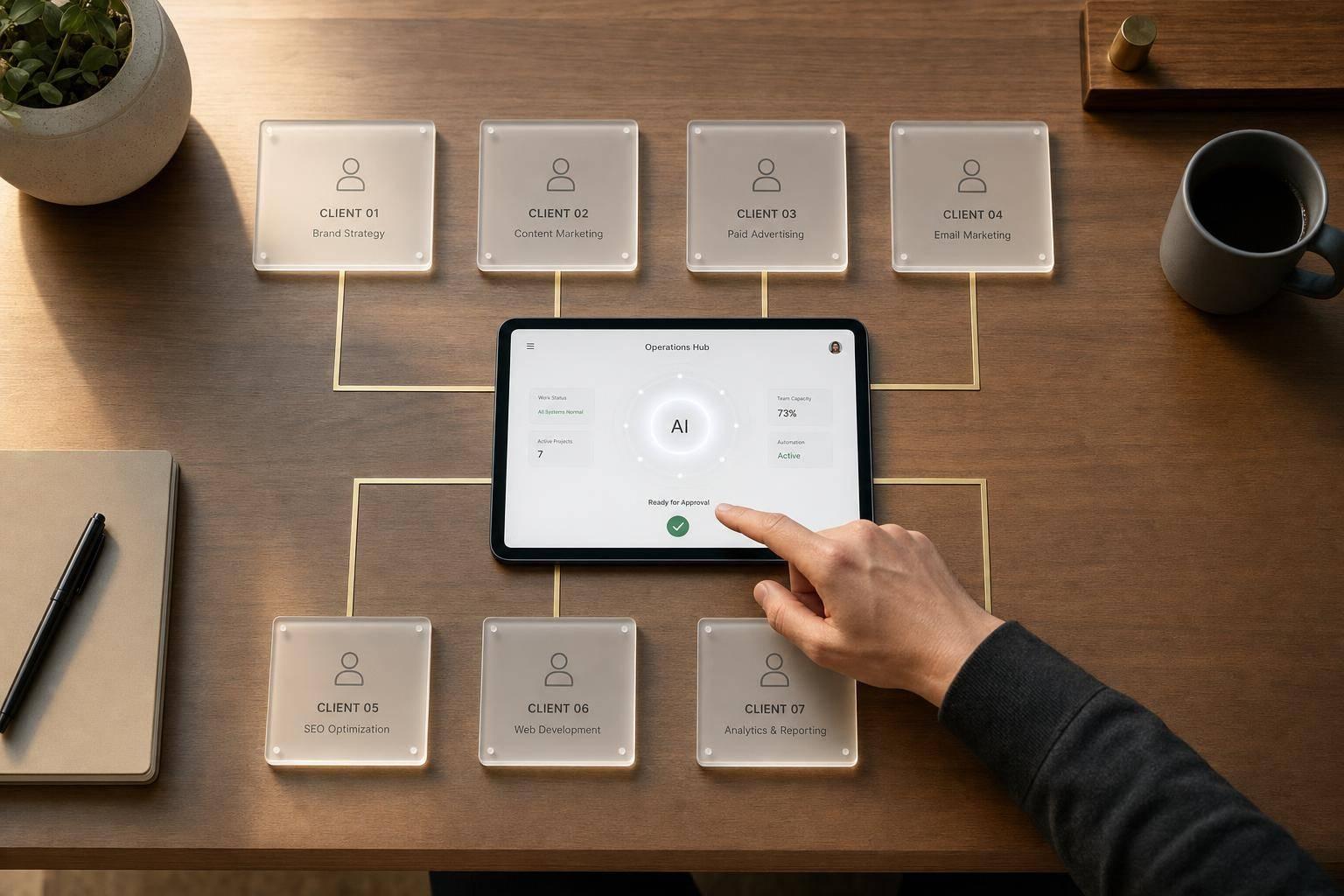
Most agencies do not hit a demand wall. They hit a system wall. AGL’s point is simple: 7 retainer clients per person works when repeat work is fixed, AI handles first-pass admin, and humans approve every client-facing step.
Here’s the short version:
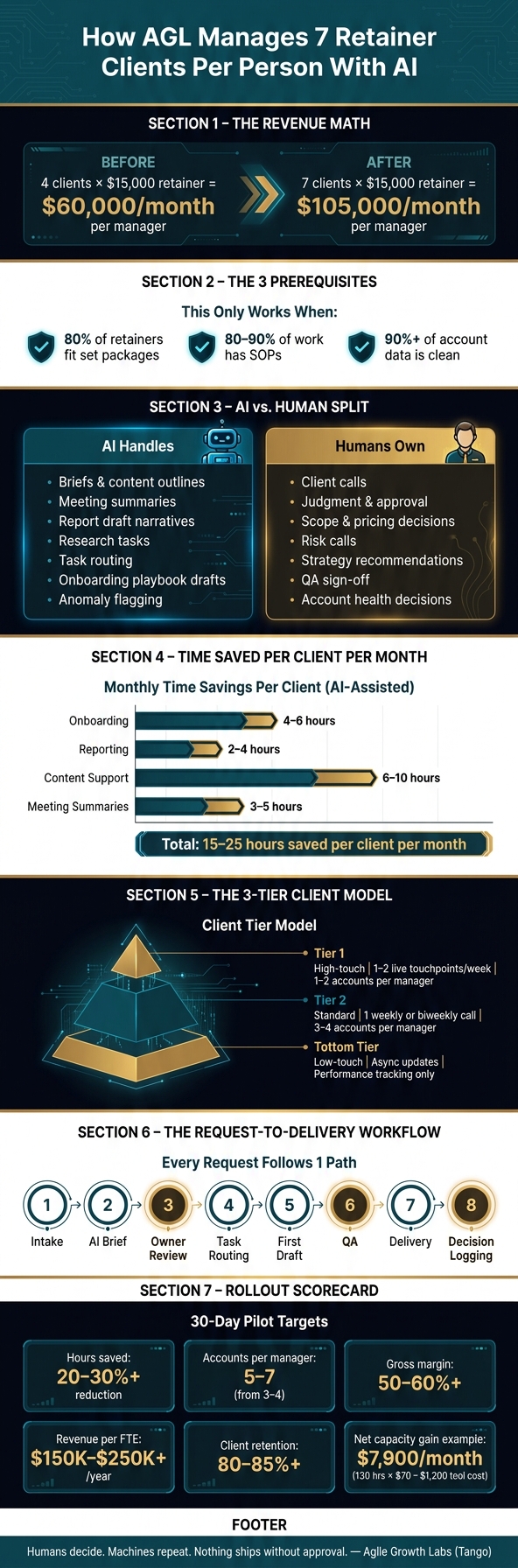
- 1 account manager moving from 4 clients to 7 shifts managed revenue from $60,000 to $105,000 per month at a $15,000 retainer.
- This only works when 80% of retainers fit set packages, 80% to 90% of work has SOPs, and 90%+ of account data is clean.
- AI handles repeat tasks like briefs, summaries, report drafts, research, and task routing.
- Humans still own client calls, judgment, approval, scope, pricing, and risk calls.
- AGL runs this through Tango, where the workflow, account history, approvals, and handoffs live in 1 place.
- The point is not more tools. The point is more output, less admin drag, and no drop in client care.
The lesson I take from this article is clear: 7 clients per person is not an AI trick. It is a control system. AGL runs many marketing departments with a small team using Tango. Humans decide, machines repeat, and nothing ships without approval.
What stands out to me is not the AI part. It is the rules.
The model works because AGL puts hard limits on scope, meetings, response times, and review steps. That keeps 1 person from getting buried by random work. It also keeps clients from feeling ignored.
I’d boil the article down to 4 parts.
First, standardize the service.
If each retainer is a custom shop, this breaks. You need 2 to 5 core packages, fixed deliverables, clear scope edges, and set meeting rhythms.
Second, keep account memory in 1 system.
Tango holds the SOPs, prompts, playbooks, decision logs, and account history. That means the system carries the context, not just the person. Backup coverage gets much easier.
Third, use AI for repeat admin only.
The biggest time cuts come from onboarding drafts, meeting notes, report narratives, content briefs, and task creation. The article points to 5 to 6 hours saved per person per week once these workflows are in place.
Fourth, build approval and QA into every workflow.
Nothing goes out without review. That matters most for reports, content, pricing, performance issues, and any client message with risk.
I also think the weekly workflow section is the part agency owners should pay most attention to.
AGL is not asking people to do 7 accounts through effort alone. It gives each request the same path: intake, AI draft, owner review, routing, draft, QA, delivery, then decision logging. That repeat path is what cuts drift.
A few numbers from the article make the case fast:
- 10 client calls max per week per person
- 24 to 48 hours for full replies
- 30 to 45 minutes of post-call admin cut to 10 to 15 minutes
- 4 to 6 hours saved in onboarding per client per month
- 2 to 4 hours saved in reporting per client per month
- 6 to 10 hours saved in content support per client per month
- 3 to 5 hours saved in meeting summaries per client per month
That time adds up. But the article makes a good point: saved time only matters if it turns into paid capacity.
The rollout advice is also solid.
Do not start on risky live client work. Start with 3 to 5 repeat workflows like weekly reports, meeting summaries, onboarding playbooks, and research tasks. Run them in phases over 12 weeks. Write a stop rule before you start.
The scorecard is simple too.
Track hours saved, accounts per manager, gross margin, revenue per employee, request-to-delivery time, and client health. If output goes up and client health stays flat or better, keep going. If quality slips, pause and fix the workflow.
For me, the main lesson is this: capacity comes from rules, not effort.
That is why the AGL result matters. AGL runs many marketing departments with a small team using Tango. Not by handing the account to AI. By giving AI the repeat work and keeping judgment with people.
If you want to use this model, take 1 step now: pick 3 repeat workflows this week, set human approval at every client-facing step, and score the pilot on margin, capacity, and client health.
AI vs. Human Roles: How AGL Manages 7 Retainer Clients Per Person
3 AI Agents I Can't Stop Selling (Clients Keep Asking for Them)
sbb-itb-9cd970b
The Operating Model Behind 7 Clients Per Person
Here’s the part most agencies miss: 7 clients per person is not a hustle metric. It’s a system metric.
It only works when capacity, workflows, QA, and coverage all run the same way. That’s the lesson. If those 4 parts drift, 7 clients per person falls apart fast.
At Agile Growth Labs, this runs through Tango. Tango is the shared workflow hub. It holds the workflow library, SOPs, and prompt templates for every account. Weekly and monthly work gets blocked ahead of time, so random requests don’t eat the whole week.
That’s the point of the Tango system. Humans decide. Machines repeat. Nothing goes out without approval. That’s how AGL runs many marketing departments with a small team.
Client Tiers, Scope Limits, and Weekly Capacity Rules
Not all 7 clients take the same amount of time.
Agile Growth Labs sorts accounts into 3 tiers based on complexity and communication load. This tier model controls workload. It shows which accounts need more attention, which ones run on a set beat, and which ones stay mostly async.
- Tier 1: High-touch accounts with frequent strategy changes and 1–2 live touchpoints per week. One person usually carries only 1–2 of these at a time.
- Tier 2: Standard accounts with repeatable deliverables and 1 weekly or biweekly call. These make up most of the 7-client load, usually 3–4 accounts.
- Tier 3: Low-touch accounts with performance tracking, light reporting, and async updates.
Capacity rules stay fixed.
Meeting time caps at 10 client calls per week per person. Response-time rules are also set: same-day acknowledgment and full replies within 24–48 hours. If a client keeps asking for daily nonstandard deliverables or frequent last-minute pivots, the account gets re-scoped, repriced, or marked as a poor fit for the model.
That’s a big shift in how to think about service delivery. Capacity is not about who works harder. It’s about what the system allows.
The Core Systems Stack: Coordination, Task Routing, and Shared Context
Once capacity is set, the next piece is the system that moves work through the account.
The stack has 5 parts. Each one has 1 job.
| System | Role | What It Does | Approval Point | Risk to Control |
|---|---|---|---|---|
| Workflow hub (Tango) | Standardize | Maintains SOPs and prompt templates | Finalize workflows, validate changes | Outdated processes |
| Project management | Route | Tracks requests and work across 7 clients | Confirm priorities, accept or reject tasks | Missed SLAs |
| AI drafting | Draft | Produces first-pass content, briefs, summaries | Edit and approve before client delivery | Off-brand content, factual errors |
| Reporting & analytics | Report | Turns raw data into client-ready performance summaries | Interpret insights, decide on recommendations | Misread data, misleading conclusions |
| Shared account history | Preserve context | Holds brand voice, ICP, offers, and past decisions | Curate and update core documents | Stale or incorrect account information |
The shared account history matters most.
AI only saves time when it works from current context. Without that, the team has to re-brief every prompt by hand. That kills output. It also adds drift.
Each client also has a primary owner and a backup. Workflows, context, and decision logs all live in Tango. So if someone is out on PTO, overloaded, or dealing with an urgent issue, the backup can step in without a long handoff.
That’s one reason the AGL model holds. The system carries the memory, not just the person.
How Work Moves From Request to Delivery
Once the stack is in place, every request follows 1 controlled path.
The path is simple: intake, AI brief, owner review, task routing, first draft, QA, delivery, and decision logging.
Intake gathers the request type, objective, deadline, and client tier through a standard form. The AI brief pulls from the shared account history. Then the account owner reviews and edits it before anything moves forward. First drafts use pre-built prompts tied to Tango workflows.
Higher-stakes work, like strategy proposals or budget changes, needs a second reviewer before delivery. After delivery, call recordings and email threads get turned into decision logs. The account owner checks those logs and stores them back in the shared account history.
That closed loop is what makes 7 clients per person possible.
And it ties back to the AGL result in the header itself: 7 clients per person. Not by asking people to do more. By giving every request the same path through Tango, with approval at each point.
If you run marketing for several clients, take 1 step now: map your current request-to-delivery path in Tango and set hard capacity rules before you add another account.
The AI Workflows We Run Every Week
The hard part is not doing more work. It’s keeping 7 client accounts moving at once without losing the thread.
That’s what this weekly layer does. It makes the 7-client model repeatable. At AGL, humans decide, machines repeat, and nothing ships without approval. That’s the Tango system in action.
Onboarding, Playbooks, and Account Setup
Bad setup creates drag later.
If the account context is thin on day 1, the team pays for it every week after. So at Agile Growth Labs, onboarding runs in 4 phases.
- Intake: AI parses the signed SOW, onboarding form, and discovery call transcript. It pulls the ICP, offers, channels, past performance, stakeholders, and success metrics into 1 structured document.
- Draft playbook: AI builds a first-draft Account Playbook. That covers brand voice, content pillars, approved CTAs, and weekly cadence rules. For example, all performance reports by Tuesday 10:00 a.m. PT in 1 email thread.
- Build checklist: The playbook turns into a project-tool checklist with flagged missing items based on the client’s tier.
- Lock operating rules: The team confirms and stores escalation paths, rules like pausing a campaign if CAC stays above $300 for 7 days, and communication preferences.
AI updates the playbook each week. But the AM approves every change.
Each week, AMs tag key call recordings and email threads for review. AI then creates a Playbook Update Proposal. This is a short list of suggested edits, like adding Director of Revenue Operations as a key persona or changing the main value prop to focus on faster implementation instead of lower cost.
The AM then approves, edits, or rejects each suggestion in 1 pass that takes 20 to 30 minutes.
That approval step matters. Without it, AI can latch onto 1 offhand comment from 1 call and treat it like a rule.
Once the account is mapped, the same pattern moves into reporting, content, and handoffs.
Content, Research, Reporting, and Meeting Summaries
These 4 workflows eat up most weekly admin time.
Running them through AI cuts the setup work. That gives the AM more time for judgment calls, which is where the account value sits.
| Workflow | Manual Version | AI-Assisted Version | Time Saved per Client per Month (approx.) | Required Human Review |
|---|---|---|---|---|
| Onboarding | AM reads all intake docs, writes ICP and playbook from scratch, builds checklists manually | AI ingests intake docs and drafts the playbook; the AM reviews and locks the rules | 4–6 hours | High: AM confirms ICP, rules, and priorities |
| Reporting | AM exports data, writes monthly narrative, identifies anomalies manually | AI pulls metrics, generates draft narrative and anomaly flags; AM edits commentary and next steps | 2–4 hours | High: AM validates data and strategic insights |
| Content Support | Strategist researches topics, writes briefs, outlines, and first drafts | AI synthesizes research, drafts briefs and outlines; humans refine for brand voice and U.S. audience | 6–10 hours | High: Editor reviews all client-facing copy |
| Meeting Summaries | AM takes live notes, writes recap emails, manually creates tasks after each call | AI transcribes calls, generates summaries and action-item lists, pushes tasks to project tools; AM reviews for accuracy | 3–5 hours | Medium: AM skims summary, corrects key points |
Those hours stack up fast.
That’s the lesson here. The point is not to let AI “run” the account. The point is to remove repeat admin work so 1 person can run 7 retainers with less drift, less delay, and less context loss. That’s how AGL runs many marketing departments with a small team using Tango.
Reporting is a good example. AI uses fixed anomaly rules. It flags any CAC increase above 15% week over week. It also flags outreach reply rates below 3%.
Those flags do not replace the AM’s read on the account. They just point to the numbers worth checking before the client spots the issue first.
Task Delegation and Account Handoffs
When work moves between people, files are not enough.
The system has to carry context too. That’s where Tango helps AGL keep delivery tight without adding more meetings.
For task delegation, AI pulls the right playbook details, including ICP, offer, brand voice, and past performance. Then it builds a task brief with the objective, inputs, constraints, success metrics, and timeline.
The specialist gets what they need in 1 document. No kickoff call needed.
For account handoffs, AI creates a 1 to 3 page Account History Summary. That includes the relationship timeline, key milestones, strategy shifts, stakeholder map, and current risks.
It also includes a decision log.
That log lists major choices and why they were made. For example, stopping targeting Series A companies due to low close rates and focusing on Series B and above. That keeps the new owner from re-testing ideas the team already ruled out.
Every meeting feeds this record on its own. AI transcribes the call, writes a summary with sections for decisions, risks, and open questions, pulls action items with suggested owners and due dates in the client’s time zone, and pushes those tasks into the project tool.
Post-meeting admin drops from 30 to 45 minutes to about 10 to 15 minutes per call.
That’s the result to pay attention to. More output. Less admin drag. No AI stack to babysit.
If you run client delivery across several accounts, map 1 weekly workflow first. Start with the one your AMs repeat every single week, then run it through the same Tango rule: humans decide, machines repeat, nothing ships without approval.
Quality Control, Client Communication, and Retention Safeguards
Here’s the big shift: 7 clients per person is not a staffing trick. It is a control system.
That is how AGL runs many marketing departments with a small team using Tango. Humans decide. Machines repeat. Nothing ships without approval. That is the part many agencies miss.
Once requests are routed and drafts are moving, this next layer keeps work from slipping.
Human Approval Gates and QA Checklists
Every deliverable needs 1 owner and 1 required review step before it goes to the client.
The rule is simple. Strategists approve strategy and budget moves. Account managers approve client-facing communication. Specialists check channel work, like ROAS in paid media or open rates in email.
Each deliverable type should also have a short QA checklist in the project tool. The task does not move to client-ready until every item is checked off.
For performance reports, that means:
- spot-check at least 3 to 5 key metrics against the source platform
- check attribution claims against CRM data
- make sure the story matches the numbers
For content, that means a brand voice check against approved assets, a compliance pass for regulated claims, and an offer and CTA check.
Keep these checklists short. Keep them tied to risk.
AI can handle format checks, broken links, and clear tone issues. That gives the human reviewer more time for strategy and judgment. That is the Tango model in practice.
Service-Level Rules That Keep Clients From Feeling Overlooked
Quality control is only half the job. Clients also need to feel informed.
At 7 accounts per person, people can start to feel pushed aside if service rules are vague. So make the rules clear from day 1.
Set response-time standards up front:
- same-day acknowledgment
- 24-hour replies for simple questions
- 48 to 72 hours for requests that need analysis
Weekly email updates should go out on a fixed schedule. Keep them tight. Cover wins, risks, and what is coming next.
Monthly strategy reviews should stay on outcomes and agreed next steps. Not just status.
Before each client call, the account manager should review an AI-made brief with the latest performance, open tasks, risk flags, and recent notes. After the call, send a same-day recap with decisions, timelines, and owners.
And if performance drops or a delay gets serious, a human should reach out first. Not bury it in the next report.
What to Monitor to Catch Quality or Churn Risk Early
Churn often shows up in the data before it shows up in a call.
Missed deadlines. Scope creep. Lower sentiment. These signs can show up weeks before a client says a word. But only if you track them.
These are the signals that help 1 person spot trouble before it hits delivery, margin, or renewal.
| Risk Type | Early Warning Signal | AI Detection & Support | Human Owner | Escalation Trigger |
|---|---|---|---|---|
| Delivery quality | On-time delivery rate < 90% for 2 consecutive weeks | Flags overdue tasks and summarizes root causes | Account manager | Third missed deadline in a quarter |
| Performance risk | CPA up 30%+ week-over-week; ROAS below target for 2 weeks | Generates diagnostic snapshot and drafts outreach | Strategist | No recovery plan within 48 hours of the flag |
| Client sentiment | Negative or urgency language in 3+ emails in a month | Sentiment scoring from email and call transcripts | Account manager | Client mentions evaluating other vendors |
| Scope creep | Hours or tasks delivered exceed contract scope | Tracks task volume vs. contracted scope | Account manager + strategist | Two consecutive months over the scope threshold |
| Account profitability | Effective margin drops below target threshold | Compares logged hours to retainer value in USD | Strategist + leadership | Two consecutive months below the margin floor |
| Renewal risk | Low sentiment plus a performance dip within 60 days of renewal | Combines health score signals into a renewal risk flag | Account manager + leadership | Score drops below threshold with less than 60 days to renewal |
Human owners should review these signals in weekly or every-2-week account health reviews. That gives the team time to act before the next formal client check-in.
This is one clear lesson: retention is built in the workflow, not saved at renewal.
That is also where Tango helps AGL get more output with a small team. The machine flags the issue. The human makes the call. No extra AI stack to babysit. Better delivery. Stronger retainers. A shop that is worth more when it sells.
If you want to start, pick 1 repeatable workflow and add approval gates, a short QA list, and 1 health review rhythm first.
How to Roll This Out Without Disrupting Delivery
Here’s the key shift: AI rollout is not a tool test. It’s an ops test.
That matters for agency owners. The goal is not to see if AI can make stuff. The goal is to see if your team can ship more work, with the same care, through clear approval gates.
So don’t test AI on live client work first.
Start inside your shop. Use the rollout to prove your approval steps and QA rules. Don’t swap them out. This is a proof cycle for the 7-client system.
At AGL, that’s the frame behind Tango. Machines do the repeat work. People check, edit, and approve. Nothing goes out without a human sign-off. That’s how a small team can run many marketing departments without letting delivery drift.
Start With 3–5 Repeatable Workflows, Then Expand
Start small.
Pick workflows that are repeatable, low-risk, and easy to QA. Good first picks include:
- Weekly performance reports
- Meeting summaries
- Onboarding playbooks
- Recurring research tasks
These jobs happen again and again. That makes them good training ground for Tango.
Run the rollout in 3 phases:
- Weeks 1–4: Build prompts, SOPs, and QA checklists inside your team.
- Weeks 5–8: Run AI in parallel on 2–5 stable accounts.
- Weeks 9–12: Expand only the workflows that match manual quality.
Set a stop rule before day 1.
For example, if you get 2 client complaints in a row tied to a new AI-assisted asset, roll that workflow back to manual at once. No debate. No slow drift. Just stop and fix it.
That one rule keeps the test safe.
The 30-Day Scorecard for Capacity, Margin, and Delivery Quality
Once the pilot is live, judge it by output and account health. Not by tool use.
If your team used AI all day but delivery got worse, that’s not a win. If output went up, margin got better, and client health stayed flat or better, now you have something.
| Metric | What to Measure | Target |
|---|---|---|
| Hours saved per person per week | Time-tracked before vs. after AI rollout | 20–30%+ reduction in production hours [1] |
| Accounts per manager | Active retainers per account manager, month-over-month | Moving toward 5–7 from 3–4 [6] |
| Gross margin | (Revenue − Direct delivery costs) ÷ Revenue | 50–60%+ [3][4][5][8] |
| Revenue per employee | Annual recurring revenue ÷ full-time staff | $150,000–$250,000+ per FTE annually [4][5][7] |
| Request-to-delivery time | Hours or days from request to delivery | Flat or improved vs. pre-rollout baseline |
| Client health | CSAT, NPS, or account health rating | Flat or improved; retention above 80–85% annually [2][7] |
Then turn time saved into dollars.
If AI workflows save 130 hours per month at a loaded cost of $70/hour, that creates $9,100 in capacity value. If your AI tools cost $1,200/month, your net margin gain is about $7,900/month [6].
That’s the part many agencies miss. Saved time is nice. Paid-for capacity is better.
If the scorecard holds, expand. If it slips, pause and fix the workflow first. That’s how Tango stays useful instead of turning into one more thing your team has to babysit.
Conclusion: The Core System That Makes 7 Clients Per Person Work
The lesson is simple: 7 clients per person is not an AI trick. It’s a control system.
It works when repeatable work is standardized, context sits in 1 system, AI drafts the routine work, people approve client-facing calls, and QA catches risk early.
AGL uses Tango to run that split. AI handles volume. Humans handle judgment. Nothing ships without approval. That’s what lets a small team produce more, keep delivery tight, and move toward stronger margins.
If you want to roll this out, pick 3 workflows this week, write the stop rule first, and score the pilot on margin, capacity, and client health.
FAQs
What kinds of clients fit this model best?
Most teams do not need more tools. They need a better way to run the work they already have.
This model fits B2B SaaS growth teams that run repeatable, data-led work across lead gen, qualification, outreach, onboarding, and retention.
It shines when the team handles high-volume, time-sensitive work. That is where Tango helps AGL run many marketing departments with a small team. Humans make the calls. Machines handle the repeat steps. And nothing goes live without approval.
That setup is why AGL can push more output without adding an AI stack to manage. It also helps keep messaging steady, QA tight, and analytics in place so teams can cut churn risk while they grow.
How clean does our data need to be before using AI?
Your AI setup is only as good as the data behind it.
If the data is messy, the output gets messy too. That is why AGL starts with the data layer before Tango does any repeat work. Humans decide what matters. Machines repeat the steps. Nothing ships without approval.
Start with a data audit. Clean out duplicates. Fill in missing fields. Make formatting match across CRM, billing, and support data.
Then set a clear data schema and rules for governance. This cuts tracking mistakes and report mismatches. It also helps AI agents do their job without drifting off course.
That is part of how AGL runs many marketing departments with a small team through Tango. The system keeps work moving, but the base has to be clean first.
If you want stronger delivery without more tools to babysit, start with your data.
What should we automate first?
The first place to use AI in an agency is not your best work. It’s the work that slows your team down.
Start with high-impact, low-stakes tasks. That means the repeat admin work your team does every day. Things like email follow-ups, lead scoring, meeting summaries, and action-item tracking.
This is how AGL runs many marketing departments with a small team using Tango. Humans decide. Machines repeat. Nothing ships without approval.
Look at your workflows and find the spots where people keep doing the same clicks, copy-paste steps, or manual data entry. Also watch for client updates that change from person to person. Those small gaps eat time fast.
A good first pilot is one area like lead management or onboarding. Keep it tight. Get it working with your CRM. Let your team use it long enough to trust it.
That’s the lesson. Don’t start with big AI plans. Start with the work that repeats. That’s how you get more output without adding more tools to babysit.
If you want to see how AGL uses Tango to do this with a small team, book the call.