How Many Clients Can an Account Manager Handle? Why 4 to 8 Is the Old Answer
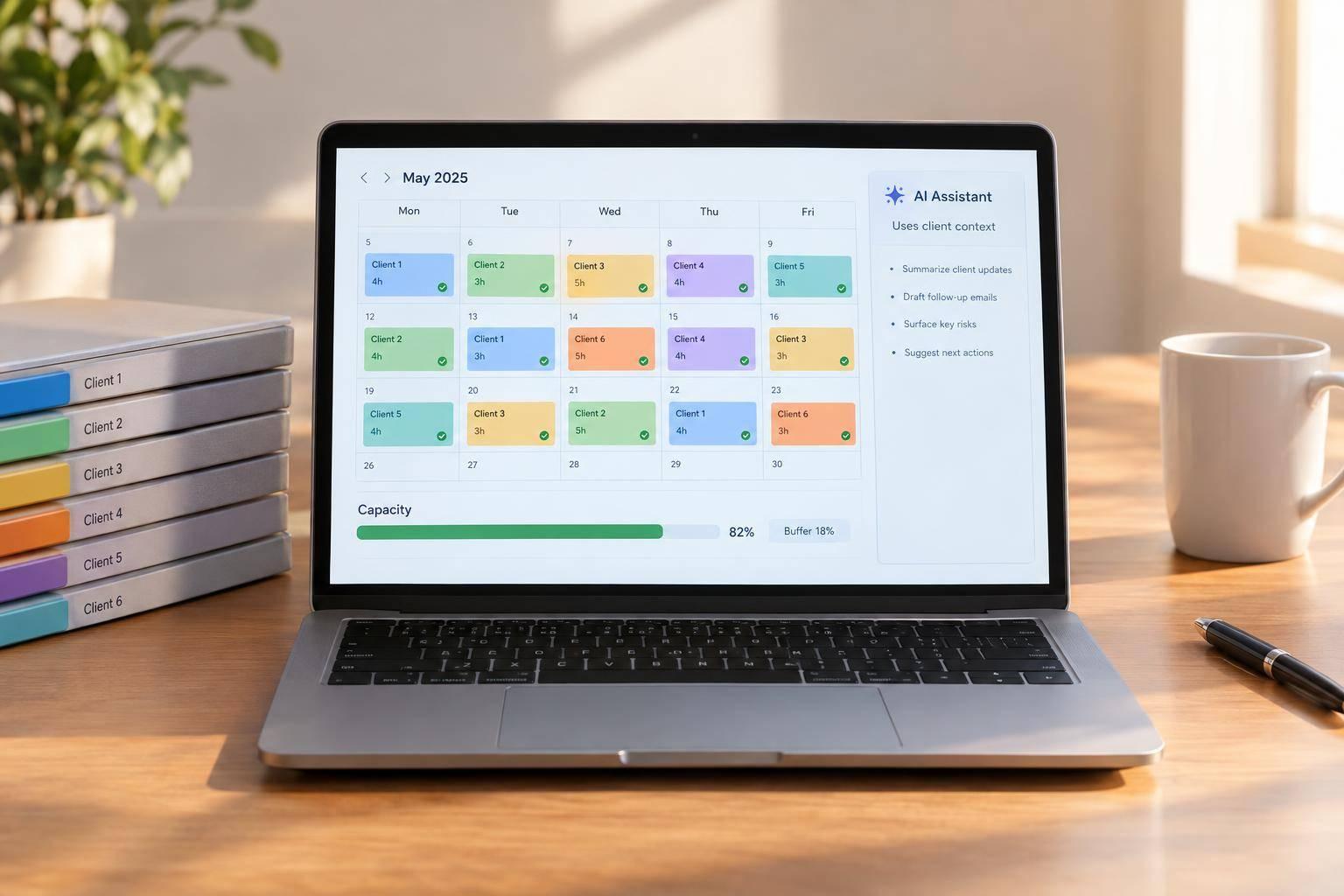
I would plan for 4 to 8 high-touch accounts per manager, then check the hours before setting a firm limit. With client rules and approvals attached to the work, Agile Growth Labs (AGL) targets 18 to 25 accounts through Portable Delivery Intelligence, but I would test that target against actual workload and service quality.
The lesson is simple: faster drafts do not prove you can serve more clients. Missing briefs, scattered feedback, and repeat fixes still take time. I would fix that context gap before adding more AI tools.
Portable Delivery Intelligence connects client context to existing AI tools, with a trained operator and human approval. The goal is less work per account, not less care.
Before adding clients, I would:
- Track 1 month of calls, messages, reviews, and rework.
- Keep a 15% to 20% time buffer.
- Test 1 repeat task and count savings only after human review.
<u>More accounts should follow measured time savings, not faster drafts.</u>
- Get the 6 free playbooks.
- Want help? Bring 1 client account to a free mapping session.
Calculate Capacity From Hours and Workload
Account Manager Capacity: Calculate Clients From Hours
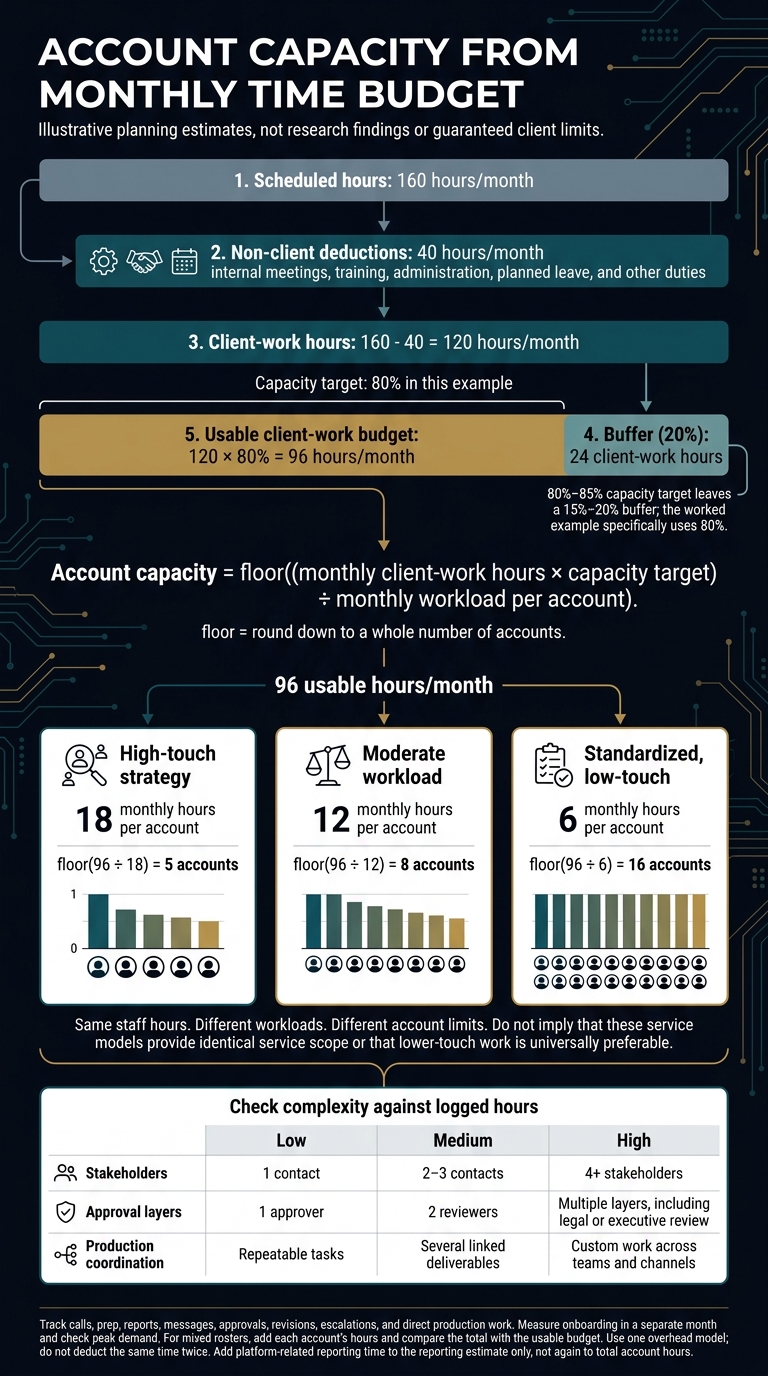
Account capacity is the monthly client-work budget divided by monthly hours per account, rounded down. Start with 160 hours, subtract non-client work, then apply an 80%–85% capacity target to leave a buffer; use 1 overhead model so you do not subtract the same time twice. [6][3]
Account capacity = floor((monthly client-work hours × capacity target) ÷ monthly workload per account).
Measure Monthly Account Work
Track all time spent on each account: calls, prep, reports, messages, approvals, revisions, escalations, and direct production work. Measure onboarding in a separate month. Routine months can hide peak demand. Compare your estimates with logged hours in the worksheet below. [3][2]
Worksheet item Planning estimate Actual input Scheduled hours 160 hours Actual scheduled hours Non-client deductions 40 hours Internal meetings, training, administration, planned leave, other duties Client-work hours 160 − 40 = 120 hours Scheduled hours minus logged deductions Usable client-work budget 120 × 80% = 96 hours Client-work hours × capacity target Monthly workload per account 18 hours high-touch; 6 hours standardized Logged account hours by service type Calculated capacity 5 high-touch or 16 standardized accounts Usable budget ÷ workload, rounded down
Use this baseline to check how much work each account needs.
Adjust for Account Complexity
Account complexity helps you estimate which accounts need more time for coordination and review. Use the factors below to rate the work, not just the client’s size. Check any multiplier against logged hours, and do not count work already in your totals. [1][3]
For a mixed client roster, add each account’s hours. Then compare that total with the usable budget. [1][3]
| Factor | Low | Medium | High |
|---|---|---|---|
| Stakeholders | 1 contact | 2–3 contacts | 4+ stakeholders |
| Approval layers | 1 approver | 2 reviewers | Multiple layers, including legal or executive review |
| Production coordination | Repeatable tasks | Several linked deliverables | Custom work across teams and channels |
Add platform-related reporting time to the reporting estimate only. Do not add it again to total account hours. [3][1]
With those factors set, compare capacity by service model.
Compare High-Touch and Standardized Accounts
Keep the same time budget for each model, but change the hours needed per account. This shows how the workload changes capacity without changing staff hours. [1][3][6]
Each model below uses (160 scheduled hours − 40 non-client hours) × 80% = 96 usable hours.
Account model Monthly hours per account Capacity calculation Planning capacity High-touch strategy 18 floor(96 ÷ 18) 5 accounts Moderate workload 12 floor(96 ÷ 12) 8 accounts Standardized, low-touch 6 floor(96 ÷ 6) 16 accounts
sbb-itb-9cd970b
How AI With Client Context Changes Workload
AI with client context changes workload by reducing the total hours each account needs, not just the time spent writing drafts. The same hour-based capacity model still applies: count briefing, drafting, coordination, review, and rework, while managers keep control of client relationships, exceptions, and service quality. [1][5]
A faster draft does not always mean more capacity. If the manager still has to rebuild the brief, chase feedback, and fix errors, that work still counts.
Compare Manual Work, Automation, and AI With Context
Task automation moves information or sends reminders. Client context gives AI the rules it needs to prepare work that fits the account. Count setup time and operator effort when measuring hours.
| Work | Manual work | Task automation | AI with attached client context |
|---|---|---|---|
| Briefing | Manager rebuilds the brief | Templates fill task fields | Drafts briefs from strategy and past decisions |
| Drafting | Human writes from scratch | Schedules pre-made content | Drafts using brand rules, priorities, and exclusions |
| Coordination | Manager chases assets and feedback | Sends reminders and status updates | Prepares updates and flags missing inputs or conflicts with past decisions |
| Approvals | Manager gathers scattered feedback | Routes work and tracks status | Keeps review rules and decisions attached to work |
| Exception handling | Manager checks the issue and decides | Routes predefined exceptions | Flags changes that need a manager’s decision |
| Human oversight | Humans do the work | Humans monitor failures | Operator checks output; manager approves publishing |
The difference depends on keeping client rules, approvals, and exceptions attached to the work. The tool alone cannot supply missing context.
Keep Client Rules and Approvals With the Work
Keep client rules, priorities, exclusions, past decisions, and approvers attached to each workflow. AI can draft briefs, content, and status updates. It can also flag work that does not match those rules.
The manager still handles scope changes, unclear requests, and strategy exceptions. Assign a human approver before publishing any client-facing work.
Use 1 portal for approvals and record approved decisions with the work. Set a clear feedback window, such as 3 business days, so review comments stay in 1 place. A draft marked ready is not permission to publish. [1]
Where Portable Delivery Intelligence Fits
Portable Delivery Intelligence maps an existing service, connects client context to existing AI tools, and routes work through a trained operator and human approval. [1]
It is an implementation, not another chatbot or project-management platform. The aim is fewer hours per account while keeping the same service standard.
Set Account Limits and Check for Overload
Set account limits by checking whether work fits into real schedules and approval queues, not just the hour model. Keep daily utilization below safe capacity so meetings, approvals, and rework leave room for protected hours, then check weekly schedules and service commitments for managers, delivery staff, and approvers. [5]
Planned capacity estimates how many accounts the team can carry. Actual utilization shows whether the work fits.
AI marketing agents add capacity only when they cut review, rework, and coordination time. The limit is where quality drops and delays start.
Pilot One Recurring Service Before Adding Accounts
Test the AI-assisted workflow on 1 recurring service before adding accounts. Attach client context and approval rules so the test shows whether total account hours fall. Treat it as a capacity test, not a rollout. [1][4][6]
Compare manager hours, delivery hours, revision rounds, approval delays, and escalations. Count all review and rework time.
Expand only when total workload falls and quality holds. Run the numbers again when scope, stakeholders, or approval needs change. [1][4][6]
Watch for Workload and Service Problems
A launch spike is not the same as lasting overload. Watch for these signs that the roster has passed its safe limit:
| Signal | Evidence to check | Likely cause | Corrective action |
|---|---|---|---|
| Lasting overload | Utilization stays above 85% for 2+ weeks, with overtime or slower replies [4][5] | Unplanned work exceeds available hours | Rebalance accounts; add support |
| Reply and approval backlogs | Replies miss agreed time frames; approval queues grow | Requests exceed capacity or ownership is unclear | Reduce load; clarify who handles requests and approvals [1] |
| Late reports | Reports arrive only after clients chase | Manual reporting uses up available hours | Automate reporting; use standard templates [3] |
| Missing context or feedback | Managers ask for information already supplied | Repeat briefs use up coordination hours | Keep context and decisions with the work [1] |
| More revisions | Multiple rounds become routine [4] | Poor briefs or unrecorded decisions add rework [5] | Tighten onboarding; improve client context [6] |
| Lost planning time | Strategy sessions and suggestions made ahead of requests disappear | Coordination uses up planning hours | Protect planning blocks; rebalance accounts that need more attention |
Check Capacity Before Taking the Next Client
Before sales promises delivery dates, check whether the new account fits the manager’s remaining protected hours. Onboarding weeks can take more time than the monthly average. Check peak demand as well as recurring work. [1][2][5]
If review, rework, or support spills into protected hours, the roster is too full. Pause new commitments until the work fits the plan. [4][6] At that point, measure the load in hours, not client count.
Conclusion: Set Client Limits With Measured Hours
Set client limits by counting work hours, task complexity, and approvals, not just accounts. Measure 1 full month of work, then compare total hours across all clients with available team hours, leaving a 15% to 20% buffer before deciding whether the team can take on more. [1][2][3][5][6]
If no buffer remains, the team is at capacity, even when the client count looks low. [3][5][6]
Test 1 repeat task. Count only time saved after human review, and add accounts only while service quality holds. Portable Delivery Intelligence keeps client context and approvals attached to the work, so capacity rests on measured hours, not old habits. [1][3][5]
FAQs
How do I calculate capacity for a mixed client roster?
Start with your account manager’s available hours: typically 30 per week after internal meetings and admin work. Track the hours spent on each client for 1 month. Then adjust each client’s workload for platform count, stakeholder volume, and time spent getting approvals.
Set aside 15% of capacity for leave, escalations, and new business support. Divide the hours left by the roster’s average weighted workload per account. This gives you an estimate of how many accounts the manager can carry.
AI-assisted reports and meeting summaries can free up time without reducing service quality.
How can I tell if AI time savings will last?
AI time savings should turn into paid client work, not idle hours. Track hours saved, accounts per manager, gross margin, revenue per employee, and client health to see whether the same team can handle more work without a drop in quality.
More output with steady or better client health means the change is working. If quality slips, pause and fix the workflow.
Set a clear stop rule before you start. Run 12-week pilots in phases. Keep client context in your AI tools so your team does not have to repeat each brief or fix work that drifts from the client's needs.
What must change to reach 18 to 25 accounts per manager?
Reaching 18 to 25 accounts per manager means moving from custom, high-touch service to set packages that need fewer check-ins. Use 2 to 5 core packages with fixed deliverables, clear scope, fewer calls, approvals in 1 place, and firm rules for revisions.
The shift is about how work gets done, not less care for clients. Automate reports and tracking. Set rules for data and AI use, response times, and who can make each decision.
Group clients by service level. Hand off routine tasks so each account takes fewer hours to serve.