How to Scale a Marketing Agency Without Hiring

I scale a marketing agency without hiring by cutting the hours each client needs, starting with repeat tasks, shared client facts, and clear review rules. Before adding accounts, I test 1 service for 4 to 8 weeks and check that time saved holds up after review, fixes, and tool upkeep.
AI is not the bottleneck. Context is. Faster drafts do not help much when staff still have to find files and explain past client decisions. That is a gap in the work process, not a team failure.
At Agile Growth Labs (AGL), we use Portable Delivery Intelligence to connect approved client context, task triggers, and human review gates inside your current tools. Our target is 18 to 25 accounts per account manager, compared with a cap of 4 to 8. That is a target, not a promise for every agency.
Here is the path I use:
- Track all client hours, including unbilled work.
- Set a fixed scope and delivery process for 1 service.
- Keep approved client facts in 1 shared record.
- Automate routine handoffs. Keep people in charge of decisions and release.
- Test time saved, quality, margins, and workload before adding accounts.
More drafts do not mean more capacity. <u>Only net time saved counts.</u>
- Run the free Capacity Leak Calculator to see how many more accounts your team could carry.
- Want help? Bring 1 client account to a free mapping session.
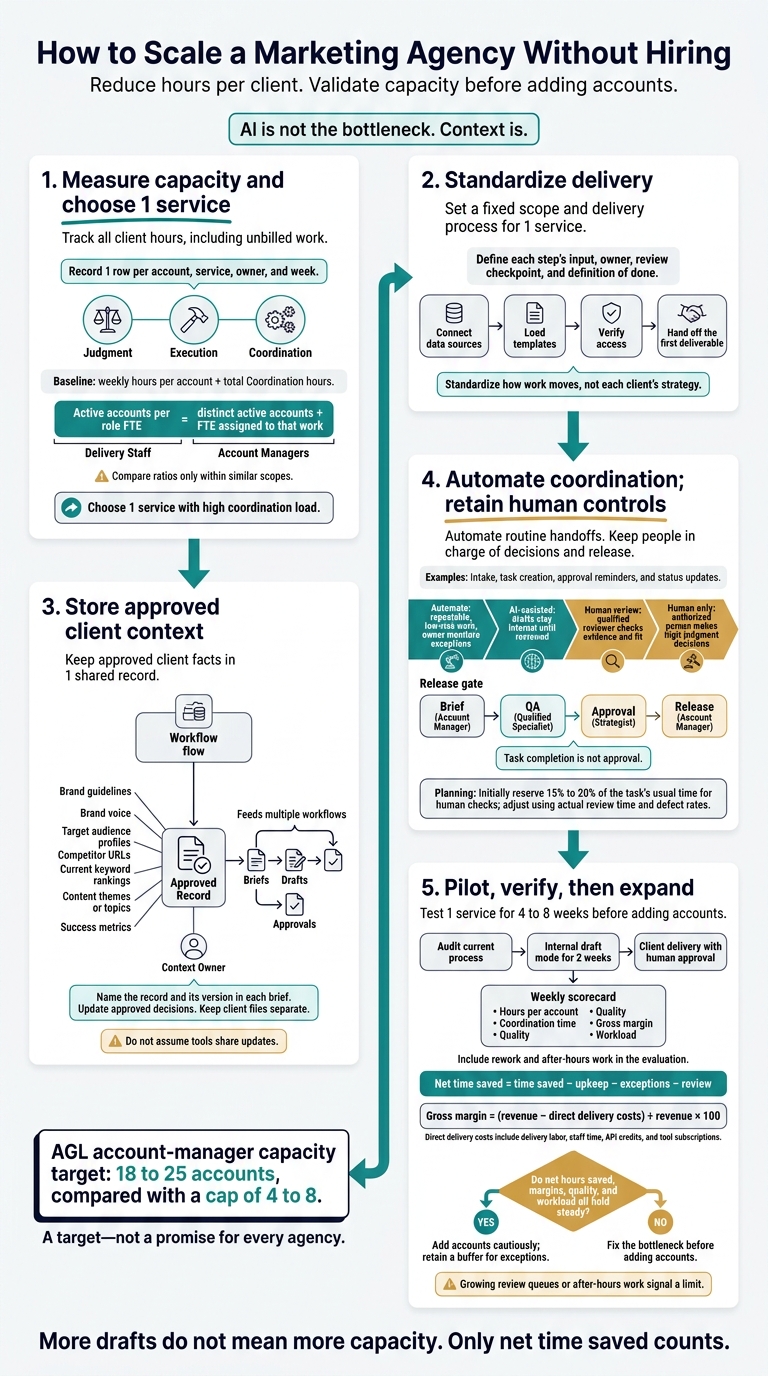
How to Scale a Marketing Agency Without Hiring
Measure Capacity and Choose 1 Service
Your team’s account capacity depends on the work each account needs, not just the tools your team uses. Track all client work, including unbilled hours, then choose 1 service with a high coordination load to standardize before you estimate how many more accounts the same team can carry[6].
Track Accounts and Weekly Work Hours
Use Google Sheets to track 1 row per account, service, owner, and week. Include unbilled client work, not just invoiced hours[6]. This helps you gauge how many more accounts the team can support before quality drops.
| Worksheet field | What to record |
|---|---|
| Account, service, owner | Client name, contracted service, delivery lead, and account manager |
| Strategy and delivery | Hours spent making decisions, researching, drafting, and building deliverables |
| Meetings and reporting | Hours spent preparing, attending, assembling data, and explaining results |
| Revisions and approvals | Hours spent making changes, routing feedback, and handling approvals |
| Coordination | Hours spent updating Asana, finding files in Google Drive, moving information between tools, and chasing assets |
Calculate active accounts per delivery FTE and active accounts per account manager FTE. For each role, divide the number of distinct active accounts by the full-time-equivalent staff assigned to that work.
Compare ratios only within similar scopes; a reporting-only account is not equal to a full-service account.
Compare hours per account to see where the work differs. Use that baseline to choose 1 service to standardize first.
Find Bottlenecks and Set Your Baseline
Tag each time entry as Judgment, Execution, or Coordination[6]. Map the service from intake to approval. Record each handoff, how long it takes, and where someone must move work between tools by hand[4][2].
Track weekly hours per account and total Coordination hours. Some coordination time may be reclaimed, but it is not guaranteed savings. Keep that distinction clear when you estimate how many more accounts the team could support[6].
Score recurring tasks from 1–5 for frequency, time required, complexity, and strategic importance[2].
Reporting-heavy services are often easiest to standardize because the inputs and formatting repeat. Results interpretation still needs judgment[1][7].
Start with the service that has the highest coordination load. Use it as the first candidate for standard client onboarding and reusable client context.
sbb-itb-9cd970b
Standardize Onboarding and Store Client Context
Standardize how work moves, not each client’s strategy. A shared delivery path and an approved client record give your team and AI tools the same instructions, so account managers spend less time explaining past decisions and more time moving client work forward.
Assign a service owner to maintain the SOP library. Give each account a context owner who keeps approved client details current. These roles cut clarifying questions, rework, and handoff time.
Define Scope, Intake, and Delivery Steps
For each step, document the input, owner, review checkpoint, and definition of done. Set the service deliverables, turnaround time, and success metrics.
Use the same onboarding checklist across accounts:
- Connect data sources.
- Load templates.
- Verify access.
- Hand off the first deliverable.
A fixed intake and delivery path shortens onboarding and reduces revisions. Have the service owner update the SOP after each project post-mortem.
| Delivery metric | Custom delivery | Standardized delivery |
|---|---|---|
| Onboarding time | New setup work for each account | A reusable checklist reduces setup work |
| Scope clarity | Deliverables vary by account | Deliverables are fixed |
| Handoffs | Staff must explain the work each time | Inputs, owners, and quality checkpoints are defined |
| Revision risk | Unclear expectations invite extra rounds | Review criteria are defined |
Build a Reusable Client Context Record
Keep 1 approved client record in Notion, Google Drive, or a shared workspace. Use the same template across accounts.
Include brand guidelines, brand voice, target audience profiles, competitor URLs, current keyword rankings, content themes or topics, and success metrics.
Update the record when approved decisions change. Use access controls to keep each client’s files separate.
This approved record is the source of truth for AI drafts. The tool should not have to guess which brief or past decision still applies.
Give AI Tools the Same Approved Context
Give ChatGPT, Claude, Gemini, Grok, or Perplexity the same approved record. Do not assume tools share updates.
Name the record and its version in each brief. Replace old copies, and check that the workflow can access the approved source of truth.
| AI context method | Setup effort | Consistency | Repeated briefing | Context retained |
|---|---|---|---|---|
| Unstructured prompts | Low | Low | High | None |
| Reusable templates | Medium | Medium | Medium | Partial |
| Portable client context | High | High | Low | Full |
Use agency-approved accounts and data settings that meet client confidentiality requirements. Share only what the task needs, and keep each client’s files separate.
Saved files reduce repeat briefing. They do not replace review. A person must still check facts, brand fit, and strategy before release.
Once the SOP and approved context are stable, automate intake, task routing, and status updates.
Automate Coordination and Keep Human Controls
Connect Intake, Tasks, and Status Updates
Automation cuts coordination time when each workflow uses the same approved client record. Connect intake, task creation, and status updates with Make, n8n, or Zapier, then keep human checks where the work needs judgment.
Connect the context, not just the tools. Start each account with standard data sources, a task template, and a dashboard. Pull the approved client record into each workflow. Then separate steps that can run on their own from steps that need a person.
Automate recurring tasks, approval reminders, and routine status updates. When clients just need to see progress, use a live dashboard or portal instead of more emails or calls.
Track net time saved. Subtract the time spent on upkeep, exceptions, and review.
Sort Tasks by Risk and Judgment
Classify each action, not the whole service. Move only low-risk, repeatable work out of the human path so the same team can carry more accounts.
A reporting workflow can assemble charts automatically while a strategist explains performance changes.
Set the boundary based on repeatability, client sensitivity, judgment, and how easily an error can be reversed. [1][3] Use it to decide which actions can run unattended and which need review.
| Classification | Tasks | Risk and judgment | Human control |
|---|---|---|---|
| Automate | Data pulls, report delivery, lead follow-up, appointment reminders | Highly repeatable, low sensitivity, easy to correct | Owner monitors exceptions |
| AI-assisted | Content drafts, SEO audits, keyword clustering, and research with Frase | Repeatable inputs; output still needs interpretation | Draft stays internal until reviewed |
| Human review | Final content polish, anomaly commentary, brand alignment | Some repeatability; errors could reach clients | Qualified reviewer checks evidence and fit |
| Human only | Strategy shifts, budget decisions, sensitive client messages | Low repeatability, high judgment, high risk | Authorized person decides and records the decision |
Use these groups to place human checks where they belong.
Set Brief, QA, Approval, and Release Gates
Put 1 checkpoint at each risk point based on the task’s group. Task completion is not approval. Give each gate 1 accountable owner, and send exceptions to that owner rather than adding reviewers to every task. [3]
| Gate | Owner | Pass criteria | Approval requirement | Escalation trigger |
|---|---|---|---|---|
| Brief | Account manager | Complete inputs, clear goals, brand guidelines | Required before start | Missing credentials or assets |
| QA | Qualified specialist | Factual accuracy, link checks, grammar, and SEO specs | Required before review | Technical errors or bugs |
| Approval | Strategist | Fit with strategy, brand voice, and client sensitivity | Required before release | Work does not match strategy |
| Release | Account manager | Client sign-off, compliance check, and privacy check | Final authorization | Client rejection or complaint |
Track defects, revision rounds, and wait time at each gate. Use that data to cut rework and protect margins, not add red tape. Put factual and technical checks in QA. Keep strategy checks at approval.
For initial planning, reserve 15% to 20% of the task’s usual time for human checks. Adjust that allowance using actual review time and defect rates. [3] Send any material change made after approval back to the right gate.
Test Capacity Gains Before Adding Accounts
Test capacity gains with a 4- to 8-week pilot before adding accounts, using the standardized service, approved context, and QA gates from the prior sections.[2][6] More drafts do not mean more capacity: the team must save delivery time while keeping quality, margins, and workload steady.
Context is the limit, not AI draft speed. If staff still chase client details and check every handoff, faster drafts leave that work in place.
- Audit the current process for 1 standardized service.
- Run the AI workflow in internal draft mode for 2 weeks.[4][5]
- Move to client delivery with human approval.[4][5]
Measure Time Saved, Quality, and Margins
Judge the pilot on completed work and margin, not draft speed alone. Each week, compare hours per account, coordination time, quality, and margin with your baseline.
Count rework and after-hours work, too. These checks show whether the team could carry more accounts without extra strain. Keep recovered hours as a buffer for exceptions, not as room for new accounts.
Calculate gross margin = (revenue − direct delivery costs) ÷ revenue × 100. Direct delivery costs include delivery labor, staff time, API credits, and tool subscriptions.[3][4]
Track revenue per employee separately. Revenue growth alone does not prove margin growth.
Use Portable Delivery Intelligence to coordinate the pilot inside your current tools.
Use Portable Delivery Intelligence on Live Accounts
Agile Growth Labs (AGL) uses Portable Delivery Intelligence to connect client context, triggers, and QA gates inside your existing tools.[3][8]
Run the standardized workflow on live accounts. Track exceptions and compare the results with your baseline.
Expand Only When the Pilot Meets Its Targets
Set baseline metrics, quality thresholds, and a review date before launch. Add accounts only when net hours saved, margins, quality, and workload all hold steady.[2][6][7]
If review queues grow or after-hours work increases, fix that limit before adding accounts.
FAQs
How do I turn saved hours into a safe client capacity target?
Test time savings with a pilot. Track hours saved per person per week. Then divide the total hours saved by the hours needed to serve 1 client over the same period. This gives you an estimate of how many more accounts your team could carry.
Add accounts per manager slowly. Don’t push the team to its limit right away. Track client health, gross margins, and time from request to delivery as account loads grow.
If quality drops or clients complain, pause. Fix the workflow before adding more accounts.
How can I standardize delivery for clients with different needs?
Move from custom projects to 2–5 productized service tiers. Give each tier fixed deliverables, clear scope limits, and a set meeting schedule. Match tiers to high-touch, standard, or low-touch client needs. Keep the delivery workflow the same across tiers.
Use templates for onboarding, reporting, and client communication. Write down what “done” means for each service, along with quality standards and review criteria. Include owner review and QA before work goes to the client.
Change the scope or price when an account keeps asking for work outside its tier or frequent changes in direction.
When does hiring make more sense than automation?
Hiring makes sense when you’ve fixed how work gets done and your team still can’t keep up, typically when team utilization exceeds 85%. Use systems first to cut repeat admin tasks and set clear delivery steps, then hire for work that needs human judgment.
Fix the work before you add people. Automate routine tasks so your team spends less time on manual busywork.
Then hire for sound judgment, new ideas, and complex client needs. Hiring before you fix how work gets done adds salary costs and cuts margins.