How Do Marketing Agencies Use AI in Client Work Without Losing Context?

I keep client context in AI work by giving each task the same approved goals, voice rules, facts, and review steps, not by relying on chat history. For agencies with 15+ clients, I use a separate client context pack, a task brief, and a human approval check before work ships.
AI is not the bottleneck. Context is. A fast draft still creates more work if it uses old prices or the wrong client’s tone. That is a handoff problem, not a writing problem.
I use Portable Delivery Intelligence to carry client context and approval rules through the tools a team already uses. Agile Growth Labs (AGL) targets 18 to 25 accounts per account manager, compared with the stated cap of 4 to 8. That is a target, not a promised result.
I start with 1 client and 1 service:
- Save approved client rules and sources in a shared pack. Use a prompt repository to standardize these inputs.
- Pass only the needed context into each task.
- Check facts, voice, and approval before delivery.
- Run a 30-day test and track rework, review time, and revision rounds.
<u>Measure less rework, not just faster drafts.</u>
Next step: Run the free calculator.
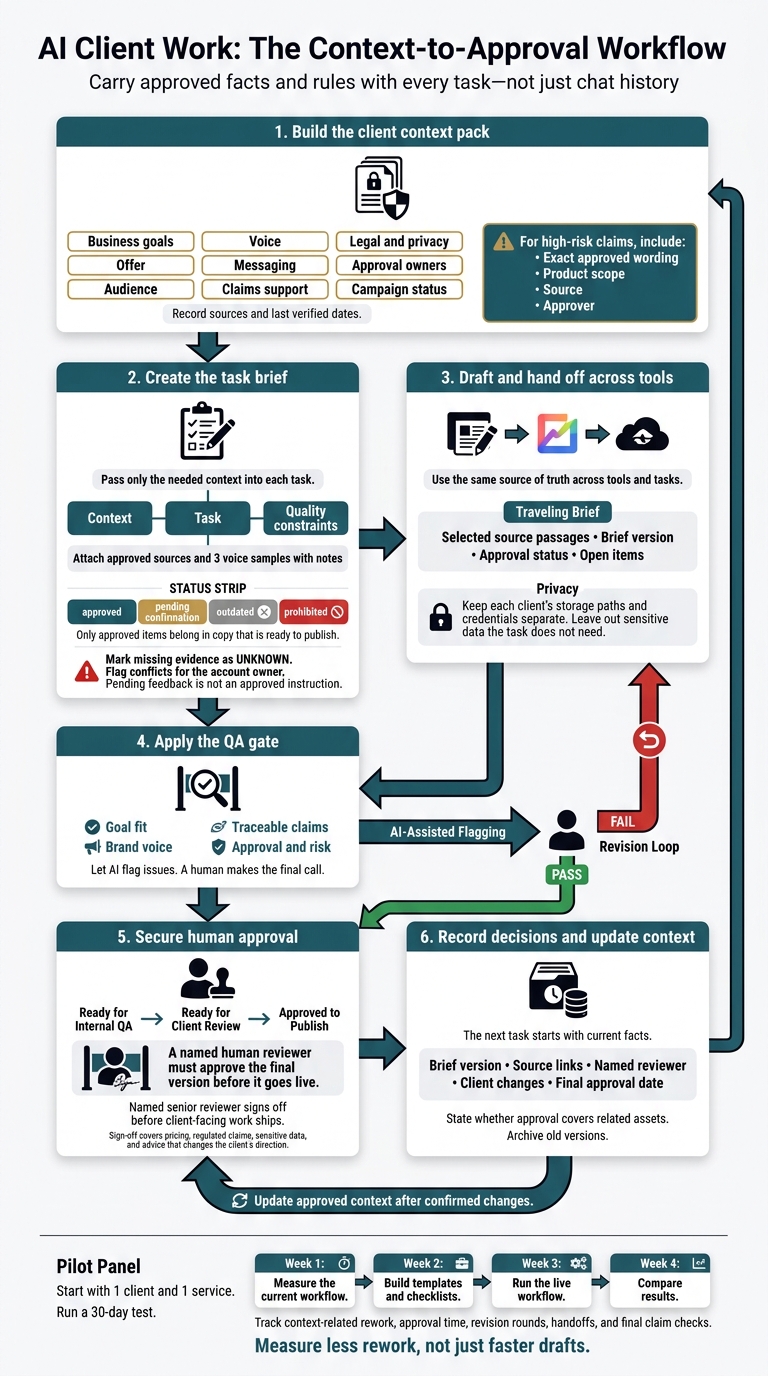
AI Client Work: The Context-to-Approval Workflow
What Is Context Engineering? Why It Matters for AI Agents
sbb-itb-9cd970b
Create a Client Context Pack and Reusable Brief
A client context pack stores verified client rules in a document or workspace, so each AI task gets only the facts and instructions it needs. Build the pack before the brief, and use it as the source of truth rather than asking chat history to sort approved material from pending notes.
AI is not the bottleneck. Context is. A longer chat does not create a clear approval record. A source link helps only if the AI tool can read its content.
Document Client Goals, Voice, Facts, and Approval Rules
Record each item once and keep it current. Use the date someone verified the information, not the date someone edited the file.
For high-risk claims, save the exact approved wording, product scope, source, and approver. This gives the team a reusable record of strategy, voice, claims, and approvals.
| Field | Required information | Source | Last verified |
|---|---|---|---|
| Business goals | Annual and quarterly goals stated as outcomes; current priorities; success metrics | Approved strategy and account plan | Last verified date |
| Offer | Product features, value props, pricing rules, guarantees, and approved limits | Approved product documents and offer table | Last verified date |
| Audience | Primary buyer roles, jobs-to-be-done, objections, and buying triggers | Discovery notes and approved audience research | Last verified date |
| Voice | Tone, formality, sentence rhythm, preferred terms, banned language, and approved examples with notes | Brand guidelines and approved copy | Last verified date |
| Messaging | Positioning, differentiators, messaging pillars, and required talking points | Approved messaging document | Last verified date |
| Claims support | Exact allowed claims, product scope, and evidence links | Claims registry and verified source documents | Last verified date |
| Legal and privacy | Required disclaimers, restricted topics, and data allowed in AI tools | Legal review and client data-use rules | Last verified date |
| Approval owners | Named reviewers, final decision-maker, review deadlines, status stages, and revision limits | Account plan and approval agreement | Last verified date |
| Campaign status | Active priorities, offer dates, delivery deadlines, unresolved feedback, and pending decisions | Approved campaign brief and decision log | Last verified date |
Once the pack is current, copy only the fields needed for the task into the brief.
Use a Copyable Client Brief Template
Keep facts separate from task instructions. Attach approved sources and 3 voice samples with notes on word choice, sentence rhythm, and how the copy uses evidence.
CLIENT AND OWNERSHIP
Client:
Account owner:
Context pack location and version:
Updated:
Next review date:

TASK
Goal:
Offer:
Audience:
Reader question:
Channel:
Deliverable:
Success criteria:
Campaign priorities:

APPROVED CONTEXT
Voice rules:
Preferred terms:
Prohibited terms:
Approved examples and annotations:
Approved claims, product scope, and evidence:
Required sources:
Pricing rules and offer limits:

DELIVERY REQUIREMENTS
Format:
Length:
Call to action:
Deadline, including time zone:
Legal, privacy, and channel limits:
Approval owners:
Current approval status:
Unresolved feedback:

QUALITY CONSTRAINTS
Use only approved claims and current offer details.
Mark missing evidence as UNKNOWN.
Flag conflicting requirements for the account owner.
Do not treat pending feedback as an approved instruction.
Separate Lasting Rules From Campaign Changes
Keep positioning, audience definitions, and voice rules in the lasting context file. Put prices, promo dates, campaign priorities, and performance figures in the task brief or current offer table.
Label each item approved, pending confirmation, outdated, or prohibited. Only approved items belong in copy that is ready to publish.
The account owner resolves gaps and conflicts. A newer note does not replace an approved rule until the owner confirms the change and updates its status.
Until then, tell AI to mark the detail unknown instead of guessing. These labels help prevent off-brand edits and let drafts move between tools and reviewers without a new brief each time.
Share Client Context Across Tools and Tasks
Client context should travel with the work, not stay in someone’s head. Keep a live brief in Notion or Google Drive, link it from Asana and Slack, and include completed work, context for the next phase, and open items so each handoff starts with the same facts.
When using ChatGPT, Claude, Gemini, Grok, or Perplexity, paste only the source passages the task needs. Structure the prompt as context, task, and quality constraints. Use the same source of truth, but change the handoff fields to fit each deliverable. [5][1]
Use HubSpot with Make, n8n, or Zapier to pass selected fields, source links, brief versions, and approval states. Keep each client’s storage paths and credentials separate. Leave out sensitive data the task does not need.
Move drafts through Ready for Internal QA → Ready for Client Review → Approved to Publish. A named human reviewer must approve the final version before it goes live. [10][8][2]
Draft Campaign Copy From Approved Offers and Claims
Start campaign copy with the approved offer and claims. Give AI the campaign goal, audience, current offer, and approved claim sources.
Ask AI to flag gaps before it writes variations. Check each version against the sources and banned terms. Save approved wording and version changes in the shared context pack. [3][8][9][11][10]
Use Client Sources to Guide Content Drafts
For longer content, keep verified facts separate from proposed angles. Set the audience, purpose, and rules for evidence. Provide allowed source passages and ask AI to flag claims those sources do not support.
Before client review, a human editor should check source dates, product terms, voice, and fit with the client’s goal. A draft needs more than smooth writing to be ready. [9][11][7]
Use Agreed Metrics and Definitions in Reports
Agree on metric definitions before analysis starts. Give AI the goals, KPIs, attribution windows, and data together. Shared definitions help prevent conflicting results and repeat work.
For AI visibility reports, track brand mentions separately from page citations. An analyst or account manager should check calculations, look into missing data, and approve conclusions before sharing the report. [8][9][7]
Review AI Outputs and Update Client Context
A polished draft can still miss the brief. After tools and reviewers finish their work, run a final check for drift before approval.
Check Goal Fit, Voice, Facts, and Approval
Check the draft against written rules, not how smooth it sounds. Let AI tools flag issues. A human makes the final call. [5][12]
| Review gate | What must pass |
|---|---|
| Goal fit | The asset answers the reader’s question and supports the client’s stated goal. |
| Brand voice | The wording follows the client’s voice rules. If another brand could use the same copy unchanged, the brief is too broad. [9] |
| Traceable claims | Product details, prices, and statistics match approved records. A human must verify claims outside the approved-claims registry. [3] |
| Approval and risk | Required permissions are recorded. Banned claims and private data from other clients are excluded. [5] |
Use this table as the QA gate. Send only passing drafts for human approval.
A human peer checks whether the work fits the client’s plan. A named senior reviewer signs off before any client-facing work ships. That sign-off must cover pricing, regulated claims, sensitive data, and advice that changes the client’s direction. [1][5][12]
Track Brief Versions and Delivery Decisions
Update the client context pack when offers, positioning, sources, or approval rules change. Archive old versions. Check the active version before campaigns, reporting cycles, and handoffs. [3][10][13]
For each deliverable, record the brief version, source links, named reviewer, client changes, and final approval date. State whether that approval also covers related assets. [1][8][10]
Log each change in the client context pack. The next task should start with current facts, not an old brief.
Test Handoffs and Track Context-Related Rework
Check handoffs for changes in positioning, audience assumptions, claims, terms, and approval routing. Fix gaps in the brief or workflow before adding more work. [5][6]
Track time spent repeating briefs, rejected drafts, fixes for old information, and missed approvals. Spot-check past work against human decisions. Tighten the brief where the process drifts. [5][6]
Use those failure patterns to update the brief before the next handoff.
Conclusion: Start With 1 Service, Then Expand
Start with 1 existing service and 1 client after you build the context pack, brief, and QA gate. Use approved sources so the team works from the same facts.
Run a 30-day test:
- Week 1: Measure the current workflow.
- Week 2: Build templates and checklists.
- Week 3: Run the live workflow.
- Week 4: Compare results.
Track context-related rework, approval time, revision rounds, handoffs, and final claim checks. Use those results to check whether context control cuts rework and keeps the work consistent. [4]
If the pilot cuts rework and approval delays, keep the workflow in your current tools. Agile Growth Labs (AGL) uses Portable Delivery Intelligence to put this context-and-approval workflow inside the tools your team already uses.
The goal is more delivery capacity with no new hires. Use approved work and measured results to choose what to expand next.
FAQs
How can we prevent AI from mixing up clients?
Use a separate workspace for each client. Keep only that client’s context in it, and close it before switching clients. Keep storage paths, credentials, and project IDs separate.
Load client context at runtime. Don’t put client facts in shared prompts. Never mix clients in the same generation call or conversation.
Use automated checks to flag identifiers from other clients. Before sending any deliverable, require a named reviewer to check it against that client’s context.
What should we do when approved sources conflict?
Do not guess or fill gaps. Leave the fact unresolved and flag it for client confirmation.
A conflict points to outdated or missing context, not an AI problem. Update your proof library or client context pack. Mark the latest verified facts with their source and date.
Use human judgment to settle each conflict before the work reaches the client.
How do we know our AI workflow is ready to scale?
Your AI workflow is ready to scale when each client has a separate workspace with only that client’s files, written delivery steps, up-to-date context, and named reviewers who check every deliverable for accuracy, brand fit, and claims backed by proof. Scaling means running work in batches, not making more drafts.
AI is not the bottleneck. Context is. If reviews take too long, fix the client context packs before you add more output.
Portable Delivery Intelligence lets your team share the agency’s methods while keeping each client’s context separate and tracking each version.