Do Not Buy Another AI Marketing Tool Until You Read This
Most AI tool buys fail for one simple reason: people buy software before they define the result. If I were buying today, on August 4, 2026, I’d ignore the demo first and ask five things: What KPI will this move? Who owns it? Does my stack already do it? Does it sync natively? Can I test it on my own data?
Here’s the short version:
- 75% of marketing teams use AI, but many still can’t fit it into the work that matters.
- 42% to 54% of AI initiatives failed in 2025, mostly because of bad data and integration issues.
- Integration, APIs, and sync work can eat up 25% to 40% of total spend.
- Many teams miss ROI because they buy for a nice demo, not for one clear business job.
If I were screening an AI marketing tool, I’d only buy if it ties to one of these four outcomes:
- More qualified leads
- Higher conversion rates
- Faster sales execution
- More content in less time without lower quality
And I’d only approve it if it passes this simple filter:
- One KPI
- One owner
- One workflow
- One pilot
- No overlap with my current stack
That’s the whole point of this piece: buy less, test harder, and tie every tool to one clear result.
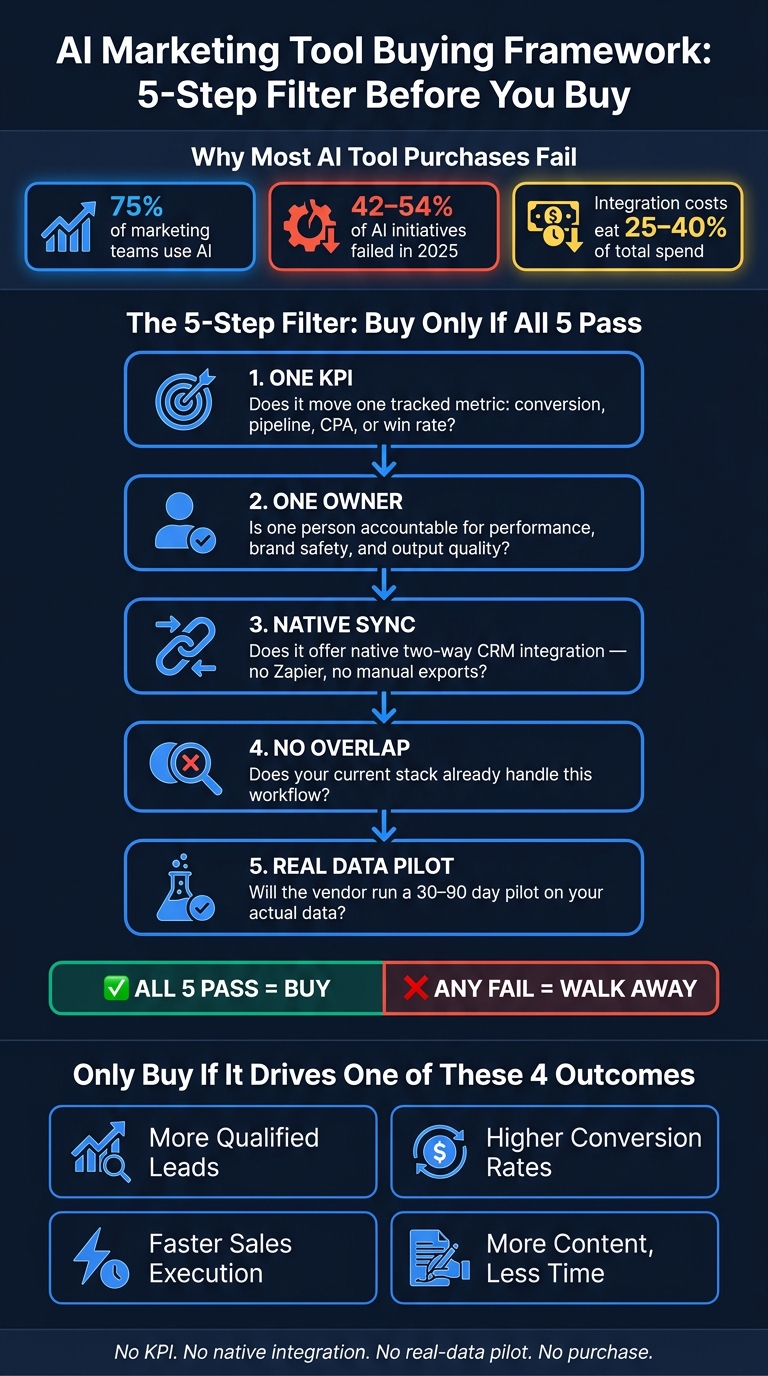
AI Marketing Tool Buying Framework: 5-Step Filter Before You Buy
My Top AI Marketing Tools in 2026 (Stop Wasting Money)
Quick comparison
| Area | What I’d check first | What would stop me |
|---|---|---|
| Copy tools | Brand accuracy, edit time, publish rate | Weak brand controls, hard export, no pilot |
| Sales enrichment | Data quality, CRM sync, credit pricing | Surprise usage fees, Zapier-only setup |
| Chatbots | Qualified lead lift, routing, CRM handoff | Reporting on chat volume only, manual routing |
If a vendor can’t show native two-way sync, a 30- to 90-day pilot on my data, and a clear KPI tied to revenue, conversion, cost, or output, I’d walk.
That’s the lens I’d use for every tool in this category of AI stacks.
What to measure before you buy any AI marketing tool
Start with the metric, the owner, and how the tool fits your stack before you compare vendors. That outcome becomes your metric, your owner, and your benchmark.
Pick one target metric and one owner before comparing tools
Choose one measurable job first. That could be ad creative iteration, SEO refreshes, or lead scoring. Then assign one person to own the result.
That owner handles data quality, reads the outputs, and decides whether the tool is doing its job. Before you buy, document your current cycle time, quality, and cost so you have a baseline for lift.
| Target Metric Category | Specific Metric Examples | Accountable Owner |
|---|---|---|
| Demand Generation | Sales-qualified leads, Cost Per Lead (CPL), Pipeline value | Demand Gen Manager |
| Sales Efficiency | Rep hours saved per week, Demo-to-close rate | Sales Ops / RevOps |
| Content Production | Content production time, Organic traffic lift | Content Lead |
| Conversion | Trial-to-paid rate, Email response rate lift | Lifecycle Marketer |
Run the ROI check: pipeline impact, time saved, output quality, and adoption
Next, pressure-test the purchase from four angles: impact, time, quality, and fit. Do this before you sign anything.
| ROI Component | Questions to Ask Before Buying |
|---|---|
| Pipeline Impact | Does this tool target our most pressing funnel constraint? |
| Hours Saved | Does it save time in production, or does it add even more time in review? |
| Output Quality | Can I see actual outputs for a customer with data like ours? |
| Total cost of ownership | What is the full cost, including setup, training, and maintenance? |
| Team Adoption | Does it fit current workflows, or does it create a parallel process? |
The total cost question matters more than many buyers think. Integration and maintenance overhead can add $20,000 to $100,000+ to the real cost of ownership [3].
For most use cases, plan a 30-day, one-team pilot. For predictive models like lead scoring, give it 60 to 90 days [9][3]. And test with your own production data, not the vendor demo set. A polished demo can look great and still fall apart when it meets your actual mess of fields, gaps, and handoffs.
Check for stack overlap before adding another subscription
This is the step many teams skip. Before you buy, audit what your current platforms already do. If your stack already covers the use case, a standalone tool can mean duplicate spend and more integration risk.
"AI only creates value when it's embedded in how work actually gets done." - Tonya Walker, Fractional CMO and Marketing Advisor [5]
Check three things:
- Whether the new tool has native integrations with your core stack
- Whether it supports two-way sync
- Whether it fits your team’s current workflow instead of pushing them into a separate system
A tool that sits outside your main stack often turns into shelfware. It gets a burst of interest, then nobody opens it two months later.
Also ask the vendor for a sample data export in CSV or JSON before signing. That gives you a clear look at how portable your data will be if the tool doesn’t work out.
With the baseline and stack check done, compare tools by category, not by feature list. Once the metric, owner, and stack fit are clear, compare only the category that matches the job.
How to evaluate the main AI marketing tool categories
Once you’ve set the metric and the owner, compare only the tool category tied to that job. Don’t stack a chatbot against a copy tool or a sales enrichment platform against a content assistant. Match the category to the result you want: content, leads, conversion, or speed.
Each category lines up with one of the four outcomes covered earlier - more qualified leads, higher conversion, faster execution, or more content. And each one tends to fail in its own way.
AI copywriting tools: brand control, output quality, and workflow fit
Use copy tools when the goal is faster content without drifting off-brand. The test isn’t how the tool handles a generic prompt. It’s how it performs when you feed it your actual brief, product claims, brand rules, and approval process.
Jasper is the AI-native option in this group. It’s built for marketing teams that need tight brand governance, with style guides, verified source libraries, and marketing-focused workflows for high-volume, brand-controlled content [4]. ChatGPT gives you more room to work, but brand control depends on how well your team prompts it. There are no built-in guardrails, so it tends to fit ideation, brainstorming, and lower-risk drafts where brand risk is limited [4][2]. HubSpot AI (Breeze) works inside Marketing Hub and uses your CRM context to move output straight into execution channels. The tradeoff is simple: more convenience and speed, less depth on brand controls [4][6].
| Tool | Brand Control | CRM Fit | Best Use Case |
|---|---|---|---|
| Jasper | High; built-in guardrails and verified source libraries [4] | Standalone, often integrates with CMS/social tools [9] | Brand-controlled volume [4] |
| ChatGPT | Low; relies on manual prompting [4] | Requires copy-pasting or custom API builds [4] | Ideation and early drafts [2] |
| HubSpot AI (Breeze) | Moderate; uses existing CRM context but may lack specialized guardrails [4] | Native inside Marketing Hub and ESP [6] | In-workflow drafting [4] |
Run one live workflow for 30 days. Then compare your baseline output against the AI-assisted version and score three things:
- Brand accuracy
- Edit time
- Publish rate
Before you commit, ask for a sample run using your actual content brief. Also check the vendor’s model deprecation policy, and make sure your data and templates can be exported in usable formats like CSV or JSON [7][8].
Once content quality is handled, the next step is simpler: does the tool improve your data and pipeline?
Sales automation and enrichment: data quality, prospecting coverage, and CRM fit
For sales automation and enrichment, data quality matters more than AI branding. If the tool doesn’t improve lead quality, prospecting coverage, or rep efficiency, it’s not doing the job. Bad data doesn’t turn into better leads just because AI is layered on top. It just sends bad outreach faster.
If your team already runs in HubSpot, HubSpot AI (Breeze) is the cleanest fit for marketing, sales, and service in one system [6]. For broader enrichment and prospecting, Clay is built for flexible, multi-source enrichment workflows. Teams can pull from dozens of data providers, build custom logic, and then push records into outreach. Apollo combines a large B2B contact database with built-in sequencing, which makes it a strong fit for teams that want prospecting coverage and outreach in one place.
Across all three, focus on data quality and coverage, native CRM connectors, and how much upkeep the workflow needs. Native connectors usually hold up better than brittle Zapier-based setups [10][7]. If your go-to-market motion depends on account-level insight, check whether the platform can spot anonymous browsing and intent signals across full buying groups, not just single leads [6].
One pricing risk is easy to miss: many sales automation tools run on credit-based models, and 78% of IT leaders reported surprise AI charges in 2025 because usage-based credits were hard to predict [10]. Before signing, model your actual usage at 12 and 24 months. Include credit overages and annual price increases, which often land between 10% and 25% for AI tools [10].
| Evaluation Criteria | What to Look For | Red Flag |
|---|---|---|
| Data Quality and Coverage | First-party data, enrichment quality, and account-level intent [6] | Thin data that only updates individual contacts |
| CRM Fit | Native connectors and closed-loop syncing [10][7] | Zapier-only flows or manual exports |
| Total Cost | Credit caps, overage terms, and 12- to 24-month usage modeling [10] | Surprise charges and unplanned annual price increases [10] |
Also make sure the contract includes a written clause that stops the vendor from using your customer data or PII to train shared AI models [10][7]. For most teams handling B2B contact data, that’s non-negotiable.
After data quality, there’s one last test: can the tool capture and route demand without adding friction?
Chatbots and lead capture: qualification logic, handoff quality, and conversion lift
Judge chatbots by qualified lead lift and lead transfer quality, not by chat volume. A high conversation count may look nice in a dashboard, but it doesn’t mean much on its own. What matters is whether the tool improves qualified lead conversion and sales acceptance.
Check whether the bot updates based on intent and behavior signals or stays stuck on static rules. For lead scoring, predictive models usually need at least 500 contacts and three months of history before they can produce outputs that mean much [2][3]. So if a vendor pushes a two-week trial as proof, that should make you pause.
Most chatbot rollouts break at the routing stage. Ask the vendor exactly what happens after the bot flags a lead. Who owns the routing logic? Does it sync to your CRM in real time, or does someone still move the data by hand? Manual handoffs and one-way sync are the big failure points here [1][3].
| Evaluation Criteria | What to Look For | Red Flag |
|---|---|---|
| Qualification Logic | Intent and behavior signals; buying stage [3] | Vague "AI-powered" claims with no model transparency [3] |
| Routing Quality | Real-time CRM routing, two-way sync [1][3] | Manual transfers or one-way data sync [3] |
| Qualified Lead Lift | Pipeline impact, cost-per-acquisition reduction, and sales acceptance [4][2] | Reporting that only shows "conversations started" [10] |
| CRM Fit | Lives inside your current CRM and sales flow [4][5] | Forces teams to rebuild processes around the tool [4] |
Use a 60- to 90-day pilot for chatbot-driven lead scoring or conversion. That gives you enough time to see actual conversion data from the leads the tool qualified, which is the only test that counts [3].
Red flags that should stop the purchase
Once you’ve scored tools on ROI and workflow fit, use these red flags to cut weak vendors fast. These problems usually show up when you test ROI, integrations, and day-to-day fit.
Vague ROI claims, long setup times, and weak integrations
Walk away from any pitch that can’t connect back to pipeline, conversion, speed, or content output. If a vendor can’t tie the tool to one tracked KPI, stop there.
A lot of API claims sound good in a demo, but the work often lands on your team. The maintenance cost - ongoing APIs, troubleshooting, and data synchronization - can account for 25% to 40% of total AI tool spend [1]. Native connectors to your CRM or marketing stack should be the starting point. If the main setup depends on Zapier or Make, that’s a fragility risk, not a selling point.
Also pay attention to tools that promise end-to-end automation but never explain where human review happens. That gap matters. If there’s no clear place for someone to catch a bad output before it reaches a customer, you’re not buying workflow help - you’re taking on brand risk.
Feature overlap, hard to use daily, and no short pilot path
If your current CRM, email, or ad stack already handles the workflow, a new tool can add duplicate steps and more sync work. Put simply: if your current stack already does the job, don’t pay for another subscription.
Hard to use daily usually means adoption slows across the team, not just for the person who liked the demo. That’s why a short pilot matters. Reject vendors that won’t run a defined pilot on your data. In 2025, between 42% and 54% of AI marketing initiatives failed, mainly because of integration failures and poor data quality [6]. A vendor that believes in the product should be willing to let the numbers speak.
If the business case still holds up, the next place things break is usually stack overlap and team adoption.
| Red Flag | What It Usually Means |
|---|---|
| API-only integrations | You build and maintain the connection |
| No defined pilot on your data | Value isn't proven before lock-in |
| ROI framed as "productivity gains" only | No KPI tied to pipeline, conversion, or content output |
| Vague answer on data training policy | Your customer data may feed the vendor's model |
| Tool requires rebuilding current workflows | You're buying workflow drag, not efficiency |
If the data can’t leave cleanly, the tool creates lock-in, not leverage. Ask for a sample export before you sign. If the vendor hesitates, treat that as lock-in.
Use this filter to narrow the shortlist before the final go/no-go check.
Conclusion: A simple go or no-go purchase filter
After spotting the red flags, use one last screen to make the buy-or-walk call.
The rule is simple: define the win before you buy. Pick one metric, one owner, one workflow, and one pilot. If a tool can't clear all four, it doesn't belong in your stack.
The final purchase checklist for founders and operators
Before you approve a purchase, run it through five hard checks. Together, these checks turn the article's main tests into one clear decision rule. Treat each one as nonnegotiable.
| Checkpoint | What to Verify |
|---|---|
| One KPI tied to the purchase | The tool must move one KPI: conversion, pipeline, CPA, or win rate. |
| No current tool already solves it | No existing tool in your stack already handles this workflow. |
| Native two-way sync with your system of record | The tool offers native, two-way integration with your CRM - without relying on Zapier or manual exports. |
| One accountable owner | One person is accountable for the tool's performance, brand safety, and output quality. |
| 30- to 90-day pilot on your data | The vendor agrees to a pilot using your real data - not a cleaned demo dataset. |
If a tool fails even one of these checks, walk away. A bad purchase costs more than the license fee. Integration and maintenance alone can eat up 25% to 40% of total AI tool spend [1], and 64% of AI projects fail to produce measurable ROI in their first year [3].
Good vendors won't fight this checklist. They'll show the integration, tie the tool to a KPI, and agree to test it on your data. If they won't, that's your answer.
No KPI, no native integration, no real-data pilot: no purchase. If the tool does not improve one measurable outcome - leads, conversion, speed, or content performance (see our guide to AI content analytics) - do not buy it.
FAQs
How do I choose the right KPI before buying?
Start by pinpointing the exact business bottleneck you want to fix. Skip broad goals like improving efficiency. Instead, name a clear task, such as lowering cost per lead, speeding up email subject line testing, or scaling creative production.
Then pick one or two success metrics that connect to revenue. Good examples include conversion rate, CAC, time-to-launch, or win rate. Before you buy anything, set a baseline for your current workflow so you can measure improvement with a clear before-and-after view.
What counts as a good pilot for an AI marketing tool?
A good pilot is a disciplined test built around real workflow impact, not a feature tour.
That means it should focus on 2 to 3 workflows that match day-to-day operations and use real data instead of polished demo scenarios. If the test doesn’t reflect how the work actually happens, the results won’t mean much.
It also needs a clear scope, named stakeholders, a firm end date, and baseline metrics such as cycle time, conversion lift, or cost reduction. Just as important, the tool should fit into current workflows without forcing excessive rework, heroics, or clunky reporting.
How can I tell if a new tool overlaps with my current stack?
Check your current platforms for built-in AI features first. A lot of CRMs, CMSs, and ad platforms already come with AI tools and direct access to your data.
If the tools you already use can do the job, adding one more system can lead to data silos, manual handoffs, and duplicate workflows. Before you buy anything, map out your stack and make sure the new tool solves a real gap instead of doing the same thing twice.