AI Search Is Eating Your Blog Traffic. Here Is the GEO Playbook We Run.
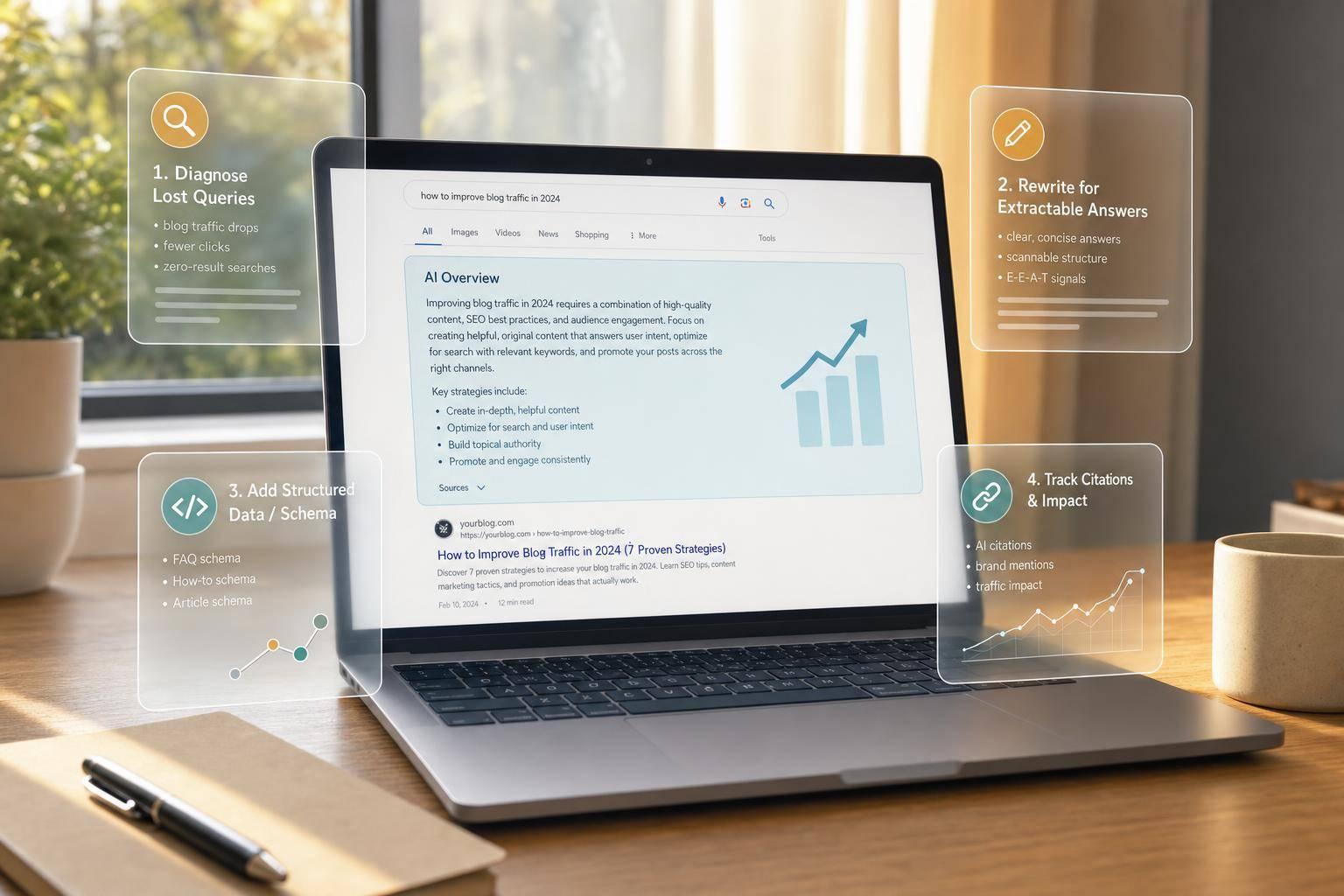
Your rankings can stay flat while your clicks fall. That is the core shift. Google AI Overviews now appear on many searches, and when they show up, standard result clicks drop from 15% to 8%. So if your blog traffic is down, the first job is not guessing. It is finding the queries where AI answers are taking the click.
Here’s the short version of how I’d explain this article:
- I start by checking query-level CTR drops in Google Search Console, not just top-line traffic.
- I look for pages that still rank but now get fewer clicks.
- I rewrite pages so AI tools can pull a direct answer fast.
- I focus on page types buyers use to compare vendors: category, comparison, pricing, and research pages.
- I add schema, dates, named authors, product details, and clean internal links so pages are easier to cite.
- I track whether my brand shows up in tools like Perplexity, ChatGPT, and Gemini.
The big idea is simple: SEO still matters, but blue-link traffic is no longer the only win. If AI tools build the shortlist before a buyer visits your site, you need your pages to be used as source material.
A few numbers stand out:
- 92% of Google AI Overview citations come from pages already in the organic top 10.
- Pages with 15+ specific entities are cited 4.8x more often than generic pages.
- Adding stats can increase citation likelihood by 32%.
- ChatGPT referral traffic can convert at 7.1%, versus 1.76% for old-school organic traffic.
If I had to sum up the playbook in one line, it would be this: diagnose click loss, rewrite for extraction, build pages AI can quote, and measure citation lift every week.
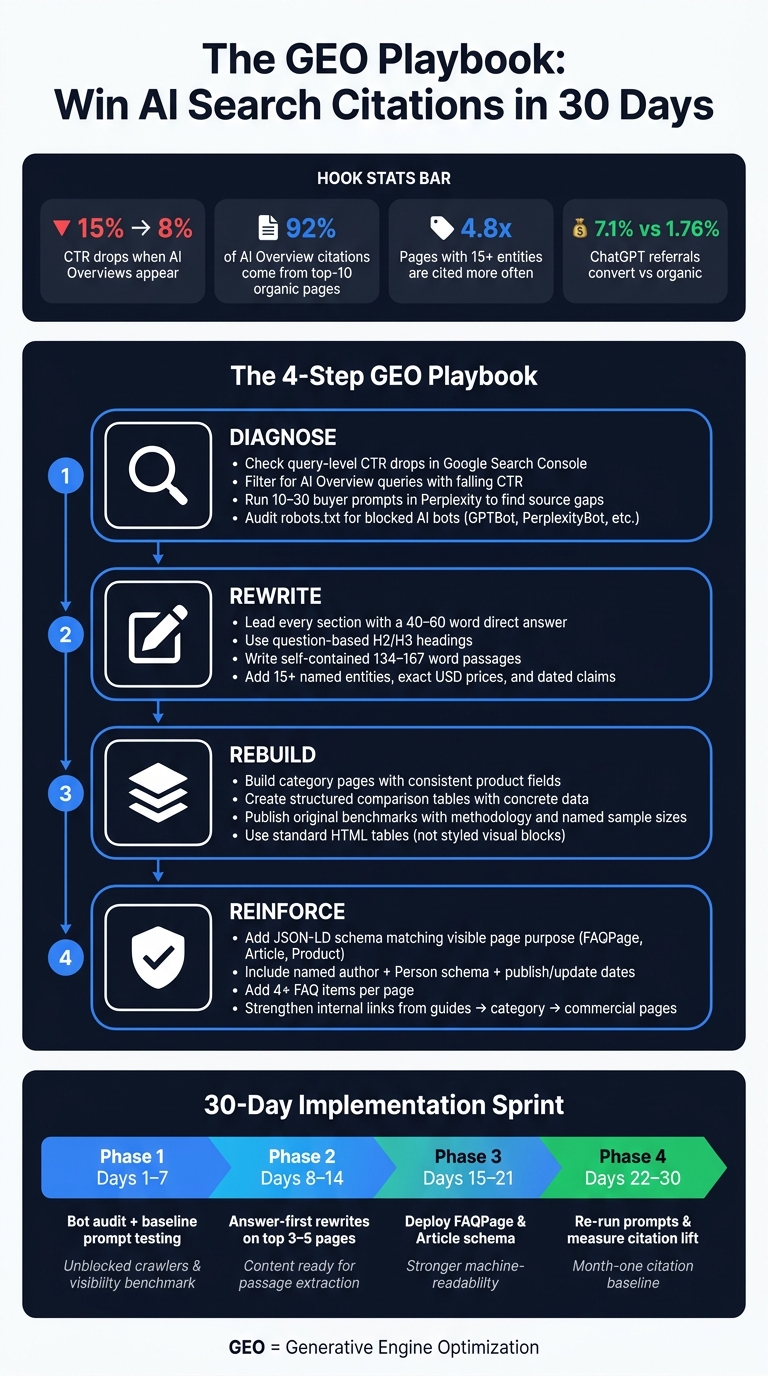
The GEO Playbook: 30-Day Action Plan to Win AI Search Citations
GEO 101: A Growth Marketer’s Guide to Winning AI Search
1. Diagnose Where AI Search Is Cutting Into Organic Traffic
Once you know traffic is slipping, the next move is to figure out which queries and pages are taking the hit. In many cases, AI search doesn't tank rankings. Instead, it chips away at clicks. You'll often see impressions and positions stay about the same while CTR falls.
Use Google Search Console to find high-impression, low-click query patterns
Open the Performance report in Google Search Console and apply the "Search Type: AI Overviews" filter. That shows queries where Google is showing an AI block next to your result. Sort by impressions, then check CTR. If impressions stay steady but CTR drops, AI search is likely taking clicks away. Start your audit there [6].
Focus first on queries with terms like:
- "best"
- "vs"
- "how"
- pricing terms
These often line up with commercial-intent searches from SaaS buyers. And the click gap is hard to ignore: when AI Overviews appear, users click standard search results in only 8% of visits, compared with 15% on pages without an AI summary [3]. Those are your first rewrite targets.
Use Ahrefs, Semrush, and AlsoAsked to map content loss and question depth
After you've flagged weak queries in GSC, check them in Ahrefs. Look for pages still ranking in the top 10 but showing falling estimated traffic. That gap usually points to lost clicks, not lost rankings. Ahrefs' Brand Radar can also track brand mentions and citations across engines like ChatGPT, Perplexity, and Gemini [9].
Semrush gives you another way to check the pattern. Its AI Search Visibility Checker assigns a 0 to 100 score for your domain's presence in AI answers, while Prompt Research helps surface topic volume and intent for conversational prompts [4]. You can also use a prompt repository to refine these queries. Put simply, this helps you confirm whether you're seeing a real pattern or just a weird GSC blip.
AlsoAsked helps at the question level. Enter your main topic and it builds a branching map of related questions. That's useful because AI engines often break one search into several sub-questions, then pull sources for each one [1]. If your page skips those subtopics, it may explain why another page gets cited instead.
Check Perplexity manually to see whether your brand is cited
Then look at what AI engines are saying in plain sight. Build a list of 10 to 30 buyer prompts tied to category, comparison, and pricing intent. Run each prompt in Perplexity using an incognito window. Track whether your brand is:
- mentioned
- linked
- cited
- described correctly
- shown high or low in the answer
This gives you a starting point for AI visibility. More than that, it shows your source gap: the exact competitor pages AI engines are using instead of yours. That's a pretty direct signal for what to rewrite first.
Also check your robots.txt file for blocks on GPTBot, OAI-SearchBot, ClaudeBot, PerplexityBot, and Google-Extended [6] [5].
Use this audit to decide which pages to rewrite first.
2. Rewrite Content So AI Engines Can Extract, Trust, and Cite It
Rewrite existing pages so AI engines can pull a clear answer without needing the rest of the page for support. Start with pages already losing CTR, because those are often the fastest place to spot gains.
Lead each section with a direct answer and use question-based headings
Open each section with a direct 40–60 word answer before any setup or backstory. That placement matters. Google’s AI Overviews pull from the first 200 words of a page 55% of the time [11], so if the answer shows up late, it may never get picked up.
Your headings matter just as much. Instead of a label like “SaaS pricing models,” use a plain question such as “What are the most common SaaS pricing models?” That tells the model where the answer starts. The goal is simple: make the content easy to extract, not just nice to look at.
Make every section self-contained with lists, definitions, and short paragraphs
Each section should stand on its own. If a paragraph only works after someone reads the three above it, many AI systems will pass it over. A good target is roughly 134–167 words per block, with one complete idea in each section [2] [3].
For definitions, stick to a simple pattern: “X is a [category] that [does what] for [whom].” It’s plain, repeatable, and easy for retrieval systems to quote word for word. Keep paragraphs short. Use lists when they help scanability. And if you’re adding comparison tables, use standard HTML tables instead of styled visual blocks. Tools like Microsoft Copilot can pull from those more easily.
Add original data, dated claims, and comparison tables that can be cited
Clean structure helps, but it won’t earn citations on its own if the page says nothing concrete. AI engines tend to cite pages with clear facts, named entities, dates, prices, and sourced claims. Pages with 15 or more specific entities - product names, dollar figures, institutions, and dates - are cited at 4.8x the rate of generic content [2]. Including statistics lifts AI citation likelihood by 32%, and direct quotations push it up by 41% [8].
Be specific with time and money. Write “As of August 2026” and use exact USD pricing instead of fuzzy phrases like “recently” or “affordable.” Swap “studies show” for “According to [Source], [Year].” That gives the model something it can verify and cite.
Compare the old structure with the updated format below:
| Feature | Traditional SEO Blog Structure | GEO-Ready Content Structure |
|---|---|---|
| Heading Style | Keyword-optimized labels | Direct natural-language questions |
| Answer Placement | Buried in body text or conclusion | Answer-first: first 40–60 words |
| Lists & Tables | Used for visual styling | Standard HTML tables and lists for extraction |
| Citability Signals | Backlinks and keyword density | Entity density and factual verifiability |
| Reading Unit | The entire page | Self-contained 134–167 word passages |
Start with your highest-value commercial pages. After that, move to comparison pages and directory pages.
3. Build GEO-Friendly Page Types for SaaS and AI Buyers
Formatting helps, but page type matters more. Build pages around the buyer question AI engines can answer. Once a page is rewrite-ready, turn it into the kind of page AI engines already pull from for commercial queries. The goal isn't just showing up. It's getting cited in the exact page format buyers use when they narrow down vendors.
Category and directory pages with consistent product fields
Category pages are often the first stop for discovery. Start with a 60–80 word definition: "X is a [category] that [does what] for [whom]." Then add buyer-fit filters like company size, use case, and budget. That gives AI engines clear signals to match your page to prompts like "CRM for a 12-person agency that syncs with Gmail."
Each product entry should follow the same field structure. Stick to core features, primary use case, and a specific USD pricing range, such as $50–$200/month, instead of fuzzy labels like "affordable" or "contact for pricing."
Comparison pages and decision pages for commercial intent
These pages matter most when buyers move from discovery to vendor selection. Comparison pages and "best of" lists often help shape the shortlist before anyone clicks.
Use concrete language only. A structured comparison table is easier for AI systems to extract than a block of narrative text [6]. Skip vague cells. Instead of "Yes", write "Native Stripe integration." Instead of "Affordable", write "$9.99/month." For SaaS buyers, this column structure works well:
| Attribute | Why It Matters for GEO |
|---|---|
| Pricing (USD) | Concrete dollar figures are easier to extract |
| Implementation effort | Answers a common pre-purchase sub-query |
| Best-fit user | Matches specific buyer prompts |
| Key integrations | Specific tool names add citable entities |
| Support tier | Differentiates vendors on a concrete axis |
With 55% of B2B buyers using AI tools to compare vendors against each other [3], a well-structured comparison page isn't just an SEO asset. It's a direct pipeline tool.
Research assets and benchmark pages that act as source material
After comparison pages, the next highest-value assets are original benchmarks and trend discovery research. Original data tends to earn citations because AI engines lean on primary sources. Publish benchmarks with a clear methodology, a named sample size, and specific USD findings [2][5].
Put a visible date on every finding and keep datePublished current. Update the page once a year, show the update date clearly, and keep those freshness signals easy to spot [2][5].
4. Add Schema and On-Page Signals That Support Citability
Once the page format is in good shape, add schema so machines can sort the page correctly. Structured content helps AI systems read the page. Schema tells them what the page is. And it only works when it lines up with what people can see on the page.
Use JSON-LD schema that matches the visible page purpose
Match schema to the page’s job, not the keyword you’re chasing. Here’s a simple map for common commercial page types:
| Page Type | Recommended Schema | Primary Benefit |
|---|---|---|
| Category / Directory | ItemList, BreadcrumbList, Organization |
Anchors brand and topic |
| Comparison Pages | FAQPage, Product, Article |
Extracts "vs" and feature data |
| Product / Tool Pages | Product, SoftwareApplication, FAQPage |
Defines capabilities, answers buyers |
| Research / Guides | Article, BlogPosting, HowTo |
Signals authority and freshness |
Only mark up what’s actually on the page. If the schema says one thing and the page shows another, that mismatch can cause problems. Validate with the Schema.org validator or Google’s Rich Results Test, and make sure FAQPage.mainEntity[].name matches the visible H2/H3 headings exactly. Also, don’t depend on client-side rendering alone.
FAQPage schema needs extra care because it packages question-and-answer pairs in a format Google AI Overviews can parse directly. AI-cited pages average 4+ FAQ items, compared with 1–2 on uncited pages [5].
Strengthen entity clarity with authorship, dates, product details, and internal links
Schema does more when the rest of the page backs it up. Use a named author, include a bio, and add Person schema. Show publish and update dates in Month Day, Year format, and match them with datePublished and dateModified.
Keep product names, pricing, and descriptions the same across your site, G2 profiles, and LinkedIn. That kind of consistency matters. Internal links help too. When you connect guides to category pages and category pages to commercial pages, you show AI engines that your site covers a topic in depth instead of pointing to one lonely orphaned post [2].
Concrete entities make pages easier for AI systems to trust and reuse.
Conclusion: Turn Lost Organic Clicks Into AI Discovery and Qualified Pipeline
The shift is simple: citations now matter just as much as clicks. AI answers are now soaking up demand before people ever reach your site. ChatGPT referral traffic converts at 7.1%, compared with 1.76% for old-school organic search [10]. So yes, losing clicks doesn't have to mean losing pipeline.
The playbook is straightforward: diagnose, rewrite, rebuild, and reinforce.
Once your page structure, schema, and entity signals are in place, it's time to put it into action.
What teams should do in the next 30 days
Use the next 30 days to turn this playbook into changes you can track. Start with the pages already losing CTR, then expand to the rest of your commercial content.
In Days 1–7, review your robots.txt and make sure bots like GPTBot, PerplexityBot, and Google-Extended can access your site [5][6]. After that, test 10–20 core buyer prompts in ChatGPT and Perplexity to set a baseline for where your brand appears - or where it doesn't [2][4].
In Days 8–14, rewrite the openings on your top 3–5 pages. Start each section with a direct 40–60 word answer [2][3]. In Days 15–21, add FAQPage and Article JSON-LD schema to those same pages [2][6]. In Days 22–30, run the same prompt set again to check citation lift. Track that lift each week and set a month-one baseline [7][4].
| Sprint Phase | Key Task | Expected Outcome |
|---|---|---|
| Days 1–7 | Bot audit and baseline prompt testing | Unblocked crawlers and visibility benchmark |
| Days 8–14 | Answer-first rewrites on priority pages | Content ready for passage extraction |
| Days 15–21 | Schema deployment (FAQPage, Article) |
Stronger machine-readability and entity clarity |
| Days 22–30 | Re-run prompts and measure citation lift | Month-one citation baseline established |
FAQs
How do I tell if AI Overviews are causing my traffic drop?
Watch for three signals.
Use Google Search Console’s Performance report with Search Type = AI Overviews. Then run a weekly citation check for your top discovery queries in ChatGPT, Perplexity, and Google AI Overviews. On top of that, ask new leads whether AI was their first touchpoint.
That gives you a simple way to spot what’s happening before the numbers hit hard.
You should also compare clicks to impressions. If clicks fall while impressions stay flat or go up, there’s a good chance AI engines are surfacing and summarizing your content without sending the visit your way.
Which pages should I update first for GEO?
Start with your 10–20 highest-traffic organic pages. These pages already have crawl history, so AI engines may pick up updates sooner.
Make changes in this order:
- Rewrite the opening paragraph with a direct 40–60 word answer
- Turn section intros into question-based headings with 20–25 word answers
- Add FAQPage and Article schema
- Include comparison tables and specific cited statistics
Think of it this way: you’re not starting from scratch. You’re improving pages that already have a track record, which gives you a better shot at getting seen fast.
How long does it take to see citation gains from GEO?
Initial citation gains can show up in 7 to 60 days, but the timeline depends on the engine.
Here’s the short version:
- Perplexity often reflects changes in 7 to 14 days
- ChatGPT web search tends to show movement in 14 to 21 days
- Google AI Overviews usually takes 30 to 60 days
For most teams, measurable citation presence starts to show within 60 to 90 days of steady work. Then things often build on themselves in months 4 to 6.
That’s why a 90-day evaluation window makes sense before you scale.