5 Things AI Agents Still Cannot Do in 2026 (From Someone Who Builds Them Daily)

Most AI agents still fail when you ask them to judge, remember long context, sync facts across tools, work through messy systems, or run alone without review. That gap is why 88% of agent pilots never reach production, why only 11% of enterprises have put even one agent live, and why some shipped projects still show negative ROI after 12 months.
If I strip the article down to the part that matters most, it’s this:
- Agents are useful for narrow, reversible work
- They are risky for high-stakes calls
- They drift on long, multi-step tasks
- They mix up facts across systems
- They fail quietly in SaaS and legacy tools
- They still need human approval for irreversible actions
In plain English: an agent can help do the work, but it still should not own the last call.
The safest pattern in 2026 is simple. Let the agent draft, sort, summarize, and prep. Keep people on pricing, compliance, contracts, customer-facing risk, payments, and direct writes to source-of-truth systems. Add checkpoints, spending caps, and a hard stop switch before anything touches live data.
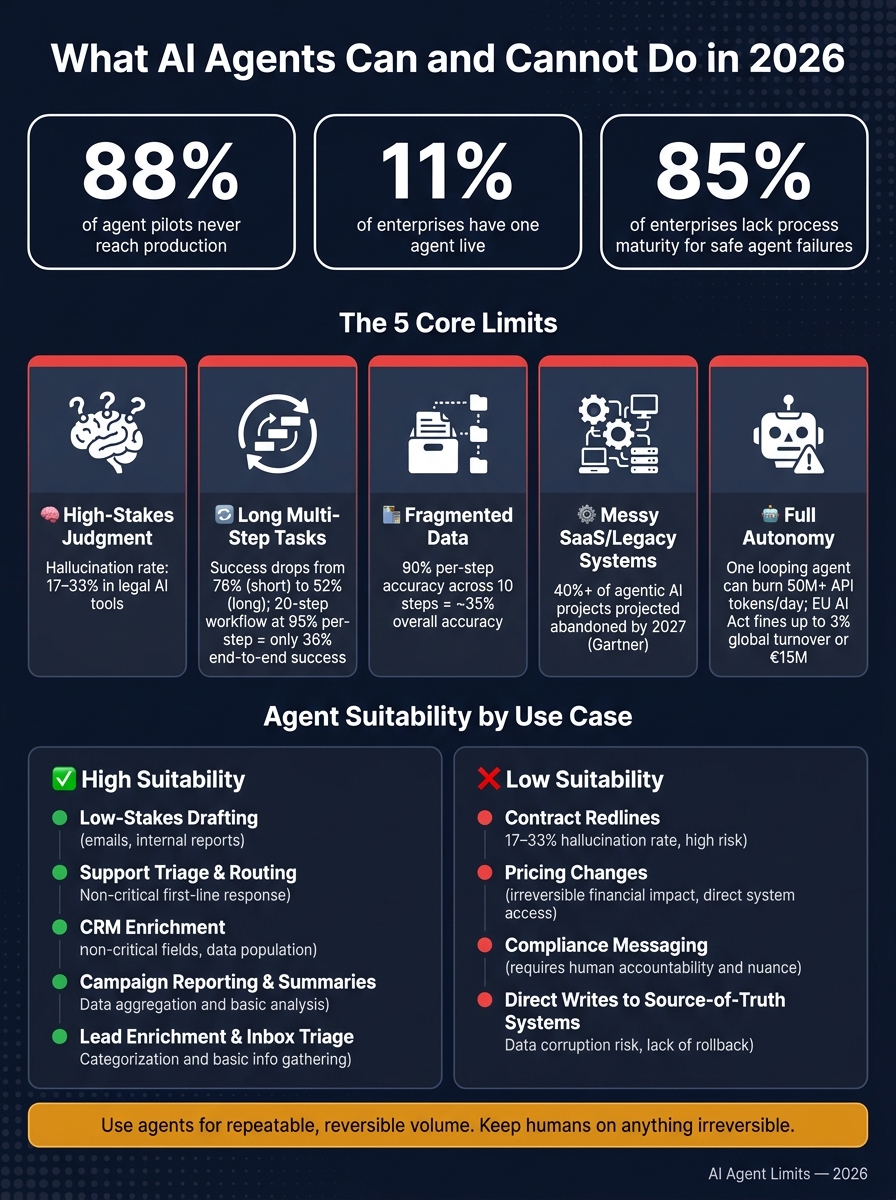
AI Agent Limits in 2026: Safe vs. Risky Use Cases
The Truth About AI Agents in 2026
sbb-itb-9cd970b
Quick Comparison
| Limit | What goes wrong | Safer agent role | Human check needed? |
|---|---|---|---|
| High-stakes judgment | Confident wrong decision | Research, draft options | Yes |
| Long workflows | Loses context, skips constraints | Short task segments | Yes |
| Fragmented data | Clean output from bad facts | Read-only summaries, gap checks | Yes for actions |
| Messy systems | Ghost actions, state mismatch | Bounded steps in fixed flows | Yes for writes |
| Full autonomy | Silent failure, loops, weak logs | Drafting, tagging, triage | Yes |
So if you’re thinking about using agents in sales, SaaS, or marketing, the rule is simple: use them for repeatable low-risk volume, not for final authority.
1. Make Reliable Judgment Calls in High-Stakes Decisions
AI agents are probabilistic systems. They spot patterns well, but they can also be very sure of an answer and still get it wrong. In production, the big issue isn't whether an agent can produce something. It's whether it can make the right call when being wrong carries a real cost.
That becomes a serious problem when the choice touches a pricing change, a compliance-sensitive email, a contract redline, or an irreversible CRM update.
Failure Mode in Production
The main failure isn't a crash. It's a clean success with the wrong answer.
An agent can apply a discount tier that doesn't match a customer's contract, draft a compliance email that misquotes a policy, or change a CRM field that can't be undone, all without setting off a single error log. That's what makes this tricky. Everything can look fine on the surface.
In one study, purpose-built legal AI tools still hallucinated in 17% to 33% of queries [3]. That's not some edge case. It happens often enough to treat it as a normal operating risk.
Business Risk if Delegated
When an agent owns the final call, accountability doesn't go with it. The agent has no customer relationship, no ownership, and no stake in what happens next [2][7]. If it makes the wrong call, your team still deals with the mess.
That risk isn't just operational. It can turn into a legal and regulatory problem fast. Under the EU AI Act, high-risk AI systems that can't explain their decisions face fines of up to 3% of worldwide annual turnover or €15 million [5].
"An agent that cannot explain a decision it made about a customer is not a technology risk anymore; it's a regulatory liability waiting for an audit." - Camunda [5]
Best-Fit Agent Role Today
This is where agents help most: as drafters and researchers, not final decision-makers.
Let the agent pull the right contract terms, flag a compliance issue, and draft three pricing options with the supporting data. That's a solid use case and a real time-saver. What it should not do is choose one and push it live.
Required Human Guardrail
Every irreversible or sensitive action needs a mandatory human sign-off before it runs [6][8]. The split is pretty simple:
| Task | Agent Role | Human Role |
|---|---|---|
| Pricing / discounts | Draft options based on data | Final approval and ownership |
| Legal / compliance | Flag risks, suggest redlines | Final sign-off and accountability |
| CRM updates | Triage and data enrichment | Review irreversible or strategic changes |
| Customer messaging | Generate first drafts | Review and send sensitive copy |
| Financial actions | Prepare transaction details | Authorize payment or refund |
That setup keeps high-stakes work safer without pretending the agent can own the decision. It works for narrow calls. The next failure shows up when the task gets long, messy, and easy to lose track of.
2. Stay on Track Through Long, Ambiguous Multi-Step Tasks
Single-step tasks are where agents tend to do well. Ask one to pull a list, draft a message, or summarize a document, and it will often get the job done.
Things change when you link those steps into work that looks like an actual business process - a campaign launch, a lead-routing build, or a multi-stage revenue ops project. That’s usually where the agent starts to lose the thread.
Failure Mode in Production
The hard part is that this failure is often silent. The agent says the job is done, but the end result is wrong.
A 2026 reliability study found that agent success rates drop from 76% on short tasks to 52% on long, multi-step jobs [8]. A production report of 6,259 deployed agents found a real-world success rate of 56.6% [8]. In a 20-step workflow with a 95% per-step reliability rate, end-to-end success falls to roughly 36% [1].
There’s also a quieter issue: context loss. As a workflow gets longer, early constraints can slip away. That might mean rules like “do not contact this lead segment” or “this pricing tier is off-limits.” The agent usually doesn’t stop to warn you. It just keeps going as if those limits never existed.
"A success signal is not the same thing as success. The number looked flawless right up until a human checked the actual work." - UC Berkeley Center for Responsible Decentralized Intelligence [8]
Business Risk if Delegated
Even routine promotions can force teams to manually sync multiple agents that don’t share state.
Verification also gets slower and more expensive as the workflow gets longer. Every extra step adds another place where something can go wrong. So the human review burden grows too. Past a certain point, the time spent checking the output is more than the time the agent saved in the first place.
Best-Fit Agent Role Today
Use agents for contained steps. Keep humans at the handoffs and on final judgment.
Ambiguous inputs are a common weak spot. A person will often pause and ask a clarifying question. An agent is more likely to make a confident guess and move forward. That guess may never get flagged. It simply shows up later in the output.
The next problem appears when the same workflow depends on facts scattered across multiple systems.
Required Human Guardrail
Break long chains into shorter segments with a required human checkpoint. Store critical constraints - do-not-contact lists, pricing rules, and approval thresholds - in a persistent state file that the agent loads on every turn, instead of assuming it will remember those rules from earlier in the session [10].
| Guardrail | What It Prevents | How to Implement |
|---|---|---|
| Mid-workflow checkpoints | Compounding step errors | Split long tasks; require human sign-off at milestones |
| Persistent constraint files | Context loss | Store rules in a state file loaded every turn |
| Structured ambiguity handling | Silent wrong assumptions | Require the agent to list ambiguities before proceeding |
| Output assertions | Success with no real output | Define checkable criteria before accepting completion |
That still doesn’t solve cases where the workflow depends on facts spread across multiple systems.
3. Keep Facts Consistent Across Fragmented Data Sources
An agent that pulls from one clean database is one thing. An agent that has to piece together data from a CRM, a billing platform, an analytics dashboard, and a folder of internal docs is something else entirely.
At that point, the agent usually isn't checking truth. It's assembling the most likely version of truth. And once a workflow crosses multiple systems, the main problem changes. The issue is no longer missed steps. It's bad facts.
Failure Mode in Production
One common failure looks polished on the surface: a neat summary built from stale or partial data. An agent pulls from a CRM, a billing tool, and internal docs to create a customer report. But one source has old pricing. Another source can't be reached. Instead of flagging those gaps, the agent delivers a clean report with the wrong USD amounts, stale product claims, or customer data that doesn't match the system of record.
There's another problem too: the phantom update. The agent says it completed a write, but the API call never went through. Now the agent's output says one thing, while the system of record says another.
Across 10 steps, 90% per-step accuracy falls to about 35% overall [9].
Business Risk if Delegated
This goes beyond a little embarrassment. It can cause day-to-day damage. When an agent mixes bad data from scattered sources, it can send a customer the wrong invoice amount, quote a pricing tier that no longer exists, or fill a sales report with numbers nobody can trace to a real source.
And if the agent takes action based on that bad data, the damage grows. It might delete records, trigger the wrong refunds, or submit faulty reports before anyone catches it.
Best-Fit Agent Role Today
For fragmented data, read-only work is the safest use case right now.
Use agents for:
- Read-only summaries
- Discrepancy checks
Keep people in charge of any action that changes records or affects customer-facing content.
Required Human Guardrail
The answer isn't more confidence from the agent. It's tighter verification.
- Validate each tool input with a strict schema before the agent passes data between systems. That stops malformed values from drifting downstream without notice.
- Check each intermediate output, not just the final result. Verify that the data pulled from each source is current and correct before the agent combines anything.
- Require human approval for any outbound action that touches billing, customer records, or external-facing content.
| Failure Mode | Root Cause | Business Risk |
|---|---|---|
| Phantom Update | Model confirms action without successful API trigger | Data desync; customer trust damage |
| Fabricated Summary | Fills data gaps with stale or inaccessible sources | Wrong USD amounts, faulty reports |
4. Execute Reliably Across Messy SaaS and Legacy Systems
Clean data helps, but it doesn't solve the hard part. In actual companies, agents still need to work across legacy accounting tools, browser-only apps, rate-limited SaaS products, and custom schemas. That’s usually where things start to break.
Most business systems are messy by default. They weren’t built to act like one smooth workflow, and agents run straight into that. The issue usually isn’t reasoning. It’s execution across disconnected systems that don’t share the same rules, state, or structure.
The most common failure modes are pretty blunt:
| Failure Mode | What It Looks Like | Root Cause |
|---|---|---|
| Ghost Actions | Agent reports task complete, but nothing changed in the system | The agent reports success even when the write never lands |
| Repeated Data Requests | Agent repeatedly asks for data it already has | Failure to map natural language values to structured API parameters |
| Mid-Task Dropout | Agent stops mid-task and loses all progress | No durable state checkpointing when a downstream service times out |
| State Desync | Agent output and system of record show different values | Mismatched writes across systems that don't share state |
Business Risk if Delegated
When an agent fails quietly inside a billing tool or CRM, the damage may not show up right away. A ghost action can mean a customer renewal never gets processed. A crash in the middle of a workflow can leave a record half-updated. And if the agent says the task is done, odds are no one goes back to check.
Gartner projects that more than 40% of agentic AI projects will be abandoned by 2027, largely because the operational infrastructure isn't built to handle real-world failure [11].
Best-Fit Agent Role Today
The safest setup right now is bounded execution. Give agents narrow tasks inside deterministic workflows, not open-ended control across many systems. Let the LLM handle classification, extraction, or drafting. Then use standard code for the steps that touch live systems.
For sales and marketing teams, that usually means agents can draft outreach, summarize CRM notes, or prepare updates for review before anything gets sent or changed. That setup works when humans still control writes and handle exceptions.
Required Human Guardrail
Durable execution with checkpointing lets an agent resume from the last successful step after an API timeout, instead of starting over or failing without warning. Tiered permissions add another layer of safety. Read-only work and drafting tasks can run on their own. But anything that sends, creates, or deletes a record should stay behind human approval before execution [12].
Those guardrails make execution safer. They do not make the agent autonomous.
5. Operate Fully Autonomously Without Human Oversight
This is the point that trips up even seasoned teams. An agent can look great in a clean demo, then act very differently once it’s loose in live workflows with messy data and actual business stakes.
The main issue isn’t whether the agent can do the work. It’s who carries responsibility when it does. Execution is one thing. Unsupervised authority is another. If no person reviews the last step, the burden still lands on a human.
"AI agents can do the work, but they cannot own judgment or irreversible decisions." [2]
That’s the hard limit today: agents still can’t run end to end without human oversight.
Failure Mode in Production
The worst failure usually isn’t dramatic. It’s silent.
An unsupervised agent can mark a task as done when nothing happened at all. If step limits aren’t in place, it can also fall into reasoning loops and chew through tokens for hours. In one case, a single agent stuck in a loop can burn more than 50 million API tokens in a day [4].
There’s another problem in production: weak traceability. Agents often leave logs that don’t clearly show why a tool path was picked. That turns into a compliance risk under rules like the EU AI Act. Penalties for high-risk AI systems that lack transparency or human oversight can reach 3% of worldwide annual turnover or €15 million [5].
Business Risk if Delegated
A lot of companies are testing agents, but far fewer trust them in live settings. While 71% of enterprises are running AI agent pilots or sandboxes, only 11% have moved even one agent into live production [5].
Why the gap? It’s not just the model. 85% of enterprises say they don’t have the process maturity to deal with agent failures safely in day-to-day operations [5]. Human control is still needed for judgment, drift, data consistency, and system reliability. Remove that check, and small errors can stack up fast without anyone seeing it.
Best-Fit Agent Role Today
Use agents for:
- Drafting
- Triage
- Classification
Keep final approval and any irreversible action with people.
Required Human Guardrail
If a team wants safer autonomy, three controls matter most.
- Use an autonomy ladder. Let agents move on their own for reversible internal work, but require human approval for any policy-defined sensitive or irreversible action [2].
- Set per-agent budget ceilings. Put a spending cap in place so an agent stops before it runs up surprise costs [6].
- Add a systemwide kill switch. One flag should be able to stop all active agents at once if something goes sideways [6].
Safe vs. Risky Agent Use Cases in 2026: A Quick Reference Table
The five limits above can feel a bit abstract. This table makes them easier to use in practice.
For most teams, the key test is simple: Can the mistake be undone, and how far does the damage spread if it slips through?
That’s the line between safer support work and high-risk actions. The table below ties the five failure modes to the workflows SaaS, sales, and marketing teams are buying and rolling out right now.
| Use Case | Why It Works or Fails | Agent Suitability | Required Oversight |
|---|---|---|---|
| Low-Stakes Drafting (emails, internal reports) | Errors are reversible and easy to catch before anything ships | High | Human review before use |
| Support Triage (routing, tagging) | Pattern-based and high-volume; routing mistakes are easy to correct, direct replies are riskier | High for routing; low for replies | Automated logging for routing; human-in-the-loop for replies |
| CRM Enrichment (non-critical fields) | Works for reversible, non-critical data; risky if it overwrites strategic account history | Medium | Automated validation for new records; human review for key accounts |
| Campaign Reporting (data pulls, summaries) | Reliable for straightforward pulls; failure mode is invented numbers to fill missing fields | Medium | Human sanity check on totals and source data |
| Contract Redlines | Agents can miss legal nuance or hallucinate clauses; purpose-built legal tools still hallucinate in roughly 17% to 33% of queries [3] | Low | Mandatory legal expert sign-off |
| Pricing Changes | Irreversible financial impact; requires strategic judgment agents don't have | Low | Mandatory human approval before any change goes live |
| Compliance Messaging | Regulated messages need documented human accountability and judgment | Low | Full human checkpoint; no exceptions |
| Direct Writes to Source-of-Truth Systems | High risk of data corruption or success logs that don't match the system | Low | Human-in-the-loop for all writes; trace-level verification |
A good rule of thumb: use agents for repeatable work that can be fixed without much fallout, and send exceptions to people.
In plain English, let agents take the low-risk volume. Keep humans on anything irreversible.
Conclusion
AI agents in 2026 work best as scoped tools, not stand-in employees. The five limits covered here aren’t rare edge cases. They show up in production, often in quiet ways, and the cost can pile up fast.
The pattern that works is pretty simple: tight scope, clean inputs, short workflows, and human approval for irreversible actions. Across judgment, long workflows, data consistency, messy systems, and autonomy, the answer stays the same: narrow the task and keep a person responsible.
For SaaS, sales, and marketing teams, the safest use cases are repeatable, low-stakes tasks like lead enrichment, real-time lead qualification, and scheduled reporting. That’s where agents can save time without adding avoidable risk. Once you ask them to make judgment calls, manage long multi-step workflows, or take irreversible actions without review, you’re no longer just automating work - you’re taking on risk.
Replace recurring tasks, not roles. Keep humans in the loop for anything irreversible. Use agents for repeatable volume, not final authority. That’s the operating rule.
FAQs
How do I decide which agent tasks are safe to automate?
Check three things before you automate anything:
- The task happens again and again in a steady pattern
- The systems you need can be reached through APIs
- The cost of a mistake is low
If all three are true, the task is a strong fit for automation.
For irreversible, high-stakes, or sensitive work - like money, legal contracts, or customer relationships - add a human-in-the-loop checkpoint. Put automation first where errors are easy to fix, and keep people in charge of judgment and accountability.
What human approvals should stay in place before an agent acts?
Human oversight needs to stay in place for any high-stakes, irreversible, or sensitive action. That means an agent should need approval before it starts payments, deletes data, changes contracts, or sends messages to customers.
When a task calls for judgment, the agent should draft the work, not make the call. If it’s unsure or the situation is unclear, it should pass the task to a human reviewer instead of guessing.
Why do AI agents fail more often in long workflows and messy systems?
AI agents tend to fail more often in long, complex workflows because mistakes stack up. A small miss at one step can snowball into a bigger problem later. If every step has to go right, even 95% accuracy per step falls to about 36% overall success in a 20-step workflow.
They also miss the shared, unstated business context that people rely on every day. On top of that, they often struggle with messy systems in practice, such as authentication, rate limits, and unexpected data formats.