The Winners in 2026 Aren't Deploying More AI Models - They're Reinventing How Decisions Get Made Around Them. IMD

Most companies don't need more AI. They need better decision flow. Even though 69% of companies use AI, 90% of senior executives say they see no measurable productivity gain. My takeaway is simple: AI stalls when nobody is clear on who decides, who checks, and who steps in when something goes wrong.
If I had to boil the article down, I'd say this:
- More models are not the edge anymore
- Decision rights are now the bottleneck , often requiring tools like DecisionLink to quantify ROI and clear the path for closures
- AI works best inside revenue workflows, not beside them
- Human review still matters for pricing, risk, escalations, and forecasts
- Clean data and clear ownership come before automation
- The teams pulling ahead measure outcomes, not just usage
Here’s the plain-English version: if you keep the same approval path, the same messy CRM data, and the same vague ownership, AI just helps confusion move faster. But if you set rules for approvals, overrides, and escalations, AI can help teams move with more consistency and less waste.
A few numbers make that clear:
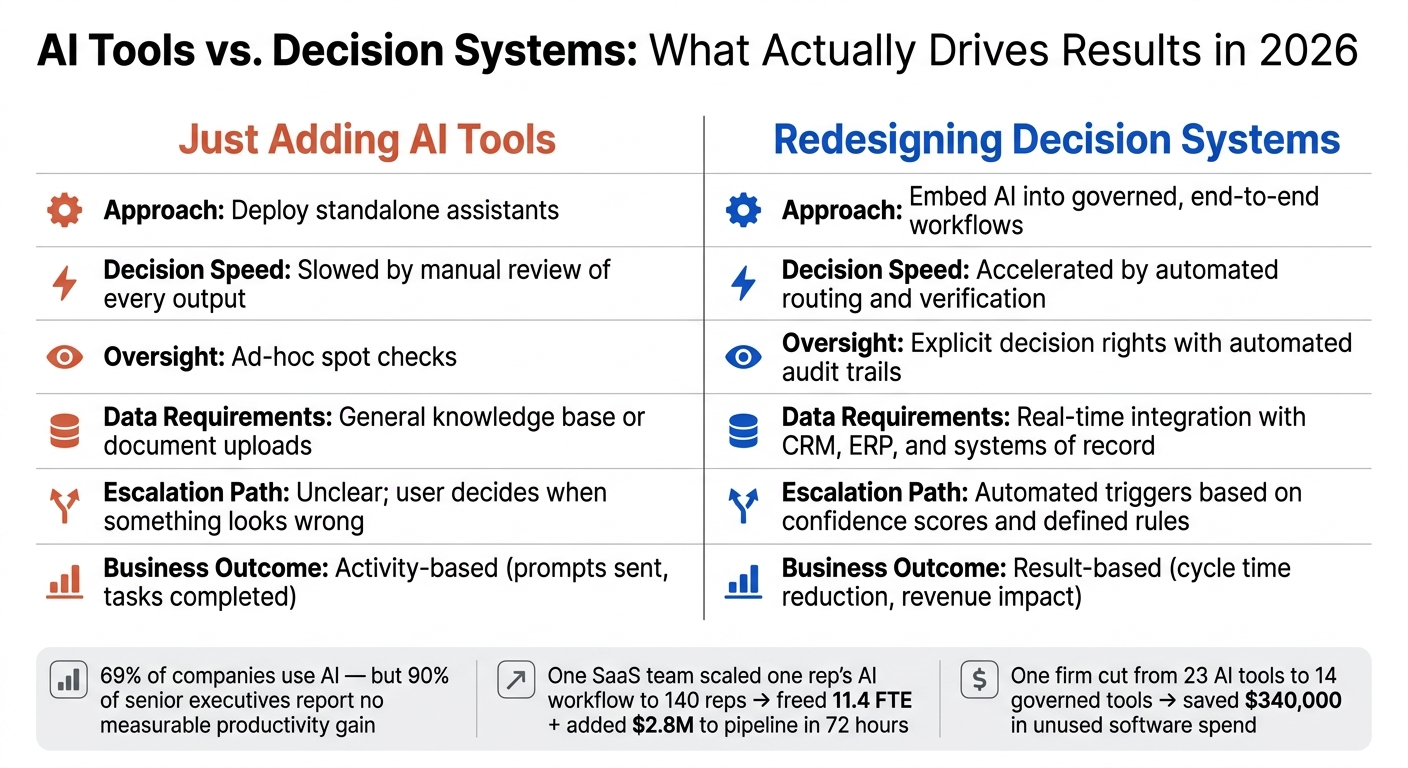
- One SaaS team turned a top rep’s AI renewal process into a standard workflow for 140 reps
- That shift freed up 11.4 FTE
- It also added $2.8 million to pipeline in 72 hours
- Another firm cut down from 23 AI tools to 14 governed tools
- That saved $340,000 in unused software spend
How AI Agents and Decision Agents Combine Rules & ML in Automation
sbb-itb-9cd970b
Quick comparison
| Focus | Teams that just add AI tools | Teams that fix decision systems |
|---|---|---|
| AI role | Standalone assistant | Part of the workflow |
| Approval flow | Unclear | Pre-set rules |
| Human oversight | Random checks | Named owners and audit trail |
| Data use | Static docs and prompts | Live CRM and system data |
| Escalation | Left to the user | Triggered by rules and confidence levels |
| Success metric | Activity | business results |
The article’s core point is straightforward: the winners in 2026 are not the ones with the biggest AI stack. They’re the ones that build clear rules around pricing, lead routing, customer risk tools, and sales forecasting so AI outputs turn into action people can trust and own.
The core problem: AI without decision design creates inconsistency
Most AI failures are decision failures.
Teams roll out tools before they decide who owns the next step, who checks the output, and who steps in when something looks off. In revenue teams, that hits pricing, routing, forecasting, and customer escalation fast. Things slow down. Or they drift.
"AI generates recommendations. Leaders decide what counts as truth, what gets verified, and who signs off." [4]
Where AI breaks when workflows stay the same
A lot of teams plug AI into CRM and support tools, then keep the workflow exactly as it was. That's where problems start.
You see it in pricing approvals, lead qualification, forecast reviews, and customer escalations. AI suggestions just sit there because nobody knows whether to act on them or wait for sign-off. Customer alerts stall because there's no clear owner and no clear path for escalation. Managers approve summaries without checking the source data, which means the output gets used but the decision itself has no owner.
At that point, AI stops helping with decisions and starts adding friction.
One IT and security firm ran into this head-on. An internal audit found 23 AI tools running across six departments, and nine of those tools had no governance. Customer PII was moving through personal AI accounts. After the company set decision rights and cut down to 14 governed tools, it reduced $340,000 in shelfware costs [2].
The business cost of poor decision flow
Poor decision flow slows exception handling, creates uneven treatment, and makes it hard to see which AI workflows are doing their job. That inconsistency hurts speed, accuracy, and revenue visibility across the whole operation.
That's why adding more AI tools doesn't create an edge. Better decision design does. And that's why piling on more models is no longer the advantage. The advantage comes from redesigning the decision system around them.
Why adding more AI models is no longer a differentiator
AI Tools vs. Decision Systems: What Actually Drives Results in 2026
By 2026, AI models are everywhere. Tools like Salesforce Einstein, HubSpot AI, and Microsoft Copilot already sit inside day-to-day work. So model access alone doesn't set anyone apart anymore. Workflow design does.
What matters now isn't how many AI tools you can stack on top of a team. It's whether AI helps people make better calls inside the systems they already use.
From more AI outputs to better decisions inside real workflows
The shift is simple: move AI out of the sidebar and into the workflow itself. That's where it can score, route, and verify work using live data.
"In 2026, the discourse will shift from 'telling' to 'showing.' Winners realize that AI is a long game and requires unglamorous heavy lifting around data governance and process redesigns." - Didier Bonnet, Professor of Strategy and Digital Transformation, IMD [1]
That quote gets to the heart of it. The value now comes from the workflow, not just the output. A summary on its own is nice. A draft can help. A score might save time. But the bigger win is the full workflow run: a lead gets enriched, scored, and routed on its own through top AI tools for real-time lead qualification through AI-powered workflow automation, without someone manually pushing each step forward. [3]
Comparison table: adding AI tools vs. redesigning decision systems
| Adding AI Tools | Redesigning Decision Systems | |
|---|---|---|
| Approach | Deploy standalone assistants | Embed AI into governed, end-to-end workflows |
| Decision speed | Slowed by manual review of every output | Accelerated by automated routing and verification |
| Oversight | Ad-hoc spot checks | Explicit decision rights with automated audit trails |
| Data requirements | General knowledge base or document uploads | Real-time integration with CRM, ERP, and systems of record |
| Escalation path | Unclear; user decides when something looks wrong | Automated triggers based on confidence scores and defined rules |
| Business outcome | Activity-based (prompts sent, tasks completed) | Result-based (cycle time reduction, revenue impact) |
Once AI is part of the workflow, the next edge comes from clear decision rights. In plain English: who can approve, who can override, and when the system should escalate a decision instead of guessing.
How winning teams redesign decision rights and revenue workflows
Decision rights: who approves, who escalates, who overrides
The biggest gap in AI rollouts usually isn’t the model itself. It’s fuzzy decision rights.
Before launch, teams need to spell out who approves, who escalates, and who can override. That means putting rules in place ahead of time, not sorting it out midstream.
A few examples make this plain:
- Any discount request above a set threshold goes straight to a manager
- Lead scores that fall into a low-confidence range go to an SDR for manual review instead of being auto-routed to outreach
- Churn-risk alerts go to a named CSM with a hard 24-hour response SLA
Permissions matter just as much. A good starting point looks like this: read-only access for search and summaries, draft-only access for outward communication, reversible updates for CRM changes, and mandatory human approval for pricing, payments, or legal commitments.
Once those guardrails are set, the next move is simple: use them in the revenue workflows that create the most friction first.
Four revenue workflow areas where AI drives better decisions
The clearest gains show up in four revenue workflows. And in each one, AI does its best work when it lives inside tools like Salesforce Einstein, HubSpot AI, or Microsoft Copilot - not as a separate chat box that forces people to copy and paste.
In pricing, AI can recommend discounts based on deal history and past win rates. But the hard rules - margin floors, contract terms, and approval thresholds - should stay locked in by the system, not left to AI guesswork.
"Deterministic financial logic - pricing calculations, discount enforcement, contract structures, margin protection - must produce the same result every time. Consequently, it cannot be left to probabilistic inference. Ever." - Daniel Kube, CEO, servicePath [5]
Teams that are confident in pricing execution see a margin premium of 5–11 percentage points compared with peers. [5]
In lead qualification, AI scores leads and drafts personalized outreach. The SDR still checks low-confidence drafts before anything gets sent.
In customer success, AI spots churn signals from product usage and suggests the next best action. The CSM then checks the health score in the customer-success dashboard and takes charge of high-risk intervention.
In forecasting, AI pulls together deal-by-deal commentary and close probability. The sales leader reviews the deals the model flags as at risk.
Workflow table: decision type, AI support, human review, and key metric
These rules become concrete in four operating areas.
| Decision Type | AI Support | Human Review Step | Key Metric |
|---|---|---|---|
| Pricing | Recommends discounts based on deal history and win rates | Manager approval required for any discount above a set threshold | Win Rate / Gross Margin |
| Lead Qualification | Scores leads and drafts personalized outreach | SDR reviews low-confidence scores before sending | Speed-to-Lead / Conversion Rate |
| Customer Success | Detects churn signals and suggests next-best action | CSM validates health score and owns high-risk intervention | Net Revenue Retention (NRR) |
| Forecasting | Compiles deal commentary and close probability by deal | Sales leader reviews at-risk deals flagged by the model | Forecast Accuracy |
How to build a decision system that improves performance
Start with one high-friction decision and fix the inputs first
Once decision rights are clear, put them to work in one workflow first. Pick a high-friction decision like lead qualification, discount approvals, or renewal outreach.
Before you automate anything, clean up the inputs. In plain English: fix the data before you trust the machine. Standardize CRM field quality, define pipeline stages, and set clear ownership rules. Automation only helps when CRM data, pipeline stages, and ownership rules are clean [3]. If your lead source field is half empty, or one rep's idea of "qualified" looks nothing like another's, AI won't solve the mess. It will just move the mess faster.
Start in recommend mode first. Let AI make the suggestion, and let humans approve it. That's the safest way to spot weak points in your decision-rights setup before anything permanent happens.
"A prompt library without decision rights creates blame, not performance."
Measure speed, consistency, and business impact
Once the workflow is under control, track whether it's improving results. The point isn't just faster decisions. The point is better decisions, backed by business outcomes. A pilot gives you a clean way to test whether speed is helping or just hiding problems.
| Metric | What It Tells You |
|---|---|
| Lead-to-qualification cycle time | Where handoff bottlenecks live |
| Override rate | How often humans correct AI; signals model or data drift |
| Escalations | How much friction remains in the workflow |
| Conversion rate | Whether faster decisions are also better decisions |
| Forecast accuracy | Whether AI-assisted pipeline reviews are improving over time |
Conclusion: the winners build systems around AI, not just on top of it
The main issue was never a lack of AI models. It was weak decision design: fuzzy ownership, messy data, and no clear path from AI signal to human action. The answer starts with governance: clear decision rights, workflow integration inside the tools your team already uses, and human review at the moments that carry real risk.
For operators reading this, durable growth in 2026 comes from building systems that turn AI signals into accountable action across pricing, lead qualification, customer success, and forecasting, not from adding to your AI tool stack. That's how AI becomes an operating system for decisions instead of a standalone tool.
FAQs
What are decision rights in AI workflows?
Decision rights in AI workflows spell out who gets to decide what in an AI-supported process.
They make it clear who can read and act on AI outputs, who should escalate an issue, and who can override an automated recommendation. They also define when a person, AI agent, or workflow automator is allowed to step in and act. When these rights are clear, teams can move with more speed and consistency while still keeping accountability, managing risk, and using human judgment where it matters.
How do we know which AI decisions need human review?
Set clear evaluation criteria from the start, and keep watching how the AI behaves over time. Don’t just test it once and move on. Track performance, watch for drift, and define accountability checkpoints along the way. For example, you can set risk thresholds that automatically trigger human review when the system makes a high-stakes recommendation or shows unusual behavior.
Build decision workflows around clear policies, documented audit trails, and defined escalation paths for high-risk actions. That means people should be able to see what happened, when it happened, and why. If something crosses a set limit, the process should make it obvious who steps in, what gets reviewed, and how the next decision is made.
What should we fix before adding more AI tools?
Before adding more AI tools, organizations need to fix the decision-making processes that let AI do useful work. In many cases, the main bottleneck isn’t the tech. It’s how fast and how well teams can govern, interpret, and act on AI outputs.
Leaders should set up clear systems for visibility, governance, and execution. That includes guardrails, audit trails, escalation paths, and repeatable management processes. Without that base in place, adding more AI tools can pile on complexity without leading to better results.