Zuckerberg Says AI Agents Are Behind Schedule. He Is Right. Here Is What Works Anyway.
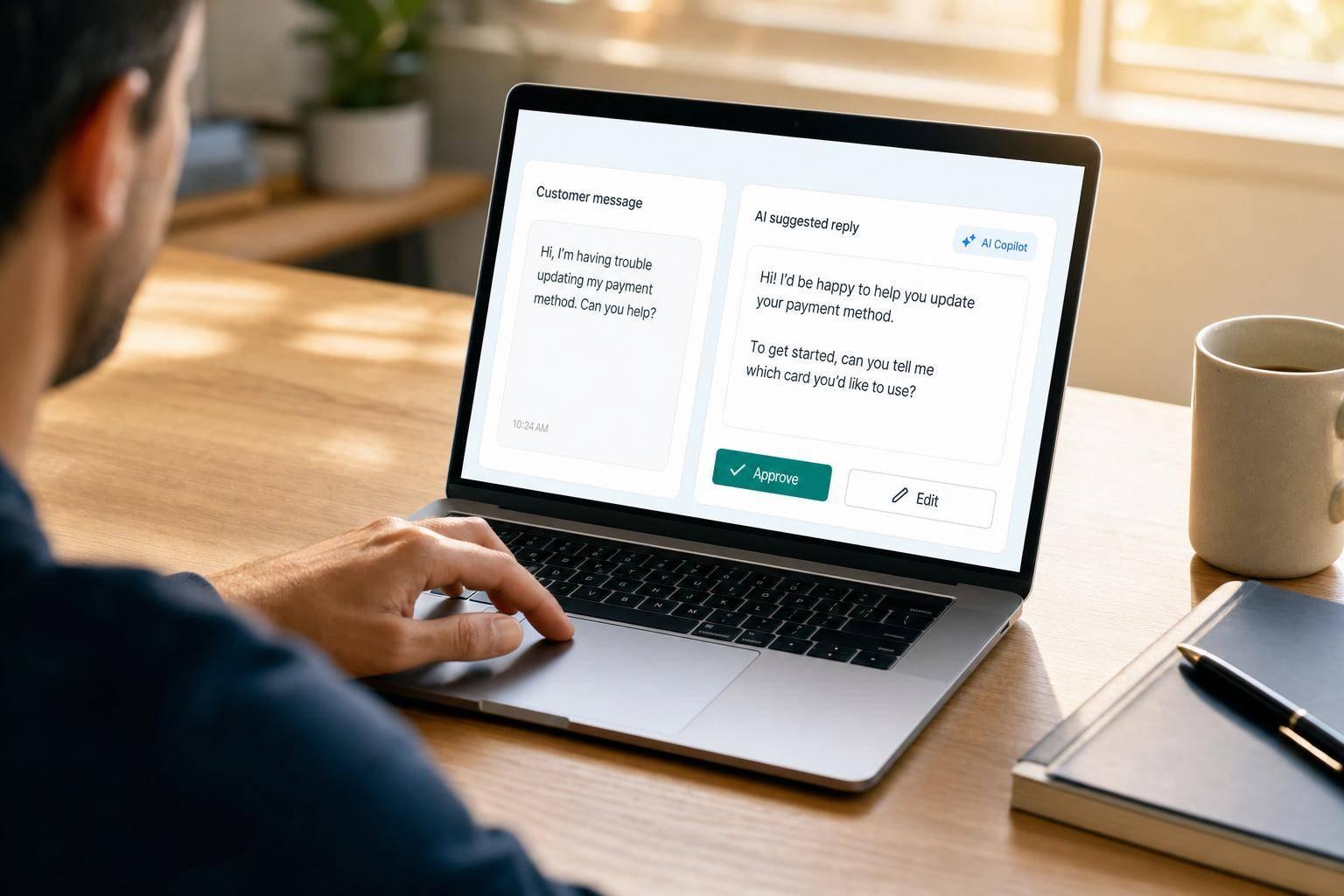
My take is simple: don’t wait for fully autonomous AI agents. Use supervised AI in narrow workflows now. Even with Meta set to spend $125 billion to $145 billion in 2026, dependable broad autonomy is still not here. And in business workflows, that gap matters fast.
Here’s the short version:
- Full autonomy breaks too often in sales, support, and CRM workflows.
- A 10-step workflow with 85% step accuracy succeeds only about 20% of the time.
- CRM data decays by 25% to 30% per year, so AI often works from bad inputs.
- In practice, human-reviewed AI setups outperform pure-agent setups in many customer-facing tasks.
- What works now is plain: lead scoring, email drafting, CRM note-taking, support triage, and reply drafts with human approval.
- What should stay gated: refunds, pricing, legal replies, and other high-risk actions.
I wouldn’t frame this as “AI failed.” I’d frame it as: the highest-ROI use cases are smaller, supervised, and tied to one metric at a time. If you run a $10 million-plus business, the goal is not to hand the keys to an agent. The goal is to cut admin time, improve response speed, and help teams make fewer mistakes.
Top 10 AI Workflows for Small Businesses | GoHighLevel AI
Quick Comparison
| Approach | Where it fits | Main upside | Main risk | Best use right now |
|---|---|---|---|---|
| Fully autonomous agents | End-to-end task execution | Less manual work on paper | Error chains, bad routing, weak audit trail | Very limited |
| Human-in-the-loop AI | Sales, support, CRM workflows | More control and cleaner outputs | Needs review process | Best current option |
| AI copilots | Drafting, summarizing, research | Saves rep and agent time | Weak output if inputs are poor | Strong fit |
| Rule-based + AI workflows | Triage, routing, event-triggered tasks | Clear guardrails and easier tracking | Setup work across tools | Strong fit |
So if I were making the call today, I’d start with one supervised workflow, track lift over 90 days, and expand only after I see results in conversion, response time, or hours saved.
Why Fully Autonomous AI Agents Stall in Real SaaS Operations
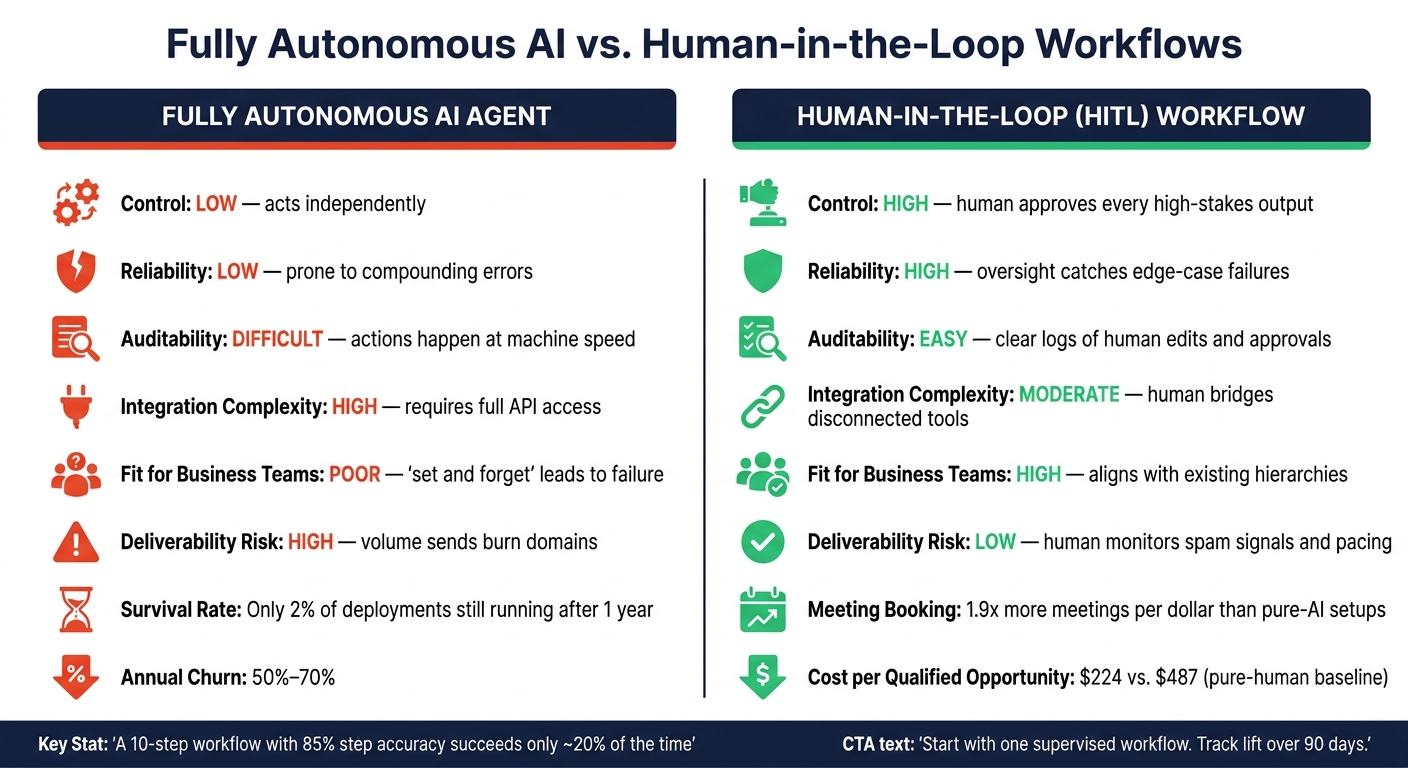
Fully Autonomous AI vs. Human-in-the-Loop: Which Wins in 2025?
Once AI gets into CRM, routing, or support, even small mistakes can snowball. One bad record turns into a misrouted lead. One missed detail leads to a bad handoff. And then deals start slipping away without anyone noticing.
Where Lead Routing, Qualification, and Support Handoffs Break Down
Stale data and weak handoffs are where most autonomous setups start to fall apart.
CRM data decays by roughly 25% to 30% per year as people change jobs, companies get acquired, and contact records age out [1]. If an agent pulls an old record, it may not spot the issue. It just moves ahead on bad data with total confidence. Human reps already lose about 27% of their working time dealing with stale contact records [4]. So when agents step into that same system, they don’t remove the mess. They often multiply it.
The problem gets worse when context is split across tools. Only 27% of enterprise applications are currently connected via APIs [2]. That leaves agents working with partial information. A support escalation can get routed without any clue that the customer is close to renewal. A sales follow-up can go out without noting that a competitor came up on the last call. That gap is a big reason supervised workflows hold up better than full autonomy.
Tone and intent are another weak spot. LLMs are only about 60% accurate at detecting sarcasm in general text [4]. So a reply like "Oh great, another cold email" might get read as interest instead of annoyance. That can trigger the wrong follow-up and push up the chance of unsubscribes or spam complaints. And there’s another issue: AI-generated emails trigger spam flags more often than human-written ones [3].
Why Human-in-the-Loop Workflows Outperform Full Autonomy
The numbers on full-autonomy deployments are tough to brush off. Only 2% of fully autonomous AI SDR deployments are still running one year later [3], and annual churn for the autonomous AI SDR category sits between 50% and 70% [3][5].
The root issue is silent failure. If an API sync breaks, you usually get an error. If an agent makes the wrong call, it can finish hundreds of tasks the wrong way before anyone catches it [6]. That’s what makes this so tricky. The system doesn’t always crash. It just quietly drifts off course.
Hybrid models are moving ahead because they put a human where it matters most. In these setups, one person can manage multiple AI seats and step in on the cases the model still struggles with - pricing questions, legal or compliance issues, and other high-stakes moments. In practice, hybrid pods book 1.9x more meetings per dollar than pure-AI setups [8].
| Dimension | Fully Autonomous AI Agent | Human-in-the-Loop (HITL) Workflow |
|---|---|---|
| Control | Low; acts independently | High; human approves or edits every high-stakes output |
| Reliability | Low; prone to compounding errors | High; human oversight catches edge-case failures |
| Auditability | Difficult; actions happen at machine speed | Easy; clear logs of human edits and approvals |
| Integration Complexity | High; requires full API access to all systems | Moderate; human can bridge gaps between disconnected tools |
| Fit for Business Teams | Poor; "set and forget" often leads to failure | High; aligns with existing sales and support hierarchies |
| Deliverability Risk | High; volume-heavy sends often burn domains | Low; human monitors spam signals and pacing |
"Fully autonomous AI SDRs have not replaced human sales teams at any meaningful scale." - Bain Capital Ventures [8]
Supervised AI is the safer, higher-value default today. Next: the sales workflows where supervised AI already works.
sbb-itb-9cd970b
What Works Now in Sales: Qualification Assistants, Email Copilots, and CRM Support
Sales value is showing up in assistive workflows, not full autonomy.
Lead Qualification Assistants That Improve Speed and Prioritization
The fastest wins usually happen before a rep writes a single email.
AI qualification assistants score inbound leads against your ICP using past CRM data and intent signals such as pricing-page visits, site activity, and hiring changes. The output is a ranked list, so reps can spend more time on leads that are more likely to convert.
Tools like Salesforce Einstein and HubSpot Breeze Intelligence are built for this kind of scoring. AI-assisted lead scoring beats static rule-based scoring by 20–30% in lead-to-opportunity conversion rates [9]. But there’s no magic trick here. It only works when your CRM history is clean and contact records are filled out well. Garbage in, garbage out still applies.
Sales Email Copilots and CRM Helpers That Cut Pipeline Admin
AI email copilots like Claude and ChatGPT work best when they help with context, not when they try to write the whole message.
Instead of producing another bland template, they can pull in a prospect’s recent earnings call, a job change, or a funding announcement, then give the rep a sharp opening line to build on. That setup matters. Teams that use AI for context while humans handle the writing and editing see open rates 15–25% higher than teams using pure template sequences [9].
On the CRM side, tools like Gong and Fireflies take care of admin work that eats up the day. They log calls, summarize transcripts, and flag deals with no activity in 14+ days. That can give back as much as 20% of a rep’s selling time [7].
Once sales workflows are under control, the next gains usually come from support automation with the same guardrails.
Where Each Sales Workflow Creates the Most Value
Not every AI sales tool brings the same payoff or the same level of risk. Here’s the side-by-side view:
| Workflow | Primary Value | Implementation Effort | Risk Level | Human Oversight Role |
|---|---|---|---|---|
| Qualification Assistants | Prioritizes high-intent leads; routes to the right rep. | Medium (requires clean CRM data) | Low | Sets thresholds and routing rules. |
| Sales Email Copilots | Increases open/reply rates via personalization. | Low | Medium | Reviews drafts before sending. |
| CRM AI Helpers | Improves data hygiene and pipeline visibility. | Low | Low | Checks summaries and flags. |
The pattern is pretty clear. Low-risk, internal-facing tasks like CRM hygiene and lead scoring tend to deliver value fastest. Email copilots carry a bit more risk because they touch external communication. That’s why human review before sending isn’t optional. It’s the point.
The same pattern shows up in support and operations too: automate the routine work, keep people on the edge cases.
What Works Now in Support and Operations: Controlled Automation With Clear Guardrails
The same human-in-the-loop setup that works in sales also works in support. In support and operations, supervised AI tends to work right now because mistakes are easier to spot and fix than they are in outbound sales.
Support Automation That Speeds Up Response Without Losing Oversight
The safest place to start is self-service deflection (Tier 0). That means using AI chat automation for repetitive, low-stakes requests like password resets, order status checks, and returns policy questions. When the system is set up well, it can deflect 30% to 50% of routine tickets [11]. AI can also sort tickets, send them to the right team, and tag them for reporting.
Past deflection, tools like Intercom, ChatGPT, and Claude work well as helpdesk copilot tools. The setup that keeps holding up is supervised automation: AI reads the ticket, checks the knowledge base, and writes a draft reply for a human to review before anything is sent. That way, mistakes don't slip through to customers, but teams still save time on reply drafting.
Refunds, payments, and access changes should stay behind an approval gate.
Workflow Orchestration With Zapier
When AI needs to act on events, it helps to add an orchestration layer instead of handing the model direct control. One practical limit of tools like Claude and ChatGPT is simple: they don't listen for events by themselves. They respond when prompted. They don't watch your inbox or trigger when a form comes in. That's where Zapier comes in.
The setup that tends to work best separates the trigger layer from the AI layer. Zapier acts as the always-on listener. It watches for a trigger, like a new support ticket, an incoming email, or a form submission, and only calls the AI model when judgment is needed. That makes the workflow easier to audit and cuts unneeded AI calls.
A simple support flow looks like this: a ticket comes in, Zapier routes it, Claude drafts a response, and a human approves the reply before the customer sees it.
Which Support Automations Are Safest to Deploy First
Start with low-risk workflows first. Then track them by speed, error rate, and time saved.
| Support Workflow | Accuracy Needs | Customer Risk | Cost Savings | Human Review Level |
|---|---|---|---|---|
| Support Triage | Moderate | Low | High (time saved) | Minimal - spot checks only |
| Draft Generation | High | Medium | Moderate (speed) | High - always required |
| Escalation Routing | High | Low | High (SLA impact) | Moderate - periodic audit |
| Autonomous Refund Processing | Critical | High | Very high | Mandatory approval gate |
Triage and escalation routing are the safest places to start. If something goes wrong, the error is usually recoverable. The time savings show up fast, and the review burden stays fairly low.
Draft generation also makes sense early on, but only if a human reviews every output before it reaches a customer. Autonomous refund processing should stay off the table until you have strong accuracy metrics and clear approval workflows in place [10][11].
How to Choose AI Tools That Improve Conversions, Pipeline Efficiency, and Business Value
Evaluate AI by Conversion Lift, Response Speed, and Manual Work Removed
Once your use cases are clear, the next step is simple: pick tools that move numbers you already watch. Full autonomy still breaks too often, so it makes more sense to buy controlled tools instead of chasing agent buzz.
A good rule of thumb is this: buy AI only if it improves a metric you already track. That could be lead-to-meeting rate, first-response time, support resolution time, or admin hours per rep.
For example, a lead-qualification agent that replies within 5 minutes can lift qualified-meeting rates by 15%–30% compared to a 24-hour human response baseline [12]. That’s a big gap. In a lot of teams, speed alone changes the outcome.
The same logic applies to sales efficiency. Hybrid AI-human outbound pods cut the cost per qualified opportunity from $487 to $224 compared to pure-human teams [5]. Put plainly, AI should go after the admin work that eats up rep time.
Apply a Simple Filter Before Buying Any AI Tool
Before you buy anything, run it through a short filter:
- Scoring accuracy: Does it separate qualified leads from poor fits on a test set you control?
- Contact validity: Does it return correct emails or job titles for the roles you target?
- Human quality: Do the drafts sound like a real rep instead of a stiff template?
- ICP flexibility: Can you change your Ideal Customer Profile prompt on the fly without re-onboarding?
- CRM/sequencer integration: Does it write straight into your CRM or sequencer?
If a tool can’t keep human approval on customer-facing actions, pass on it. Set hard guardrails from day one too: never offer discounts, share custom pricing, or answer legal questions without approval. That alone blocks a lot of early errors.
Most mid-market tools cost $200 to $2,000 per month [12]. So the math has to work. The tool should save enough labor hours or help deals move fast enough to earn its place.
That’s the line between a useful assistant and an expensive experiment.
Conclusion: Reliable AI Assistants Beat Premature Autonomy
Zuckerberg’s point that agentic AI is behind schedule isn’t a reason to sit still. It’s a reason to be specific about where you use it. The tools that win are narrow, supervised, and tied to a measurable business result.
Start with one workflow. Prove lift in 90 days. Then expand.
FAQs
Why do autonomous AI agents fail in real workflows?
Autonomous AI agents usually fail in day-to-day workflows because of how the work is set up, not because the model is dumb.
The biggest issues tend to be pretty practical: authentication roadblocks, anti-bot limits, messy or scattered data, weak targeting, no workflow redesign, too little human review, systems that don’t connect well, and a scope that’s far too broad.
That’s why narrow, well-defined agents tend to work better. They have a clear job, cleaner inputs, and fewer ways to go off the rails.
Which AI tasks are safest to automate first?
Start with work that’s narrow, repeatable, heavy on data, and easy to finish cleanly. Put the focus on tasks that take a lot of manual effort, need little judgment, and produce outputs someone can check without much friction.
Strong early use cases include research, data hygiene, content personalization, lead enrichment, scoring, inbound routing, document processing, inbox triage, and meeting-to-CRM logging. For higher-stakes actions like emails or financial updates, keep human-in-the-loop checks in place.
How should I measure AI ROI in 90 days?
Measure AI ROI by setting a clear business baseline before deployment. Then track financial outcomes, not surface-level activity metrics like hours saved or content produced.
The main idea is simple: tie AI to the P&L. Look at results such as lower turnaround times or more qualified meetings. Those are the signals that show whether the project is helping the business, not just keeping a dashboard busy.
A 60-day check helps you catch drift early and confirm that things are moving in the right direction. If the results aren't on pace to hit the industry-median payback period by day 60, change course or shut the project down.