The $40,000 Mistake Hiding in Your "Set It and Forget It" Automation

I see the same pattern over and over: the workflow looks fine, the status light stays green, and revenue still slips out. In this piece, I’d sum it up like this: small automation errors in lead routing, system syncs, and AI SDR flows can cost you leads, pipeline, and time without any loud warning.
Here’s the short version:
- Lead routing breaks can leave demo requests unowned for hours or days.
- Sync errors between tools like HubSpot, Salesforce, Zapier, and ActiveCampaign can stop updates, create duplicates, or trap contacts in dead sequences.
- AI SDR workflows can send the wrong message when CRM data is wrong.
- A single bug can snowball into tens of thousands of dollars in lost revenue, plus wasted ad spend and rep cleanup time.
- The fix is simple in concept: audit key workflows on a set schedule, clean input data, trim bloated logic, test every handoff, and put one owner on each revenue-critical automation.
A few numbers stand out:
- Nearly 60% of marketing automation setups miss their goals.
- 70% of workflow failures tie back to recent changes.
- Inconsistent data and poor lead scoring can slow lead response by 67%.
- Reps spend about 21% of their time on manual data cleanup.
If I were reading this for one takeaway, it would be this: don’t trust a green checkmark. Check the handoffs, the triggers, the owner rules, and the output.
| Risk area | What goes wrong | What it costs |
|---|---|---|
| Lead routing | Qualified leads sit unassigned | Lost follow-up and colder pipeline |
| System syncs | Fields stop updating or records duplicate | Bad outreach, stale nurture, messy reporting |
| AI SDR flows | Wrong inputs lead to wrong messages | Brand damage and missed deals |
| Weak oversight | Changes break logic and no one spots it | Slow leak that grows month after month |
I’d treat this article as a plain guide to spotting the leak, putting a dollar number on it, and fixing it before more revenue slips away.
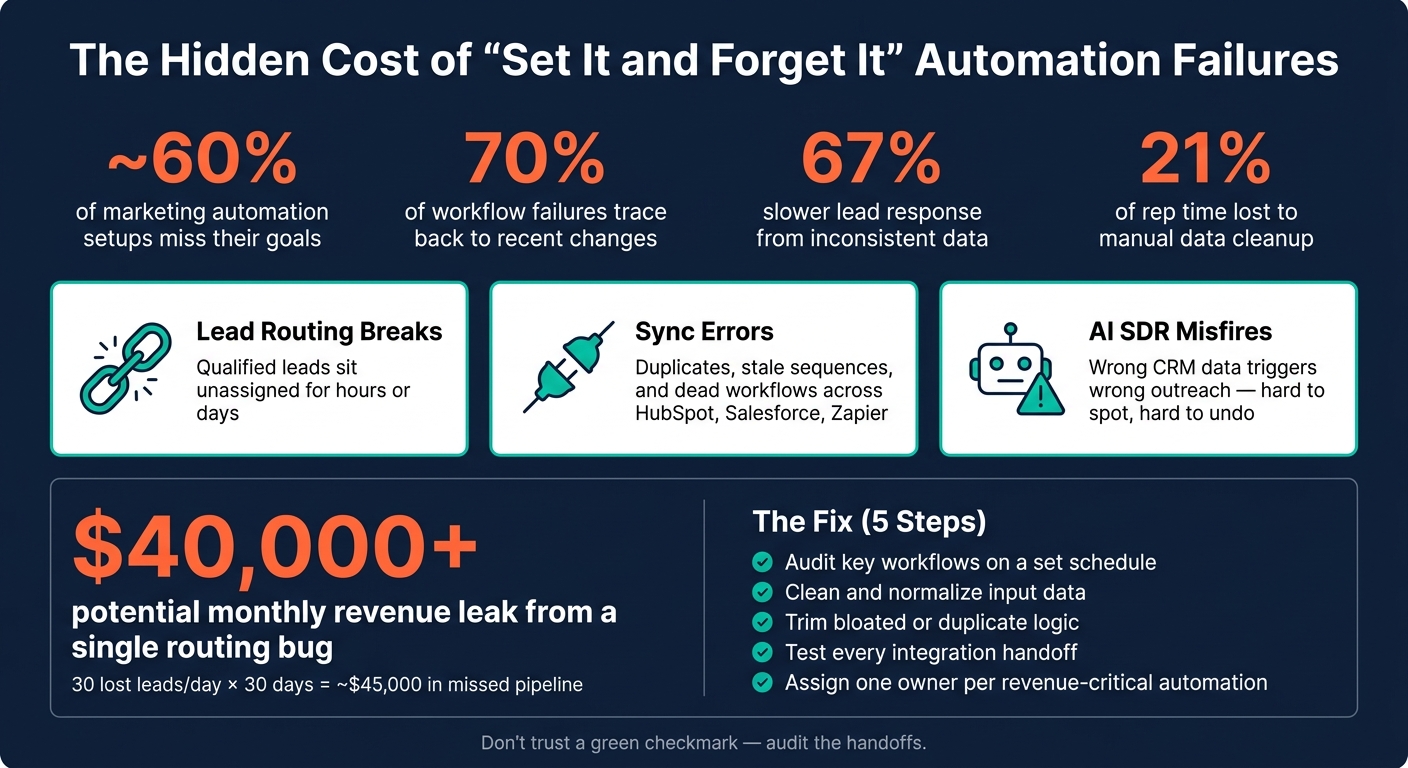
The Hidden Cost of Automation Failures: Key Stats & Risk Areas
5 GoHighLevel Workflow Mistakes That Are Quietly Killing Your Revenue
Where automation failures most often occur in SaaS sales and marketing stacks
Most automation failures show up at the handoff between tools. That’s the exact point where one system updates a record and another system is supposed to react. On the surface, everything can look fine because the automation still seems to be running. But under the hood, the handoff breaks. In most cases, the weak spot isn’t the tool itself - it’s the connection between tools.
Lead routing, ownership rules, and lifecycle stage errors
One of the most common handoff failures looks simple: a qualified lead lands in your CRM and then... nothing happens.
This usually comes from routing logic that no longer matches current territories, lead-to-account matching that fails, or a lifecycle stage that never updates after a form fill. The lead just sits there untouched.
Lead response times increase by an average of 67% when data is inconsistent across the revenue stack [8]. That delay has a ripple effect. If a lead never moves from "Lead" to "MQL", every workflow tied to that stage change stays idle. No sales alert. No handoff task. No follow-up sequence.
Instead, the contact gets stuck in stalled automation and keeps receiving generic messaging that was never meant for them. What starts as a small process bug can turn into lost pipeline fast.
Broken syncs, duplicate outreach, and stale nurture sequences
Sync failures between platforms like HubSpot and ActiveCampaign are easy to miss. A renamed field, a mismatched picklist, or an expired token can stop the sync cold. Then contacts get trapped in a stale sequence that never sends. To make things worse, most platforms alert you only after the workflow fails, not before.
Duplicate records add another layer of mess. If the same contact exists twice in your CRM, both records can trigger outbound sequences on their own. That leads to repeated outreach, confused prospects, and more unsubscribes.
Misfiring AI SDR automations and weak data inputs
When lifecycle stages or account status don’t sync the right way between Salesforce and your AI growth tools, the system can mistake an existing customer for a new lead. The outreach may look polished, but it’s still wrong - and that makes it harder to spot and harder to undo.
These failures may look different from one stack to another, but they hit revenue in the same way.
| Failure Type | Systems Affected | Revenue Impact | Most Direct Fix |
|---|---|---|---|
| Lifecycle Stage Flatline | HubSpot, Salesforce | MQLs never trigger sales alerts; leads go cold | Audit stage-change triggers after any field or territory update |
| Expired OAuth Token | Zapier, HubSpot, Make | Total workflow stoppage; leads lost in transit | Set 60-day calendar reminders for re-authentication |
| AI SDR Misfire | AI Outbound Tools, Salesforce | Cold pitch sent to existing customers; brand damage | Add a human-in-the-loop review step for low-confidence AI outputs |
Next, those misses compound into a measurable dollar loss.
How a small workflow bug turns into a $40,000 mistake
When lead routing, syncs, or AI automations break, the first failure usually looks small. A trigger fails. A task doesn’t fire. An alert never shows up. On its own, that may not seem like a big deal.
But here’s the problem: automation failures stack up quietly while everyone assumes the workflow is still doing its job.
The loss path: from a dropped lead to lower pipeline conversion
Here’s how the damage plays out.
A high-intent lead fills out a demo request form. Then a routing rule in HubSpot or Salesforce misfires, and the lead lands in an unowned queue. No sales alert fires. No follow-up task fires.
From there, the damage spreads fast. When data is inconsistent across systems, response time gets worse by an average of 67% [8]. That means the paid acquisition dollars used to bring in that lead are wasted, and the opportunity never makes it into the pipeline.
On the surface, leadership may see weak lead quality. But the real problem is the workflow itself.
Misrouted leads also throw off reporting. In companies with poor data integration, up to 30% of deals can be incorrectly attributed [8]. So the team isn’t just losing leads. It’s also making decisions based on bad numbers.
A hypothetical $40,000 scenario for a mid-market revenue team
Here’s what that can look like in dollar terms.
Hypothetical example: one routing bug can compound into real revenue loss.
Imagine a mid-market SaaS team that loses just one high-intent lead per day because of a routing bug in HubSpot. Over 30 days, that adds up to 30 leads that never get timely follow-up [3]. At that pace, the team gives up $45,000 in lost revenue before you even count wasted acquisition spend.
There’s another cost hiding in the background. Reps spend an average of 21% of their time on manual data entry and cleanup [8]. Add that cleanup work to wasted ad spend, and one broken workflow can turn into a $40,000+ monthly leak with no big warning sign.
The next step is catching these failures before they snowball.
sbb-itb-9cd970b
An audit system that catches automation failures before they hit revenue
Audit the workflows that move leads, update records, and trigger follow-up. Silent failures need scheduled checks, not postmortems. Start with the same HubSpot, Salesforce, Zapier, ActiveCampaign, and AI sales tools like AI SDR workflows that carry leads from capture to handoff.
5 audit checkpoints for revenue-critical workflows
Use these checkpoints to spot the failures that lead to missed follow-up, duplicate outreach, and bad routing.
| Checkpoint | Check Cadence | Failure Signal | Owner |
|---|---|---|---|
| Critical Sync Health | Daily | Sync errors >48 hours; API usage >80% of daily limit | RevOps / IT |
| Lead Routing & SLAs | Daily / Real-time | Unowned leads >4 hours; no contact owner assigned | Sales Ops |
| Trigger & Enrollment Volume | Monthly | Sudden drop or spike in enrollments vs. source traffic | Marketing Ops |
| Field Mapping & Data Hygiene | Quarterly | Null values in routing fields; duplicate records >1%; orphaned properties | Data Steward |
| AI SDR Output | Weekly | Low confidence scores; blank personalization tokens | Growth / SDR Lead |
Auditing these systems is a core part of managing a modern AI tool stack designed for scale.
Watch for zombie workflows, where records move forward but no action fires, and infinite loops, where contacts keep cycling through the same steps because exit criteria are missing. [4]
When you audit field mapping, check for orphaned properties, meaning unused fields, and duplicate properties, where more than one field tracks the same data. Those issues can corrupt attribution data. [9] Any custom property with data on fewer than 5% of your database that hasn't been updated in six months is a strong cleanup candidate. [9]
Alerting rules and conversion monitoring that stop silent failures
Critical alerts need to show up where people will see them fast. Use Slack or Teams for these alerts. Email is too easy to overlook. Trigger alerts when a sync is down for more than 15 minutes or API usage hits 80% of quota. For Salesforce, that limit usually falls between 15,000 and 100,000 API calls per 24 hours. If you go over it, data syncs can stop without much warning. [8]
Alerting is only part of the job. You also need to track four conversion metrics that help you catch problems early:
- sync freshness
- workflow completion rate
- MQL-to-SQL velocity
- lead response time
These numbers don't just point to broken workflows. They help you see where the funnel is taking the hit. [8][4][6]
For AI SDR tools, add manual review for low-confidence outputs and keep OAuth token expiry in one central list. [1][2]
Once an audit finds the leak, the next move is to clean up the workflow, cut extra logic, and retest the handoff.
How to fix the leaks and get more return from your automation
Fix the workflow: clean inputs, simplify logic, retest handoffs
Start with data quality. It drives roughly 50% of workflow problems [4].
That means small issues can do outsized damage. A routing field with extra spaces. A picklist value that doesn't match the API name. A capitalization mismatch between HubSpot and Salesforce. On paper, those look minor. In practice, they stop automation cold.
Clean up the inputs first. Normalize field formats across HubSpot, Salesforce, and any connected tools. Focus on:
- Capitalization
- Whitespace
- Picklist API names
- Routing fields
If routing fields are blank or inconsistent, records can miss assignment or get stuck in the wrong path.
Once the inputs are clean, trim the logic. Merge duplicate workflows where you can. Add exit criteria so contacts don't keep re-entering after they convert. And make sure every routing path has a fallback owner. No record should sit there unowned.
After each fix, run live tests through every branch and every integration handoff. Don't just test the happy path. Test edge cases too. If a branch is unclear, get human sign-off before you turn the workflow back on. Also check SPF, DKIM, and DMARC so automated email lands in inboxes instead of getting filtered out [6][5].
"A messy CRM isn't just an annoyance; it is an active drain on your revenue." - Jason Spooner [5]
Once the workflow is clean, the next step is making sure it stays that way.
Build ongoing governance: monthly audits, change control, and executive visibility
Treat every workflow edit like a risk. 70% of workflow failures trace back to recent modifications [4].
That's why each revenue-critical automation needs one clear owner. That person should run weekly checks and know exactly where to escalate issues when something breaks [2].
Push all workflow changes through staging first. And before anyone edits fields or logic in production, require governance approval [4][8]. That step helps protect lead routing, follow-up speed, and pipeline reporting.
When issues come up, report them in business terms. Don't just say a sync failed or a workflow broke. Show the revenue impact. Talk about recovered pipeline, not fixed errors [4][6].
A fixed review cadence helps stop the same leak from showing up again a month later:
| Review Frequency | Focus Area | Key Activities |
|---|---|---|
| Weekly | Lead Flow Stability | Check failure alerts, volume anomalies, and heartbeat monitors [2][7] |
| Monthly | Sync Accuracy | Review error logs, pattern analysis, and field mapping consistency [8] |
| Quarterly | Pipeline Protection | Audit for strategic obsolescence, API/token updates, and architecture fit [4][8] |
Automation is a revenue asset. Manage it like one.
FAQs
How do I know if an automation is quietly losing leads?
Automation failures are often silent, so error logs alone won’t tell you the whole story. A workflow can show green checkmarks and still miss records or send leads to the wrong place.
Watch for signs like:
- Drops in engagement or conversions
- Mismatches between source and destination systems
- Teams not receiving expected leads or data
- More manual cleanup or inconsistent lead processing
The big idea is simple: treat automation like a live system, not a set-it-and-forget-it setup. That means regular checks, alerts, and periodic audits to catch problems before they snowball.
Which workflows should I audit first to prevent revenue leaks?
Start with lead routing and qualification workflows. If something breaks here and no one notices, sales opportunities can slip away fast.
Next, check CRM-to-email syncs and other data integrations. Look for broken connections, expired tokens, and renamed fields that may be stopping data from moving where it should.
Then review active nurture sequences and legacy automations. This is where you’ll often find outdated promotions still running or tasks assigned to former employees.
What metrics best reveal broken lead routing or sync issues?
Focus on performance anomalies, not vanity metrics.
The signals that matter most are the ones that show where the process breaks down:
- Segmented conversion rates: Look for gaps by territory or lead segment
- Speed to lead: Track the median time from form submission to first rep contact
- Data quality and sync errors: Watch for missing routing decisions, lag, or unavailable rep assignments
- Workflow progression: Compare leads generated with leads assigned or leads that reach booking stages