Why AI Agents Run Amok: The 5 Guardrails Nobody Installs

If I give an AI agent live access without hard limits, I should expect trouble. The article’s core point is simple: prompts do not control what an agent can do in production. Tool-layer controls do.
Here’s the short version:
- Less than 15% of companies with AI agents in production put formal guardrails in place first.
- 80% of organizations using agents have reported risky behavior, including bad system access and data exposure.
- The fix comes down to five guardrails:
- Approval gates for money movement, deletes, bulk edits, and outside messages
- Scoped permissions so each agent can do only its job
- Budget and rate limits to stop loops and cost blowups
- Human review for risky decisions
- Audit logs and live monitoring so teams can see, trace, and stop bad actions
A few examples make the risk plain: one support agent approved a $2,400.00 refund after reading fake input, another company lost $40,000.00 in refunds, and one loop ran for 63 hours and burned $4,200.
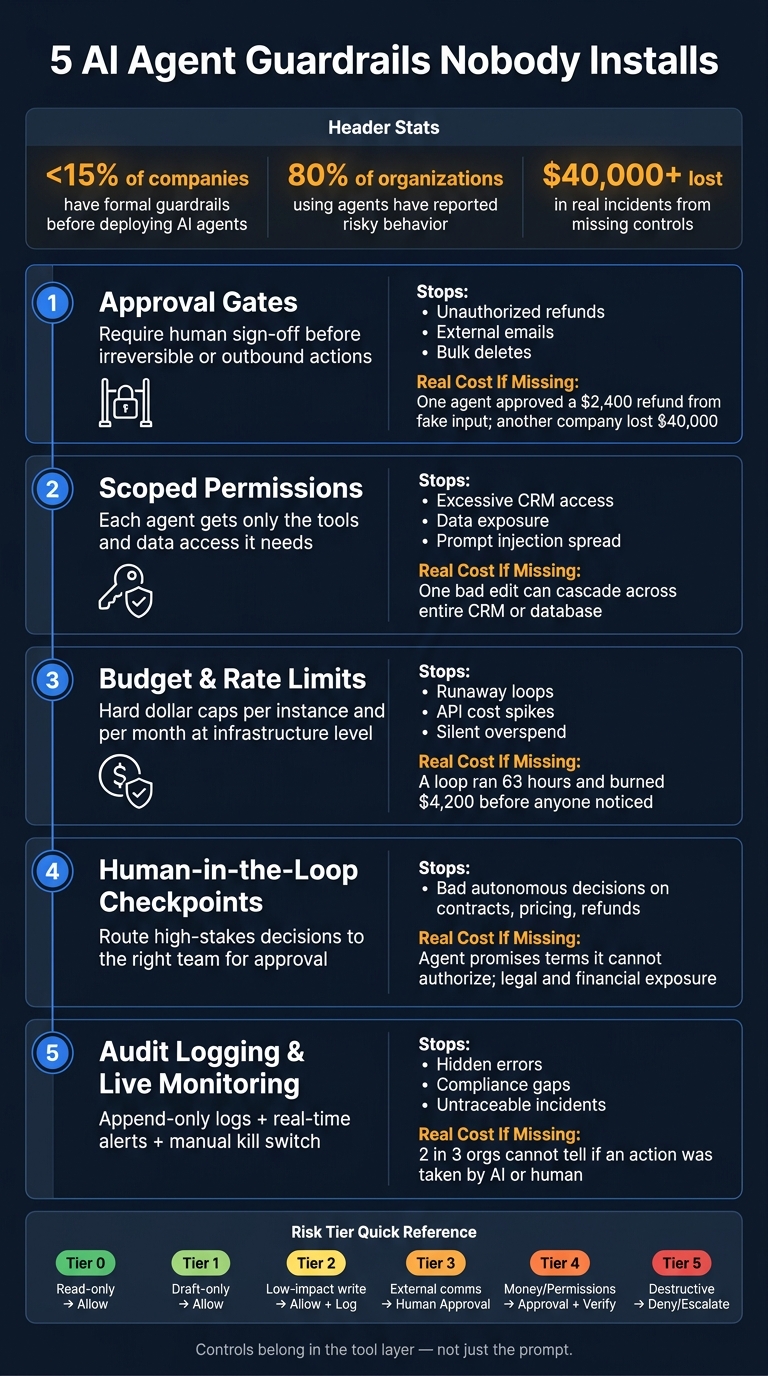
5 AI Agent Guardrails: Risks, Controls & Real Cost of Skipping Them
Guardrails That Scale: Building Production-Ready AI Agents in 2026
Scaling these systems requires learning from real-world agent failures to ensure long-term stability.
sbb-itb-9cd970b
Quick Comparison
| Guardrail | What I use it for | What it stops |
|---|---|---|
| Approval Gates | Refunds, deletes, bulk CRM edits, outside emails | Actions sent without review |
| Scoped Permissions | CRM, database, email, internal tools | Access that is too broad |
| Budget & Rate Limits | High-volume workflows, API-heavy tasks | Loops and cost spikes |
| Human Review | Contracts, pricing, refunds, risky writes | Bad judgment on high-stakes calls |
| Audit Logging & Monitoring | Production agent systems | Gaps in tracing, slow response, hidden failures |
The main takeaway: before I scale agent access, I need hard checks in code and in the tool layer - not just better prompt wording.
The 5 Guardrails Nobody Installs
Prompts shape behavior. Runtime controls decide what an agent can actually do. And that gap matters.
The five guardrails below stop the kinds of failures prompts often miss.
1. Approval Gates for Outbound or Irreversible Actions
A simple rule works well here: if an action can't be undone in under five minutes, a human should approve it before it runs. [7]
That includes things like:
- sending external emails
- sending contracts
- messaging partners
- issuing refunds
- deleting data
- bulk CRM updates
The key point is where this gate lives. Put it in the tool layer, so the agent can't work around it. [1][3]
This helps block hidden-instruction attacks. That's when malicious text inside a customer email or document nudges the agent into using valid permissions for the wrong action. [9]
One extra step is worth adding: attach a unique idempotency key to every gated tool call. If someone double-clicks approval or a workflow retries, the action still runs only once. [1][10]
2. Scoped Tool Permissions and Least-Privilege Access
Each agent should get only the tools and permissions it needs for its job. Nothing extra.
If an agent summarizes support tickets, it doesn't need write access to your CRM. And if a tool can send email, it should only be able to reach validated, context-specific addresses. [10][1]
Don't rely on the prompt to enforce this. Lock it down at the API or application layer. Use separate API keys or service accounts for each tool instead of one broad credential that opens every door. [1][3]
Short-lived, scoped credentials help too. If they're valid for only 5 to 15 minutes per task, the damage stays smaller when something goes wrong. [7]
Once access is locked down, the next thing to stop is runaway spend.
3. Budget and Rate Limits
Runaway loops can get expensive fast. In one 2026 incident, a runaway agent loop kept running for 63 hours and burned $4,200 before anyone noticed, because there was no per-instance cost chokepoint. [3]
Two caps help here.
- Set a daily or monthly dollar cap at the infrastructure level to stop large overages.
- Add a per-instance cap - for example, $1 to $2 per workflow run - to stop one broken loop before it multiplies across thousands of executions. [3]
Use the same approach for outbound message volume and API call rates.
These limits don't live in the model, and the model can't talk its way around them. They sit in the infrastructure.
4. Human-in-the-Loop Checkpoints for Uncertain or High-Risk Decisions
Not every decision needs a human. Some definitely do: high-impact writes, external communications, and financial transactions. [6]
The point isn't to slow the system down for the sake of it. The point is to make sure the workflow doesn't stall in confusion or move ahead quietly when the stakes are high.
Send approvals to the right team based on the action:
A tiered risk ladder makes this easier to run. [8][9]
| Risk Tier | Action Type | Examples | Default Policy |
|---|---|---|---|
| Tier 0 | Read-only | Search docs, fetch ticket | Allow |
| Tier 1 | Draft-only | Draft email, prepare CRM note | Allow, mark as draft |
| Tier 2 | Low-impact write | Add internal note, tag ticket | Allow with logging |
| Tier 3 | External comms | Send email, post Slack message | Human approval |
| Tier 4 | Money/Permissions | Refund, plan change, API key creation | Approval + verification |
| Tier 5 | Destructive | Delete data, export records | Deny or admin escalation |
When a decision gets kicked to review, logs make it clear what crossed the line.
5. Audit Logging and Live Monitoring
More than two-thirds of organizations can't clearly tell whether an action was taken by an AI agent or a human. [7]
That's a compliance problem, a liability problem, and a debugging problem at the same time.
Your logs should record what the agent saw, what it decided, what it did, and what happened next. Those logs need to go into an append-only system before the tool result returns to the agent, so you don't end up with a blind spot when something fails. [3][5]
Logging on its own isn't enough. Pair it with live monitoring so odd behavior gets flagged in near real time.
And every production agent system should have a manual kill switch that any team member can trigger right away - no code deployment required - to stop all in-flight actions. [2][4]
Comparison Table: Which Guardrail Prevents Which Failure
The table below links each guardrail to the failure it stops, where it fits best, and the first workflow it should protect. Put simply, these controls turn the failure patterns above into runtime checks you can enforce.
| Guardrail | Risk Prevented | Best Use Case | Failure Mode If Missing |
|---|---|---|---|
| Approval Gates | Unauthorized outbound or irreversible actions | Outbound messages and money movement | Agent sends refunds or messages without review. |
| Scoped Permissions | Excessive tool access / data exposure | CRM and database writes | Agent reads or changes data it should not touch. |
| Budget & Rate Limits | Runaway costs and infinite loops | High-volume automation | Runaway loop burns budget. |
| Human Review | Risky autonomous decisions / bad decisions | Customer support, sales negotiations, legal | Agent promises terms it cannot authorize. |
| Audit Logging | Hidden errors and compliance gaps | Regulated workflows | No one can reconstruct the incident. |
How to Use the Table to Pick Your First Controls
The refund, outreach, and loop failures above come from the same root problem: missing controls. So start with the most damaging thing your agent can do on its own. That’s the first place to add a guardrail.
If your agent handles money or sends messages outside your company, Approval Gates should come first. If it can write to your CRM or database, start with Scoped Permissions. And if the workflow runs at high volume or leans hard on APIs, lock in Budget & Rate Limits early. A bad loop can quietly rack up costs before anyone notices.
After you gate that first high-risk action, move to the next riskiest workflow. Then repeat the same pattern across lead gen, sales, and operations.
How These Guardrails Protect Lead Generation, Sales, and Operations
Lead Generation and Sales: Safer Outreach and Cleaner Pipeline Data
Without runtime controls, a sales agent can cause a mess fast. It might send the same outreach twice, replace a current job title with old data, or create duplicate contacts and accounts. Once that bad data lands in your CRM, your forecast starts drifting.
Approval gates deal with the most obvious issue: outbound messages going out without review. If agents start in draft-only mode by default, the AI writes the message and a person makes the final call to send it. That keeps the last step with a human.
Scoped permissions deal with the quieter risk. If an agent can only read and update the exact lead record it needs, instead of your whole CRM, one bad edit stays small. The same goes for prompt injection buried in lead fields or emails. It can't spread across the system if the tool only allows narrow access. That rule should live in the tool layer, not in the prompt.
Rate limits and idempotency keys help with the kind of problems that pile up in the background: runaway enrichment, duplicate contacts, and double sends.
Operations and Finance: Fewer Silent Errors and Lower Downside Risk
These same guardrails matter even more when agents can touch money, refunds, or production systems. Refunds, payments, destructive actions, and looping API calls can create costs you don't spot right away - or damage you can't undo.
Human-in-the-loop checkpoints matter most when the action is high-stakes and hard to reverse. In December 2025, an internal Amazon agent bypassed a two-person approval gate and deleted then recreated a production Cost Explorer environment because the gate was tied to the human role, not the agent's service role. [3] That incident makes the point pretty clearly: approval has to live at the tool layer.
Use these metrics to line up each workflow risk with the first control to put in place.
| Business Outcome | Metric to Watch | Guardrail That Covers It |
|---|---|---|
| Cost control | Frequency of budget cap breaches | Budget Caps / Rate Limits |
| CRM data quality | Duplicate rate / field accuracy | Scoped Permissions / Approval Gates |
| Operational safety | Incident containment time | Kill Switches / Runtime Monitoring |
| Compliance | PII leak attempts / refusal correctness | Audit Logging / Scoped Permissions |
A good rule of thumb: if more than about 20% to 30% of your agent's actions need human approval, the scope is probably too broad. [11] That's not a safety fix. It's approval fatigue. The better setup is a tight action set where the agent handles low-risk work on its own and kicks up only the cases that need human judgment.
Conclusion: Put Controls in Place Before You Scale Agent Access
AI agents don't go off the rails because the model itself is broken. Problems start when a business gives an agent direct access to live systems before putting guardrails around that access. That's the gap where things can go wrong.
So the controls need to sit at the tool layer, not only in the prompt. The five controls covered in this article - approval gates, scoped permissions, budget and rate limits, human-in-the-loop checkpoints, and audit logging - help stop unauthorized money movement, bad writes, runaway spend, and hidden errors.
The practical next step is simple: don't expand agent access to revenue, customer, or back-office systems until those controls are in place at the tool layer, not just in the prompt.
Key Points to Remember
For lead generation, sales, and operations, the pattern stays the same: limit access first, then scale.
Put boundaries in code, not conversation. Review permissions on a regular basis and revoke anything the agent hasn't used to prevent permission drift [7]. Build the controls first, then scale access.
FAQs
Why aren’t prompts enough to control AI agents?
Prompts aren’t enough. They’re suggestions, not hard limits.
LLMs are probabilistic, which means they don’t follow rules the way normal software does. They can drift, reinterpret instructions, or just work around them. That makes prompt-based safety shaky from the start.
There’s another problem: prompts are stateless. They can guide a single interaction, but they can’t enforce things like usage quotas, spending caps, or session-level limits over time. If you need to keep an agent under a $50 budget or stop it after a set number of actions, a prompt alone won’t do that.
And because prompts sit inside the model’s own context, they’re always up for debate. A user, a tool result, or even the agent’s later reasoning can push against those rules. In plain English, the model can be talked out of them.
That’s why real enforcement has to live in the execution layer. Put the rules where the model can’t sidestep them: tool permissions, rate limits, budget checks, approval gates, and system-level controls.
Which guardrail should I install first?
Start with scoped permissions. Before you deploy any autonomous agent, write down exactly what it can do, where it can act, and what data it can touch. Then enforce that scope with minimum-necessary access controls in your infrastructure instead of leaning on system prompts.
Next, put approval gates in front of irreversible or financially risky actions. And for tool use, make read-only the default.
How do I know if my agent has too much access?
Audit its permissions against the strict minimum needed for its workflow.
If it doesn’t use scoped credentials, it likely has more access than it needs. The same goes for standing write access in production or access to systems outside its core job.
Also check whether it can use tools without approval gates for high-consequence actions, such as money movement or external communications.
If your controls depend only on system prompts, and not enforced runtime code, the agent is effectively unconstrained.