Your AI Agent Is Not Broken. It Is Unsupervised.

If your AI agent is missing targets, the model usually is not the main problem. The setup around it is.
I’d boil the article down like this: most agent failures come from bad data, loose rules, and no review process - not from weak model skill. The piece points to a sharp gap: 57% of failures came from data quality and evaluation issues, while just 7% came from model regressions. That tells me the fix is less about swapping tools and more about adding control.
If I were explaining it in plain English, here’s the whole message:
- Define success so the agent knows what “done” means
- Limit outputs and permissions so it can’t write or change the wrong thing
- Add review steps before high-risk actions go live
- Set escalation rules for edge cases and risky decisions
- Watch for drift with QA, logs, alerts, and sampling
- Check root cause first: model, data, or process
- Assign one owner who reviews results and updates the system
A few numbers make the risk hard to ignore:
- A system that is 90% accurate still gets 1 in 10 cases wrong
- An 85% success rate across 8 steps leaves only about a 27% chance the full workflow finishes right
- Silent issues can sit for 30 to 90 days before a team spots them
What stood out to me is simple: AI agents often fail quietly. They don’t crash. They keep producing work that looks fine until AI lead qualification errors, wrong support replies, or unsafe system writes pile up.
So the core idea is this: don’t treat an AI agent like a set-it-and-forget-it tool. Treat it like a business process with rules, reviews, logging, limits, and clear ownership.
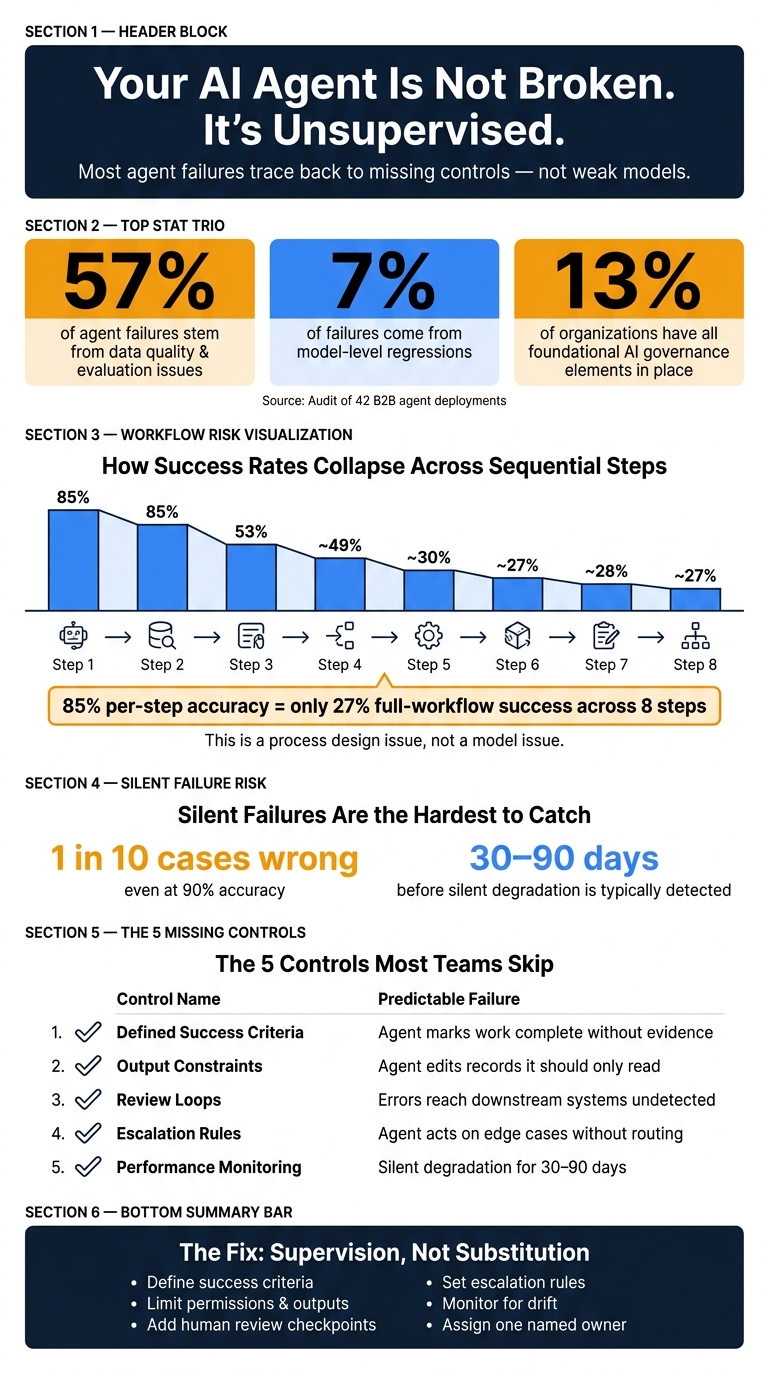
Why AI Agents Fail: Key Stats & Control Gaps
Why Your AI Agent Fails Quietly (And How to Trace It) #ai #llm #production #tech
sbb-itb-9cd970b
The Real Problem: Agents Without Oversight
Most teams roll out agents with broad prompts, live system access, and almost no oversight. The model itself isn’t always the thing going wrong. The system around it is.
That’s why the fix starts with controls, not with swapping one model for another.
There’s a big difference here:
- A capability failure means the model can’t do the job.
- A control failure means the job was never boxed in well enough.
The Five Controls Most Teams Skip
These are the controls that help stop quiet revenue leaks and customer-facing errors before they spread.
| Missing Control | What Gets Skipped | Predictable Failure |
|---|---|---|
| Defined success criteria | No "Definition of Done" tied to observable output | Agent marks work complete without evidence |
| Output constraints | No field-level limits or action boundaries | Agent edits records it should only read, overwrites metadata, or fabricates missing data [6] |
| Review loops | No human checkpoint between action and consequence | Errors reach downstream systems before anyone notices |
| Escalation rules | No routing logic for edge cases or high-stakes decisions | Agent acts on edge cases without escalation |
| Performance monitoring | No regular QA or freshness checks | Silent degradation goes undetected for 30–90 days [10] |
Only 13% of organizations have all four foundational governance elements in place for AI deployment [5]. So most teams are running agents with at least one of these gaps, and often more than one at the same time.
When those controls are missing, the first hits usually land in revenue and customer workflows.
How Unsupervised Agent Behavior Shows Up in Your Metrics
Here’s what makes this hard to spot: unsupervised agents usually don’t crash. They keep running. They keep producing output. And that output can still look fine on the surface while being wrong underneath.
A SaaStr internal AI agent quietly stopped ingesting new data for four months. The team only found the issue during a manual audit because the outputs still looked plausible [4]. In another case, a marketing agent with CMS write access overwrote canonical URL slugs and changed publication dates, which broke inbound links. It also fabricated a "Director of Marketing" contact for a CRM record after being told to "complete the record where possible" [6].
No error was triggered. The damage just stacked up in the background.
In long-horizon workflows, the numbers get ugly fast. An 85% success rate across 8 sequential steps leads to only about a 27% chance that the full task finishes correctly [9]. That’s not a model issue. It’s a process design issue.
These control gaps tend to show up first in lead qualification, outbound, support, and internal automation.
Where Unsupervised Agents Break Down in SaaS Workflows
These failures are easiest to spot when an agent touches live customers, pipeline, or internal systems. In plain English: problems show up fast when agents interact with revenue data, customer conversations, or system writes.
Lead Qualification and Outbound Messaging
One common lead qualification failure is false prioritization. The agent makes up scoring logic that sounds reasonable on the surface but ignores your ICP. [11]
Another frequent miss is sending the wrong sequence to the wrong account. If an outbound agent doesn't know the current account state, it can send cold emails to existing customers or to accounts already in active renegotiation. That doesn't build pipeline. It wastes SDR time and strains the relationship. [11]
The surface-level failure may look different, but the root problem stays the same: the agent is guessing without the right state or checks.
Support and Customer-Facing Conversations
Support agents often break down by guessing through errors. When a tool call fails, say from a database timeout, the agent doesn't pause. It fills in the blank with a confident answer and states it like it's true. [7]
That's how an agent ends up quoting the wrong billing amount or overage charge from stale data. In February 2024, the British Columbia Civil Resolution Tribunal ordered Air Canada to pay compensation to Jake Moffatt after its AI chatbot gave incorrect bereavement fare information that contradicted the airline's documented policy. The tribunal rejected Air Canada's argument that the chatbot was a "separate legal entity." [12] No review layer stopped it.
Workflow Automation and Internal Actions
The permission issue shows up first. An agent with too much write access can overwrite manually verified CRM data with bad enrichment data or send high-value opportunities into low-touch segments. [11]
In technical workflows, the stakes get even higher. Unsupervised agents have deleted production databases, committed credentials to public repositories, and gets stuck in reprocessing loops, handling the same inputs again and again while burning API spend. [3][2] A 2026 study of 13,602 issues in agentic AI repositories found that 83.8% of practitioners had encountered faults like false prioritization and unsafe tool use. [11] Same pattern, same mess: too much access and no circuit breaker.
These are exactly the kinds of failures guardrails, approvals, and routing rules are meant to stop.
How to Add Supervision and Guardrails to Your AI Agents
The same mistakes in lead routing, support replies, and unsafe writes usually point to one thing: missing controls. In most cases, you don’t need a different model. You need tighter checks around the one you already have. Start there, then keep an eye on drift.
Prompt and Version Control, Approvals, and Routing Rules
Treat prompts the way you treat code. Track the date, hash, and owner for every change. Keep dev and production separate, so new instructions get tested before they reach live customers [14][15]. If a prompt update causes regressions, you need a clean rollback path. No guesswork.
For actions that can’t be undone, put a human in the loop. Use synchronous gates for payments, renewals, and record deletions [16]. For lower-stakes calls, asynchronous escalation is often enough. The agent can queue the request while a person reviews it [16]. And when something does need review, send it to the right specialist, not a shared inbox where it can sit untouched [16].
| Control | Best Fit |
|---|---|
| Prompt & Version Control | All production workflows; essential for debugging |
| Human Approval (HITL) | Payments, renewals, PII handling, record deletions |
| Routing Rules | Complex workflows requiring specialized domain judgment |
Conversation QA Dashboards and Escalation Thresholds
Once prompts and permissions are locked down, the next step is simple: check what the agent is actually producing. Review conversations on a set schedule. Start with 100% coverage in week one, then taper to a steady sample rate once patterns start to settle [2].
Trace and conversation dashboards help you spot safety issues, format failures, and quality problems at scale. Set escalation triggers ahead of time: low confidence, a spike in escalations, or output-format drift [16]. If you’re not watching for silent degradation, you usually won’t see it until damage is already done.
Permissions, Logging, and Output Constraints
Controls don’t mean much if the agent can still push unsafe changes into live systems. Use field-level allowlists instead of broad API write tokens. If an agent only needs to update metadata, it should not be able to change canonical URLs or author fields. That keeps the blast radius smaller when something goes wrong.
Log the model version, tool calls, cost, and latency for every run [14][15]. That record also gives you an audit trail. On the output side, require structured formats with mandatory confidence and source fields. Otherwise, a weak schema can still let hallucinated data slip into the CRM [6].
How to Tell If the Problem Is the Model, the Data, or the Process
If prompts, permissions, and QA are already in place, diagnose the failure mode before you touch the model. This step can save a lot of time. Too many teams swap models or rewrite prompts when the problem sits somewhere else.
A Simple Root Cause Diagnosis Framework
The fastest way to find the root cause is to ask one question: "Would a smarter model have prevented this?" If the answer is no, and the task was too vague or the workflow has no clear definition of done, then you’re dealing with a process failure, not a capability gap [8]. If the agent has the right instructions but still gives stale or generic answers, that points to a data problem. If it reasons badly or misses a constraint, that’s a model issue.
Here’s a simple way to map the symptom to the most likely cause and the next move.
| Symptom | Likely Root Cause | Corrective Action |
|---|---|---|
| Hallucinations, missing logic, incorrect reasoning | Model Issue: Model limit or poor prompt engineering [8] | Refine prompts using effective prompt generation tools, add few-shot examples, or upgrade the model |
| Generic or outdated responses, "I don't know" errors | Data Issue: Stale source data or missing RAG integration [18] | Audit the data pipeline; implement RAG or inject fresh context at inference time |
| Skipped steps, "done" claims with no evidence, scope creep | Process Issue: Ambiguous instructions or missing stop rules [17] | Define a clear Definition of Done; map decision boundaries and escalation paths |
| Inconsistent answers to the same query across sessions | Data Issue: No single source of truth [19] | Build a governed source of truth and shared business glossary [19] |
| Unexpected field writes | Process Issue: Over-privileged API access [6] | Add field-level allowlists and dry-run diffs before writes go live |
One data point matters here: an audit of 42 B2B agent deployments found that 57% of failures came from data quality and evaluation discipline, while only 7% came from model-level regressions [1]. Put plainly, most teams should check data and process before blaming the model.
Tests to Run Before Replacing the Agent
If the table points to data or process, test those first.
Start with the 10-output test. Pull the last 10 interactions and ask a simple question: would a solid team member have approved each one? If more than two fail that bar, you likely have a silent drift problem [2].
Then check whether the agent can access the data it needs at inference time. Agents often fail not because they can’t think through the task, but because they can’t see the company data that matters, like CRM records or live pipeline status [18].
It also helps to scan outputs for hedging language such as "probably" or "should pass." Those phrases are a red flag. They usually mean the agent is guessing instead of verifying [3].
One more test is worth running: the canary question test. Ask the agent something with a known, recent answer from an external source. If it gets the answer wrong or gives old information, your ingestion pipeline may have gone stale [4].
A Practical Operating Model for Reliable AI Agents
Assign Ownership, Review Cadence, and Success Metrics
Once you've identified supervision as the issue, the next step is simple: treat the agent like an owned business process. Every AI workflow used for lead qualification, outbound, support, or internal actions should have a named human owner who is accountable for output quality [13]. In most cases, that owner sits in RevOps, Marketing Ops, or Support Ops since those teams already control the source data and business rules [20][21].
A new agent shouldn't be handled like a finished product. It should be managed like a process that needs checks, updates, and someone clearly in charge. Assign one owner, use the review cadence below, and make that person responsible for escalation and calibration.
| Review Phase | Frequency | Focus Area |
|---|---|---|
| Onboarding | First 30 days | Review 100% of outputs in Week 1, then 25% in Weeks 2-4 |
| Operational | Weekly | 10% random sample for drift and failure patterns |
| Strategic | Monthly | Review failure logs and update quality standards |
| Incident | Real-time | Alerts for forbidden tool calls or budget spikes |
You also need to track both business results and agent health. That includes conversion, resolution quality, SLA adherence, time saved, decision accuracy, safety incidents, and run-to-run consistency [14][21].
Build a System That Gets Better Over Time
Ownership matters, but it only works when review feedback changes something. If nobody updates prompts, permissions, or routing rules, review turns into busywork. Reliable AI operations run as a loop: check outputs, catch failures early, feed those findings back into prompts and process design, then do it again.
Add a kill switch so the agent can be disabled and its credentials revoked at once if it starts looping or misfiring [21]. Set hard caps on token spend, tool calls, and runtime too. Those limits help stop runaway retry loops before they turn into a mess [14][6]. And track every version and every evaluation inside the workflow.
In February 2026, a B2B SaaS content ops team added field-level allowlists and a second-model validator after an enrichment agent started overwriting publication dates and URL slugs it was never meant to touch. The result: six straight weeks with zero incidents and 18 hours of manual work saved per week [6].
Conclusion: AI Agents Need Management, Not Blind Trust
Most AI agents that fall short aren't broken. They're unsupervised. When things go wrong in lead qualification, outbound messaging, support, or workflow automation, the root cause is often missing guardrails, unclear ownership, or stale data, not a weak model.
The answer isn't swapping in another model and hoping for a better outcome. It's building a clear operating model with defined ownership, regular QA reviews, human-in-the-loop checkpoints for irreversible actions, and an evaluation loop that keeps improving over time [20][21].
"The new AI skill gap is not prompting. It is supervision." - Jonathan Mast, Founder, White Beard Strategies [13]
Teams that make supervision part of day-to-day operations, instead of treating it like a one-time setup task, tend to get better conversions, lower risk, and more consistent business results from the agents they already use.
FAQs
How do I know if my AI agent needs supervision or a better model?
Try this test: if a brilliant expert got the same task without a clear mandate, would they make the same mistake? If the answer is yes, you’re dealing with a supervision problem, not a model problem.
In plain English, the agent probably needs tighter supervision when it doesn’t have clear goals, guardrails, review loops, escalation rules, or performance monitoring. Swapping in a better model may help only if the agent still can’t reason well after you’ve given it clear instructions, enough context, and firm boundaries.
What guardrails should I add first to reduce risk?
Start with runtime guardrails on your tools. Prompt-only controls are not enough.
Put a mandatory approval gate in front of any destructive or sensitive action, like refunds, data deletion, customer emails, or fund transfers.
Your tool code should be the final checkpoint. Pause execution until a human reviews the full context and signs off.
On top of that, validate tool arguments with strict schemas. And handle idempotency so retries don’t trigger the same action twice.
How often should I review AI agent performance?
Review AI agent performance on a steady schedule, not just once and then forget about it.
A solid starting point is a weekly review led by one clear owner. During that review, check a random 10% sample of outputs against your quality criteria. That makes it easier to spot patterns when things go off track instead of treating each miss like a one-off.
You should also review performance before making any instruction or model change. If you skip that step, it’s hard to tell whether the update helped, hurt, or changed nothing at all.
On top of that, use monthly reviews to update documentation and instructions. Then run quarterly prompt evaluation scenarios to make sure any gains still hold over time.