If Your AI Vendor Cannot Show You the Dashboard, Walk
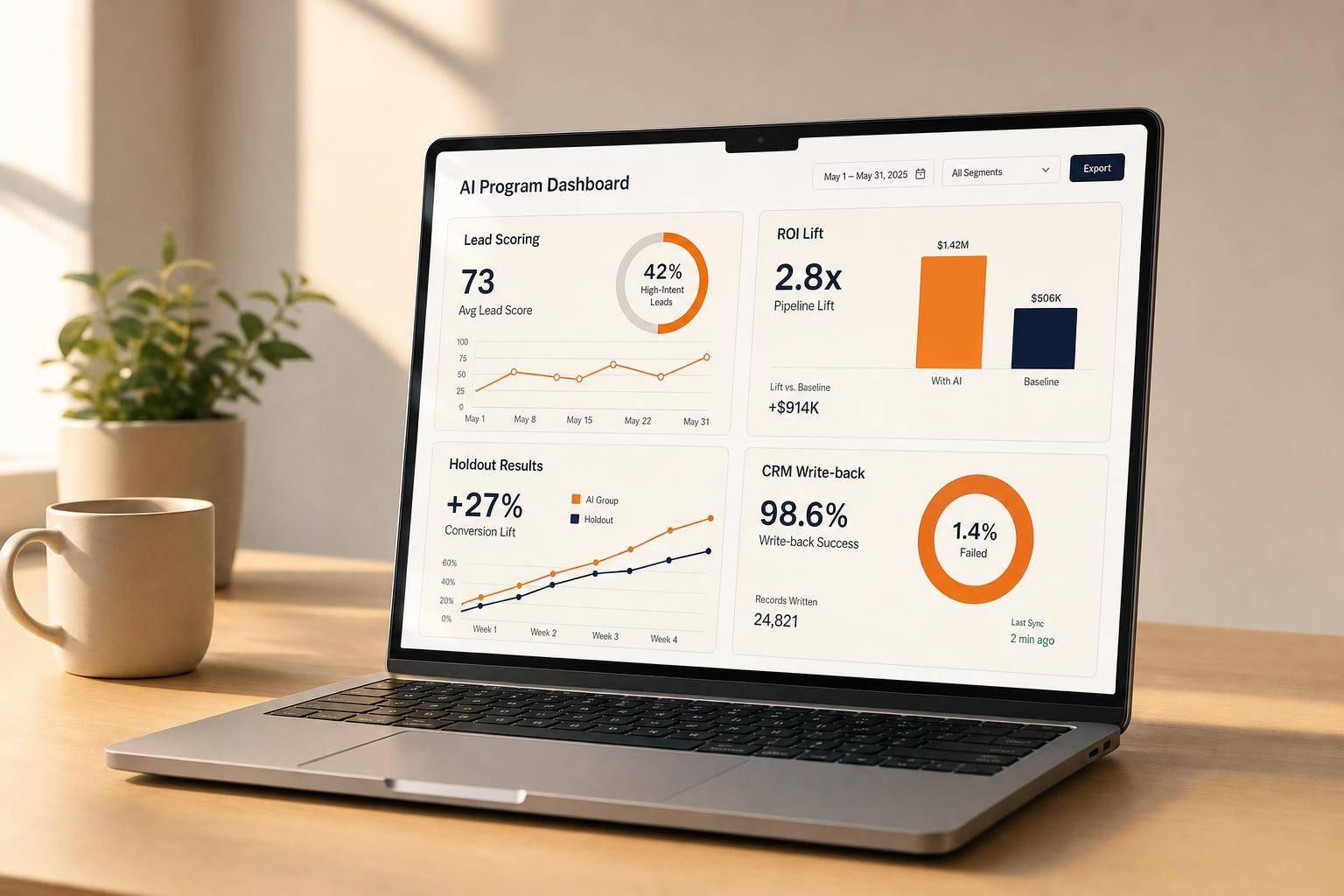
Here’s the short version: if an AI vendor can’t show me a live dashboard with my data, tied to pipeline, conversion, ROI, and workflow results, I stop the deal.
This article makes one point plain: AI claims are not enough. I need to see live reporting for lead scoring, model accuracy, usage, workflow load, conversion lift, and CRM write-back before I sign anything. If that view is missing, I’m taking on the risk.
A few numbers make the problem hard to ignore:
- Implementation often costs 2 to 4 times the license price
- Total AI tool cost can reach nearly 3x license cost once admin and review time are added
- Live dashboards can cut issue response time from 51 days to 14 days
- 83% of marketers say measuring AI ROI is their biggest challenge
Here’s what I’d check right away:
- Live dashboard access using my data, not sample records
- Clear metric definitions with source and time window
- Baseline or holdout reporting to test lift
- Raw data export and logs for review
- CRM write-back so the tool updates fields, tasks, and flows
- Model and workflow reports such as override rates, backlog, latency, and score-band conversion
If a vendor shows screenshots, blended metrics, vague ROI math, or no exit plan for my data, I pause or walk.
This piece is a simple buying filter: proof on screen or no deal.
How To Measure Enterprise AI ROI?
sbb-itb-9cd970b
The problem with black-box AI vendors
A black-box AI vendor hides how it measures performance, how that performance changes over time, and how it proves results. For companies doing $10M+ in revenue, that kind of opacity creates control and audit risk. Finance can’t cleanly approve spend without a baseline captured before rollout, and RevOps can’t check whether the system is doing what the vendor says it does [4][8]. If performance stays hidden, you can’t manage it.
Why no dashboard means no accountability
Without live reporting, drift can pile up quietly. The model gets worse over time, lead scores become less dependable, and weak outputs move through the workflow before anyone catches them. Monthly PDF reports slow everything down. Live dashboards cut the time from issue to action from 51 days to 14 [10]. The missing loop is almost always the same: issue detection → diagnosis → fix → verified result.
There’s a labor cost hiding in this too. If every AI output still needs manual review because the system has no automated evaluation harness, then the tool didn’t remove work. It just shifted the work somewhere else. The fully loaded cost of an AI tool, once you include implementation, admin time, and rep review hours, can be nearly 3x the license price [3].
Once performance disappears from view, the fallout hits pipeline and revenue calls.
How opacity breaks lead generation and sales decisions
The business impact shows up fast. Sales teams start trusting lead scores they can’t check. Marketing teams keep tuning for activity instead of revenue. Leaders end up staring at metrics that don’t connect to closed revenue. And when a vendor says it delivered a 12.5% lift, there’s no clean way to tell whether that gain is real or just misattributed unless you have a baseline and a holdout group [1][3].
That’s why ROI proof is still the main AI buying problem. 83% of marketers say that proving ROI is their biggest challenge with AI initiatives [1].
The dashboards every AI vendor should show you in a live demo
A slide deck or a screenshot is not a dashboard. In the demo, ask for a live view using your data, with outputs tied to revenue decisions [7]. And that dashboard can't just sit there looking pretty. It should update CRM fields, create tasks, and trigger workflows [5][6].
Before you move ahead, these are the baseline views you should see live.
Lead scoring and sales automation dashboards
Ask for a conversion-by-score-band report that shows MQL-to-SQL and SQL-to-deal rates for high-score leads versus mid-score leads [2]. That gives you a clear read on whether the scoring model is helping sales focus on the right accounts.
Go a step further and ask for:
Those numbers help you judge whether the AI is improving sales efficiency and team capacity planning. One detail matters a lot here: the lead score should be stored as a static snapshot at MQL handoff, not as a live field that keeps changing and wipes out history [2].
Score quality only matters if it stays steady over time and people can understand why the model made the call it made.
Model accuracy, usage, and workflow performance dashboards
Don't settle for one headline metric. Ask the vendor to show time-series reporting on model quality and accuracy [7][9]. You should be able to see quality scores, confidence distribution, and a confusion matrix over time [7][9].
Then look at the workflow side. This is where a lot of tools sound good in theory but create more work in practice. Ask to see human override rates, escalation rates, approval backlogs, and p95 latency during peak volume [7][9].
Those numbers tell you whether the AI is cutting manual work or just building a new review queue. If override rates are high, or climbing, that usually means the model isn't trusted and needs recalibration.
A dashboard isn't complete if it only shows activity. It has to show whether the AI changed the result.
Conversion lift and attribution dashboards
This is the part where many vendors start to dance around the question. Ask for dashboards that compare current performance against a baseline period or a holdout group, not just current totals. You need to see conversion lift, CAC by channel, and ROAS, all broken out by score tier [2][4].
A claim like "more pipeline" doesn't say much without a control condition showing the AI caused the change rather than demand that was already there. If the vendor only shows aggregate totals and skips drill-downs by score band, source, or stage, the reporting is built for the sale, not accountability [2][6].
| Dashboard Type | What to Require | Why It Matters |
|---|---|---|
| Lead Scoring | Conversion rates by score band (80–100 vs. 40–60); snapshot score at MQL handoff | Proves predictive accuracy, not just activity [2] |
| Sales Automation | Pipeline velocity by score tier; reply rates by segment; meetings booked per 100 contacts | Ties AI output to sales efficiency and capacity planning [2][3] |
| Model Quality | Time-series quality scores, confidence distribution, confusion matrix | Shows whether the model stays reliable over time [7][9] |
| Workflow Performance | Human override rates, escalation rates, approval backlogs, p95 latency | Shows whether the system cuts manual work or creates a queue [7][9] |
| Conversion Lift | Baseline vs. holdout comparison; CAC and ROAS by channel and score tier | Proves incrementality, not just correlation [2][4] |
How to evaluate AI vendors: criteria, red flags, and walk-away rules
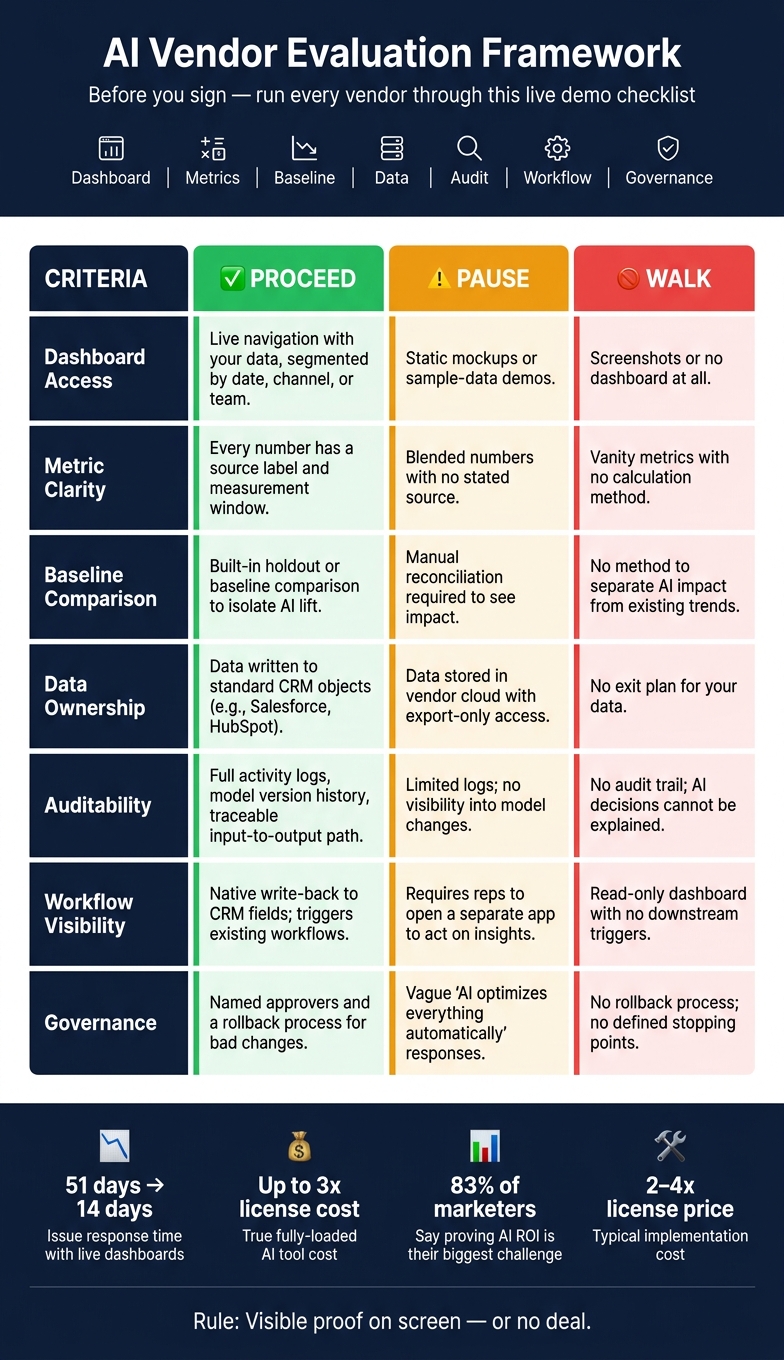
AI Vendor Evaluation: Proceed, Pause, or Walk Decision Framework
Once you've reviewed the dashboard types, the next step is simple: see if the vendor can run them live. A vendor saying, "we have a dashboard", doesn't mean much on its own. What matters is whether that dashboard works under pressure.
Here's the basic test: can the vendor demo the tool live, define each metric, show where it comes from, and filter the data when you ask?
Non-negotiable criteria before you sign
Before you even get into contract talk, the vendor should clear every item below:
- Live data access: Live access to your data with real filters, not a sample-data sandbox
- Metric clarity: Every metric should show its source and measurement window, so you don't end up comparing numbers that don't match [8]
- Baseline comparison: Built-in holdout or baseline comparisons that separate AI lift from normal performance changes [1]
- Auditability: Exportable raw data, model version history, activity logs, and alerts for low-confidence outputs or growing approval backlogs [5][9]
- Data ownership: Clear terms on where your data lives after the contract ends. If it's sitting in the vendor's cloud instead of being written to your CRM's standard objects, you're taking on dependency and portability risk [6]
If the vendor can't meet all of these during the demo, stop there.
Red flags that should trigger a pause or a walk
Walk away if the vendor relies on static mockups or sample data instead of your real records in a live demo. If they can't work through a raw, messy export on the spot, they probably won't deal with your production data well either [7].
Be careful with blended metrics that don't name their source. One rolled-up number doesn't tell you much unless the report clearly separates platform-attributed data, analytics-attributed data, and CRM-closed data [8]. The same problem shows up in ROI claims that skip the math or leave out a holdout group. Without that, it's a sales line, not a measurement [1].
The contract matters too. If the vendor limits raw data exports, treats quality checks like protected IP, or won't give sandbox access within 48 hours, that's not some small contract detail. It's a lead-gen and revenue visibility issue [5][11].
Vendor comparison table: proceed, pause, or walk
Use this table to sort vendors fast. Proceed only when the dashboard is live, auditable, and tied to your CRM.
| Criteria | Proceed | Pause | Walk |
|---|---|---|---|
| Dashboard Access | Live navigation with your data, segmented by date, channel, or team | Static mockups or sample-data demos | Screenshots or no dashboard at all |
| Metric Clarity | Every number has a source label and measurement window | Blended numbers with no stated source | Vanity metrics with no calculation method |
| Baseline Comparison | Built-in holdout or baseline comparison to isolate AI lift | Manual reconciliation required to see impact | No method to separate AI impact from existing trends |
| Data Ownership | Data written to standard CRM objects (e.g., Salesforce, HubSpot CRM) | Data stored in vendor cloud with export-only access | No exit plan for your data |
| Auditability | Full activity logs, model version history, traceable input-to-output path | Limited logs; no visibility into model changes | No audit trail; AI decisions cannot be explained |
| Workflow Visibility | Native write-back to CRM fields; triggers existing workflows | Requires reps to open a separate app to act on insights | Read-only dashboard with no downstream triggers |
| Governance | Named approvers and a rollback process for bad changes | Vague "AI optimizes everything automatically" responses | No rollback process; no defined stopping points |
Conclusion: If they cannot show the dashboard, do not buy the story
Transparency isn't a nice extra. It's the baseline. If an AI tool can't show live reporting before it gets access to your leads, pipeline, and attribution workflow, you're the one taking on the risk, not the vendor.
That turns the buying test into a simple yes-or-no call: visible proof or no deal. Live dashboards help you catch problems before they spread. Without that view, you can't trace results back to the source or stand behind the decision.
The final buying rule for founders and operators
Once you've gone through the dashboard checklist, the next step is pretty simple: move forward only if the vendor can give you a live demo using your data, explain each metric on screen, and show CRM write-back in action. Stop and ask for a real proof of concept on your actual records. If anything tied to leads, pipeline, attribution, or closed revenue stays opaque, walk.
If they cannot show the dashboard, do not buy the story.
FAQs
What should a live AI dashboard include?
A live AI dashboard should show day-to-day performance and business impact. Static reports won't cut it.
It should include:
- conversion lift, pipeline velocity, CAC, quota attainment, forecast accuracy, and planning cycle reduction
- routing accuracy, response latency, manual overrides, and fallbacks
- clear attribution, pinned methodology, and score snapshots at handoff
Just as important, the dashboard should show how the AI got there. That means tracing the path from input signals to the final decision or field update.
If a vendor can't show this live on your data, that's a serious risk.
How can I verify AI ROI before signing?
Ask for a proof of concept that uses your own production data, not a hand-picked demo. Set a clear ROI target up front - like more conversions, a shorter sales cycle, or more pipeline - and put that target in the order form.
Start by setting a baseline. Then make sure the math comes from a separate, governed engine, not from the model itself. Also require an exit clause if the pilot misses the agreed performance thresholds.
When should I walk away from an AI vendor?
Walk away if the vendor can't prove value with live, measurable results.
If they won't run a POC on your actual data and instead lean on polished demos or pre-built datasets, stop the evaluation there. That's a major red flag.
A few other warning signs should put you on alert:
- They won't agree on baseline metrics or a kill criterion
- They treat the method like a black box
- They need heavy custom development to make it work
- They don't have native CRM integration
- They offer vague testimonials instead of clear proof
At this stage, you want facts, not promises. If a vendor can't show how their product performs in your setup, with your data, it's probably not worth more time.