The Churn Nobody Talks About: Why Most AI Automation Gets Abandoned in 90 Days
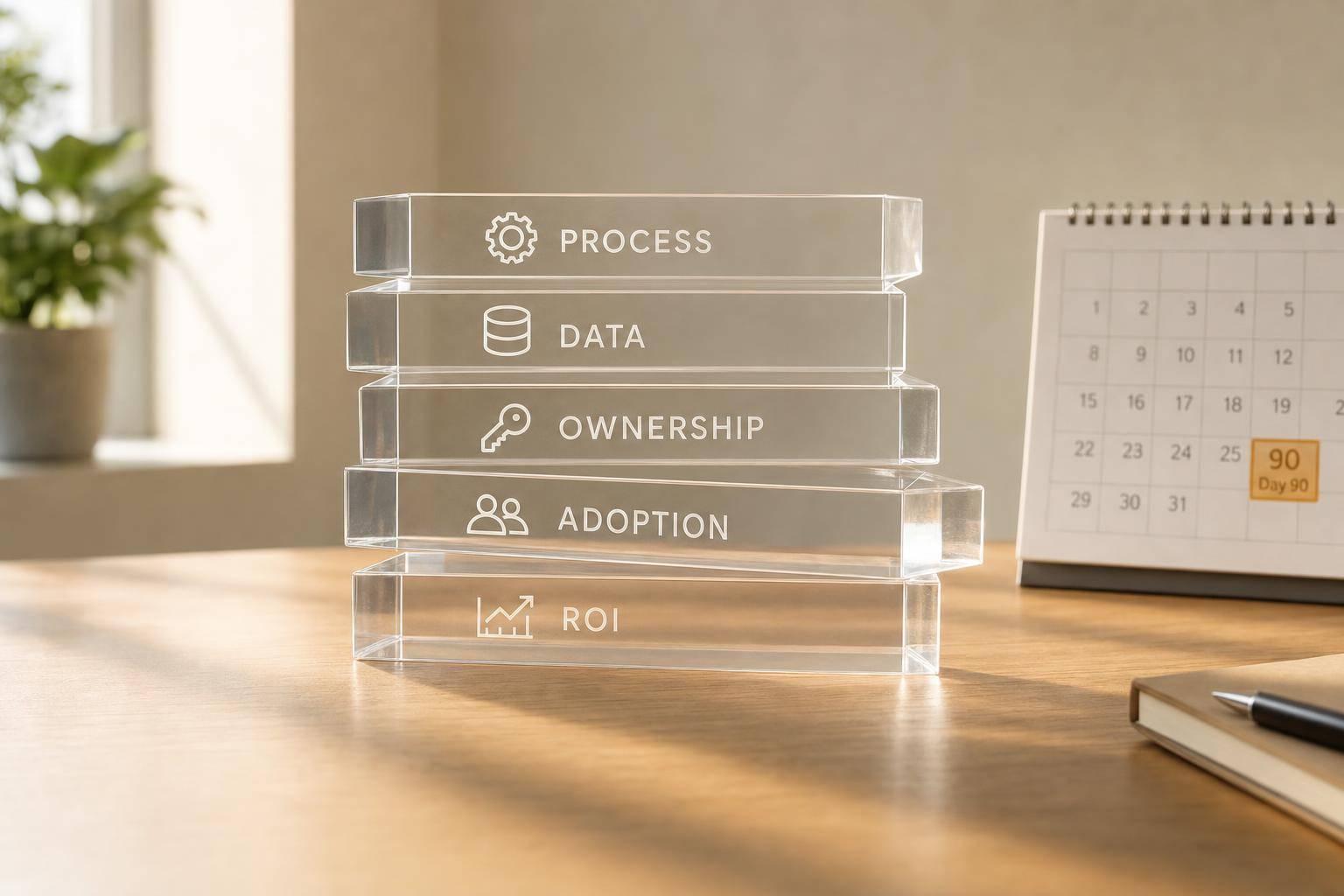
Most AI automation is dropped for four plain reasons: bad process, bad data, no clear owner, and no proof of ROI. In 2025, 42% of companies walked away from most of their AI work, and forecasts show 40%+ of agentic AI projects may get cut by 2027. That drop usually happens in the first 90 days.
If I had to sum up the article in one quick checklist, it would be this:
- Weeks 1–2: the workflow is messy, so AI spreads the mess
- Weeks 2–6: poor data leads to wrong outputs and lost trust
- Weeks 4–8: no one owns fixes, reviews, or prompt updates
- Weeks 8–12: leaders ask for ROI, but the team can't show it
- Warning signs: low daily use, manual workarounds, and 20%+ human override rates
- What to do: score each automation on process, data, ownership, adoption, and ROI before renewal
This article argues for one simple rule: don't judge AI by launch day. Judge it by whether people still use it after 90 days, whether outputs hold up, and whether the work saves or makes money in a way you can show.
If you're running AI in sales, marketing, or support, this is a plain way to spot hidden churn before it turns into wasted spend.
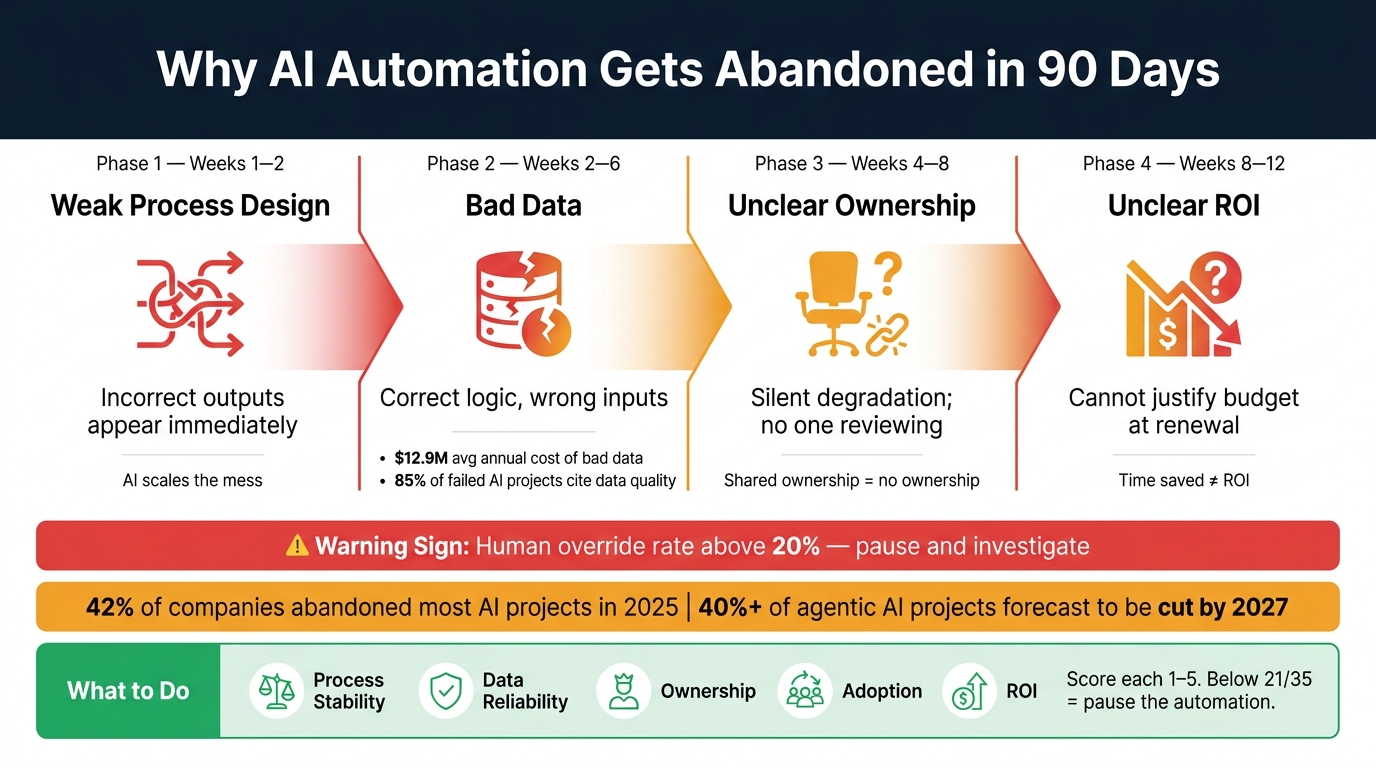
Why AI Automation Fails: The 90-Day Churn Timeline
3 Common Reasons AI Use Cases Fail in Business
sbb-itb-9cd970b
Why Most AI Automation Gets Abandoned
Most AI automations fail in the same sequence: process, data, ownership, then ROI. It usually starts quietly. There’s no dramatic outage, no flashing warning, just a slow slide until people stop using the automation while the invoice keeps showing up.
Poor Workflow Fit and Weak Process Design
The fastest failures tend to show up in the first two weeks [1]. This usually happens when a team automates a process that was never documented or wasn’t being handled the same way from one person to the next.
You see this all the time in AI lead qualification tools, marketing enrichment, and support triage. A team adds AI before the workflow is mapped or standardized. The result? The automation spreads the mess across every record, ticket, or interaction. Wrong outputs show up right away, and trust drops fast.
A polished demo is irrelevant if no one can evaluate the real workflow.
If the process itself is in good shape but people still start pulling away, the next problem is often data.
Bad Data, Weak Ownership, and Low Adoption
Even when process design is solid, bad data can kill automations quietly between weeks two and six [1]. Duplicate records, missing fields, and old entries mean the logic may be right, but it’s working from junk inputs. The output looks wrong, trust starts to fade, and reps begin going around the system instead of using it.
Poor data quality costs businesses an average of $12.9 million per year [7], and 85% of failed AI projects point to data quality or availability as a main cause [5]. Even so, many teams skip a pre-launch data audit. Others go in the other direction and try to clean the entire database instead of checking only the fields the automation will use.
Bad inputs lead to bad outputs. Then weak ownership lets the problem sit there.
Ownership usually breaks when the internal champion leaves and nobody takes charge of drift, edge cases, or prompt updates [2]. “Shared ownership” often means no ownership at all. If no one is clearly responsible, the automation starts to slip in ways that are easy to miss.
Low adoption is often just the symptom people notice first. If accuracy is weak, users try the tool once, get burned, and go back to manual work [8]. Only 12% of U.S. workers use AI daily in their jobs, even though 91% of companies report some level of AI use [7]. That gap isn’t about people refusing new tools. It’s usually about tools that didn’t work well enough to get a second shot.
Unclear ROI and Overcomplicated Tool Stacks
Once usage settles down, the next hurdle is cost.
By weeks eight to twelve, the question changes from “Is this working?” to “Can we prove it?” Most teams can’t. They tracked activity metrics, like time saved, but never tied those numbers to a money outcome. Time saved doesn't equal ROI unless that time is shifted into higher-value work or cuts a real expense such as headcount or outsourcing spend [3].
At the same time, many companies buy several AI tools that each work on their own but don’t connect well. So what happens? Teams end up doing manual exports or stepping in by hand to fill the gaps. That defeats the whole point of automation.
License and API fees are only part of the cost. Most of the spend sits in data prep, process redesign, and maintenance [3]. If leaders can’t draw a straight line from the tool to a business result, the 90-day budget review tends to go badly, and the automation gets cut.
The table below shows each failure type, when it usually appears, and what it looks like from the outside:
| Failure Type | Typical Window | Visible Symptom |
|---|---|---|
| Weak Process Design | Weeks 1–2 | Incorrect outputs appear immediately |
| Bad Data | Weeks 2–6 | Correct logic acting on incorrect or duplicate records |
| Unclear Ownership | Weeks 4–8 | Silent degradation discovered through external complaints |
| Unclear ROI | Weeks 8–12 | No data to justify continued budget or scaling |
Use that sequence to score each automation in the diagnostic below.
A Simple Diagnostic to Identify At-Risk Automations
Use the failure pattern above to score each automation before renewal. Hidden churn usually shows up in weak scores long before it shows up in canceled contracts.
Score Each Automation on Process, Data, Ownership, Adoption, and ROI
Before renewal, score five retention risk factors: process stability, data reliability, ownership, adoption, and ROI [1][3]. For each automation, ask one question for each factor:
- Is the workflow documented end-to-end?
- Were the fields the automation uses audited before launch?
- Is one named owner reviewing logs on a set cadence?
- Is the tool part of daily work?
- Is there a baseline tied to business results?
Score each factor from 1 to 5. If an automation lands below 21/35, pause it [3]. Then use that score to decide whether the automation needs a fix, a pause, or retirement.
Use a Red-Yellow-Green Table to Benchmark Sales, Marketing, and Support Automations
The table below turns those scores into a fast red-yellow-green read of what usually makes it past the first 90 days.
| Retention Risk Factor | 🟢 Healthy | 🟡 At Risk | 🔴 Abandoned |
|---|---|---|---|
| Process Stability | Documented end-to-end; exceptions follow a defined path [1][4] | Exists but relies on tribal knowledge [1] | Undocumented or broken; AI accelerates the mess [1][5] |
| Data Reliability | Pre-launch audit done; key fields are clean [1][3] | Hygiene debt; occasional bad outputs [9] | Unverified inputs; silent schema drift [1][2] |
| Ownership | Named individual reviews logs monthly [2] | Informal team ownership; reviews only when problems surface [2][9] | No assigned reviewer; implementation partner gone [1][2] |
| Adoption | Part of daily work; high activation-to-habit rate [6] | Workarounds forming; editing more than 20% of outputs [3][2] | Usage is occasional and nonessential [6] |
| ROI | Hits set P&L targets (e.g., cost per task under $4.00) [3] | Promising results but no baseline for comparison [3] | Vanity metrics don't prove value [1][3] |
The same risk can look different depending on the team. In sales, the red flag is reps going back to manual sequences inside the CRM instead of using the AI tool [6]. In marketing, it shows up as tool sprawl - eight workflows stuck at 40% automation instead of two running at 95% [9]. In support, it looks like silent churn: customers hit dead ends, get frustrated, and leave [10].
If the human override rate on any automation goes above 20%, pause the project and dig into the cause [3]. Start with the lowest scores. That’s usually where the trouble is hiding.
What to Change So AI Automation Actually Sticks
Once the risk score is clear, fix the weakest link first. Use the red-yellow-green score to work on the lowest-scoring factor before the 90-day renewal window closes.
Fix the Process Before You Automate It
AI scales the process you hand it. If people do the same task in different ways, AI will scale that inconsistency too. The result is often more errors and early drop-off [1].
Before you build anything, map the workflow from start to finish and cut the extra steps. Start with one repeatable task. Then expand only after it runs cleanly for two weeks [1][5]. That guardrail helps stop first-month churn caused by a shaky process.
If the workflow is steady but usage still starts to slip, the issue is usually ownership.
Assign an Owner and Tie AI Usage to Management Routines
Automation without a clear owner tends to drift in the background. Outputs shift, prompts get old, and no one spots the problem until errors show up. By then, people have often gone back to manual work.
One person - not a team - should own monthly log reviews, prompt updates, and integration checks [2]. Put the first three review dates on the calendar before launch support ends [2]. That rhythm helps catch the quiet drift that often shows up between weeks four and twelve [1][2]. Tie the review to work that already happens, so checking AI output feels like part of the job instead of one more thing piled on. Good owners spot drift before users walk away.
Once someone owns the system, you need proof it works. That means tight metrics, not vague AI activity.
Set Narrow Success Metrics and Cut Overlapping Tools
"The 95% that produced no P&L impact didn't fail because the AI performed badly. They failed because the experiment itself was designed in a way that made measurement impossible." - Joey Glyshaw, ZonFlip [3]
Pick one or two hard outcomes before launch, like hours returned per week or cost per successful task. Then record a baseline for two to four weeks before building [3][11]. No baseline means no way to prove 90-day ROI. Cancel any tool that goes unused for 30 days [11]. Removing overlapping tools before you buy something new keeps the stack easier to manage.
| Metric | What It Measures |
|---|---|
| Output Acceptance Rate | How often AI outputs are used without changes - signals trust and quality [3] |
| Escalation Rate | How often AI fails and a human steps in - early sign of silent churn [3] |
| Manual Correction Rate | How much human cleanup is still needed - shows the real cleanup load [3] |
| Cost per Successful Task | Total cost divided by tasks completed correctly without human cleanup [3] |
Track these four numbers from day one. If output acceptance falls or manual correction goes up, that's a sign to act on before the 90-day window closes. Judge each automation by retention, not launch-day excitement.
Tools and Practices That Help AI Automation Last
Choose Tools That Match Your Documented Workflow, Not the Demo
Once you know what’s at risk, pick tools that fit the workflow, not the sales demo.
That sounds obvious, but most teams do the opposite. They watch a polished demo, get excited, and buy the tool. Then the hard part starts: fitting that tool into a messy, half-documented process.
Start with the workflow instead. Write it down step by step. Name the owner for each part. List the data fields involved. Set one success metric. Then judge tools against that document, not against a shiny feature list.
License and API costs are only part of the total cost. The rest usually comes from data prep, process changes, and monitoring [3]. So before launch, audit the exact fields the automation will use. If the data is weak, another tool won’t save it.
After the workflow and data are clear, use a curated tool list to narrow your options by use case.
Use Most Companies Never Become Valuable as a Planning Resource
Use Most Companies Never Become Valuable as a shortlisting resource for SaaS and AI tools that fit recurring-revenue workflows.
It helps founders and operators narrow down tools that support recurring revenue growth across:
- lead generation
- sales
- marketing automation
- content creation
- customer engagement
- analytics
Conclusion: Judge AI by 90-Day Retention, Not Launch Day
The right test is not whether AI launched well. It’s whether people still use it after 90 days.
Audit every automation you’re running right now. Score each one on process clarity, data quality, ownership, adoption, and measurable ROI. Simplify what stays. Cancel what has gone unused for 30 days [11].
Launch day can look great and still mean very little. 90-day retention and business impact are the numbers that matter.
FAQs
How can I tell if an AI automation is worth saving?
An AI automation is worth keeping only if it beats the pre-AI baseline in a way you can measure.
That means it should do things like:
- lower the cost per task
- cut errors
- shorten cycle time
- reduce risk
If it’s just running, that’s not enough. Activity isn’t the same as value.
It also needs a few basics in place. The inputs should be trustworthy. The outputs should stay consistent within defined guardrails. There should be a clear path for human escalation when something goes off track. And someone specific should own it.
One more thing matters: adoption has to hold up. If people are still relying on repeat workarounds after 6–8 weeks, that’s a red flag. At that point, the automation may be adding friction instead of taking it away.
What should I measure before launching AI automation?
Before launch, measure the workflow’s pre-automation baseline. That means tracking cycle time, error or rework rate, labor cost per task, throughput capacity, and exception rate.
Then set one clear KPI that ties straight to a business outcome. On top of that, review data quality and confirm you can access the data you need.
After launch, track those same metrics again so you can compare before-and-after results without guesswork.
Who should own an AI automation after launch?
Every AI automation needs one clearly named internal owner before launch. That should be a specific person, not a committee, outside vendor, or vague team name.
That person owns the day-to-day follow-through. They monitor performance, update configurations when business rules change, and deal with exceptions when something goes off track.
Regular reviews matter too. A simple monthly log check can help spot drift and integration issues early, before they turn into bigger problems.