AI Orchestration vs Automation: What Agencies Actually Need

I use automation for fixed tasks and orchestration for work that needs shared client context, handoffs, and approvals. Before adding either, I measure 1 service from start to finish, because faster drafts do not save time if account managers still have to repeat briefs, chase approvals, and fix errors.
The old approach speeds up tasks. The new approach keeps client rules with the work. AI is not the bottleneck. Lost context is.
| What I compare | Automation | Orchestration |
|---|---|---|
| Best fit | Fixed tasks with stable inputs | Linked tasks with shared client rules |
| Setup | Define a trigger and output | Map context, handoffs, and owners |
| When rules do not cover a case | Stop for review | Route it to a named owner |
| Example | Pull reporting data | Move campaign assets through approval |
| Time saved | Less repeat task work | Fewer repeat briefs and checks |
At Agile Growth Labs (AGL), we call shared client context that stays with work across tools Portable Delivery Intelligence. Our target is 18 to 25 accounts per account manager, compared with a cap of 4 to 8. That is a target, not a promised result.
I start with <u>total time saved</u>, counting setup, review, rework, and upkeep. If quality drops or those costs erase the savings, I fix the workflow before expanding it.
Next step: Run the free calculator.
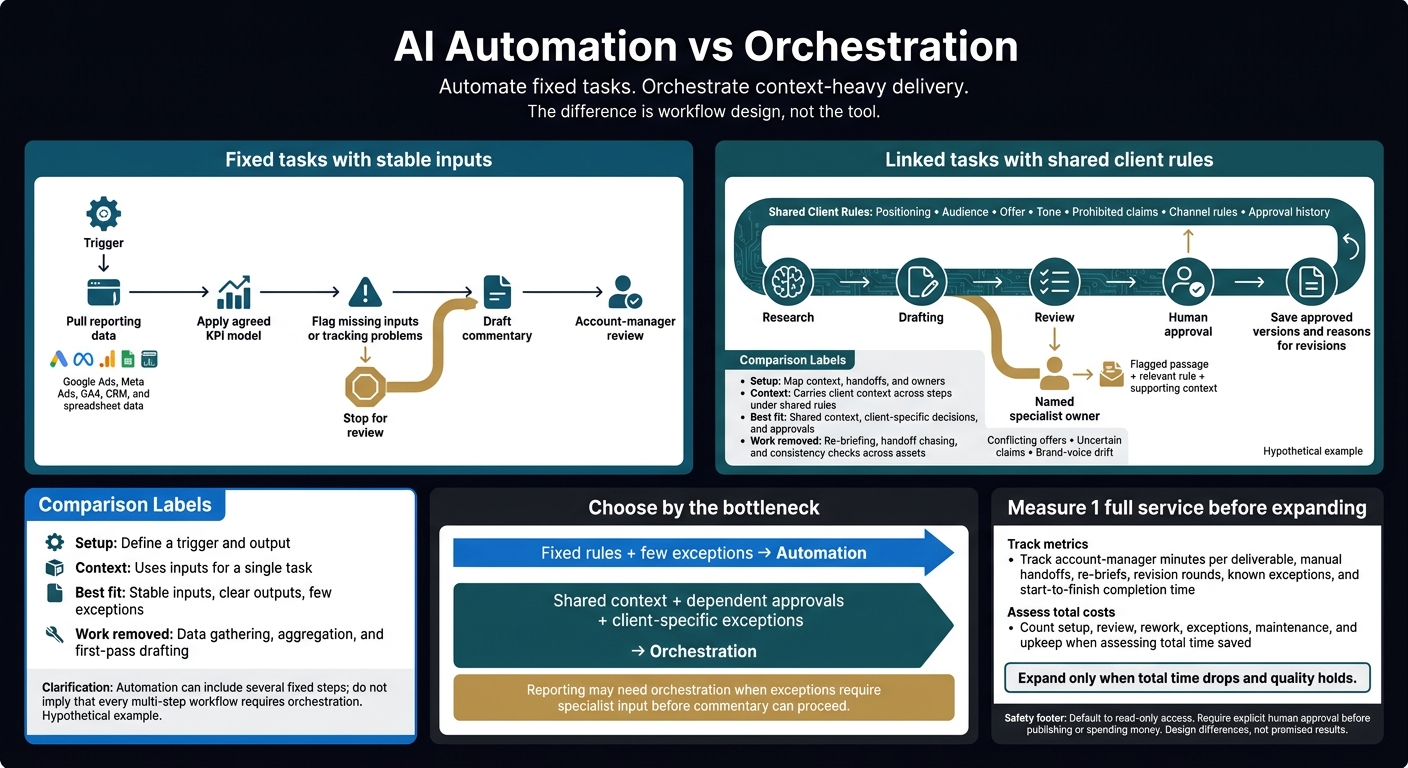
AI Automation vs Orchestration: What Agencies Need
AI Orchestration vs Automation: Build a Real AI System, Not Just Parts
sbb-itb-9cd970b
AI Automation vs Orchestration: What Each Does
AI automation runs a fixed task after a trigger, while AI orchestration connects tasks, client context, tools, and approvals across a workflow. For agencies handling more accounts without hiring, the difference is workflow design, not the tool: Make, n8n, and Zapier can support either approach. [2][3]
Orchestration usually takes more setup. It needs shared data, written rules, and named owners for exceptions. [2][3]
| Factor | Task automation | Workflow orchestration |
|---|---|---|
| Setup speed | Faster for a clear trigger and action | Slower; needs a map of the full workflow |
| Maintenance | Connections need checks; client versions can drift | Shared rules make updates simpler; routing still needs checks |
| Exception handling | Stops or needs a manual check | Sends exceptions to a named owner |
| Context retention | Uses inputs for a single task | Carries client context across steps under shared rules |
| Account-manager time saved | Cuts repeat work | Cuts rework and oversight time |
These are design differences, not promised results. Neither approach frees up team time if the process is poor or the output still needs heavy fixes. [3]
The gap is clearest in reporting handoffs and client work.
Automation Runs Bounded, Repeatable Tasks
AI automation runs 1 fixed task after a trigger.
That task might pull reporting data, check for missing inputs, draft a summary, send a reminder, or create a Slack notification. [2][3]
Automation can be enough when inputs stay stable, outputs are clear, and exceptions are rare. [2][3]
Before building, label each step fixed-rule or judgment-based.
A missing-field check follows a rule; interpreting a performance change requires context. [2]
Write down the inputs, expected output, and review owner. [2]
This fits work where the output is the goal, rather than the handoffs around it.
Orchestration Connects Context, Tools, and Approvals
AI orchestration coordinates models, tools, client data, handoffs, and approvals across a workflow. Shared client rules travel with the work. Account managers do not have to explain those rules again at each step. [3][6]
Routing rules set what happens next. They send edge cases to a named person who can act right away. Human approvals stay built into the process, rather than becoming cleanup work. [3][6]
Make each human handoff easy to trace. Include the original trigger, work done, tools used, and the exact reason a person needs to step in. [2][3]
Name an owner. Define what that person should do if the workflow stops at 9 p.m. Keep client context current so the next step uses the right information. [2][3]
In these workflows, time savings come from fewer repeat briefs and quality checks, not just a faster task.
2 Examples: Reporting Handoffs vs Campaign Delivery
Monthly reporting handoffs need automation when the data and rules stay stable; campaign delivery needs orchestration when drafts depend on shared client context and approvals. These hypothetical workflows show why the tool is not the deciding factor: the choice rests on what happens when data, claims, or client rules need review.
The first workflow is a data problem. The second is a coordination problem.
| Component | Monthly reporting handoff | Campaign asset delivery |
|---|---|---|
| Inputs | Google Ads, Meta Ads, GA4, CRM, and spreadsheet data | Positioning, audience, offer, tone, prohibited claims, and channel rules |
| Client context | Agreed KPI models and stable formats | Brand voice, approval history, and approved brand rules |
| Dependencies | API connectivity and data availability | Research, drafting, and audit handoffs |
| Exceptions | Missing data, tracking problems, and KPI outliers | Conflicting messages, uncertain claims, and brand-voice drift |
| Approvals | Account-manager review of commentary | Specialist review and human approval |
| Work removed | Data gathering, aggregation, and first-pass drafting | Re-briefing, handoff chasing, and consistency checks across assets |
| Suitable approach | Automation with stable rules and few exceptions | Orchestration for shared context and dependent approvals |
Start with reporting. Stable inputs and rules make automation enough.
Automate a Monthly Reporting Handoff
Automation can pull Google Ads, Meta Ads, GA4, CRM, and spreadsheet data, apply the agreed KPI model, flag missing inputs or tracking problems, and draft commentary for account-manager review. Stable inputs and rules make this a clean automation use case.
The bottleneck is data gathering plus first-pass drafting; human approval remains. Keep each KPI’s source and definition explicit. If client-specific exceptions or tracking questions require specialist input before commentary can proceed, reporting may need orchestration too. The deciding factor is the exception path, not the report format.
Orchestrate Campaign Assets Using Shared Client Rules
In this hypothetical campaign workflow, research feeds drafting, review, and approval under the same positioning, audience, offer, tone, prohibited claims, channel rules, and approval history. The bottleneck is keeping context aligned across drafts and approvals. Review checks assets against stable rules and one another, flagging exceptions such as conflicting offers and uncertain claims before specialist review and human approval.
Save approved versions and the reasons for revisions so later drafts use accepted guidance, not rejected wording. Give reviewers the flagged passage, the relevant rule, and the supporting context - not just the full draft.
That is why shared rules, approvals, and exception handling matter more than faster drafting or a trigger alone: they reduce re-briefing, handoff friction, and repeated QA work.
Choose Based on Complexity, Exceptions, and Time Saved
Choose automation for fixed tasks with few exceptions, and orchestration for work that needs shared context, client-specific decisions, and approvals. The key is net time saved across the whole workflow, not task speed alone, because a faster task can still leave an account manager doing the same handoffs and checks.
| Criterion | Automation signal | Orchestration signal |
|---|---|---|
| Workflow complexity | Repeatable steps with fixed inputs and outputs | Multi-stage work with shared context, branching paths, or combined outputs |
| Exception volume | Few exceptions; failed steps can restart safely | Frequent client-specific exceptions that need context and a clear owner |
| Net time saved | Minutes saved on repeat tasks | Hours saved on coordination, re-briefs, checks, and handoffs |
Find the Bottleneck: Tasks or Coordination?
The bottleneck is a task when the work follows fixed rules; it is coordination when people must carry context between steps.
Check whether the work needs judgment, whether failed steps can restart without losing context, and whether outputs need client-specific checks or approvals at several stages.
Automate copying and notifications when the path is fixed. Consider orchestration when people still have to brief, check, and resolve exceptions across tools. That is a workflow limit, not a team failure.
Default to read-only access. This is especially critical when deploying AI marketing agents that interact with live data. Require explicit human approval before publishing or spending money.[4][5]
Measure Net Time Saved on 1 Existing Service
Measure time saved across 1 full service, including the work needed to keep it running.
Record account-manager minutes per deliverable, manual handoffs, re-briefs, revision rounds, and known exceptions. Track start-to-finish completion time, not just the speed of each task.[3]
Test 1 existing service. Compare equivalent work before and after, then calculate net hours saved after review, exceptions, setup, and maintenance.[1][2] Use that result to decide whether fixed steps are enough or the workflow needs shared context and approvals.
Where Portable Delivery Intelligence Fits
Agile Growth Labs (AGL) uses Portable Delivery Intelligence to keep client strategy, rules, and approvals together across the tools your team already uses.[1][2]
Portable Delivery Intelligence is shared client context that stays with the work across tools, so people do not have to rebuild the brief at each handoff.
Conclusion: Automate Tasks; Orchestrate Context-Heavy Delivery
Use automation for fixed tasks, such as reporting handoffs, and add orchestration when work depends on shared client rules, exceptions, and approvals. The bottleneck is not AI; it is context that gets lost between tools and people, which Portable Delivery Intelligence keeps attached to the work.
Start with 1 service you already sell. Pick one with complex work, frequent exceptions, and room to save time.
- Map its handoffs and measure the time spent.
- List the points where someone must make a call, and name who owns exceptions.
- Test the smallest change. Send exceptions to that owner with the client rules and details attached.
Expand only when total time drops and quality holds. Count review, rework, and upkeep in that total. If they eat up the savings, fix the workflow before adding more work. Scale only when the change saves account managers time.
FAQs
How do I know when to upgrade automation to orchestration?
Move to orchestration when separate automations need more oversight than the work they save: people must check each run, data no longer matches across tools, or no one owns the exceptions. The next step is to coordinate the full workflow, not add more task-level automation.
Orchestration links triggers, rules, and exception routing so the team can track work from start to finish. It shifts the focus from whether each task ran to whether the full job got done.
If a process adds steps but saves no time, fix how the work connects before trying to make each task faster.
How do I keep shared client rules current?
Treat shared client rules as a single source of truth in daily work, not a file that sits on a shelf. When a rule changes, update that source instead of editing each prompt or project file.
Use human corrections and logged exceptions to improve rules, prompt templates, and guardrails. Set clear human review checkpoints. If a rule is unclear, resolve it before automated work resumes. Name who owns final approval and who keeps the rules up to date.
How do I turn time savings into account capacity?
Cut coordination work across delivery, not just minutes from each task. Use orchestration to automate repeat handoffs. When work needs a human, send it with the context needed to make a call.
Track time from the first request to the accepted result. Give each workflow 1 owner. Set clear approval gates. Use a shared format for briefs and inputs.
This helps keep time saved on tasks from turning into more review and back-and-forth. Account managers can then carry more accounts without lowering the quality of the work.