Agency Approval Workflow: A 4-Step QA Checklist for AI-Drafted Work

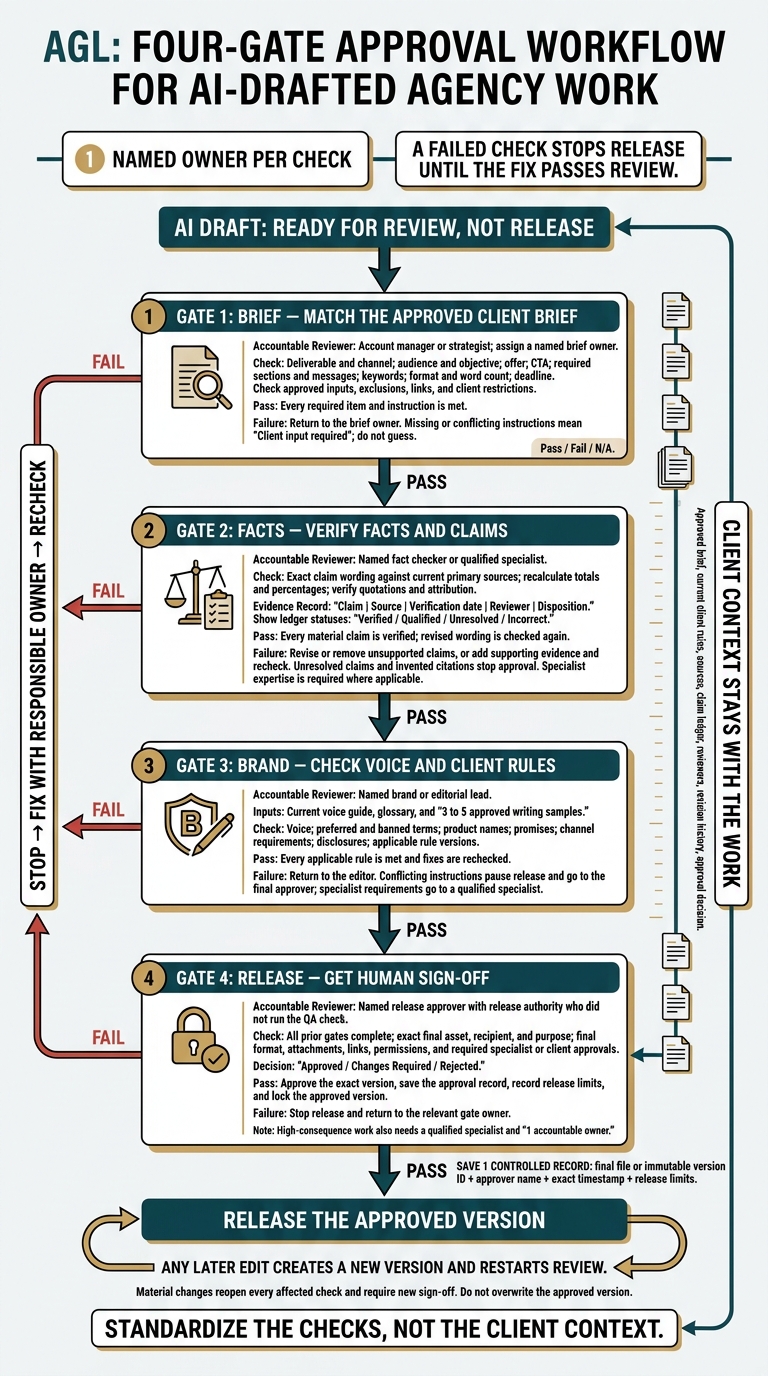
I treat AI drafts as ready for review, not release: check the client brief, verify claims, check brand rules, then get human sign-off on the exact file. The bottleneck is not the draft. It is the client context reviewers need, so I keep the brief, sources, rules, and approval record together.
My rule is simple: 1 named owner per check. A failed check stops release until the fix passes review.
- Brief: Match the draft to the approved scope, audience, offer, and format.
- Facts: Check claims against current sources.
- Brand: Check voice, terms, and required disclosures.
- Release: Get approval for the final version and save the record.
I use Portable Delivery Intelligence to mean client context that stays with the work across tools. Instead of asking account managers to rebuild that context for every review, I put it where reviewers can use it.
Agile Growth Labs (AGL) sets a target of 18 to 25 accounts per account manager, compared with 4 to 8. That is a target, not a promise. <u>More drafts alone do not get you there.</u>
Next step: Run the free calculator.
Agency AI Approval Workflow: 4 QA Gates
How to use AI in approval workflows
sbb-itb-9cd970b
Step 1: Check the Draft Against the Client Brief
The brief owner checks the draft against the approved client brief before editing, not against the AI prompt. A draft passes only when it meets every required item and follows every instruction in the brief, even if the AI prompt asked for something else.
If the brief is missing, has conflicting instructions, or differs in a way that affects the work, stop. Resolve the issue before the review moves forward.
Check the Format, Audience, Offer, and Content
Use this checklist for client emails, ad copy, and blog drafts. Assign the brief owner to every row. Beside the draft, record the section, heading, or text that meets each requirement.
| Check | Pass condition | Owner |
|---|---|---|
| Deliverable and channel | The asset type and channel rules match the brief. | Brief owner |
| Audience and objective | The content speaks to the stated audience and business goal. | Brief owner |
| Offer | The approved offer, pricing, eligibility, and terms appear without changes. | Brief owner |
| CTA | The next action is clear and links to the approved destination. | Brief owner |
| Required sections and messages | Every required heading, content block, and key message is present. | Brief owner |
| Keywords | Required keywords appear as the brief directs. | Brief owner |
| Format and word count | The layout, heading levels, and length meet the stated limits. | Brief owner |
| Deadline | The draft meets the agreed review timeline. Any missed deadline is flagged. | Brief owner |
Send the draft back if any required item is missing or changed. Do this before checking facts.
Check Approved Inputs and Exclusions
Check the draft’s sources, links, products, services, client terms, legal limits, and instructions against the approved source materials. Mark any unapproved heading, offer, claim, or addition as a failure. AI text that sounds right does not count as client approval.
The brief sets what can appear. Step 2 checks whether the claims have support.
Search for banned terms and words that may signal a promise, such as “will,” “guarantee,” and “approved.” Read each match in context to check for promises the client has not allowed. Check attachments and links for excluded content or private information, too.
Log each missing requirement and conflict as a separate failure. Include the brief requirement, its location in the draft, and the fix needed. Mark each item Pass, Fail, or N/A.
If the brief does not give an answer, record Client input required. Ask the brief owner to resolve it. Do not fill the gap with a guess.
Once Step 1 passes, verify the claims in Step 2.
Step 2: Verify Facts and Claims
Step 2 checks that each approved brief item has facts to back it up before brand and release checks begin. Assign a named editor, subject-matter expert, or fact-checker to open each source and confirm that it supports the draft’s exact wording.
Create a Claim Ledger
Copy each claim into a ledger beside the draft. Note where it appears. Include every claim a reader could rely on, and apply Step 1’s pass/fail rules to each factual statement.
Replace the placeholders below with the claim and its review record. A claim fails until evidence supports it.
| Claim | Source | Verification date | Reviewer | Disposition |
|---|---|---|---|---|
| Statistic, price, or performance claim, plus draft location | Original data export, current pricing record, or contract; note the relevant section | Date checked | Named editor or fact-checker | Evidence status and action taken |
| Capability or specification claim, plus draft location | Current official documentation; note the relevant section | Date checked | Named subject-matter expert | Evidence status and action taken |
| Quote or customer attribution, plus draft location | Original statement or approved client record | Date checked | Named editor or fact-checker | Evidence status and action taken |
Mark each claim Verified if the source supports the wording. Use Qualified if it supports a narrower claim, Unresolved if evidence is missing or conflicts, and Incorrect if the source contradicts the draft.
Record whether the claim stayed, was rewritten, or was removed. Check any revised wording against the source again.
Flag Unsupported or Outdated Claims
Check each claim against a primary source, such as a contract, original data, client record, or official documentation. Make sure the source is current. Recalculate totals and percentages from the original figures.
Check quotes against the source’s exact words and context. Send legal, medical, financial, and regulatory claims to a specialist reviewer. Pause approval if the reviewer lacks the expertise to judge the claim.
Check repeated claims in metadata, structured content, and ad fields, not just body copy. Review the final email, PDF, or other delivery format for changed numbers and broken links.
Remove, revise, or add evidence for claims that lack support or overstate the facts. Any unresolved claim or invented citation stops approval. Log the error and the required fix before Step 3.
Move to Step 3 only when every material claim is verified.
Step 3: Check Brand Voice and Client Rules
After checking the facts, check that the draft sounds like the client and meets the channel rules. Correct facts and grammar do not make a draft ready if its tone, promises, or wording miss the brief.
Assign a named brand or editorial lead to check voice, apart from proofreading. Give them the current voice guide, glossary, and 3 to 5 approved writing samples. [2][3][4]
Check Voice, Terms, and Channel Requirements
Compare the draft with the approved samples. Use a logo-hidden test: cover the logo. If the piece could belong to any other client, it fails. Use written rules, not personal taste. [2][4]
Check preferred terms, banned phrases, product names, promises, and competitor references against the client’s guidance. [2][4]
Then check capitalization, punctuation, formatting, and en-US spelling. Review the rules for the channel: email subject lines and links, paid-ad fields and offer wording, social hashtag limits and image alt text, and landing-page or blog structure. Even a factual promise fails if the client has not approved it for that channel. [1][5]
Check Disclosures and Rule Versions
Check disclaimers, disclosures, and compliance wording against the client’s current official rules. Confirm both the wording and where it must appear in the final format. [1][3][6]
Record the rule source and version or last-updated date. Include the draft version, reviewer, review date, and any unresolved exceptions. [1][3][6]
Send legal, financial, or medical requirements to a qualified specialist as part of this review. The brand lead should not guess whether rewritten wording meets the rule. [1][3][6]
If instructions conflict, pause release and send the conflict to the final approver. Record the fixes. Pass the draft only when it meets every rule that applies and the fixes have been rechecked. Then send it to Step 4 for final sign-off. [1][6]
Step 4: Get Human Sign-Off Before Release
Human sign-off means a named person with release authority approves the exact asset, recipient, and purpose, not just the draft. After brief, fact, and brand checks pass, assign that decision to an account lead, strategist, editor, or analyst who did not run the QA check. [1][3][5]
High-consequence work also needs a qualified specialist and 1 accountable owner. [1][3][5]
Confirm All Checks Are Complete
The approver reviews the completed checklist. This includes verified claims, recalculated numbers, and the brief check. Resolve comments, check grammar, and review tracked changes before the decision. Record any required specialist or client approval. [3][5][7]
Check the final file format, attachments, links, and access permissions. Unresolved requirements block release. That includes open checklist items, invented citations, and missing sources. [1][5][7]
Record Approved, Changes Required, or Rejected. If work must go back, name the issue and the person who owns the fix. [1][5][7]
Save the Approval Record
After approval, save 1 controlled record in Notion or another workspace with access controls. Keep the final file or an immutable version ID, brief, client rules, claim ledger, sources, reviewers, revision history, and approval decision. [1][3][7]
Include the approver’s name and an exact timestamp, such as:
Record any release limits, then lock the approved version. Do not publish until all required checks are complete. [2][5][7]
Any later edit creates a new version and restarts review. Material changes reopen every affected check and need new sign-off before release. Do not overwrite the approved version. [2][5][7]
Conclusion: Use the Same 4 Checks Across Accounts
Use the same 4 checks across accounts: brief alignment, factual accuracy, brand compliance, and human release approval, while keeping each client’s context separate. Work is ready to release when those checks are documented, each gate has a named owner, and a person gives final approval.
Standardize the checks, not the client context. The checklist stays the same. The brief, brand rules, and sources belong to each account.
Summarize Review Owners and Failure Actions
Assign 1 named reviewer to each gate. If work fails, send it to the owner who can fix it, then check it again. Keep it out of a general revision queue.
| Gate | Accountable reviewer | Failure action |
|---|---|---|
| Brief alignment | Account manager or strategist | Return to the brief owner. |
| Verified claims | Fact checker or specialist | Revise or remove unsupported claims. |
| Brand and rules | Editorial lead | Return to the editor. |
| Human sign-off | Named release approver | Stop release. Return to the relevant gate owner. |
Use the same ownership map for every account. Apply it through your project system so reviewers know what they own and where failed work goes.
Keep Client Context Available Across Tools
Use the same gates across accounts, but keep each client’s context separate. Portable Delivery Intelligence keeps strategy, rules, sources, and approval records in the project system while using the same production stages across tools.
Test the checklist on 1 recurring type of work. Track revision loops and account manager review time per asset. Log which gate caused each return, then use repeat failures to improve prompts and approved source sets.
FAQs
How can a small team separate QA and release approval?
Give QA and release approval to separate owners. A qualified QA reviewer checks accuracy, brand voice, and technical structure. A senior practitioner or account lead makes an independent release decision and takes responsibility for the output. Neither should rely on the drafter’s assumptions.
Record the version, reviewers’ names, sign-off date, and supporting evidence in your project management tools. Any change after approval restarts the full QA and approval process.
How much review does low-risk AI content need?
Match review depth to the cost of an error, not the content’s format. For low-risk work, such as internal notes, early drafts, or social captions, the creator should check that the work fits the brief and remove claims without support.
Even a light review needs a named human owner. That person must confirm the work meets quality standards and decide whether it can be shared inside or outside the agency.
How do I measure whether this workflow saves time?
Track total labor time, not just drafting speed. Count the minutes spent drafting, checking, making corrections, and getting sign-off on completed work. Faster drafts may not save time if weak checks lead to more rework.
Use a worksheet to log minutes at each stage across project types. This shows where work gets stuck.
Keep an error log, too. Repeat fixes point to gaps in prompts, briefs, or source prep. Fix those gaps instead of just adding more review time.