Human-in-the-Loop AI: How to Build an Approval Workflow for Client Work

I build a human-in-the-loop approval workflow by attaching client rules and sources to each AI draft, naming the reviewer, and blocking release until that person approves the exact version. The bottleneck is context, not AI: when reviewers have the rules beside the work, they spend less time chasing answers.
I use Portable Delivery Intelligence to mean client context, rules, and checks that stay with the work across tools and people. The old way makes each account manager piece that context back together. My approach keeps it attached.
Here is what I put in place:
- Set the rules. Write down the client’s goals, voice, approved claims, and sources.
- Match review to risk. Name an approver and require expert review for regulated claims.
- Check before review. Send the draft, sources, and check results together.
- Gate the release. Keep edits, missed deadlines, and failed checks blocked until resolved.
- Log and test. Save the approved version and delivery result. Run a 4-week pilot before adding accounts.
Agile Growth Labs (AGL) sets a target of 18 to 25 accounts per account manager, compared with a cap of 4 to 8. That is a target, not a promise that approval tools alone will get you there. <u>I measure review time and errors before expanding.</u>
Next step: Run the free calculator.
How to use AI in approval workflows
sbb-itb-9cd970b
Build the Draft-to-Release Workflow
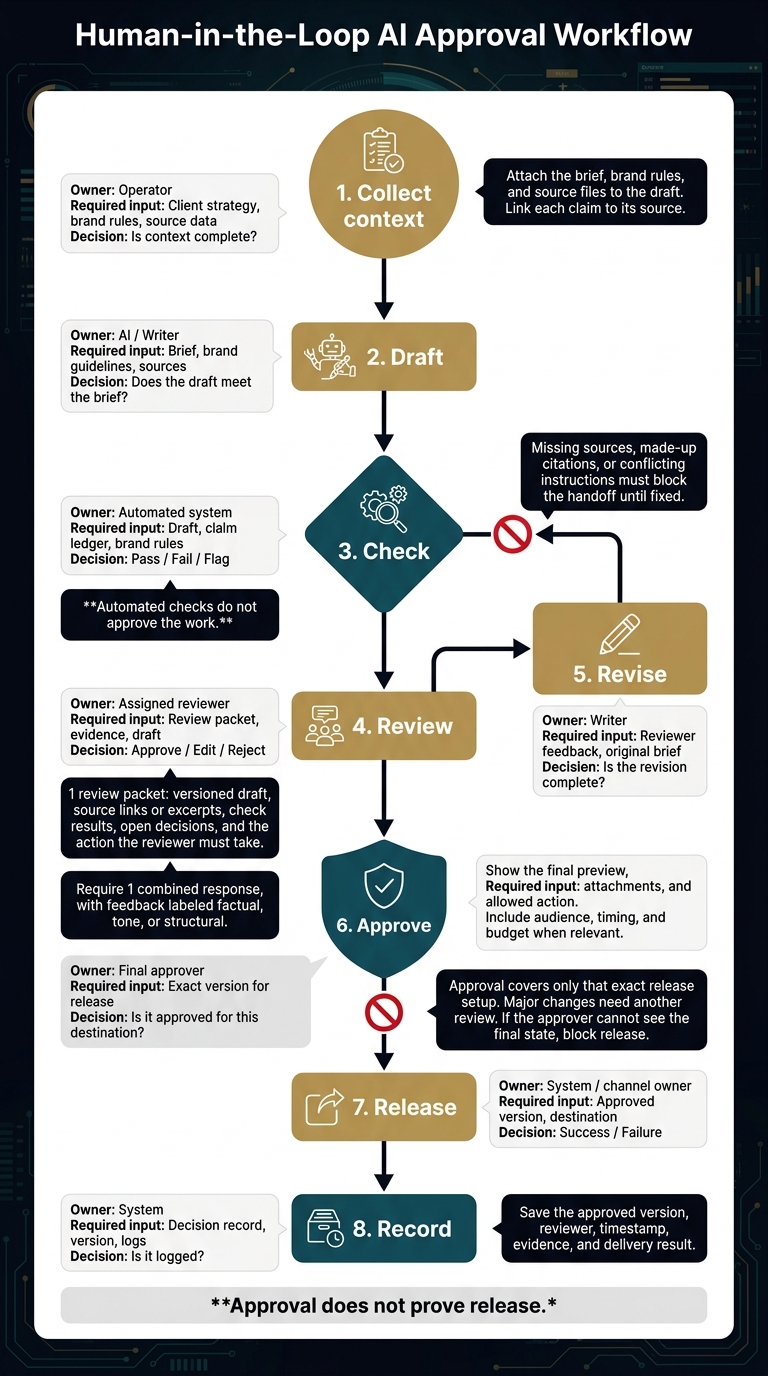
Human-in-the-Loop AI Approval Workflow
Build the draft-to-release workflow around client context, clear owners, and approval of the exact version that will go live. For AI marketing agents producing campaign copy, reports, and other client work, each handoff needs an owner, and each revision must return to checks and review before release. [1][6][7]
A draft is not ready just because AI finished it. The next owner needs the brief, sources, check results, and a clear decision to make.
| Stage | Owner | Required input | Decision | Next action |
|---|---|---|---|---|
| Collect context | Operator | Client strategy, brand rules, source data | Is context complete? | Move to Draft |
| Draft | AI / Writer | Brief, brand guidelines, sources | Does the draft meet the brief? | Run automated checks |
| Check | Automated system | Draft, claim ledger, brand rules | Pass / Fail / Flag | Block or send to review |
| Review | Assigned reviewer | Review packet, evidence, draft | Approve / Edit / Reject | Revise or send for final approval |
| Revise | Writer | Reviewer feedback, original brief | Is the revision complete? | Repeat checks and review |
| Approve | Final approver | Exact version for release | Is it approved for this destination? | Release to destination |
| Release | System / channel owner | Approved version, destination | Success / Failure | Record the result |
| Record | System | Decision record, version, logs | Is it logged? | Archive and monitor |
Load Client Context, Draft, and Check
Attach the brief, brand rules, and source files to the draft. Link each claim to its source. Check those claims, then scan for brand rules, required fields, and missing data.
For reports, check the date range and figures against the source export. Missing sources, made-up citations, or conflicting instructions must block the handoff until fixed. Automated checks do not approve the work. [1][6][11]
Send Reviewers the Draft and Sources
Send 1 review packet with the versioned draft, source links or excerpts, check results, open decisions, and the action the reviewer must take.
Keep evidence beside the draft. This helps reviewers tell sourced facts from AI interpretation. Send claims without source support back for revision before review. Require 1 combined response, with feedback labeled factual, tone, or structural. [1][2][5][6][11]
Approve the Exact Version for Release
Put the approval gate at the final send or publish step. Show the approver the final preview, destination, attachments, and allowed action. Include the audience, timing, and budget when relevant.
Approval covers only that exact release setup. Major changes need another review. If the approver cannot see the final state, block release. [1][7][11]
Save the approved version, reviewer, timestamp, evidence, and delivery result. Approval does not prove release. [1][7][11]
Next, assign an owner to each review gate and set the rules for each decision.
Assign Reviewers and Set Decision Rules
Assign a release approver for each deliverable and risk tier, then spell out what each reviewer can decide. Reviewers need clear roles and the right context, not another round of checks on work someone else has already checked.
Define Each Reviewer's Role
Name 1 accountable release approver for each deliverable and risk tier: low risk, standard client content, and high risk. High-risk work includes pricing, legal claims, and regulated advice. It needs qualified specialist review and client sign-off when required. Keep release approval separate from drafting and review. [1][12]
The operator checks context and instructions. The account manager checks strategy and voice, rather than checking every fact again. Specialists check accuracy in their field. [1][2][12]
The client signs off when required. The workflow owner handles late reviews and makes sure a backup can step in. [1][2][12]
Use Copy and Reporting Checklists
For copy, check the audience, format, length, tone, level of detail, approved claims, and links against the approved brief. Flag prices, percentages, dates, and promises such as “will” and “guarantee.” Send fact checks to the right specialist and strategy checks to the account manager. [1][2]
For reports, check date ranges, metric definitions, sources, calculations, major changes, and the required format. Recalculate figures outside the AI-written text. Check percentage changes and percentage-point changes as separate measures. [1]
Keep observed results separate from interpretation. A change in performance does not prove what caused it. [1]
Set Rules for Approve, Edit, Reject, and Escalate
Tell each reviewer which decisions they can make. The final approver resolves conflicting feedback, but questions that need a specialist must go to a qualified reviewer. [1][2][10][12]
Late reviews stay blocked. The workflow owner finds backup coverage. Escalation does not permit release. [1][2][10][12]
| Decision | Trigger | Responsible role | Next action |
|---|---|---|---|
| Approve | Required checks pass; no stop conditions remain | Named approver or required client signer | Allow release |
| Edit | Minor typo, format, or wording issue within the reviewer’s authority | Reviewer requests a fix; drafter revises | Recheck and approve the revised version |
| Reject | Major content failure, fabricated citation, or data use without permission | Reviewer stops work; workflow owner handles the failure | Stop the deliverable and investigate before restarting |
| Escalate | Missing evidence, conflicting instructions, new claims, changed commercial framing, or regulated language that needs higher authority or specialist review | Workflow owner routes to the specialist, account lead, or client | Keep release blocked until the required authority resolves the issue |
Build these roles and decision rules into your draft routing and release tools.
Connect Tools and Keep Approval Records
Put reviewer roles and decision rules into tool permissions, routing, and audit logs. Your existing tools should move drafts, approvals, and release records through 1 controlled flow. [4]
Keep each client’s records separate. Limit access through permissions. [7]
Connect Drafting, Review Routing, and Release
Use ChatGPT, Claude, Gemini, Grok, or Perplexity for drafts. Use Asana or Notion for tasks, Slack for alerts, and Google Drive for files. Connect the steps with Make, n8n, or Zapier. [7]
Allow publishing, sending, audience changes, and budget changes ONLY at the release step. Drafting tools should never have publish or send permissions. [7]
Set reject, revoke, and expiry rules to block release. If the draft or its inputs change, require approval again. [8]
If a send fails or times out, save the attempt log and check whether delivery happened. Retry only after the workflow owner gives the go-ahead. [8]
Save the Approved Version and Decision Record
Keep 1 linked record in Notion. Store the approved file in Google Drive or another file store with access controls. [1][7]
Record the client, deliverable, approved version, AI tool and model, source and rule versions, reviewer, decision, timestamp, rationale, destination, and release status. Save the evidence used to make the decision. Keep the record under the agency’s retention rules. [1][7]
A Slack reaction counts as approval only if the integration logs the verified reviewer and the approved version. Approved does not mean sent. [7][8]
Log the release result separately. It should show who approved which version, what was delivered, and whether recovery is needed. [7][8]
Once routing and logging work, test blocked work and backup reviewers with a small set of clients.
Pilot the Workflow and Measure Capacity
Pilot 1 recurring client deliverable before adding accounts, then measure whether it cuts review time without hurting review quality. Keep approved sources, clear approval routes, and client rules attached to the work so the team can test capacity without losing control of what reaches the client [1][4][13].
With routing and logging in place, choose work with a set schedule and an output you can check. The account lead must be able to resolve exceptions without reopening the strategy. Record the recipient, purpose, source of truth, approver, and next step after approval [1][4].
- Week 1: Audit the workflow.
- Week 2: Connect tools and approval routes.
- Week 3: Run draft-only cycles using real sources.
- Week 4: Go live with approval gates.
Train the workflow owner to gather evidence and route exceptions [4][10].
Test Blocked Work and Backup Reviewers
Test whether the workflow stops work when sources are missing, strategy conflicts arise, claims remain unresolved, or revisions lack approval.
For each path, name a backup reviewer, an escalation deadline, and an exception owner. Check that backups can inspect the evidence and stop release. Confirm that the recovery owner can handle delivery failures [1][3][5][7].
A timeout must leave work pending. It cannot move forward until a backup reviews it [1][3][5][7].
Measure Review Time Before Expanding
After the 4-week pilot, compare results with the baseline before adding accounts.
Measure account-manager checking time, total operator and reviewer time, wait time, corrections, disagreements, missed exceptions, and unresolved tasks [1][5].
Use those results to update prompts, source bundles, and checklists. Add accounts only when checking time falls without lowering review quality [13].
Conclusion: Keep Approval Attached to the Work
Keep written client context, risk-based routing, named reviewers, and a decision record attached to each piece of work.
No AI-generated client work goes to an external recipient until the correct reviewer checks it against written client rules, records a decision, and approves the exact version being released [1][7][9].
FAQs
How can a small team separate drafting from approval?
Lock the brief in writing before AI drafts. Set the scope, goals, and brand rules. Link the brief to the draft in Notion or Google Drive so both stay in sync.
Have AI check each draft against the brief, brand voice, and factual claims. Work that passes then goes to a named human reviewer to check fit with the plan, risk, and nuance.
Keep final approval in human hands. Record the approval date and reviewer’s name for every deliverable.
How do I prevent reviewers from rubber-stamping AI drafts?
Treat human review as a risk check, not a polish pass. Use a checklist to check each draft against your proof library or brand guidelines. Stop the draft if evidence is missing, facts remain unchecked, or permissions are unclear.
Set reviewer roles by risk level. Give each role a clear, narrow task. Before human review, require writers to acknowledge or address every AI flag. This lets reviewers focus on strategy and judgment.
How do I know when we can safely add more accounts?
You’re ready to scale when reviews stop holding up delivery. Each client needs a separate workspace with only their files, current context, and clear delivery steps.
Before you scale, check each handoff. Fix gaps in positioning, audience assumptions, and who approves the work. Every review should use the same checks: goal fit, brand voice, and claims you can trace to a source.
Grow by grouping work into well-planned batches, not by creating more drafts.