Hire vs Install: The Real Cost of Your Next Account Manager

I would hire an account manager when client relationships need more time, and test a delivery system when repeat tasks fill the week. Before choosing, I would compare 12 months of setup, pay, tools, staff time, and upkeep against the added accounts each option can support without cutting service quality.
More staff adds hours. Better access to client context cuts repeat work. Another hire can still face the same missing rules, scattered notes, and handoffs.
Portable Delivery Intelligence is a system that puts client context, written rules, and repeat workflows where the team can use them. People still own client talks, judgment, and approvals.
Here is the quick comparison I would use:
| Decision point | Hire | Install |
|---|---|---|
| Best fit | More client care and judgment | Less repeat work and fewer handoffs |
| Costs to count | Recruiting, pay, training, supervision | Setup, tools, upkeep, human review |
| Capacity test | Accounts supported after ramp-up | Accounts supported by net hours saved |
| Main limit | New staff may face the same process gaps | Saved hours cannot replace relationship time |
Agile Growth Labs (AGL) sets a target of 18 to 25 accounts per manager, compared with 4 to 8. I would treat that as a target, not a promise. <u>Measured hours and service quality must support the account count.</u>
My rule: test 1 service, count review time, and check quality before adding accounts or payroll. Use both options if less repeat work still leaves a gap in client care.
Next step: Run the free calculator.
Calculate the Full Cost of Hiring and Installing
Compare hiring and installation over the same 12 months, using both cash paid and staff time valued at a loaded hourly rate. Then compare how many added accounts each option can support, counting each cost or hour once and keeping staff time separate from cash.
Staff time is not a cash expense unless it leads to overtime or paying someone to cover the work. Use the task split above to build both totals.
| Cost period | Hiring: cash expenses | Hiring: internal staff time | Installation: cash expenses | Installation: internal staff time |
|---|---|---|---|---|
| Year 1 setup | Recruiting fees, equipment, and paid training | Interviews, onboarding, training, and client handoff | Scoped setup fee, tool connections, and operator training | Process mapping, writing down rules, and testing workflows |
| Annual recurring costs | Salary, employer taxes, and benefits | Supervision and training | Software usage fees, maintenance, and governance | Quality checks, human approvals, and fixing problems |
| Replacement/transition costs | Recruiting again, replacement equipment, or retraining | Handover, retraining, and short-term coverage | Tool migration, rebuilding connections, or system updates | Updating rules, testing changes, and retraining the operator |
Hiring Costs: Pay, Recruiting, Training, and Supervision
In a U.S. example, a $72,000 salary plus $24,000 in employer costs and supervision time totals $96,000 a year. Add $12,000 for recruiting and ramp-up, and year 1 reaches $108,000. That is a combined cash-and-time total, not a $108,000 cash bill.[4]
Split that total into cash and staff time before comparing it with installation. The new hire’s salary already covers their onboarding hours. Do not count those wages again as lost output.
Instead, credit the hire with fewer accounts during ramp-up. Count existing staff’s training and client handoff hours separately. If the hire leaves, recruiting, training, and handoff costs return.
Installation Costs: Setup, Tools, Maintenance, and Oversight
An AI-enabled delivery system can use tools you already have, such as ChatGPT, Claude, Asana, and Slack, to help current managers carry more accounts. The cost is not just the tools. It also includes the work needed to give those tools the right client context.
Budget for setup and recurring costs in the table. Keep provider charges separate from your team’s hours. Check which maintenance tasks the quote covers.
Once you have the full cost, calculate the cost per added account.
Calculate Cost per Added Account
Cost per added account = fully loaded annual cost ÷ additional accounts actually supported. Include setup costs in year 1, but leave them out of later years unless you incur them again.
For installation, include every account whose workflows must change to make room for more work. Split shared usage and maintenance costs across supported accounts, and state how you split them.
Before turning saved hours into added account capacity, subtract the hours still needed for review and upkeep. Use the time left, not the gross hours saved.
sbb-itb-9cd970b
Worked Example: Cost per Account and Break-Even
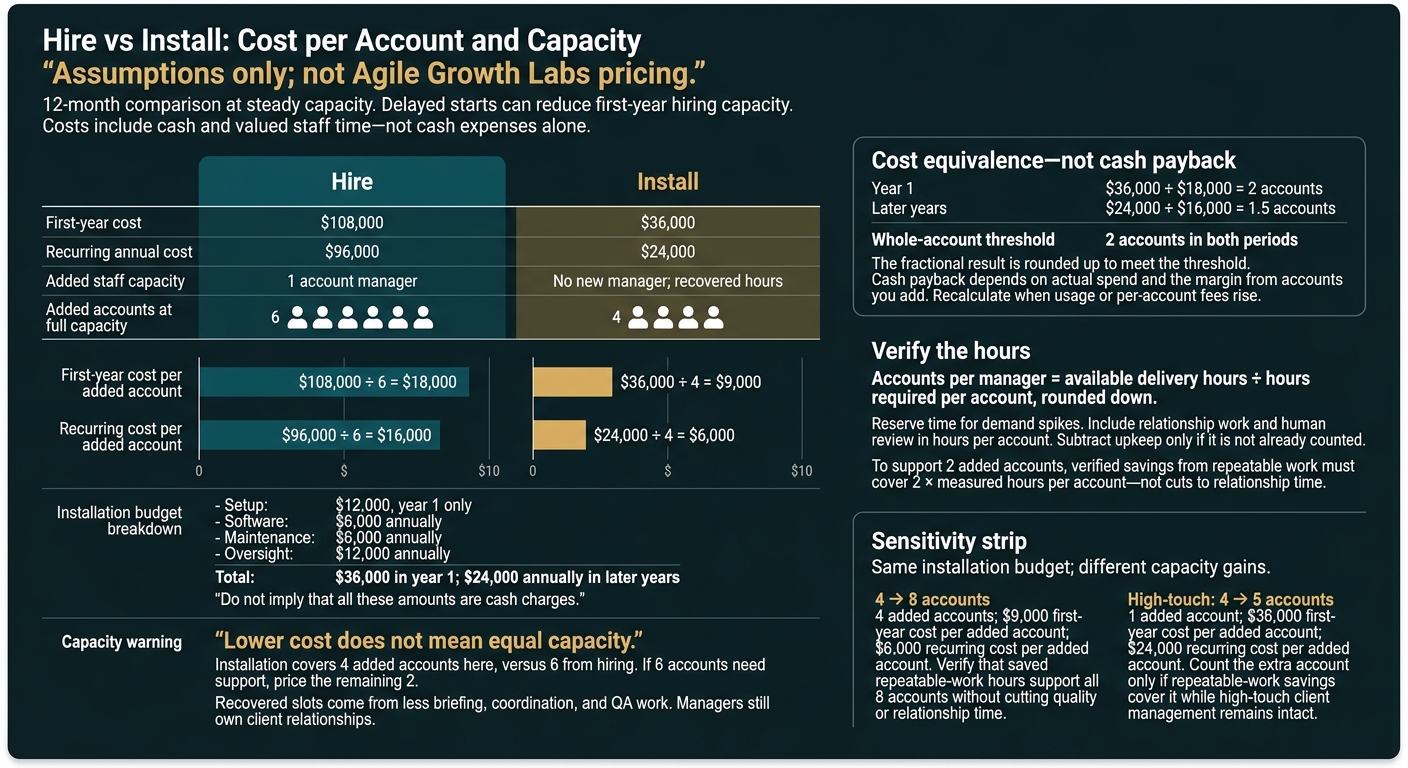
Hire vs Install: Cost per Account and Capacity
Installation costs less per added account in this example: $9,000 versus $18,000 in year 1, and $6,000 versus $16,000 in later years. But it covers 4 added accounts rather than 6, so the choice depends on both cost and the hours each account needs.
Compare 6 Hired Account Slots With 4 Recovered Slots
Assumptions only; not Agile Growth Labs pricing. Compare 12 months at steady capacity. On the install side, the base case is $12,000 setup plus $6,000 software, $6,000 maintenance, and $12,000 oversight for 4 recovered slots. That totals $36,000 in year 1 and $24,000 annual cost in later years. On the hire side, a fully loaded account manager costs $70,000-$200,000 a year before recruiting and ramp; delayed starts cut first-year capacity. The comparison below uses the earlier $108,000 first-year and $96,000 recurring hiring example.
Measure Hire Install First-year cost $108,000 $36,000 Recurring annual cost $96,000 $24,000 Added staff capacity 1 account manager No new manager; recovered hours Added accounts at full capacity 6 4 First-year cost per added account $108,000 ÷ 6 = $18,000 $36,000 ÷ 4 = $9,000 Recurring cost per added account $96,000 ÷ 6 = $16,000 $24,000 ÷ 4 = $6,000
Lower cost does not mean equal capacity. Installation costs less here, but it covers fewer accounts.
The 4 recovered slots come from less briefing, coordination, and QA work. Managers still own the client relationship. If 6 accounts need support, price the remaining 2. The break-even check must account for that gap.
Calculate Break-Even Accounts and Available Hours
The cost-equivalence threshold is 2 whole accounts in both year 1 and later years.
Year-1 installation cost equals the hiring cost for 2 accounts. In later years, it equals 1.5 accounts. Round up to 2 whole accounts to meet that threshold.
This is not cash payback. Cash payback depends on actual spend and the margin from accounts you add.
The cost-equivalence calculation is $36,000 ÷ $18,000 = 2 accounts in year 1 and $24,000 ÷ $16,000 = 1.5 accounts in later years.
Run the math again when usage or per-account fees rise.
Check the hours behind the account count:
Accounts per manager = available delivery hours ÷ hours required per account, rounded down.
Set aside time for demand spikes first. Count client relationship work and human review in the hours each account needs. Subtract upkeep only if it is not already counted.
To support 2 added accounts, verified hours saved from repeatable delivery work must cover 2 times the measured hours per account. Those savings cannot come from cutting relationship time.
Test Small Gains, More Accounts, and High-Touch Work
Small gains increase the cost per added account, even when the total budget stays the same.
Sensitivity assumptions: Both cases retain the base budget. Count only extra accounts supported by reclaimed repeatable work, not reduced high-touch client management.
Portable Delivery Intelligence supports repeatable delivery work. Managers keep ownership of client relationships.
Assumed capacity change Added accounts First-year install cost per added account Recurring cost per added account Decision check 4 → 8 4 $9,000 $6,000 Verify that saved hours from repeatable work support all 8 accounts without cutting quality or relationship time High-touch: 4 → 5 1 $36,000 $24,000 Count the extra account only if saved hours from repeatable work cover it while keeping high-touch client management intact
Choose Hiring, Installing, or Both
Choose hiring, installation, or both based on your break-even result and the work your team does each week. Hire for judgment and client relationships, install for repeatable work and scattered context, and use both when fixing routine delivery still leaves more high-touch work than your team can handle.
More staff won't fix scattered context. New hires may face the same handoffs and missing client rules. Choose the lower-cost option that frees team capacity.
| Capacity gap | Hire | Install |
|---|---|---|
| Judgment and expertise | Add someone who can make unclear decisions or do work that needs special skills. | Put context in order to support decisions. Rules do not replace expertise. |
| Relationships, escalations, and leadership | Add an owner for conversations that depend on trust and for team direction. | Prepare the facts and flag cases that need that owner. |
| Repeatable work and fragmented context | Extra staff may face the same burden of tracking and sharing work. | Install when the work follows clear client rules that can be used again. |
A named person still owns results, approvals, and cases that fall outside the rules.
Track 1 Week of Account-Manager Work
For 1 week, log time by task. Tag each task as execution or judgment. Note whether it followed a set path or needed a decision. [2][3]
Count only tasks with clear rules. Subtract time for upkeep, approvals, and handling cases outside those rules. Use the hours left to test the break-even capacity estimate, not as permission to add accounts.
Match the Choice to the Work
Use the work audit to see what limits capacity.
Hire when repeat tasks are gone but the role still needs more judgment, client relationship ownership, or help with escalations.
Install when predictable delivery work limits capacity. Portable Delivery Intelligence uses written client rules and repeatable workflows to reduce routine delivery work.
Use both when setting a standard way to work frees time, but high-touch client work still needs another person.
Start with tasks that repeat often, need little judgment, have low risk to client relationships, and cost less if an error occurs. [3]
Conclusion: Verify Capacity Before Adding Fixed Costs
Verify added capacity before you add fixed costs. Use the break-even result as your final filter: compare full costs with measured capacity, not salary with software prices, and use any freed time before adding payroll if the pilot cuts briefing, coordination, and QA work without hurting service quality.
If client relationship work still needs more staff and human judgment, hire.
Pilot 1 Service With Written Rules and Human Approval
If installing Portable Delivery Intelligence looks cheaper than hiring, test it on 1 existing service first.
Document the workflow. Set approval rules and connect the tools that service needs. Then run live work with a trained operator and human approval. Check that the system frees team time without lowering service quality before you expand. [1]
Add Accounts Only When Capacity and Quality Improve
Track accounts per manager, hours per account, client response time, and time to delivery. Use measured capacity to recalculate the cost per added account. Include setup, software, upkeep, and oversight costs. [1]
Compare those results with the full cost of hiring over the same period. Include recruiting, pay, onboarding, and supervision. Add accounts only when measured capacity and service quality both improve.
FAQs
How long should I pilot Portable Delivery Intelligence?
Do the job yourself for 90 days before a full rollout. Use that time to find edge cases, tricky steps, and the rules your standard operating procedures need to cover.
If AI can handle the role, run a 60- to 90-day test with a part-time operator working alongside your AI stack. Review and approve every output for the first 30 days. Move to full automation only after the workflow runs for 1 full week without edits.
How do I calculate cash payback from added accounts?
Start by planning how current account managers will use time saved on repeat tasks to serve more accounts. Saved hours only add capacity when the team uses them. Add up annual AI costs, including software, setup, upkeep, and human oversight.
If those extra accounts let you skip a hire, subtract annual AI costs from that hire’s full annual cost, including pay and benefits. Payback typically takes 2 to 6 months when the team uses the freed-up time to take on new accounts.
What if saved hours don’t translate into capacity?
Saved hours only pay off when they create room for more work. If they don’t, you’ve added software costs to payroll without a financial return. Automation frees some time. It does not mean you can cut headcount.
Before the workflow goes live, decide where that time will go: billable client work, sales, or growth that would otherwise need another hire.
Without that plan, small tasks and admin browsing can eat up the saved hours. Your team stays busy, but it still can’t carry more work.