Context Re-Pasting: The Hidden Hours Your Agency Loses to AI Every Month

I count re-pasting client context as lost delivery time, not an AI problem: at 25 clients, 20 reloads each month, and 6 minutes per reload, the total is 50 hours a month. I would start with a 1-week time log, then test shared client rules and subtract upkeep and review time from any hours saved.
The old way makes each person rebuild the brief. That is a process gap, not a team failure. I use client context packs to describe shared files of approved client rules and task details that people and AI tools can reuse.
My takeaway: <u>keep the client rules shared, current, and owned</u>. Track setup time, name an owner, and keep human approval before work goes out.
Agile Growth Labs (AGL) uses Portable Delivery Intelligence to connect those rules across tools. AGL’s account target is 18 to 25 per account manager, compared with a cap of 4 to 8. That is a target, not a promise of added capacity.
Next step: Run the free calculator.
How to Give AI Agents Enough Context to Be Useful
sbb-itb-9cd970b
Calculate Monthly Time Lost to Context Reloads
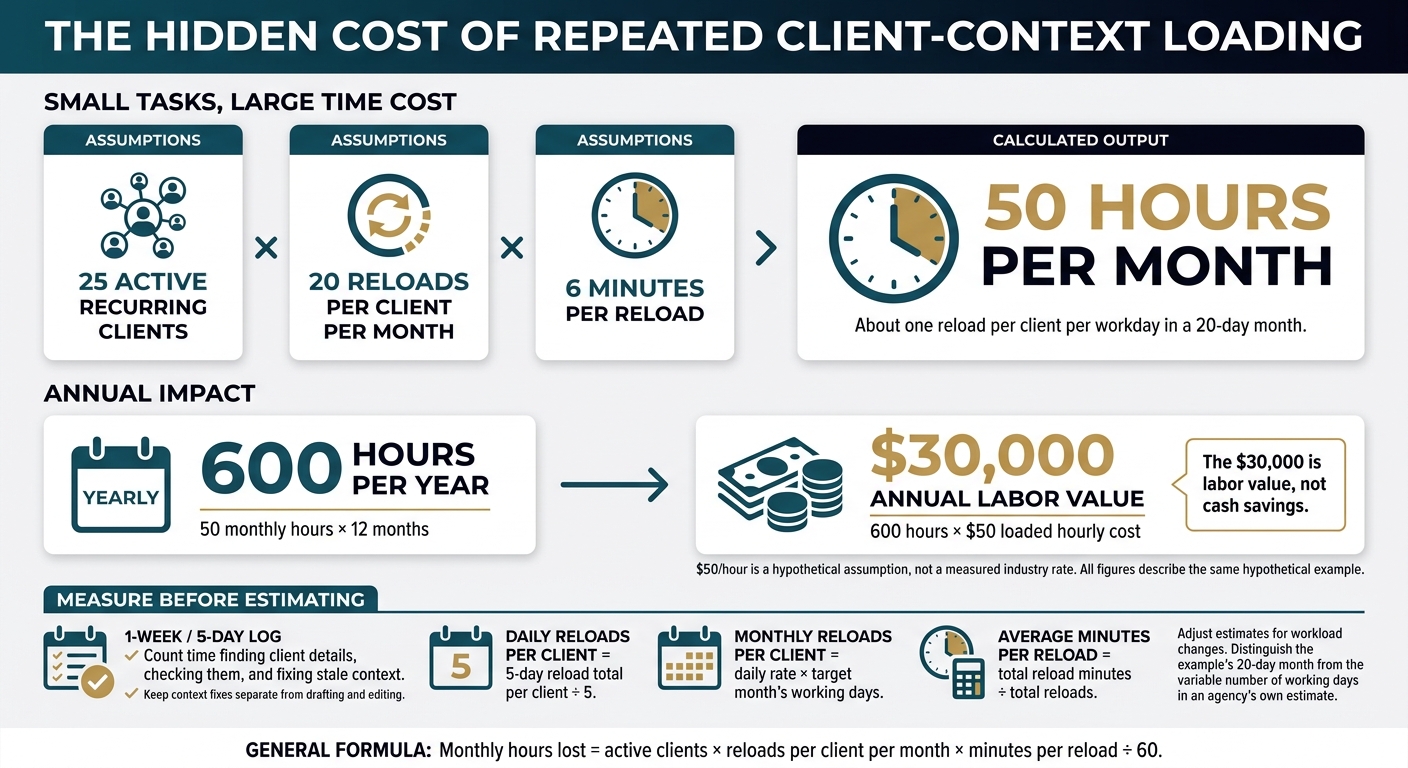
The Monthly Cost of AI Context Re-Pasting
Monthly time lost to context reloads equals active clients × reloads per client per month × minutes per reload ÷ 60. Use a 1-week log to measure time spent finding client details, checking them, and fixing stale context, so your estimate reflects repeat work rather than time spent drafting or editing.[4][5][6]
Count recurring delivery accounts as active clients. Include retrieval, checks, and fixes for stale context in your reload time.[4][5][6]
Monthly hours lost = active clients × reloads per client per month × minutes per reload ÷ 60.
Example: 25 Clients and 50 Hours Lost Each Month
Example: An agency repeatedly loading client briefs across 25 accounts spends 50 hours per month on context reloads: 25 clients × 20 monthly reloads × 6 minutes ÷ 60. That equals about one reload per client per workday in a 20-day month.[4]
| Type | Measure | Value |
|---|---|---|
| Assumption | Active recurring clients | 25 |
| Assumption | Reloads per client per month | 20 |
| Assumption | Minutes per reload | 6 |
| Assumption | Loaded hourly cost | $50 |
| Output | Monthly context reload hours | 50 hours |
| Output | Annual context reload hours | 600 hours |
| Output | Annual labor value | $30,000 |
The $30,000 is labor value, not cash savings. It uses a hypothetical loaded hourly rate of $50.
Track 1 Week Before Estimating Savings
Use your 5-day log to estimate monthly reloads per client and average time per reload. Keep context fixes separate from drafting and editing.[4][5]
- For each client, divide the 5-day reload total by 5.
- Multiply that daily rate by the target month’s working days.
- Calculate average minutes per reload = total reload minutes ÷ total reloads. Adjust your estimate for workload changes.[4][5]
This estimate shows how much team time repeat context work takes. Next, look at how to keep client context ready to use instead of rebuilding it for each task.
Reuse Client Context in AI Projects
Reuse client context by keeping shared client decisions in Google Drive or Notion and using AI projects for repeat instructions, rather than rebuilding the same brief in each tool.[3][5] AI can help with the task, but shared context lets the work move between ChatGPT, Claude, and account managers without starting over.
Once you know how many hours context reloads cost, focus on keeping those decisions ready to use. The tool can change. The client rules should not.
What AI Projects and Source Systems Keep
AI projects keep context inside a tool, while source systems keep records that other tools and teammates can use. Check current file access, sharing, and memory behavior before you rely on a project.[4]
| Tool or system | Stored context | Cross-tool portability | Maintenance | Risk |
|---|---|---|---|---|
| ChatGPT or Claude Projects | Instructions, files, chats, brand voice, ICP, and approved deliverables.[3][4][5] | Low. Context does not transfer between tools on its own.[4] | Account lead updates materials.[3] | Decisions stay trapped in 1 project.[3][4] |
| Notion and Google Drive | Briefs, SOPs, meeting recaps, action items, deadlines, and versioned files.[3][5] | High. Files can be reused where access allows.[1][3][7] | Named document owner.[3] | Old versions reach the next teammate.[3] |
| Asana, Slack, and HubSpot | Work records, with relevant updates sent to the client pack.[4] | Depends on workflow and permissions.[4] | Named owner routes updates.[3] | Decisions never reach the pack.[4] |
Project context can help within 1 tool. It does not replace a shared home for client decisions.
Build a Client Context Pack for Decisions
Create a portable CLIENT.md file that works across LLMs and project instructions.[1][7] A client context pack is a shared file of client rules, decisions, and task details that tools and teammates can reuse.
- Add 6 parts: who we sell to, what we offer, how we sound, proof that lands, what’s live right now, and success criteria.[3]
- Add an approval owner, escalation rules, and 2–3 approved writing samples.[3]
- Separate lasting rules from a dated Current task block with this week’s offer, deadline, status, and approved exceptions.[3]
- Keep changing status and meeting notes in the source system. Send only updates needed for the task.[3][5]
- Flag conflicts between campaign instructions and standing client rules for review. Do not let the model choose.[3]
Give 1 person ownership of updates and rule changes. Without that owner, even a shared file can fall out of date.
Name an Owner and Check Client Rules
The account lead owns the client pack, leadership owns positioning and pricing, and function leads own service playbooks.[3] Review approved deliverables monthly and add lessons that come up often to the pack.[3]
When rules change, update the affected AI workspaces too.[3][5] A change in the source file does not mean every project has the new rule.
Limit access to approved client info. Keep credentials out of chats. Check outputs against the current strategy, brand rules, and approval rules before use.[3][4]
Track time spent reloading context as the pack gets used. Keep 1 current source of truth, and check for old copies at each handoff.
Keep Client Context Current Across Tools and Handoffs
Keep client context current by adding dated notes to the client workspace after each interaction and keeping proposed changes separate from approved rules. A shared workspace helps the next person or AI tool use the latest client decisions without relying on someone’s memory or loading old instructions.[3]
AI is not the bottleneck here. Context is. A context pack cuts setup time, but it still needs care as client needs change.
After each client interaction:
- Save dated notes in the client workspace.
- Flag repeat patterns for review.
- Keep proposed changes separate from approved instructions.
- Get human approval before changing a standing rule.[3]
Compare Re-Pasting, Context Packs, and Client Workspaces
Re-pasting adds setup work each session; context packs and maintained workspaces give the team shared instructions.
| Approach | Setup time | Handoffs | Consistency | Approval control |
|---|---|---|---|---|
| Re-pasting | High every session | Depends on what each person knows | Varies by memory | Ad hoc |
| Context packs | Low per job | Shared files | Standard rules | Named owner review |
| Client workspaces | Initial setup plus upkeep | Shared history | Version-controlled rules | Built into delivery |
Re-pasting relies on people to bring the right details each time. That is a limit of the process, not a team failure. Packs reduce setup work. Maintained workspaces help the team repeat delivery with the same approved rules.
Choose based on both setup time and upkeep. A shared file only helps if its instructions stay current.
Use a 20-minute Friday tune-up to review AI drafts that needed heavy edits. When those edits show a broken rule, update the approved instructions.[5]
Log each approved change with its date and named owner. Major changes need review from the right owner. Unapproved changes must not become standing instructions.[3]
How Portable Delivery Intelligence Fits
Portable Delivery Intelligence gives agencies a delivery layer across tools without replacing their software.
Agile Growth Labs (AGL) uses Portable Delivery Intelligence to keep client strategy, rules, priorities, and approvals connected to tools like ChatGPT, Claude, and Gemini. Start with 1 service, connect its client context, and require human approval before expanding.[3]
AGL sets a target of 18 to 25 accounts per account manager with Portable Delivery Intelligence. That is a target, not a reason to add accounts before checking the work.
Track reload time, upkeep, review time, and client-specific fixes before adding accounts. These checks show whether the team spends less time rebuilding context and has more hours for client delivery.
Conclusion: Measure the Capacity You Recover
Measure recovered capacity by tracking how much time your team saves when client context stays current across tools, then subtracting setup, upkeep, and approval time. Re-pasting is not just a typing task: it takes time away from account managers that could go back to client work.
Reusable rules and maintained workspaces cut setup time. Human approval still closes the loop.
Calculate Recovered Hours After Upkeep
Use this formula: baseline monthly context loss − setup time − maintenance time − approval time.[3][4]
Count approval time the same way on both sides. Do not subtract review work you already counted twice. The hours you recover go back to delivery.
Start With 1 Client and 1 Recurring Service
Track 1 week of time spent finding briefs, re-pasting context, making corrections, and reviewing work. For 1 client and 1 recurring service, build a client context pack. Assign an owner and a review date.[3][5]
Keep the final human review. Test the pack in a new session, then compare the next week’s time and how well the work follows the rules.[2][3][5]
FAQs
How can I tell if a context pack is worth the upkeep?
A context pack is worth the upkeep when it cuts rework, approval delays, and time spent explaining client rules again. If your team repeats the same context more than 2 times a week, that effort costs more than keeping the pack up to date.
Test it for 2 weeks on your most common task. Keep it if it cuts rework, keeps work consistent, and saves at least 1 hour a week. Drop it if weekly savings stay below 1 hour.
How do I prevent client context from mixing across accounts?
Keep each client’s workspace, storage paths, credentials, and project IDs separate. Close 1 workspace before opening another. Keep client facts out of shared prompts. Never put more than 1 client in an AI request.
Load context from a central record for that client, stored outside the chat. Use automated checks to flag identifiers that belong to other clients. Assign a named human reviewer to check every deliverable against the client’s context before sending it.
When is it safe to increase my account managers’ workloads?
Add more work only when client context is under control. The workflow must cut rework and produce consistent results before the team takes on more accounts.
Give each client a dedicated workspace. Keep its files and client details current. Assign named reviewers to check every deliverable for accuracy and brand fit.
Track rework caused by missing or wrong context, approval delays, revision rounds, and final claim checks. Use reusable context packs and QA gates to keep those checks in place.
If those packs and checks cut rework and delays, add 1 client at a time. If reviews are still slow, fix the context packs first.