From Meeting Transcript to Task Board in 4 Hours: The Daily Pipeline We Run at 5pm
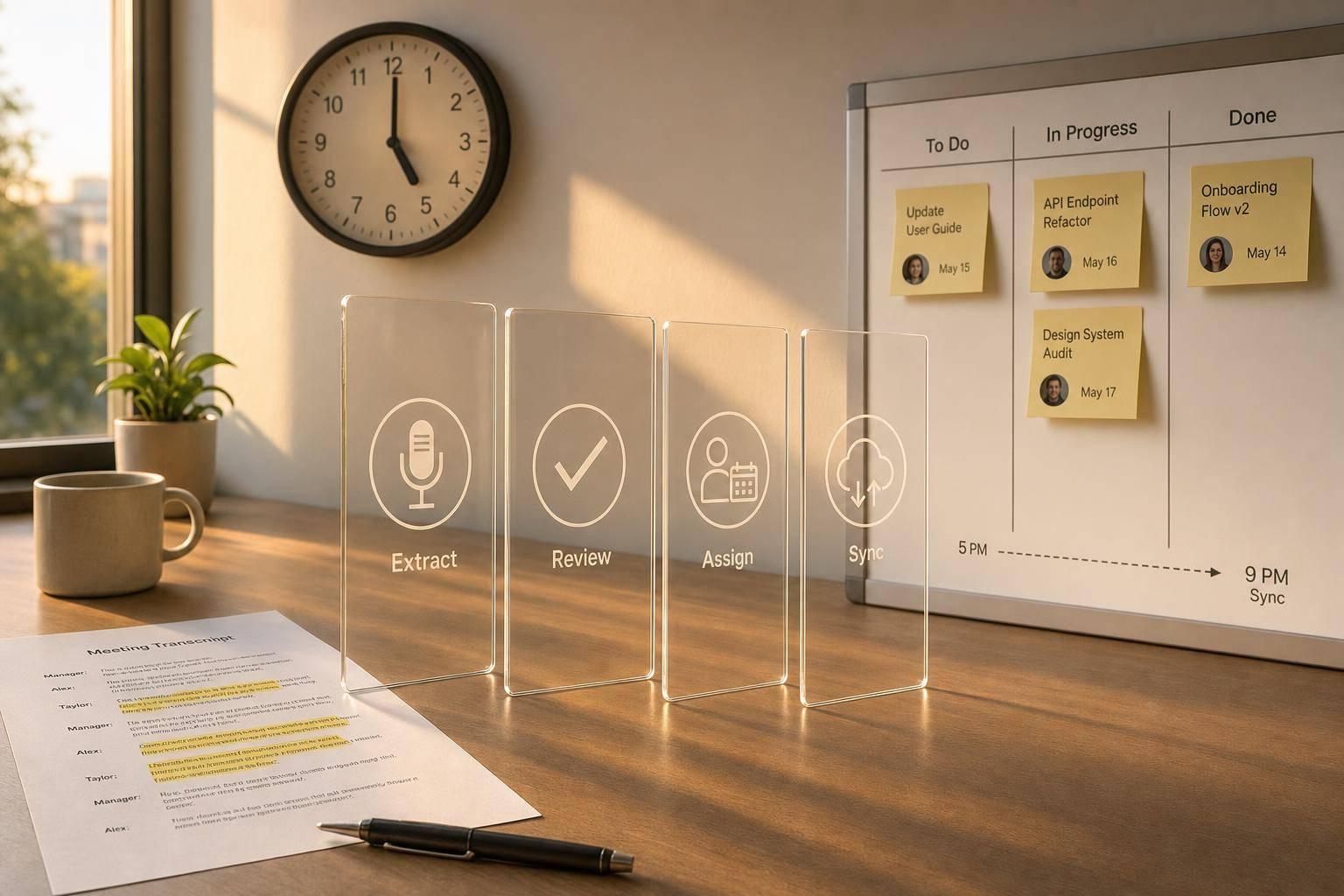
From Meeting Transcript to Task Board in 4 Hours: The Daily Pipeline We Run at 5pm
If you want meeting follow-up done by the same night, the process is simple: take every transcript at 5:00 PM, clean it, pull out only real tasks, assign an owner and due date, review unclear items, and push approved tasks to your board by 9:00 PM. That matters because project managers spend about 8 hours per week on meeting follow-up, and teams using this kind of flow save 4 to 6 hours per week.
Here’s the article in plain English:
- I start with one intake format for transcripts, summaries, or JSON
- I keep speaker labels, punctuation, and timestamps/@mentions when possible
- I sort each item into confirmed task, needs review, or reference only
- I rewrite vague lines into clear task titles and remove duplicates
- I assign priority, owner, and due date
- I stop unclear tasks from reaching the board
- I send approved tasks to Notion, ClickUp, Asana, or Trello
- I post a team update with the task and the transcript quote for context
A few rules drive the whole system:
- No title, owner, due date, or status = no board sync
- Speculation stays out
- Unclear ownership goes to review
- Duplicate checks run before task creation
- Each task links back to the source meeting
The core idea is this: I turn messy meeting talk into a short list of trackable work, then publish it on the same evening so nothing slips into Slack history or memory.
What I like about this process is that it doesn’t depend on people remembering to follow up. It depends on a fixed nightly run, a review gate, and a clean task record with the fields that matter: title, owner, due date, priority, source link, and status.
The article then walks through each part of that pipeline, from intake rules to board sync and final checks.
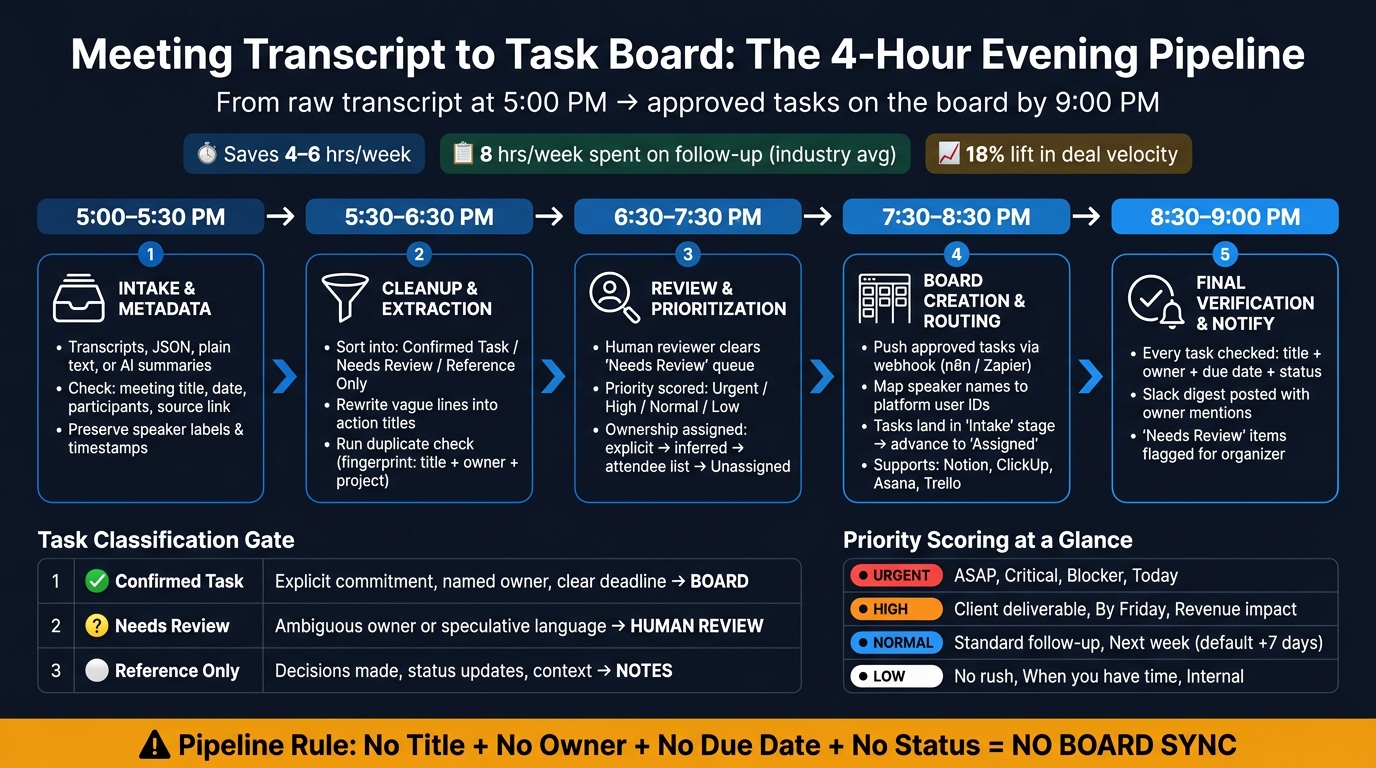
Meeting Transcript to Task Board: The 4-Hour Evening Pipeline
Turn any meeting transcript into actionable Notion tasks in under a minute with Claude.
1. What the 5:00 PM pipeline does
At 5:00 PM, raw transcripts come in through a single intake format. From there, they move through AI extraction, a rules-based review, and then onto the board by 9:00 PM. This section sets the intake gate for the daily run: what gets into the pipeline and which rules apply before extraction starts.
1.1 The business problem this solves
Slow follow-up is an operations problem, not a motivation problem.
Sales teams that automate CRM updates from meeting outputs report an 18% lift in deal velocity [7]. The point here is simple: turn follow-up into a system people can run every day, not something they have to remember in the moment.
1.2 What the workflow accepts at 5:00 PM
The pipeline accepts full meeting transcripts from meeting-recording tools, structured JSON payloads, plain text pastes, and AI-generated summaries [1][2][10]. These can come in through a webhook, API, or manual paste.
Before processing starts, the intake payload should include:
- the meeting title
- the meeting date in U.S. format, such as July 28, 2026
- participant names
- a source link or file path to the original transcript [1][2][9]
The meeting date matters because it lets the AI turn relative deadlines like "by Friday" into an actual calendar date [2].
1.3 Formatting rules before automation starts
Three rules matter before any transcript moves into automation.
Speaker labels must be preserved. Without clear speaker labels, AI models have a harder time assigning ownership correctly [2].
Keep punctuation and sentence breaks intact. If a transcript jams multiple thoughts into one line, extraction gets less reliable [1].
@mentions and timestamps should be kept when available. These signals help the AI map tasks to the right person and timeline [1][8].
Once the transcript is normalized, the next step is to separate confirmed tasks from decisions, references, and noise.
2. Clean the transcript and pull out real tasks
Filter the normalized transcript into real tasks, review items, and notes. This step acts like a gate: only work that can actually be done should move toward the 9:00 PM board. After that, the pipeline scores priority, assigns owners, and sets due dates.
2.1 How to sort decisions, tasks, and reference notes
Each item belongs in one of three buckets: confirmed task, needs review, or reference only.
A confirmed task includes an action, an owner, and a due date you can track. Decisions and FYIs should stay out of execution. Reference items belong in notes.
For something to count as a valid task, it needs commitment language, a named or inferred owner, and an action that can be checked later. Phrases like "we could look into that" or "it might be worth exploring" are speculative, so they should stay out of the pipeline. The system prompt should also filter out off-topic discussion, status updates, and speculative language.
2.2 Remove duplicates and rewrite vague items
Raw transcript language usually doesn't sound like a clean task. For example, a line like "we talked about updating the onboarding flow" should be rewritten as "Update onboarding checklist." Turn it into a direct action title. Clean titles make prioritization and ownership assignment easier later.
Duplicates show up all the time, especially when several people mention the same follow-up in different parts of the meeting. Use a dedupe key based on the normalized title, owner, and project context to merge overlaps before the board sync. If two people are named, split the item into two task objects so each person gets their own task.
Example:
- Raw transcript line: "I think Marcus mentioned he'd probably get back to the client about the revised pricing sometime next week."
- Normalized task: "Send revised pricing to client" - Owner: Marcus - Due: next week
Save the original sentence as a Source Snippet in the task record so the reasoning stays visible. Confirmed items then move into prioritization and assignment.
2.3 Task filtering table: confirmed, needs review, reference only
| Category | Criteria | Example Phrasing | Next Action |
|---|---|---|---|
| Confirmed Task | Explicit commitment, named owner, clear deadline | "Sarah will send the Q4 report by Friday." | Board |
| Needs Review | Ambiguous owner, group commitment, or speculative language | "The team needs to look into the API error." | Review |
| Reference Only | Decisions made, status updates, or background context | "We decided to delay the launch until October." | Notes |
Needs Review items pause for human approval. Confirmed tasks move next into scoring, ownership, and due-date assignment.
sbb-itb-9cd970b
3. Score priority, assign owners, and set due dates
Once a task makes it through filtering, the pipeline needs to answer three things fast: How urgent is it? Who owns it? When is it due? If that part goes sideways, the board ends up mirroring whoever spoke first in the meeting instead of what needs attention first.
At this stage, each confirmed task becomes a board-ready record.
3.1 Priority scoring rules used every day
The system scans the task title and source snippet for trigger words, then assigns one of four priority levels: Urgent, High, Normal, or Low. The goal is simple: make sure the 9:00 PM board sorts by urgency, not by meeting order.
A few common signals drive the score:
- Urgent: words like "ASAP", "critical", "blocker", "today," and "by end of day"
- High: phrases like "Client deliverable", "by Friday," or anything tied to revenue
- Normal: standard follow-ups with a "next week" window
- Low: tags like "no rush", "when you have time," or work that is plainly internal [11][8]
This keyword-based setup keeps triage steady from one meeting to the next. Each label is then mapped to the board's native priority field so it displays the right way after sync [5][2].
3.2 How ownership is assigned from explicit and implied signals
Ownership follows a simple lookup order.
First, the system checks for an explicit name in the sentence itself. If that fails, it looks for a first-person commitment from the speaker, such as "I'll handle it." If there's still no match, it checks the attendee list. When none of those steps produce an owner, the task is marked Unassigned and routed to Needs Review, where the meeting organizer is tagged to clear up the ambiguity. Until that review happens, unassigned items do not sync to the board [11][2][1].
Shared tasks need a little extra care. If the meeting note says, "Sarah and Marcus will prep the deck", the system creates one task per owner so the work shows up in each person's filtered view [2][4]. After the owner is set, the pipeline stamps the due date in that same pass.
3.3 Priority and assignment matrix
With priority and ownership locked in, the last step is setting a due date the board can sort correctly.
| Priority Level | Urgency Signals | Owner Status | Due-Date Condition | Required Action |
|---|---|---|---|---|
| Urgent | "ASAP", "Critical", "Blocker", "Today" | Explicitly named | Explicit or relative | Push to top of board; notify owner |
| High | "Client deliverable", "By Friday", "Revenue impact" | Inferred from role | Relative (e.g., "EOD") | Assign to project sprint; set reminder |
| Normal | Standard follow-up, "Next week" | Attendee list match | Missing (default +7 days) | Add to backlog; review in weekly sync |
| Low | "No rush", "When you have time", "Internal" | Known owner | None | Keep on board, deprioritized |
The AI gets the meeting date as a reference point so it can turn relative phrases like "by Friday" into a specific ISO 8601 date [2][1][12]. If no date is mentioned, Normal work gets a default due date of +7 days. Use TBD only when the timing is still unclear.
4. Push approved tasks to the board and notify the team
Once tasks are scored and assigned, the next step is simple: send them to the board and let the team know.
4.1 The board structure that keeps work moving
Only confirmed tasks that make it through filtering and scoring reach this stage. Every board in this pipeline uses four stages: Intake, Review, Assigned, and Ready for Work. [1][8]
AI-extracted tasks land in Intake first. If ownership is unclear or confidence is low, the task moves to Review before it can reach Assigned. Once a person clears it, the task advances to Assigned and then moves to Ready for Work when it has the green light for execution. [2][8]
Each task card should include seven fields:
| Field | Data Type | Rule |
|---|---|---|
| Task Title | String | Under 100 characters; action-oriented |
| Description | Text | Context from the transcript explaining the "why" |
| Owner | User ID | Map speaker name to platform-specific ID |
| Due Date | Date | ISO 8601 format; use a fallback if not stated |
| Priority | Select | Urgent / High / Normal / Low |
| Source Meeting Link | URL | Direct link to the transcript or recording |
| Status | Status | Defaults to Intake |
The Source Meeting Link gives each owner a direct path back to the transcript or recording. That means they can click through and see where the task came up in the meeting. It also gives the team a clear audit trail. [5][8]
4.2 How tasks move from transcript to task board
This is the handoff point where approved transcript tasks become board records.
The automation starts with a webhook in n8n or Zapier. That webhook sends approved tasks from the transcript parser into the board API. Before the API call happens, names are mapped to platform user IDs. Those names and task details are extracted by GPT-4o or Claude 3.5 Sonnet and then sent into the target tool through its API. [1][2][5]
This name-mapping step matters more than it may seem. A transcript might say Sarah, but ClickUp or Asana needs Sarah's platform-specific user ID. [5] Skip that step, and the card may end up with no owner.
Before creating a new card, check the task fingerprint so repeat runs don't create duplicates. [8]
After the card is created, Slack posts a summary, mentions each owner, and lists anything still sitting in the Needs Review queue. [1][7]
A simple example helps make that flow easier to picture.
4.3 A hypothetical end-to-end example
Say a transcript shows Marcus assigning Sarah the revised onboarding checklist and asking for it by Thursday. The pipeline pulls out that task and turns it into a ClickUp card like this:
| Field | Value |
|---|---|
| Task Title | Send revised onboarding checklist |
| Description | Assigned in the meeting. |
| Owner | Sarah (mapped platform user ID) |
| Due Date | ISO 8601 date for Thursday |
| Priority | High |
| Source Meeting Link | Transcript link |
| Status | Assigned |
ClickUp saves the task. Slack posts the summary. Sarah confirms in the thread, and the task then moves to Ready for Work.
The last piece is timing the full run inside the 5:00 PM to 9:00 PM window.
5. Run the full process inside the four-hour window
5.1 The 5:00 PM to 9:00 PM schedule
Once a task gets approved, the pipeline stops acting like an open-ended extraction flow and shifts into a fixed 5:00 PM–9:00 PM run. That four-hour block lines up with the earlier stages in the workflow: intake, cleanup, review, routing, and verification. Each stage has its own time block and one clear job.
| Time | Phase | What Happens |
|---|---|---|
| 5:00 PM – 5:30 PM | Intake & Metadata | Raw transcripts or audio files land in a watched folder or Meetings database. An operator checks the meeting date, participant list, and speaker labels. [8][3][4] |
| 5:30 PM – 6:30 PM | Cleanup & Extraction | The automation layer pulls out task JSON. Duplicate checking uses a task fingerprint built from normalized title, owner, and project. [1][2][8] |
| 6:30 PM – 7:30 PM | Review & Prioritization | A rotating reviewer or project manager clears the Needs Review queue, sorts out unclear owners, and adds implicit tasks the AI missed. [2][4] |
| 7:30 PM – 8:30 PM | Board Creation & Routing | Approved tasks are pushed to the task board, and speaker names are matched to platform user IDs. [1][5][3] |
| 8:30 PM – 9:00 PM | Final Verification | Every task is checked for title, owner, due date, and status, and the team gets a final digest. [1][5][3] |
That review block matters. It's the point where unclear ownership and missed tasks get caught before anything hits the board.
5.2 Rules that keep the pipeline reliable
After extraction, the gate stays tight. Only verified tasks move ahead.
- One source of truth. Every task lives in one database, so follow-ups don't get split across tools.
- No task moves past Intake without title, owner, due date, and status.
- Ambiguity goes to review, not the board.
- Error handling runs in parallel. If an API call fails, an error branch sends an immediate alert with the raw transcript attached. Nothing disappears quietly. [1][2]
These rules keep the board clean enough to trust the next morning.
5.3 Key takeaways for teams starting tomorrow
The pipeline works because each step is predictable. Standardize transcript inputs with speaker labels before 5:00 PM. Keep review strict: every task must clear title, owner, and due date before it reaches the board. Then publish by 9:00 PM.
For leadership teams, the upside is simple: faster follow-up, clearer accountability, and fewer missed handoffs.
"The point [of automation] isn't speed. The point is sovereignty. Every action item that lives only in your head is a tax on your attention." - Justin Glover [6]
FAQs
How much of this 5:00 PM to 9:00 PM pipeline can be fully automated?
Almost the entire pipeline can run on its own, but a human-in-the-loop review is still a smart safety check for accuracy and accountability.
A good rule of thumb: automate low-stakes internal routing. But for high-stakes items, client commitments, and tasks with fuzzy owners or deadlines, route them to a draft or review queue first. That quick check can catch small mistakes before they go live.
What happens when a transcript has no clear owner or due date?
Don’t make up missing details.
If a transcript doesn’t clearly show an owner or due date, the AI agent should mark that field as Needs confirmation, unspecified, or leave it blank, depending on how your workflow is set up.
For structured JSON, use unspecified or another placeholder string.
For Notion, bring in the task with an empty due date. Then set up the board to show tasks with missing dates so someone can assign them manually each Monday.
How do I set this up if my team uses multiple task and chat tools?
Use a routing setup based on meeting titles or metadata. A simple move is to add prefixes like [RevOps] or [Engineering]. Then, in n8n or Zapier, use an if/else or switch step to send extracted tasks to the right tool, project board, or Slack channel.
For user routing, keep one central roster that maps participant names to emails, IDs, or handles across platforms. Your automation can look up that roster to assign tasks to the right account and send notifications to the correct workspace or direct message.