We Rebuilt a Google Ads Account With an Agent Doing the Grunt Work. CPL Dropped. Here Is How.
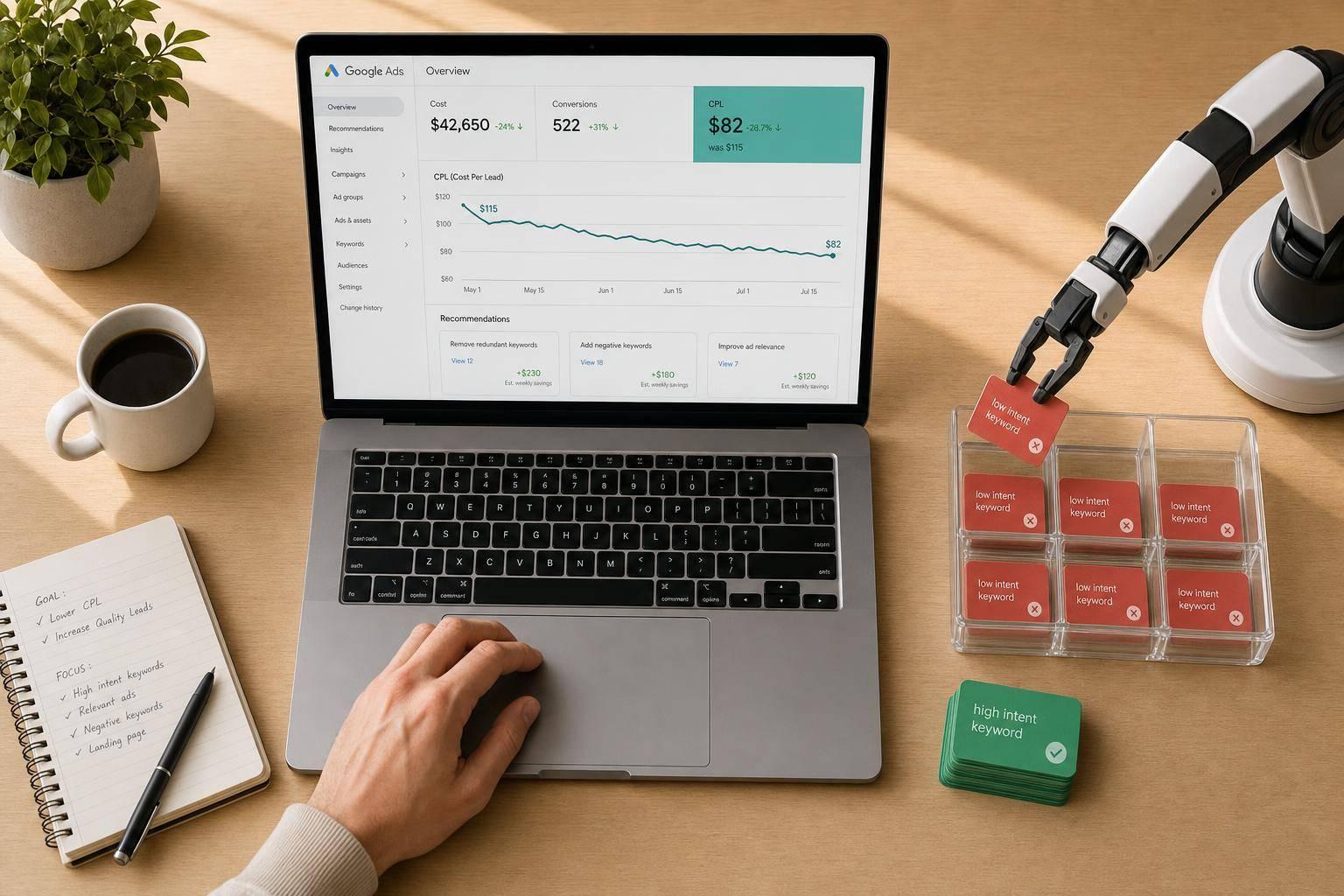
We Rebuilt a Google Ads Account With an Agent Doing the Grunt Work. CPL Dropped. Here Is How.
Here’s the short answer: I used an AI agent to handle the daily Google Ads cleanup work, kept humans on approval, and saw CPL drop from $115 to $82 - a 28.7% cut.
This was not about handing the account over to software. It was about fixing the slow, repetitive work that teams often miss:
- reviewing search terms every day
- building negative keyword suggestions
- testing RSA headlines
- watching spend pace, device results, and odd swings
- cleaning up conversion signals before changing bids
Across the two accounts in the case study, the same pattern showed up: too much broad traffic, weak conversion data, and budget leaking into low-intent clicks. The fix was simple in concept:
- clean tracking first
- let the agent flag waste
- keep human approval in place
- tighten keyword intent, ads, landing pages, and bidding signals
A few numbers stand out:
- 35% of the law firm’s clicks came from low-intent searches
- the SaaS account was wasting 29% of spend on low-value traffic
- negative keyword coverage grew by 35% in the first 30 days
- a -35% mobile bid adjustment helped improve CPA by 18%
- by the end, one SaaS campaign reached $87 CPA and 112 demo requests
What I take from this is simple: the agent did the grunt work, and the humans made the calls that needed judgment. That mix cut waste, improved conversion rate, and lowered spend without chasing more traffic.
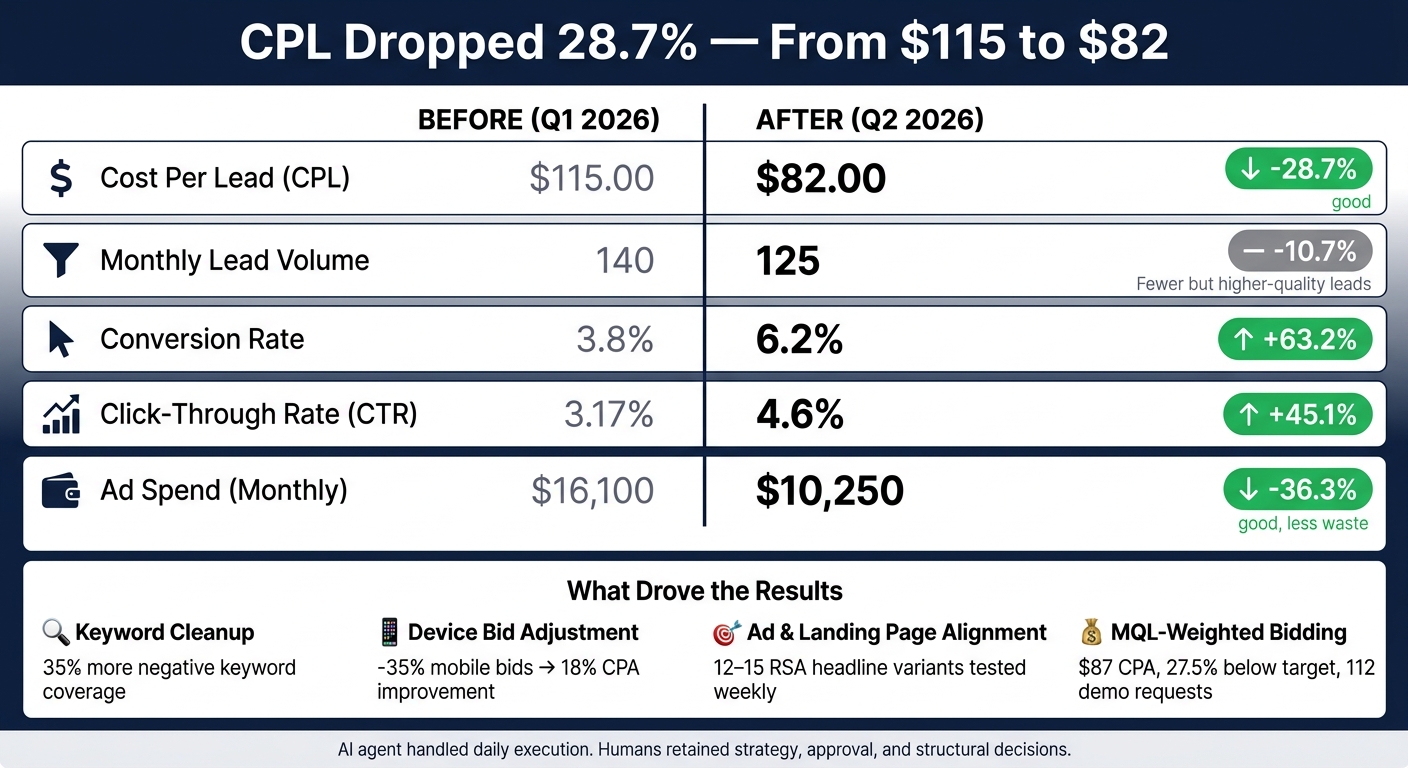
Google Ads AI Agent Rebuild: Before vs. After Performance Results
AI Agent Builds a Google Ads SKAG Campaign in 2 Minutes (Live Demo)
sbb-itb-9cd970b
1. The AI Agent's Role: Handling Repetitive Google Ads Work With Human Guardrails
The agent took care of the repeatable execution work. The human team kept strategy, judgment, and final approval. That mattered because the waste didn't come from one giant blunder. It came from lots of small leaks that added up over time.
Tasks the agent handled every day
Each morning, the agent authenticated with OAuth2, pulled fresh data from the Google Ads API, and ran through its review checklist. It checked spend pacing against monthly targets, flagged any metric that moved more than two standard deviations from its 30-day rolling average, watched for Quality Score changes, and reviewed search terms for zero-conversion queries, high-click terms, and off-topic intent. [5]
Search terms with five or more clicks and no conversions were added to a review queue. They were not added to the negative keyword list on their own. [5]
"The agent handles data review and pattern recognition; humans handle strategy and client context." - Volado Labs [5]
Tools, automations, and data flow
The stack was pretty simple. Google Ads API supplied spend and search-term data, GA4 tracked on-site conversions, CRM data showed lead quality, and an LLM created RSA variants from landing-page headers. [7][8]
CTR was used to judge ad copy performance. Landing page performance was measured on its own, not mixed into ad copy evaluation. [3]
"An account manager might update RSAs once or twice in a six-month period... The agent has no such competing priorities." - Brendan Andrew Chase, Founder, Extra Large Marketing [3]
Human review loop and control points
Every suggested negative keyword went into a review queue, never straight into the account. The agent built a candidate list with context, including spend, clicks, and the reason each term was flagged. A human then approved or rejected those suggestions in bulk. [5] Ad copy swaps needed explicit approval, and people handled major structural changes.
Here's how that split worked across the main task types:
| Task | Agent's Role | Human's Role |
|---|---|---|
| Search terms | Flags negative candidates with spend and click context | Approves or rejects candidates in bulk |
| Spend control | Monitors pacing, bid performance, and overspend risk | Sets target CPA and approves reallocations |
| Ad copy | Generates RSA variants from landing page data | Reviews for brand voice and strategic fit |
| Anomalies | Detects statistical deviations | Investigates root cause |
Offer positioning, ICP decisions, and messaging direction stayed with the human team the whole time. That division made it easier to spot the waste patterns behind account performance and gave the team a clear basis for the next round of changes.
With that review loop in place, the team could move on the waste patterns it found.
2. Four Account Changes That Cut Wasted Spend
The review found four main leaks: keyword waste, weak ad-to-page match, poor bidding signals, and pacing drift.
Keyword restructuring and negative keyword expansion
The rebuild grouped keywords by intent and moved away from feature-heavy terms. Instead of chasing searches like "workflow automation software", it shifted toward problem-first queries such as "reduce manual handoffs" and "replace spreadsheet processes." The goal was simple: get in front of people who were closer to buying, not just browsing. [9]
Campaigns were also split into intent tiers. High-intent demo searches were separated from mid-funnel research traffic, which stopped ad groups from cannibalizing each other. [4]
The agent also flagged search terms with 5+ clicks and no conversions, and humans then bulk-approved the negatives. [5] Semantic similarity scoring helped spot off-topic queries like "what is crm" and "crm jobs near me." Those searches had been draining $4,200 per month without a single conversion. [5][10] In the first 30 days, negative keyword coverage grew by 35%. [5]
Ad copy testing and landing page alignment
The agent produced 12–15 headline variants per ad group. It pinned the two highest-volume keywords into the headlines to help improve Quality Score and Ad Rank. [2][3]
Ad testing used CTR as the main signal, while landing page performance was tracked on its own. That way, one weak link didn't hide the other. A strong ad can pull clicks. A weak page can still kill conversions.
Generic pages were replaced with intent-specific landing pages that matched the search query. That tighter match tends to cut friction fast.
Budget, bidding, device, and schedule adjustments
Bidding shifted from raw CPA targets to MQL-weighted conversions. That told Google to go after lead quality, not just cheap form fills. [9]
"If your conversion tracking tells Google Ads that every trial is equally valuable, the algorithm will do exactly what you asked: find the cheapest trials." - Alexander Perleman, Head of Product, groas [9]
In the B2B SaaS campaign with an $8,000/month budget, the agent spotted a problem on day 9: mobile traffic was converting at half the rate of desktop even though click rates were higher. [2] It applied a -35% mobile bid adjustment. By week three, overall CPA had improved by about 18%. [2]
By the end of the 90-day run, the campaign landed at $87 CPA, which was 27.5% below target, and drove 112 demo requests. [2] Automated pacing also kept budget available during peak conversion hours. [2]
These four fixes set up the before-and-after results below.
3. Results: How Much CPL Dropped and What Drove It
This compares Jan. 1–Mar. 31, 2026, with Apr. 1–Jun. 30, 2026.
Before-and-after performance snapshot
Here’s the short version: CPL dropped from $115.00 to $82.00. That’s a 28.7% cut.
At the same time, conversion rate moved from 3.8% to 6.2%, monthly ad spend dropped from $16,100 to $10,250, and CTR went from 3.17% to 4.6%. Lead volume also went down, from 140 to 125, because low-intent traffic was filtered out [2].
That tradeoff matters. The account brought in fewer leads, but those clicks were more qualified. So the gains came from less waste, tighter intent, and faster cleanup, not from spending more money.
| Metric | Before (Q1 2026) | After (Q2 2026) | Change |
|---|---|---|---|
| Cost Per Lead (CPL) | $115.00 | $82.00 | -28.7% |
| Monthly Lead Volume | 140 | 125 | -10.7% |
| Conversion Rate | 3.8% | 6.2% | +63.2% |
| Click-Through Rate (CTR) | 3.17% | 4.6% | +45.1% |
| Ad Spend (Monthly) | $16,100 | $10,250 | -36.3% |
Most of the lift came from cutting wasted clicks and tightening match between search intent, ads, and landing pages. Put simply: the account got leaner.
What automation drove vs. what humans drove
These results came after the keyword, ad, landing page, and bidding changes covered above. Over 90 days, those routines stacked on top of each other.
The key point is simple: the agent didn’t replace strategy. It made execution faster. Automation handled repeat work at scale, while humans still made the big calls about structure, priorities, and offer fit.
| Change Type | Agent Involvement | Result |
|---|---|---|
| Search Term Cleanup | Daily negative expansion | Immediate reduction in wasted spend |
| RSA Headline Testing | Weekly testing | Lower CPC via improved Quality Score |
| Bid & Device Adjustments | Performance checks and mobile bid cuts | 18% improvement in CPA [2] |
| Account Restructuring | Low (human-led intent mapping) | Long-term lead quality improvement |
| Offer & Landing Page Alignment | Medium (agent audits, human copy) | Higher trial-to-paid conversion rates [9][6] |
This split matters because it shows where each side does its best work.
- Automation handled speed, volume, and consistency.
- Humans handled direction, judgment, and account structure.
That’s the part many teams miss. The win didn’t come from letting software run wild. It came from using automation to do the repetitive work faster, while people stayed in charge of the plan.
Next is the rollout order teams can use to apply the same process.
4. How to Apply This in Your Own Account
A practical rollout order for teams managing growth at scale
This process worked because the team followed a strict sequence. If you skip the early steps, the later ones tend to fall apart. The goal is simple: don’t train the system on messy data, and don’t burn budget while doing it.
Start with tracking. Fix tracking before anything else. Keep 1–3 primary conversions, move soft signals into secondary status, and remove duplicate firing. When tracking is clean, the agent can spot waste instead of making it worse.
"If tracking is wrong, every other finding is noise." - Soku Team [11]
After tracking is in good shape, bring in the agent in read-only mode. Let it run that way for 2–4 weeks. During that time, have it flag high-spend, no-conversion terms, and require human approval for every negative keyword. That extra check matters. It helps you cut bad spend without blocking traffic you may still want.
Before the agent can write to the account, set hard $ thresholds. Flag any campaign where wasted spend is more than 10% of total budget, or where spend-weighted Quality Score drops below 7.0 [11]. Then expand the agent’s role in this order: keyword cleanup, ad-to-landing-page alignment, and only then budget and bidding controls.
Here’s the rollout order in practice:
| Phase | Action | Signal |
|---|---|---|
| 1. Tracking | Fix primary/secondary conversions, remove duplicates | Tracking accuracy |
| 2. Keyword Cleanup | Agent flags high-spend, no-conversion terms; human approves negatives | Reduction in non-intent spend |
| 3. Ad & Page Alignment | Match ad headlines to landing page copy | CTR and landing page conversion rate |
| 4. Bidding Controls | Move to automated bidding once conversion volume is sufficient; agent monitors pacing | CPL, qualified lead rate |
One more thing: do not switch to automated bidding too early. Wait until conversion data is clean and volume is steady. Changing bidding strategies can reset the learning phase [1]. Get the base right first. Then let automation handle the work it’s meant to do.
FAQs
What tasks should an AI agent handle in Google Ads?
An AI agent should take care of the repetitive parts of Google Ads work, such as:
- Pulling live performance and Quality Score data
- Reviewing spend pacing and spotting anomalies
- Auditing search terms and suggesting negative keywords
- Generating and testing responsive search ads
- Organizing keywords and ad groups
- Monitoring audiences, remarketing, and attribution setup
It can also draft optimization actions and prepare change scripts in dry-run mode, so a human can review everything before any live updates go out.
How do I safely use an AI agent without losing control?
Use a human-in-the-loop setup: let a person make the big calls, and let the AI do the hands-on work.
Start with read-only analysis first. That gives you a safe way to see what the AI spots before it touches anything. As trust builds, you can grant limited access in stages instead of handing over the keys all at once.
For bigger moves, keep manual approval in place. That includes major budget shifts or campaign changes. A simple rule works well here: the AI can suggest changes, but a person signs off before anything major goes live.
It also helps to set clear guardrails, such as:
- Daily budget caps
- Percentage-change limits for bids, budgets, or targeting
- Regular weekly or bi-weekly reviews
Those guardrails keep the AI from drifting too far from your business goals. And the review cycle gives you a steady checkpoint to make sure performance, spend, and direction still match what the business needs.
What should I fix first before automating my account?
Fix tracking first. Clean up double counting and sort out micro-vs.-primary conversion mix-ups. Make sure every lead from forms and phone calls ties back to the exact ad and keyword. Then check the data with a human review.
Only automate after your conversion signals are trustworthy. If not, bidding, budget shifts, and optimization will run on bad or incomplete data.