Inside a Real Agent Stack: 5 Tools, 1 Operator, 0 New Hires

One person used five tools to research 137 leads, book 9 meetings in 4 days, and add $35,000 in MRR within 45 days. That is the core idea.
If I strip this down to the plain facts, the setup works like this:
- Apollo finds leads
- Clay fills in missing data
- Claude writes research notes and draft emails
- Instantly sends sequences and follow-ups
- Make updates systems and alerts the human
The big takeaway for me is simple: this stack cuts manual GTM work without adding staff. Reported time dropped from 20 to 30 hours a week to 3 to 5 hours, while monthly tool spend stayed around $400. The human still reviews drafts, checks edge cases, and handles replies that need judgment.
Here’s the short version of what matters:
- Best fit: companies past $10 million in revenue that want more outbound work done by the same team
- Main jobs covered: sourcing, enrichment, research, drafting, follow-up, reply routing, and CRM updates
- Human checkpoints: ICP setup, message approval, reply review, and campaign changes
- Safe rollout: start with one workflow, keep a 14-day human approval period, and use one shared record for each account
| Tool | Main job | Output |
|---|---|---|
| Apollo | Lead search | Contact list |
| Clay | Data enrichment | Verified emails and buying signals |
| Claude | Research and drafting | Personalized hooks and email drafts |
| Instantly | Sending | Sequences, follow-ups, replies |
| Make | Routing | CRM updates and alerts |
In other words: this is not about full hands-off outbound. It is about using AI for the repeatable parts and keeping humans on the parts where mistakes cost money.
I Built 6 AI Agents That Run Our Entire Outbound (Learn HOW)
sbb-itb-9cd970b
The five-tool stack and what each tool does
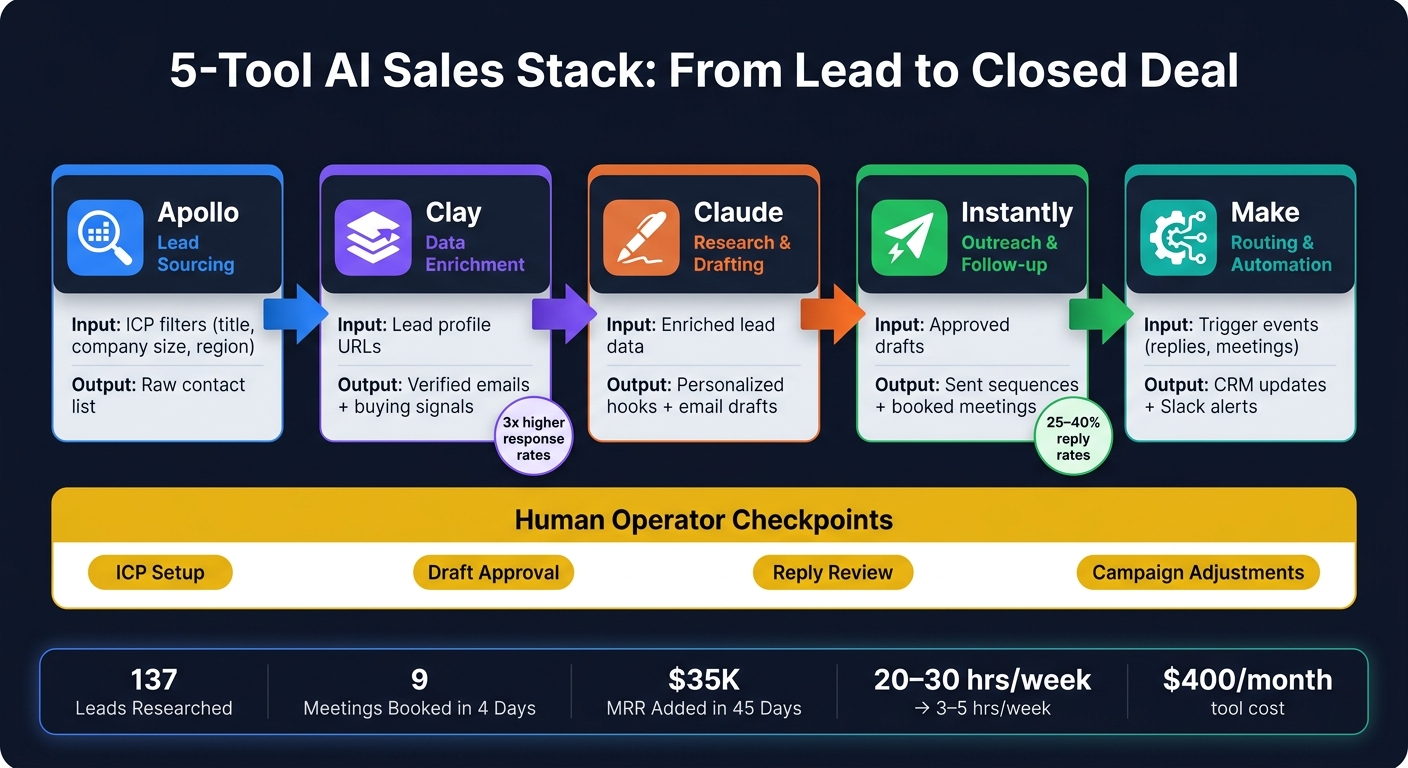
5-Tool AI Sales Stack: From Lead to Closed Deal
Each tool has one clear job. Then it passes one clean output to the next tool in the stack.
| Tool | Core Function | Primary Input | Output | Next Handoff |
|---|---|---|---|---|
| Apollo | Lead Sourcing | ICP filters (title, company size, region) | Raw lead list with contact profiles | Clay |
| Clay | Enrichment | Lead profile URLs | Verified emails, headcount growth, funding signals | Claude |
| Claude | Research & Context | Verified lead data + company website | Personalized message hooks and draft copy | Instantly |
| Instantly | Outreach & Follow-up | Personalized drafts | Sent sequences, replies, booked meetings | Make |
| Make | Automation & Handoff | Trigger events (new reply, meeting booked) | CRM updates, Slack alerts, tracking field changes | Human operator |
Read it from left to right: the output from one tool becomes the input for the next. That simple handoff is what keeps the system from turning into a mess.
Lead sourcing and enrichment
Apollo finds the right people. The operator sets ICP filters like job title, company size, industry, and region. Apollo then returns a list of matching contacts from its B2B database.
That list goes straight into Clay. Why so directly? Because it keeps enrichment structured and clean, which matters once you start working at scale.
From there, Clay adds more depth to each record. It pulls in signals like headcount growth and new funding rounds. Claygent automates that enrichment step, so the operator doesn't have to do it by hand. And this part matters: signal-based first lines built from this data can achieve response rates 3x higher than generic openers.[5]
Those signals then become Claude's input.
Research, drafting, and outreach execution
Once Clay produces enriched records, Claude turns those raw signals into personalized messaging. It isn't just filling blanks in a template. It's used for voice and strategy, so the message sounds like it came from someone who did their homework.
The operator still checks a sample of drafts before anything goes out. That's the guardrail. If the tone feels off or the hook is weak, it's easier to fix a few drafts early than clean up a bad campaign later.
After the draft is approved, Instantly takes over the sending side. It handles inbox warmup, domain rotation across multiple accounts, and follow-up sequencing. Sequences are capped at three emails to protect domain reputation.[5]
Automation, routing, and campaign handoff
Make ties the whole process together. When a prospect replies or books a meeting, Make triggers the next action. That might mean updating the CRM, sending a Slack alert, or moving the contact into a new sequence.
At that point, the human operator only steps in where judgment matters most: objections and warm handoffs.
How the workflow runs from lead capture to reply handling
Here’s how the five tools move a lead from capture to a human-approved send. The key is simple: use one shared record per account so every tool reads from and writes to the same context.[1][6]
| Stage | Responsible Tool | Action | Result |
|---|---|---|---|
| Lead Capture | Apollo | Pulls new inbound signals into the shared record | Structured lead record ready for qualification |
| Qualification & Research | Claude | Scores the lead against ICP and intent signals, then prepares a research brief | Qualified status and research brief ready for operator review |
| Drafting | Claude | Writes personalized copy tied to the specific trigger | Send-ready draft in the review queue |
| Approval | Human Operator | Reviews the queue, edits tone, approves or rejects | Verified draft released for sending |
| Sending & Follow-up | Instantly | Executes the sequence after approval and manages follow-up timing | Outreach delivered; touchpoint logged |
| Reply Handling | Claude / Human | Claude classifies routine replies; humans handle objections and edge cases | Human notification or drafted follow-up |
| Routing & CRM Update | Make | Updates CRM, sends Slack alerts, and routes the contact to the next step | Pipeline stays current; operator notified |
Stage-by-stage handoffs
Each step follows the same left-to-right flow: Apollo to Clay to Claude to Instantly to Make. Data moves through the stack on triggers, not manual forwarding. That matters because the whole system stays in sync without someone babysitting every handoff.
When a lead hits the shared record, Claude reads the full record, pulls the right context, and builds a research brief. Then it drafts the message and places it in the review queue. Nothing goes out until the operator checks it. For the first 14 days of a workflow, that Edit/Approve step stays mandatory so the system can calibrate to the operator’s judgment.[1][8]
The message itself should tie back to the exact event that created the lead. That’s the safe play. A funding announcement, a job repost, or a headcount spike gives the draft a reason to exist. A generic opener does not.
After approval, Instantly handles the send and follow-up timing. When a reply comes in, Claude or the operator interprets it. Then Make updates the CRM and routes the contact to the next step, whether that’s a CRM update, a Slack alert, or human follow-up.
Where the operator steps in
The operator stays involved where judgment matters most:
- ICP selection
- Draft approval
- Reply interpretation
- Campaign adjustment
If a reply sounds short, skeptical, or unsure, it should go to a human instead of being pushed through automation.[1][3] Put plainly, humans step in when a reply needs judgment, not when it can be routed.
These handoffs follow the same AI lead-gen playbook that sets up the time savings and headcount gains covered in the next section.
Results: time saved, hires avoided, and output gained
Once the handoffs are in place, the next thing that matters is output. That’s where this workflow starts to pay off: fewer manual steps, faster handoffs, and much less operator time.
Productivity and speed metrics
Weekly execution time drops hard. Operator time goes from 20–30 hours per week to just 3–5 hours focused on review and approval [4].
The same pattern shows up in research. Competitive research went from 4 hours to 42 minutes total [2]. Lead qualification, which took 20 minutes on average when done by hand, dropped to 11 seconds once the stack was live [1].
Outreach performance changed too. Intent-based outreach through the stack hit 25–40% reply rates, compared with 1–2% for manual cold outbound [4].
That gap isn’t small. It changes how much work one person can handle in a week.
Cost and headcount impact
Time saved matters most when it means you don’t need to add another hire. The clean way to track that is to map each workflow to the role it takes over.
At about $400 per month in tool costs, the stack can take on SDR, research, and campaign-ops work for a fraction of the cost of a full-time employee [1].
Next, here’s the minimum setup needed to run this without disrupting current operations.
How to build this stack without breaking your current operations
What you need in place before you start
Bad inputs break the stack. Messy signals make automations fail without warning. So the rollout starts with inputs, not automation.
Before you touch any tool, lock down three things: a clear ICP, clean CRM fields, and an approved Voice Bible. A Company Bible that spells out tone, ICP, beliefs, and guardrails keeps drafts on message and protects outbound quality as one operator scales [2][9]. Without it, AI-drafted copy turns generic fast.
You also need a shared memory schema: one record per account that every tool can read from and write to. Without that setup, the tools act like isolated scripts instead of one connected stack [1][7]. Put one person in charge of a daily review, too. That human checkpoint is what catches edge cases and keeps the system from drifting off course.
Where to start and what to take away
Don’t build the full stack all at once. Start with one repeatable task. Lead enrichment is the safest first move, and it gives you a clean way to prove ROI before adding more tools [10][7]. That early win buys back operator time for work that needs judgment.
For the first 14 days of any new agent, keep every output in Edit/Approve mode [8][9]. Set those guardrails before the first send, post, or CRM write.
Use this checklist before you turn on any automations:
| Requirement | What It Means | Who Owns It |
|---|---|---|
| ICP + Voice Bible | Documented brand voice, beliefs, and target customer profile | Founder / Brand Owner |
| Clean CRM fields | Standardized, consistently updated fields with a shared memory schema | Operator / Ops Lead |
| API connections | OAuth/API links between tools; modular links so one swap doesn't break the stack | Technical Operator |
| 14-day HITL period | Human approval required on every email, CRM write, or post during the first 14 days | Daily Monitor |
| Safest first automations | Lead enrichment, research prep for calls, follow-up routing, and CRM routing | Operator |
Once the first workflow is stable, add follow-up sequencing and drafting. Keep low-stakes outputs on spot checks. Keep high-stakes work human-only [2][8]. It also helps to set aside about two hours per month for prompt tuning and knowledge base updates so performance doesn’t slip over time [10].
When those pieces are in place, the stack can run with light oversight. The model here is simple: one operator, five tools, and human checks at high-stakes steps can increase output without adding headcount.
FAQs
Is this stack worth it for companies under $10 million in revenue?
Yes. For companies under $10 million in revenue, this stack can produce pro-level output at a fairly low fixed cost, often around $300 to $600 per month.
It takes routine work off the team's plate, including:
- lead generation
- customer support
- reporting
That means smaller businesses can save time, cut headcount costs, and spend more energy on strategy instead of busywork.
How hard is it to set up shared records and tool handoffs?
It’s usually a modular setup. More often than not, it takes technical discipline more than advanced coding.
You’re connecting systems that already exist through an integration layer, then relying on one central source of truth instead of building a big, complex stack from scratch. That’s the trade-off: less custom infrastructure, more care in how everything fits together.
The main friction points are setup time, clean and standardized data, and iterative testing. A good way to handle it is to start small with just two tools, make sure each handoff works, and then add more complexity only when bottlenecks start to show.
Which tasks should stay human-led after automation?
Even with an advanced agent stack, some high-stakes work still needs a human in the loop to protect quality and trust.
That usually includes:
- High-emotion interactions, like angry customers or people about to cancel
- Judgment calls around strategy, such as pricing, positioning, or crisis triage
- Physical-world tasks and final output decisions, including brand-voice review and core business logic checks