The 9-Email Webinar Sequence an Agent Now Sends for a Licensing Coach
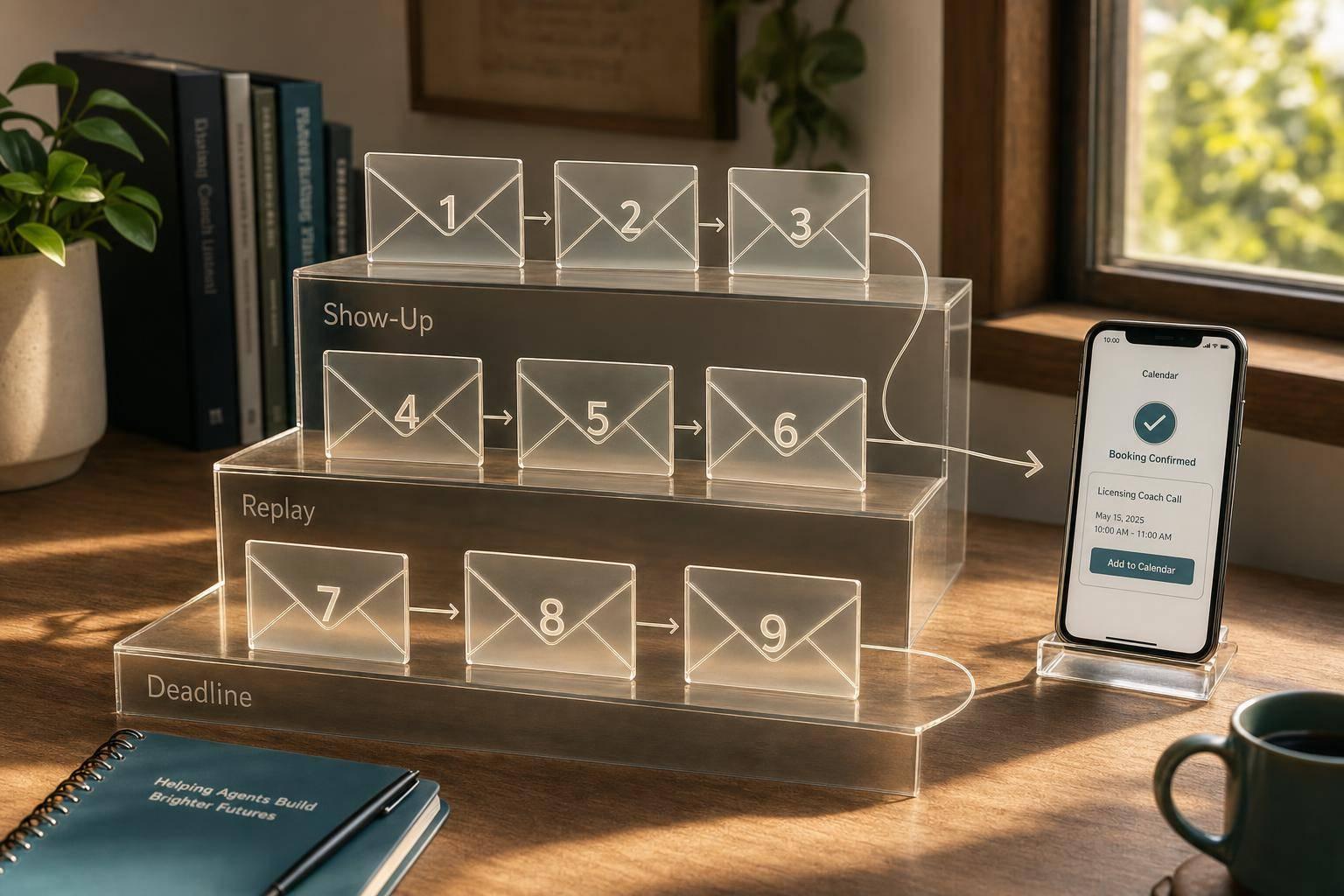
The 9-Email Webinar Sequence an Agent Now Sends for a Licensing Coach
Most webinar buyers do not buy on the day of the event. If a licensing coach sells a $3,800+ offer, the money usually comes from the follow-up, not the live room.
I’d sum up the article like this: the agent sends 9 emails across three stages - before the webinar, right after it, and near the close of the offer. It also changes the path based on what each person did, like attending, watching the replay, clicking the pricing page, or asking buying questions. That matters because live buyers may be just 1%–5%, while high-interest leads need a sales reply in about 2 to 4 hours, not the 42 hours many teams take by hand.
Here’s the full flow in plain English:
- Emails 1–3: confirm registration, remind people, and get them to show up
- Emails 4–6: drive attendance, send the replay, and recap the main points
- Emails 7–9: use proof, answer objections, and push action before the deadline
- The agent sorts leads by behavior, so no-shows, partial attendees, and high-intent leads do not get the same emails
- Main things to track: show-up rate, replay clicks, watch time, reply rate, booked calls, and unsubscribe rate under 0.5%
A short view of the sequence:
| Main job | What triggers the next step | |
|---|---|---|
| 1 | Confirm registration | Calendar clicks, initial interest |
| 2 | Build interest | Opens, clicks, CRM tags |
| 3 | Lock in attendance | Opens, resend if missed |
| 4 | Get people into the room | Same-day opens, live joins |
| 5 | Send replay or thank-you | Attend vs. no-show split |
| 6 | Recap and soft CTA | Replay clicks, call interest |
| 7 | Show buyer proof | Objection-based clicks |
| 8 | Handle concerns | Replies, call requests |
| 9 | Push action before close | Last-minute clicks, SMS reminder |
If you want webinar follow-up to turn into sales, this is the core idea: send the right email based on what the lead did, then move fast when buying intent shows up.
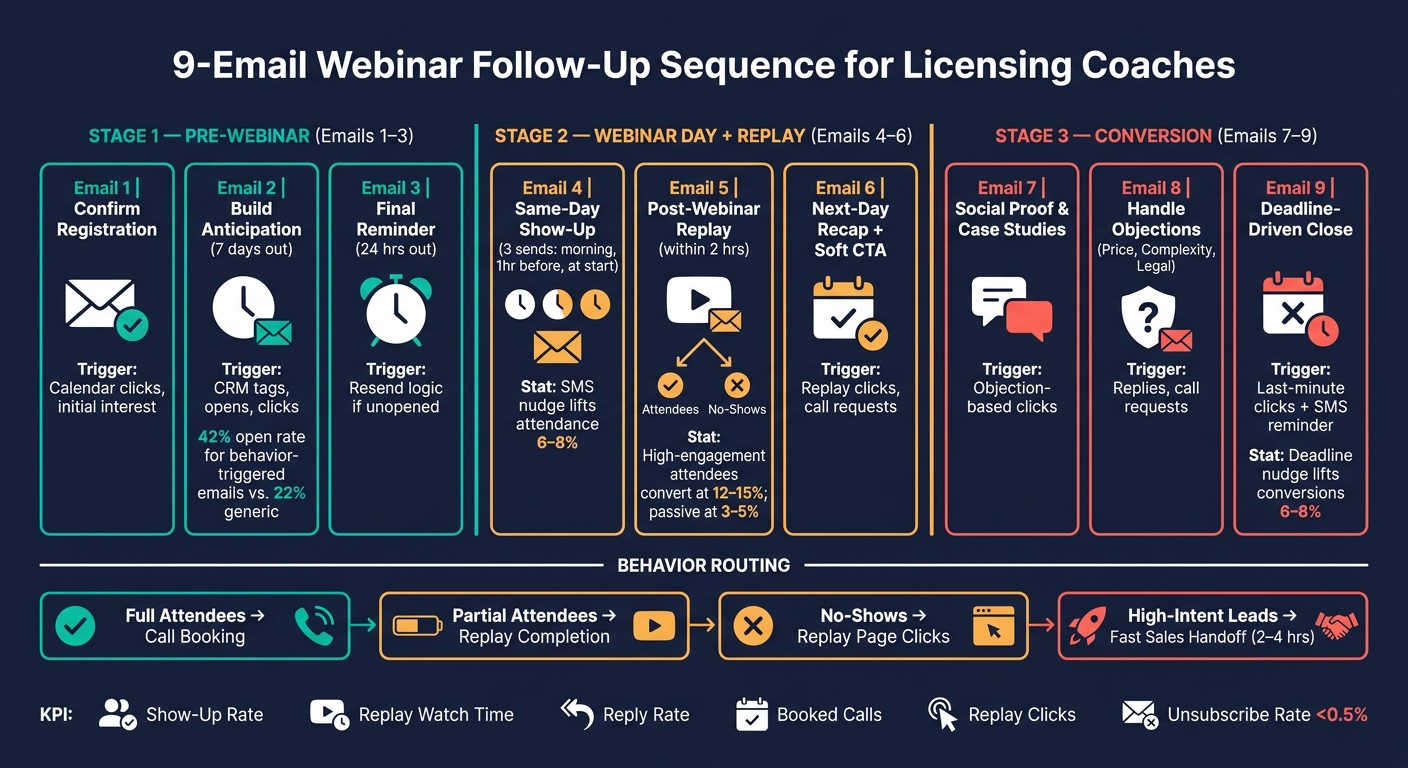
9-Email Webinar Follow-Up Sequence for High-Ticket Licensing Coaches
How to Follow Up Effectively After a Webinar | Day 27
sbb-itb-9cd970b
Emails 1–3: From Registration to Pre-Webinar Commitment
Emails 1–3 take a new registration and turn it into a real plan to show up. Each email has a clear job: confirm the signup, build interest, and nail down the final details. It starts with the confirmation email because what happens in that first minute shapes what happens later.
Email 1: Registration Confirmation and Expectations
Send this email right after someone registers. The goal is to remove friction and lock in the commitment. That means the email needs the date, time, time zone, duration, join link, and calendar links.
But logistics alone won't do the job. The email should also restate 3 to 5 specific things the person will learn about the licensing offer. Skip vague claims. Focus on clear outcomes they can picture.
If the form collected a licensing challenge, the agent should reflect that back in one sentence. That small detail matters. It makes the message feel like it was written for them, not sent to a giant list.
End with a P.S. that hints at the next email, such as "Keep an eye out - I'm sending you something useful before the session." That little tease gives people a reason to open what comes next.
Once the registration is confirmed, the next email keeps the webinar date from slipping into the background.
Email 2: One-Week Reminder That Builds Anticipation
Seven days later, attention starts to drift. This email needs to rebuild the why before it fades.
Instead of sending a plain “the webinar is next week” reminder, use this message to share one strong insight. That could be a common mistake in the licensing industry or a short story that shows why the speaker is worth listening to. The shift here is from logistics to value. You're giving the registrant a reason to keep that time blocked.
This is also where segmentation pays off. The AI agent syncs with the CRM and tags registrants as new leads, warm leads, or past clients. Then it adjusts the angle based on the registration source and form answers. A past client might get a line that nods to earlier work together. A new lead might get a line tied to a core licensing pain point. Research on behavior-triggered sequences shows they reach 42% open rates, compared to just 22% for generic blasts [6].
Add the calendar links again so the session stays on the person's calendar, and keep the copy plainspoken and specific to the industry.
The last pre-webinar reminder shifts that interest into a firm plan.
Email 3: One-Day Reminder With Access Details and Agenda
Twenty-four hours before the webinar, the focus moves back to logistics. Restate the start time, join link, and agenda. If there's a live-only bonus, mention it here. If it helps, add a short note about what to bring, like a few licensing questions, and remind people to join a few minutes early to test the platform.
The AI agent also uses resend logic at this stage. If a registrant doesn't open the email, the agent automatically sends it again with a different subject line. That second send catches people who missed the first one without bothering those who already clicked. The goal is simple: cut last-minute confusion so more people attend.
After this, the sequence moves from pre-webinar commitment to same-day attendance prompts.
Emails 4–6: Show-Up, Replay, and Early Post-Webinar Conversion
Webinar day is where attendance and post-show conversion are won or lost. This is the point where the sequence turns attention into actual show-ups.
Email 4: Same-Day Show-Up Reminders
After the one-day reminder, the agent moves from prep mode to attendance mode. Email 4 includes three same-day sends: one in the morning, one an hour before, and one right at start time.
The morning email should rebuild urgency with a teaser, not a bland “don’t forget” message. Think along the lines of "Today: The #1 mistake most people make with licensing" [5][10]. That gives people a reason to open and a reason to care.
The one-hour reminder should stay short. Under 50 words is the target, with the join link placed at the top [1][10]. At that point, people don’t need a long explanation. They need a fast path into the room.
The final send, at start time, should use plain and direct wording like "We're live" or "Doors opening" [7][10]. This works well for late openers who are scanning their inbox and deciding in seconds.
Subject lines matter a lot in this stretch. Curiosity-based lines tend to work best for the morning reminder, while clear subject lines like "Starting in 60 minutes" usually perform better for the last push [1][10]. Adding an SMS reminder 15 minutes before the event can increase attendance by 6%–8% [7]. The AI agent can send all three on its own and swap subject lines based on timing and purpose.
Email 5: Post-Webinar Thank-You and Replay Link
This email should go out within 2 hours after the webinar ends [10]. It also needs to split into two versions based on whether the person attended.
Attendees should get a thank-you email with the replay link, presentation slides, and a bonus item. For a licensing coach, that bonus could be a licensing checklist. No-shows should get a "We missed you" version that points to one key takeaway from the session and includes a replay link with a 48-hour expiration to add urgency [10][4][1].
From there, the agent routes each contact based on attendance and replay activity. If someone clicks the replay link or another product CTA, the AI agent tags that person as sales-ready and moves them into a faster follow-up path instead of the standard nurture sequence [2][4].
That matters because engagement level changes conversion odds quite a bit. High-engagement attendees - people who stayed for 75% or more of the session - convert to sales conversations at 12%–15%. Passive attendees convert at 3%–5% [11]. So the agent should put the high-engagement group at the front of the line.
Email 6: Next-Day Recap With a Light Call to Action
The morning after the webinar, the AI agent should pull the three biggest takeaways or the most common Q&A question and turn them into a short recap [10][1]. For a licensing coach, that recap should connect straight to outcomes like recurring licensing revenue and cleaner deal terms [5][1].
This email should still be useful even if the reader never watches the full replay. That’s the point. Give them something helpful right in the email instead of making them work for it.
The CTA at the end should stay light. A direct link to book a discovery call or fill out a short application form tends to work better here than a hard sell [4][2]. The goal is to start the conversion process, not shove someone into a decision. It opens the door to the next step and sets up the proof, objection, and deadline emails that come after.
Emails 7–9: Social Proof, Objections, and Deadline Conversion
These last emails are where warm leads either move to a call or slip away. The job here is simple: show proof, clear the friction, and give people a firm reason to act now.
Email 7: Case Studies and Social Proof
Once the replay goes out, the focus shifts from teaching to proof. But not just any proof. The story needs to match the objection in the reader's head.
Instead of dropping in a generic testimonial, use a short case-study style story built around problem, action, and result. Then line that story up with the buyer's role or business type [5][4].
For a licensing coach, that means matching each proof story to the lead's main objection. If someone watched the replay but stalled, send proof from a similar buyer who paused for the same reason. If a full attendee clicked the pricing link but didn't buy, send proof aimed at price hesitation [5][4].
Show one result from a similar buyer who hesitated on price but still converted. That kind of segmented social proof tends to work better than a broad case study because it reflects the exact objection the lead is already showing [4].
Email 8: Addressing Pricing, Complexity, and Legal Concerns
After proof comes objection handling. At this stage, the goal is to deal with the issues still blocking the sale.
For licensing decisions, the biggest blockers are usually price, implementation, and legal concerns, especially IP rights, usage terms, and implementation risk [4][12].
Don't argue every point like you're in a debate. Reframe the cost of waiting instead. Start with the objection the lead has already signaled [4][1].
For high-ticket licensing programs, this is also a smart moment to invite a direct reply or offer a short call. Complex sales often move forward more easily in conversation than through automation alone, especially when legal questions or fit concerns come up [3][4].
Email 9: Deadline-Driven Conversion Email
Once you've handled the objections, the last email needs to give qualified prospects a clear reason to act now.
Use one hard deadline, such as "Applications close Friday at 11:59 PM EST", so the reader has a specific point in time to react to [1][4].
Be plain about what happens next: the price goes up, the bonus disappears, or the cohort closes until the next round [1][4]. The AI agent can also send an SMS reminder 15–30 minutes before the deadline. That extra nudge can lift last-minute conversions by 6%–8% [7][8].
Plain-text formatting can also help the message feel more personal and improve deliverability [7].
How to Measure and Improve the Sequence Over Time
What to Track by Email and by Segment
Once all nine emails are live, track each one based on the action it’s supposed to drive. That makes it much easier to spot where leads are dropping off and which emails are pulling in calls and sales.
For the pre-webinar emails, Emails 1–3, pay close attention to Add to Calendar click-through rates and open rates [1][8]. Those two numbers help you see whether registrants are just sitting on the list or actually getting ready to attend. For Email 4, the main metric is the live show-up rate.
After the webinar, the focus changes. Look at replay watch time and drop-off points. If partial attendees keep leaving at the 18-minute mark, call out that timestamp in your follow-up and send them back to the part they missed [5][9]. For Emails 8 and 9, watch direct reply rates and booked calls. Replies to the objection-handling email often turn into the best sales conversations [4].
This is where segmentation starts to matter a lot. Don’t just split metrics by registration status. Split them by behavior. Someone who watched the full webinar is in a very different place than someone who never showed up, so the KPI should match that stage.
| Segment | Primary KPI | Goal |
|---|---|---|
| Full Attendees | Call booking / sales conversion rate | Convert to a booked call or sale. |
| Partial Attendees | Replay completion from the drop-off point | Watch from the drop-off point to the offer. |
| No-Shows | Replay page clicks | Bring back no-shows with the replay. |
| High-Intent (Q&A/Polls) | Speed to lead / reply rate | Fast sales handoff. |
Keep your unsubscribe rate under 0.5% per send to protect deliverability [1]. If one email is causing a spike in unsubscribes, that usually points to a timing or tone problem, not always an offer problem.
For ROI, compare total ad spend and production costs with the revenue generated across the full sequence window, not just on the live webinar day [11][4]. It also helps to track call booking rate across the sequence, since that shows how much manual outreach the AI agent is taking off the team’s plate [3].
Conclusion: The 9 Emails That Make Webinar Follow-Up Work
Each of the nine emails has a single job. The first three build commitment. The middle three catch attendees and no-shows right after the webinar. The last three handle objections and push qualified prospects to act before the deadline hits.
What makes the system work is the AI agent’s ability to route follow-up based on behavior - attended, partial attendee, no-show, or high-intent - without the coach having to track every touchpoint by hand. That behavior-based logic is what helps turn webinar engagement into booked calls and sales over the 21-day follow-up window [4][11].
For licensing coaches, that creates a direct, measurable path from webinar registration to revenue.
FAQs
How long should this 9-email sequence run?
A typical 9-email webinar sequence usually runs over 3 to 7 days when the offer has a firm deadline.
If you're selling a higher-ticket coaching program, the sequence can stretch out a bit longer. That gives prospects more time to think it over before they commit.
The key is to keep your post-webinar follow-ups steady. Then send your final urgency emails shortly before the enrollment deadline.
When should a lead move from automation to a sales call?
A lead should move from automated nurturing to a sales call when they show high-intent behavior. That usually means they’ve done more than casually look around. Maybe they stayed for the full webinar. Maybe they clicked on pricing or offer links. Those actions tell you they’re not just browsing. They’re leaning in.
Once that happens, the AI should step in and qualify the lead. If the fit is there, it should book the call. If not, or if timing matters, it should flag the lead for fast follow-up and shift them into a shorter sequence built around human connection.
What tools does a licensing coach need to run this sequence?
To run this automated sequence, a licensing coach needs a few core tools: webinar hosting, engagement tracking, email and SMS automation, and CRM sync.
You can handle this with an all-in-one platform, which keeps things simple. Or you can build a custom stack if you want more control.
A custom setup usually includes:
- a webinar platform
- a CRM
- automation middleware
- an email/SMS provider
- an AI layer for personalized follow-up and lead scoring