The New Org Chart: 1 Founder, 1 Operator, 12 Agents

A two-person SaaS team can run work that used to need six or more hires. In the model I see in this article, one founder sets direction, one operator runs the system, and 12 narrow AI agents handle repeatable tasks across sales, support, marketing, data, reporting, and admin.
Here’s the core idea in plain English:
- The founder decides goals, limits, and what needs human approval
- The operator builds workflows, checks output, and fixes weak spots
- The 12 agents each own one job and one KPI
- The stack often includes HubSpot, Claude or ChatGPT, Zapier or Make, Clay, and Apollo
- The rollout starts with 3 low-risk agents, then grows to 12 over 90 days
- The math is the big draw: the article says a six-role team may cost $24,500 to $46,000 per month, while an AI-first setup may run around $410 to $850 per month
- The catch: this only works if your CRM is clean, permissions are clear, and customer-facing work stays under review until the output is steady
What stood out to me most is that this is not about replacing people with a pile of prompts. It’s about turning repeatable digital work into a system with rules, logs, reviews, and clear ownership. The article backs that up with examples, including one case tied to about $280/month in model spend and reported growth of 243% month over month in new subscribers and 100% growth in new customers.
If you want the short version, it comes down to four parts:
- Set the human roles first
- Give each agent a narrow lane
- Build on clean data and tool connections
- Track speed, conversion, quality, and cost every week
A quick view of the 12-agent setup:
| Area | Agent roles |
|---|---|
| Revenue | Lead list & enrichment, outbound prospecting, real-time lead qualification, sales support |
| Customer | Support & knowledge base, success & onboarding |
| Marketing | Content creation, marketing automation |
| Back office | CRM hygiene, analytics & reporting, internal workflows, insights & testing |
I’d sum up the article like this: small human core, large agent layer, tight review rules. If your work is digital and repeatable, this setup can cut manual load, shorten response time, and keep headcount low - but only if someone owns the system day to day.
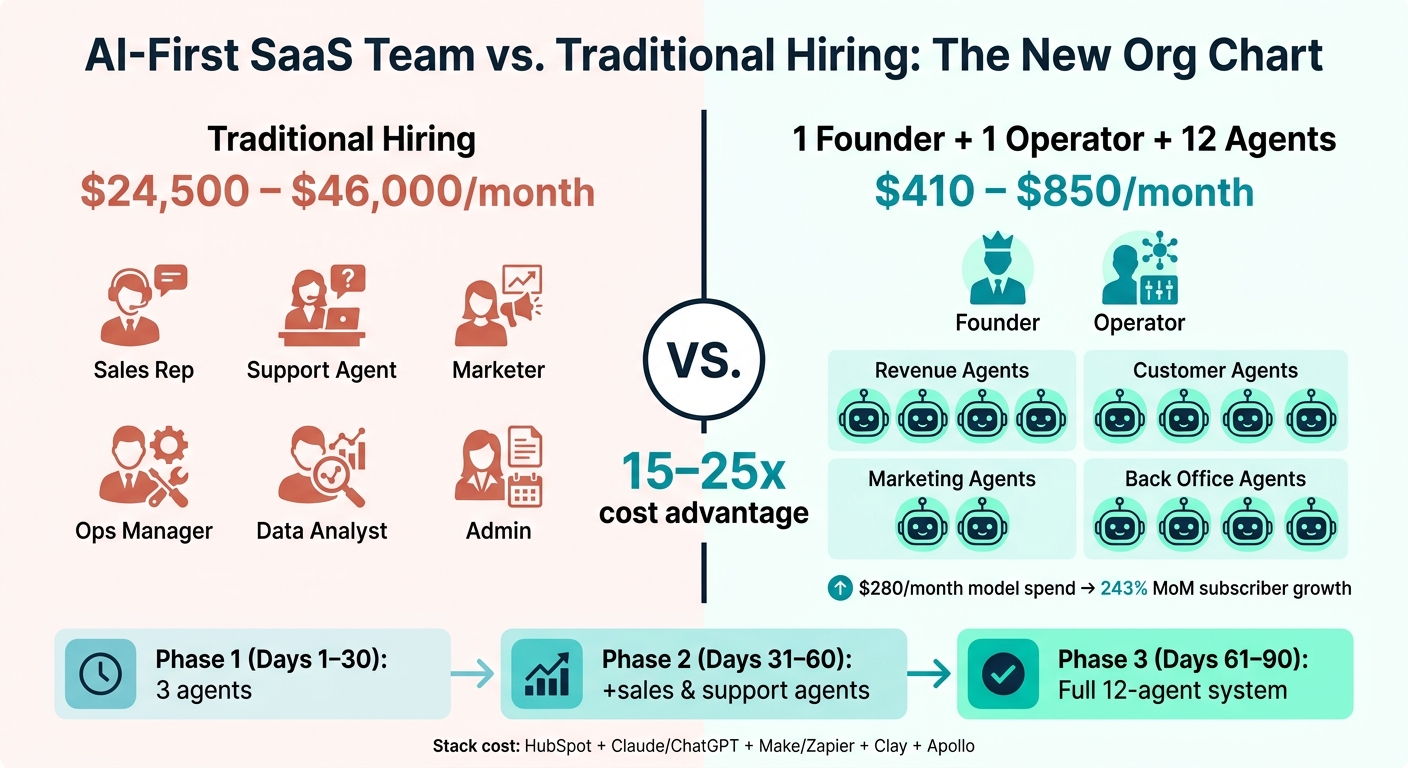
AI-First SaaS Team vs. Traditional 6-Role Hire: Cost & Structure Breakdown
We replaced our sales team with 20 AI agents - here’s what happened next | Jason Lemkin (SaaStr)
sbb-itb-9cd970b
Section 1: The two human roles - founder as architect, operator as orchestrator
Two people keep the system on track: the founder and the operator. That split matters more than it may seem at first.
Founder responsibilities: goals, constraints, and decision rights
The founder sets the main goal for the system. That might be pipeline, conversion, support quality, or revenue growth. But the job goes past picking metrics. The founder also owns the calls that don't come with an obvious right answer: pricing, positioning, when to pivot, and what the brand should never say or do.
As Maxime Le Morillon notes, the founder bottleneck shifts from doing work to deciding what work matters. [1]
In day-to-day use, the founder also sets review tiers. Some outputs should be checked every single time, especially customer-facing work like outbound sales emails, strategy documents, and pricing materials. Lower-risk outputs, such as internal reports or AI-powered lead scoring, can move ahead without sign-off.
If those rules aren't written down, one of two things usually happens. The founder becomes the bottleneck, or the founder loses sight of what agents are putting out.
Operator responsibilities: workflow design, QA, and monitoring
The founder picks the destination. The operator builds the system that gets there.
That includes writing prompts, using effective prompt libraries, building automations in automation tools, setting escalation rules, and running weekly quality audits. Each workflow should connect to one task owned by one agent. If an agent produces weak output, the operator digs into the cause. Was the prompt off? Was the data messy? Was the task too broad? Then they fix the actual issue instead of papering over it.
This role calls for a pretty specific skill set:
- Comfort with no-code automation
- Clear writing for prompt design
- A sharp eye for data quality
The operator also owns the draft-first workflow. No agent should touch a customer-facing task without producing a reviewable draft first. Tyler Bryden of Speak AI put it in plain terms:
"The plan isn't friction. The plan is the product." - Tyler Bryden, Founder, Speak AI [2]
What needs to be in place before adding agents
Agents only work as well as the data and structure behind them. Before agents go live, you need clean CRM stages, clear lead-routing rules, and connected systems with role-based access. If those pieces are missing, agents don't fix the mess. They just move bad inputs through the system faster.
It's also smart to build a source-of-truth document early. This is where the brand voice, ICP profile, and non-negotiables live. Agents should refer to it on every task. Without it, output starts to drift into generic AI tone. [2][5] With that base in place, the next step is assigning narrow jobs to each of the 12 agents.
Section 2: The 12 agents and the work each one owns
Once the human roles are set, the next move is simple: assign the work. The founder sets the target. The operator gives each agent a tight lane to run in. One agent, one job, one KPI.
Revenue agents: lead generation, outbound, inbound qualification, and deal support
The first four agents own pipeline work.
The Lead List Building and Enrichment Agent builds and scores target accounts. Inducted (YC W24) used this setup to cut customer acquisition costs by 60% in the first 90 days.[4]
The Outbound Prospecting Agent writes personalized sequences for cold outreach. The Inbound Qualification Agent scores leads and sends them to the right place. The Sales Support Agent takes care of follow-ups, call summaries, and CRM updates.
That covers the front end of revenue. From there, the system moves into customer work, marketing, and internal execution.
Customer and marketing agents: support, onboarding, content, and nurture
The next four agents handle customer touchpoints and marketing flow.
The Customer Support and Knowledge Base Agent deals with common FAQs and ticket triage. The Success and Onboarding Agent sends activation emails, runs check-in sequences, and flags churn alerts.
The Content Creation and Repurposing Agent drafts blog posts, social posts, and SEO briefs. The Marketing Automation and Nurture Agent moves leads through the funnel with behavior-triggered workflows and timed sequences.
Operations agents: CRM hygiene, reporting, internal workflows, and insights
The last four agents focus on the back-office work that keeps the system clean and usable.
The CRM Hygiene and Data Quality Agent handles deduplication and field normalization on a fixed schedule. The Analytics and Reporting Agent pulls funnel diagnostics and MRR snapshots.
The Internal Operations and Workflow Agent manages task extraction, scheduling, and invoicing triggers. The Strategic Insights and Experimentation Agent reviews performance patterns, scores experiments, and watches competitive signals.
Here’s the full 12-agent operating model at a glance:
| Role | Tasks | Tools | KPI |
|---|---|---|---|
| Lead List & Enrichment | Account targeting, data enrichment, ICP scoring | Clay, Apollo | ICP fit rate |
| Outbound Prospecting | Personalized email drafting, sequencing | Apollo, Claude, Lemlist | Meetings booked |
| Inbound Qualification | Lead scoring, routing, initial response | HubSpot AI, Zapier AI | Speed to lead |
| Sales Deal Support | Follow-up drafts, call summaries, CRM updates | HubSpot, Fireflies | Deal velocity |
| Customer Support & KB | FAQ resolution, ticket triage, KB gap flagging | Intercom Fin, HubSpot Service | Resolution rate |
| Success & Onboarding | Activation emails, check-ins, churn alerts | HubSpot, SendGrid | Activation rate |
| Content Creation | Blog drafts, social posts, SEO briefs | Claude, Midjourney, Surfer SEO | Content throughput |
| Marketing Automation | Nurture sequences, behavioral triggers | HubSpot workflows | Lead-to-MQL rate |
| CRM Hygiene | Deduplication, field normalization | HubSpot, Make | Data accuracy rate |
| Analytics & Reporting | Funnel diagnostics, MRR snapshots | Stripe, Plausible, Claude | Report turnaround time |
| Internal Operations | Task extraction, scheduling, invoicing triggers | Zapier, Make, Stripe | Workflow completion rate |
| Strategic Insights | Experiment scoring, competitive monitoring | Perplexity, Claude | Insight turnaround time |
Each agent should own one domain, one output, and one metric. With the roles mapped, the next step is the tool stack and data layer.
Section 3: How to build the system with the right tools and clean data
The core stack: CRM, AI models, automation, prospecting, and enrichment
Use three layers: a system of record, AI drafting, and automation. That setup gives one founder and one operator enough leverage to run 12 agents without adding more managers.
| Layer | Tool | Primary Role in the 12-Agent Model |
|---|---|---|
| System of Record | HubSpot | Centralizes leads, deals, and customer interactions |
| AI Drafting | Claude / ChatGPT | Supports content, sales, and support work |
| Orchestration | Make / Zapier | Connects tools and triggers workflows |
| Enrichment | Clay | Adds LinkedIn and news-based context to leads |
| Prospecting | Apollo | Supplies the top-of-funnel database and sequencing |
This stack usually costs $410 to $850 per month, depending on usage and tier. [3][6]
Once the stack is set, bring agents online in stages. That way, each one starts with clean data and clear permissions instead of getting tossed into a messy system and hoping for the best.
A phased rollout: start with 3 agents, then expand to 12
The tools only do their job if each agent has a tight scope and a clear checkpoint. Don’t turn on all 12 agents at once. A phased rollout keeps things steady and gives the operator time to tighten prompts, permissions, and data quality.
Phase 1 (Days 1–30): Start with CRM hygiene, reporting checks, and a review agent. These are low-risk jobs, and they help clean up the data base first. Using an AI and analytics platform at this stage helps unlock data potential for future revenue opportunities. [7][2]
Phase 2 (Days 31–60): Add outbound sales and support triage. These agents can draft outreach, enrich leads, and queue customer replies for human review before anything goes out. [3][7]
Phase 3 (Days 61–90): Move into content, internal ops, and strategic insights once the first agents are stable, focusing on strategies to scale B2B SaaS and services. [7]
Governance, permissions, and failure handling
As the number of agents grows, permissions matter just as much as prompts. Clean data and narrow roles are what keep autonomy from turning into chaos.
Before any agent goes live, set its autonomy level. A simple three-tier model works well: autonomous, escalate, and human-only. CRM field updates and internal reporting can run autonomously. Customer-facing replies and mass outbound campaigns should go to the operator for approval.
Keep customer-facing work in review until the agent has a solid track record. If you skip that step, mistakes can hit customers directly, and those are a lot harder to clean up than errors caught in a review queue.
Log every action that changes a contact record or sends an external message. When an agent puts out weak work, the log helps you trace the problem. Maybe the prompt was off. Maybe the HubSpot data was stale. Maybe the model ran into a context limit. Find the source, fix it, then let the agent run again.
Section 4: How to measure results and improve the system over time
The KPIs that matter: speed, conversion, quality, and cost
Once your workflows are live and permissions are locked in, measurement becomes your control loop. The founder sets the target. The operator keeps the scoreboard. That split matters, because gut feel falls apart fast when 12 agents are working at the same time.
Here are the KPIs worth watching:
| KPI Category | What to Measure | Target Benchmark |
|---|---|---|
| Speed | Time-to-first-touch on new leads | Under 5 minutes [1] |
| Conversion | Lead-to-meeting rate; outbound reply rate | Lead-to-meeting rate; outbound reply rate |
| Support Efficiency | Ticket deflection rate; autonomous resolution rate | 70–85% resolved without human [3] |
| Operating Leverage | AI stack cost vs. equivalent payroll | 15–25x leverage ratio [1] |
| Quality | CRM completeness rate; weekly audit pass rate | 90% audit pass rate [3] |
Track operating leverage in plain numbers. Look at cost per meeting booked, cost per ticket resolved, and cost per report generated. Those metrics show whether the machine is doing its job: moving pipeline faster, handling support volume, keeping reports clean, and holding down operating cost.
Don’t stop at reporting the numbers. Check them. A 10% weekly audit is a simple way to do it. Pull a random sample of agent outputs, such as drafted emails, generated reports, and updated CRM fields, then review them line by line. If the tone starts to drift from the voice guide, trace the issue back to the prompt or your voice bible and tighten the instructions.
How a tools marketplace helps choose and swap tools for each agent role
When a metric slips, the marketplace is where you go to find the bottleneck. Compare tools based on the job that’s slowing things down: enrichment, sequencing, support, reporting, or automation.
The rule is simple. If a new tool fixes a clear bottleneck, add it. If it doesn’t, leave the stack alone. And when you do make a change, don’t just pile on one more app. Replace the weak tool if that’s the better move. Otherwise, the stack starts to sprawl, and that’s when things get messy.
Conclusion: the case for 1 founder, 1 operator, 12 agents
This model works when three things are true: workflows are repetitive, data is clean, and one operator owns orchestration. When those pieces are in place, a two-person team can turn out the kind of output you’d normally expect from a much larger company.
The payoff is pretty straightforward: faster follow-up, less manual work, cleaner reporting, and better customer coverage without adding headcount. As Maxime Le Morillon, founder of 500k.io, put it after building a $9,500 MRR business on a 13-tool stack costing $565/month:
"The autonomous business fails if the human runs at human-employee hours. Stack leverage shows up only when the human is rested enough to make non-obvious decisions." [1]
If you’re putting this model in place, start here:
- Audit your current workflows for repetition
- Clean your CRM data
- Pick three agents to start
- Get the operator role defined before you add anything else
FAQs
What kind of SaaS work should agents handle first?
Start with high-volume, repeatable work that doesn’t need deep judgment calls. A smart place to begin is engineering management, including sprint planning, ticket tracking, and daily standups. It creates a closed-loop system you can extend into other teams later.
Other strong early use cases include customer support triage, outbound sales operations, and marketing content production. When you automate these manual workflows first, you can defer early hiring and get more leverage from the team you already have.
How do I know if my CRM is clean enough for this model?
Check two things: integration access and data hygiene.
Your CRM should connect with platforms like Zapier or Make. And your fields need to be used the same way across the board, so agents can score leads, trigger sequences, and update pipeline stages without a mess.
A simple way to test this is to start agents in read-only mode. Let them pull data, enrich profiles, or triage tickets first. If they can do that without major missing values or formatting issues, your CRM is clean enough for execution.
When should customer-facing agent output stop needing review?
For customer-facing interactions that can have serious consequences, human review should always stay in the loop.
That final human check isn't optional for messages going to customers, partners, or press contacts. Why? Because agents can hallucinate or make things up, and that's a risk you don't want to take in public.
Human oversight matters even more in situations like:
- edge cases
- angry customers
- complex troubleshooting
- high-stakes decisions such as large refunds
These are the moments where judgment, context, and a calm read from a person can make all the difference.