You Do Not Have an AI Problem. You Have an Operator Problem.

If AI is not moving your numbers, the tool may not be the issue. The work around it probably is.
I see the article’s main point as simple: AI pays off only when one person owns one workflow, runs it with clear rules, and tracks one business result. The data in the piece backs that up: 95% of enterprise AI projects in 2025 showed no measured P&L return, only 21% of companies changed workflows, and 88% of AI proof-of-concepts never reached production.
Here’s the article in plain English:
- Most AI failure is people-and-process failure
- The four main blockers are:
- No owner
- Bad process
- Weak execution
- Weak KPIs
- AI works better when you:
- assign one workflow owner
- write the workflow into an SOP
- review outputs every week
- track pipeline, cycle time, cost, or resolution rate instead of tokens or prompt count
- A simple fix is to run a 30-day audit, then test one workflow for 90 days
- The point is not to buy more tools. The point is to make AI part of how work gets done
What stood out to me is this: the article does not say AI fails because models are weak. It says companies often drop AI into messy workflows, leave ownership unclear, and then blame the software when nothing changes.
That makes the core message easy to remember: AI needs a manager, a process, and a scorecard before it can help the business.
Why Enterprise AI Fails: Stop Bolting AI On and Redesign Your Workflows
sbb-itb-9cd970b
The 4 Operator Bottlenecks Blocking AI Results
Most AI failures come back to four operator-side breakdowns. And each one gets in the way of one of three things: revenue, speed, or cost savings.
Here’s how these failure modes tend to show up, and who usually needs to step in.
| Failure Mode | Symptoms | Who Owns Fix | Example Process |
|---|---|---|---|
| No Owner | Pilots stall; no one handles exceptions; licenses renew unused | Workflow owner / RevOps lead | Lead handoff from AI agent to Sales Rep |
| Bad Process | AI replicates bad decisions at scale; CRM data stays inconsistent | Operations Manager / COO | Customer support ticket categorization and routing |
| Weak Execution | Inconsistent outputs; prompts not updated when ICP shifts; no feedback loop | Technical Lead / Prompt Engineer | Drafting personalized outbound prospecting emails |
| Weak KPIs | Dashboards track tokens and hours saved instead of revenue | VP Sales / CMO / Business Sponsor | Reducing proposal turnaround from 9 days to 3 |
No Owner: AI Is Everyone's Project and No One's Job
When no one is clearly accountable, AI output turns into background noise.
Scored leads sit untouched. Slack alerts fire, then disappear into the void. Licenses auto-renew while the tool gathers dust. That’s not a model problem. It’s an ownership problem.
71% of workers admit to using unapproved AI tools for personalized outreach [3]. That’s what happens when nobody is in charge of turning AI output into business action.
The fix is simple: give one person ownership of one workflow and one outcome. That outcome should be concrete, like pipeline generated, response time reduced, or support tickets deflected.
Bad Process: Teams Automate Broken Workflows
"Automation doesn't fix a broken process. It accelerates it." - ForgeWorkflows [1]
This is where a lot of teams trip over their own feet.
AI can’t automate judgment that only lives in people’s heads. If two people handle the same case in two different ways, the process isn’t ready. At that point, automation just spreads inconsistency faster.
Dirty CRM data? Unclear handoff rules? Loose routing logic? Fix those first. Then automate.
Weak Execution: Prompts, Reviews, and KPIs Are Not Standardized
"The bottleneck in enterprise AI is not model quality. It is operationalization." - Ry Walker [6]
A lot of AI rollouts lose steam here.
One prompt gets tuned and maintained. Another sits untouched, even after the ICP changes. Reviews happen once, then stop. There’s no version control, no QA loop, no steady process for updating what the system is doing.
That’s why AI can look great in a demo and fall apart in production. In fact, 88% of AI proof-of-concept projects never make it to production [7].
Weak KPIs: Measure Business Outcomes, Not Usage
When teams track the wrong metric, the workflow drifts.
If the dashboard focuses on prompts sent, tokens used, or hours saved, the team starts thinking about the tool instead of the result. That’s where things go sideways. What matters is pipeline created, tickets deflected, or renewal risk reduced.
The fix is to define the business result first, then tie it to clear SLAs.
Once you can spot the bottleneck, the fix gets a lot more straightforward: one owner, one workflow, and one KPI set. The next section shows what operator-led AI looks like in sales, marketing, and SaaS teams.
What Operator-Led AI Looks Like in Sales, Marketing, and SaaS Teams
This gets a lot easier to see when you zoom in on the day-to-day work. One owner. One workflow. One KPI. Same fix, different team: ownership first, process second, execution third.
| Team | Pre-AI Workflow | Operator-Led AI Workflow | Primary Tools | Business Outcome |
|---|---|---|---|---|
| Sales | Manual prospecting, ad-hoc CRM entry, generic outreach | Automated enrichment, deduplication, and instant routing; AI-drafted personalized outreach | HubSpot, Clay, OpenAI, Zapier | Lead-to-contact time <4 hours [10] |
| Marketing | Manual drafting of every asset; inconsistent brand voice across channels | Standardized briefs and prompt libraries; agents handle 60–80% of execution work | OpenAI, Jasper, Claude | 60–80% reduction in manual execution hours [5] |
| SaaS / CS | Reactive ticket handling, manual churn risk assessment | Automated ticket triage, AI-driven risk scoring, proactive renewal signals | Freshdesk, HubSpot, OpenAI | 18% faster resolution; lower SLA penalties [2] |
Sales: Pipeline Creation, CRM Hygiene, and Follow-Up at Scale
In sales, the operator owns three things: the trigger, the review gate, and the pipeline KPI.
Here’s what that looks like in practice. RevOps sets the rule that a lead is only marked as "enriched" when 10 out of 12 required fields are filled in and synced to HubSpot [9]. From there, Clay pulls enrichment data, OpenAI drafts personalized outreach using account context, and Zapier sends the lead to the right rep while also firing a Slack alert. All of that happens before a person steps in.
That doesn’t mean humans disappear from the process. Far from it. High-stakes outreach and final negotiations still stay with people. The point is simpler than that: the repetitive upstream work runs through a clear system instead of living in someone’s inbox or memory.
The same pattern shows up in marketing and customer success too.
Marketing: Campaign Briefs, Content Production, and Distribution Control
Marketing usually breaks down for a different reason. It’s often not that AI writes bad output. It’s that nobody has set a clear standard for what good output is supposed to be.
That’s where Marketing Ops comes in. The team splits work into two lanes. Internal tasks like competitive monitoring, SEO audits, and first-draft content can run all day without approval. Customer-facing work, such as posts and emails, needs a human check before anything is published [9].
A standardized campaign brief and a maintained prompt library change the game here. Instead of each person starting from scratch, the team works from the same playbook. That makes it much easier to keep brand voice steady across channels. The operator keeps the standard in place; the team moves the work through it.
SaaS and Customer Success: Onboarding, Support, and Renewal Signals
In customer success, the biggest win often comes from spotting trouble early. CS Ops has the most leverage in what gets flagged before it turns into churn or an escalation.
AI can help sort and tag support tickets, score churn risk using AI churn prediction tools and product usage telemetry, and surface renewal signals ahead of a contract date. One mid-size SaaS team cleaned up its CRM data before rolling out AI support tools and then saw an 18% faster resolution rate, along with lower SLA penalties [2].
Just like in sales and marketing, the hard calls still stay human-led. Renewal strategy and messy escalations aren’t things you hand off to a bot. But when the workflow owner builds a risk-scoring system tied to actual usage data, the CS team starts every at-risk account conversation with a head start.
Once the workflow is clear, the next step is to codify it with scorecards, SOPs, and a tool stack.
The Operator Toolkit: Scorecards, SOPs, and Workflow Systems
Once ownership is set, operators need a small connected stack and clear rules to make AI work the same way each time. The order matters: start with the scorecard, write the workflow into an SOP, then connect the tools.
Role Scorecards That Tie AI Work to Business Outcomes
An AI role scorecard is an accountability contract, not a job description.
"The AI Operator is not a job title. It is a scorecard." - Amir Reiter, CEO, CloudTask [12]
A good scorecard tracks the mission, 3–5 measurable outcomes, core competencies, weekly KPIs, and clear ownership. It should also spell out the handoff: who owns the result when an AI-influenced decision affects revenue or customer experience, especially in edge cases where a manager overrides the system [4].
The best scorecards tie work to business numbers, not vague activity. That might mean cutting proposal turnaround from nine days to three, doubling qualified meetings per rep, or adding $50,000 in monthly pipeline [3][12]. And there’s a simple gut check here: does the work end up in the system of record, or does it stay stuck in chat [8]?
CloudTask offers a concrete example. Sergio owned outbound from end to end, from ICP definition to booked meetings, and generated more than $3 million in opportunities using Clay and Smartlead [12].
Once the owner and KPI are clear, the next step is to write the workflow into an SOP.
SOPs and Prompt Libraries That Make Execution Repeatable
Before you automate anything, map the workflow. Define the inputs, outputs, and reviewers. Then write that into an SOP and an output contract.
Prompts should be treated like versioned specs, not throwaway text in a chat box. That means approval rules, change tracking, and a weekly review cycle. If the prompt changes the output, and the output affects revenue or customer experience, you need a clean way to track what changed and who approved it.
Using HubSpot, Clay, OpenAI, Zapier, and Other Workflow Tools as an Operating Stack
Only after that should you pick tools that fit the workflow, not the other way around.
| Tool or Platform | Primary Use | Operator Responsibility | Key KPI |
|---|---|---|---|
| HubSpot / Salesforce | System of Record | CRM mapping, data hygiene, lead routing logic | Pipeline Dollar Value |
| Clay | Data Enrichment & Prospecting | ICP refinement, enrichment rules | Qualified Meetings Booked |
| OpenAI / Anthropic | Reasoning & Content Generation | Prompting, briefing, and QA | Content Production Cycle Time |
| Zapier / n8n / Make | Automation & Orchestration | Connecting tools, managing automations, error handling | System Uptime / Error Rate |
| Apollo / Outreach | Sequencing & Delivery | Deliverability monitoring and sequence architecture | Meetings Booked per Sequence |
These tools don’t create value by themselves. Value shows up when an operator owns the inputs, reviews the outputs, and connects the result to a business number. That’s how tools turn into measurable output. And that’s the setup the diagnostic will test against revenue, speed, and cost savings.
How to Fix the Operator Problem and Measure the Results
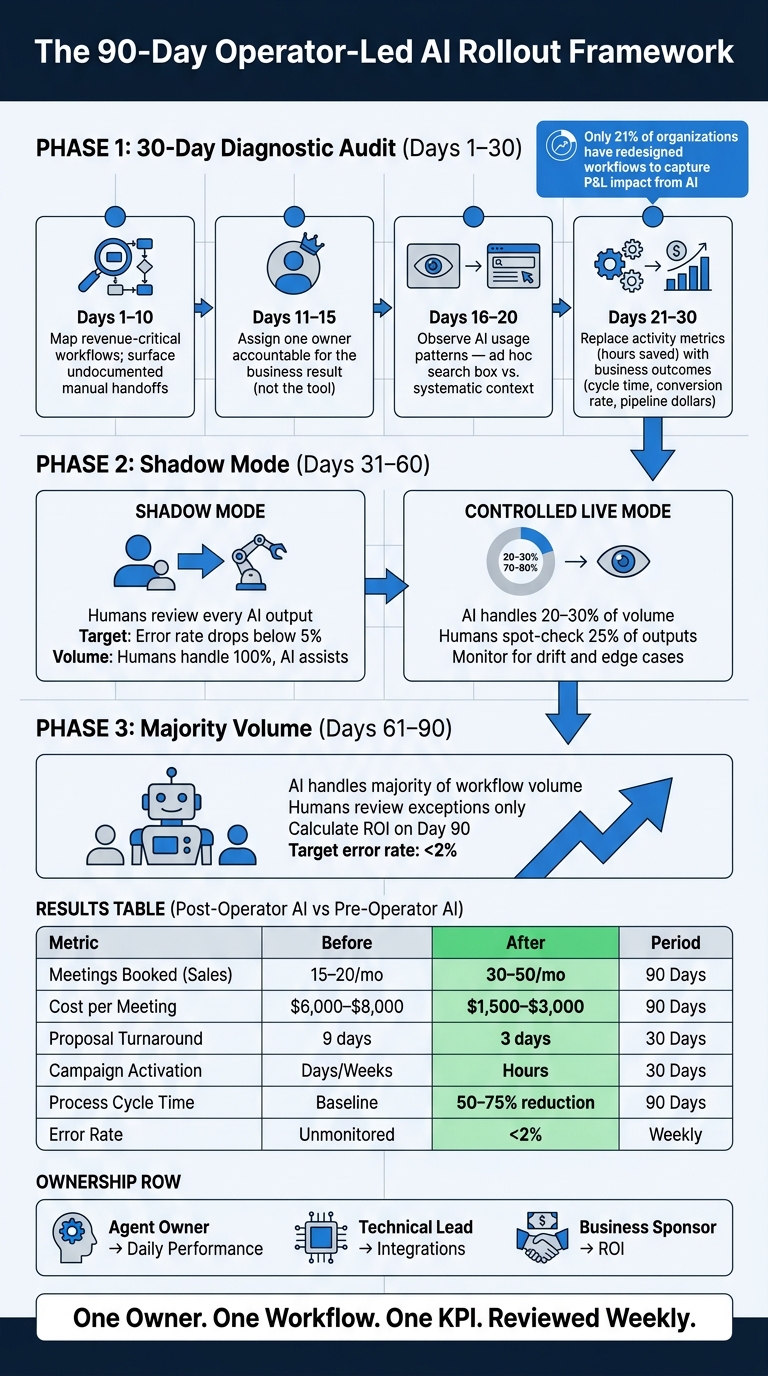
The 90-Day Operator-Led AI Rollout Framework
Run a 30-Day Diagnostic Before Buying Anything Else
With the scorecard, SOP, and stack in place, pause before you buy one more tool. Run a 30-day workflow audit first.
Focus on revenue-critical workflows and map each step from start to finish. That includes the messy parts too: undocumented manual handoffs, side-channel fixes, and work that lives in someone's head instead of in an SOP [2][11].
The sequence is simple:
- Days 1–10: map the workflows and spot where undocumented know-how is doing the job of documentation
- Days 11–15: name one owner who is accountable for the business result, not just the tool
- Days 16–20: watch how the team uses AI - like a one-off search box or like a system with standing context about the business
- Days 21–30: stop leaning on activity metrics like “hours saved” and track business outcomes instead, such as cycle time, conversion rates, and pipeline dollars [3]
That shift matters. Only 21% of organizations have redesigned their workflows to capture P&L impact from AI [3].
Use the audit to pinpoint which of the four operator bottlenecks is getting in the way: ownership, process, execution, or KPIs. Once you can see the bottleneck clearly, you can stop guessing.
Then fix one workflow first.
Redesign One Workflow, Assign One Owner, and Review One KPI Set Weekly
Start small and keep the scope tight. Pick one bounded, high-volume workflow like prospect research, lead qualification, or campaign content production.
Run it in shadow mode for 30 days. Humans review every output until the error rate drops below 5% [7]. From Days 31–60, move into controlled live mode. The agent handles 20%–30% of volume, and humans spot-check 25%. From Days 61–90, move to majority volume, review exceptions, and calculate ROI on day 90 [7].
This same operating model can work across sales, marketing, and CS. The workflow changes. The KPI changes. The structure stays the same.
Measure the rollout with business outcomes, not busywork.
| Metric | Pre-Operator AI | Post-Operator AI | Measurement Period |
|---|---|---|---|
| Meetings Booked (Sales) | 15–20 per month | 30–50 per month | 90 Days |
| Cost per Meeting (Sales) | $6,000–$8,000 | $1,500–$3,000 | 90 Days |
| Proposal Turnaround (Sales) | 9 days | 3 days | 30 Days |
| Campaign Activation (Marketing) | Days or weeks | Hours | 30 Days |
| Process Cycle Time (Ops) | Baseline | 50–75% reduction | 90 Days |
| Error Rate | Unmonitored/High | <2% flagged in audit [7] | Weekly |
You also need clear ownership across the rollout:
- Agent Owner for daily performance
- Technical Lead for integrations
- Business Sponsor for ROI [7]
That setup is often the line between a pilot that dies in a slide deck and one that becomes part of how the business runs.
Key Takeaway: AI Does Not Create Enterprise Value Without Operators
The numbers are hard to ignore. In 2025, 95% of enterprise AI deployments produced zero measurable return on the P&L, and 56% of CEOs said they saw neither revenue gains nor cost reductions from their AI investments [3]. The tech was not the issue.
"AI does not remove operating discipline. It raises the standard for it." - Tim Booker, President & CEO, MindFinders [4]
Lasting gains come from ownership, process clarity, prompt discipline, and KPI accountability - not from chasing the newest model. When those four pieces are in place, AI can shrink cycle time, cut cost per result, and make operations cleaner and more predictable. That leads to stronger recurring revenue and better long-term business value.
If you want to lock in that cadence, use The Great CEO Within and High Output Management. The companies that get this right are not buying better models. They are building better operators.
FAQs
How do I know if my AI problem is really an operator problem?
It’s likely an operator problem when AI gets treated like a tech project instead of an operating change.
Common signs include:
- disconnected workflows
- inconsistent outcomes
- weak or missing governance
- broken handoffs between systems
- no clear, metric-based business value
Another red flag: no one owns the outputs, fixes mistakes, or tracks business results.
If the AI is running but the process around it hasn’t been redesigned, the bottleneck is your operating model.
Which workflow should we test first with operator-led AI?
Start by auditing your current processes for ROI, risk, and complexity. Then focus on the workflows that matter most to revenue but still eat up time because they’re repetitive and manual.
For most mid-market B2B SaaS teams, the best first pilots are usually:
- weekly competitive intelligence
- structural SEO content production
- paid-media reporting
Those use cases tend to have a clear payoff without dragging you into too much complexity on day one.
What should you avoid? High-risk, end-to-end projects like full-funnel campaign generation. That kind of work sounds appealing, but it can get messy fast. It touches too many moving parts at once, which makes it a rough place to start.
What KPIs should we track to prove AI ROI?
To prove AI ROI, skip activity metrics like usage, prompt volume, or training completion. Those numbers may look busy, but they don’t tell you what AI is doing for your business.
Track outcomes that hit your P&L instead.
For efficiency, focus on metrics like cycle time, error rates, and costs. For performance, look at conversion rates, customer acquisition costs, pipeline growth, and margin improvement.
Set these metrics before the pilot starts so they line up with the business result you want to drive.