Agency Utilization Rate: Why a Busy Team Still Caps Your Growth

Agency utilization rate shows time billed, not room for more clients. I would check 4 weeks of approved work, repeat edits, and approval waits before adding accounts, because a team can bill 75% of its hours while missing client context still holds up delivery.
My rule: fix the handoff before filling more hours. Keep client rules and past approvals in 1 shared place. Track accounts per person, quality, and turnaround alongside billable time.
Agile Growth Labs (AGL) uses Portable Delivery Intelligence to connect client context to the AI tools teams already use. Its target is 18 to 25 accounts per account manager, compared with 4 to 8. That is a target, not a promised result.
<u>Test the change before adding client work.</u>
Next step: Run the free calculator.
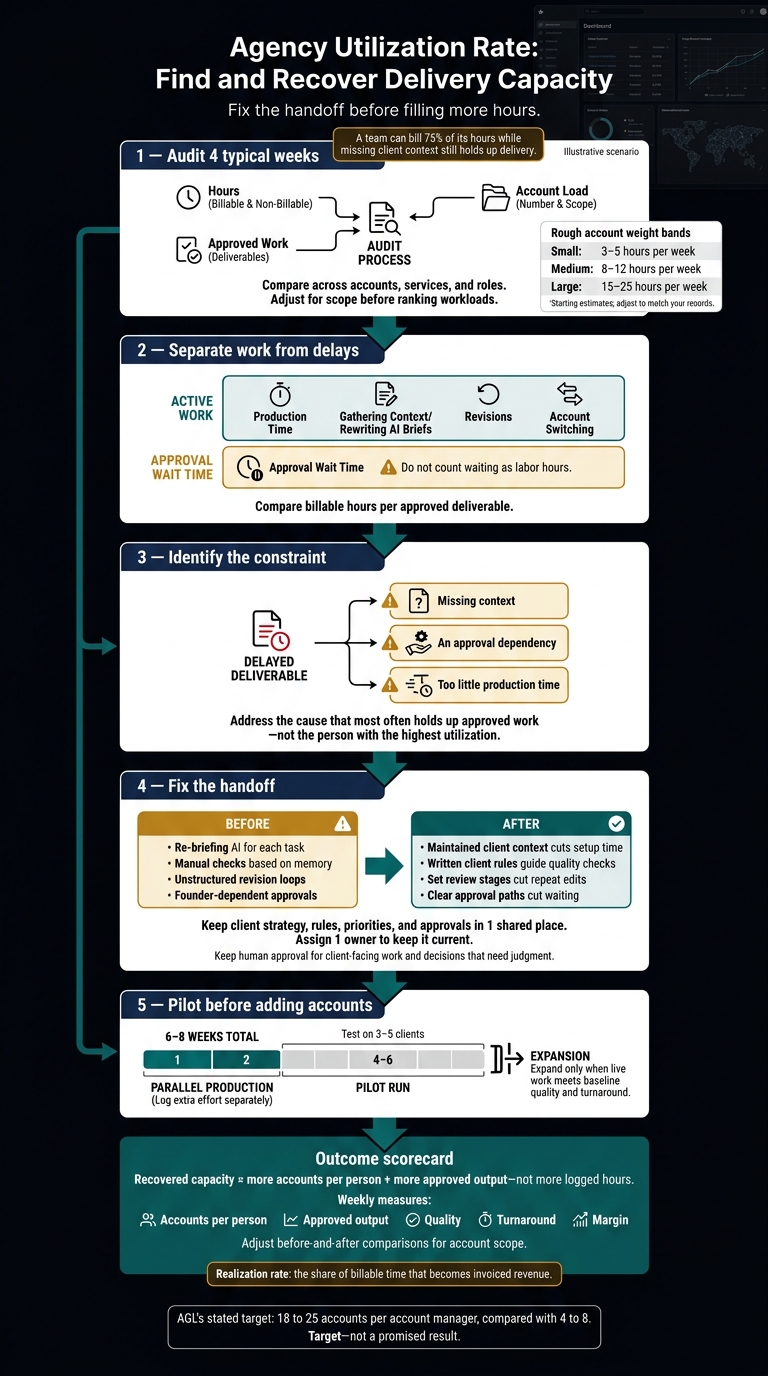
Agency Utilization Rate: Find and Recover Delivery Capacity
Utilization Rate Explained for Professional Services (Formula, Mistakes, and What It Misses)
sbb-itb-9cd970b
Why a busy team can still limit growth
A busy team can still limit growth because time spent rebuilding client context, revising work, and waiting for approval does not produce finished work. AI can help create drafts, but missing context still limits how much client work the same team can finish and bill.
Repeated AI briefs and account switching
Re-entering client details into AI tools and switching between accounts adds setup time, not output. Utilization can hide that setup time, even as delivery slows.
Batch work by client to reduce context resets. That gives the team fewer stops to reload the same client details.[4]
Revision loops and approval delays
Incomplete briefs leave decisions for the revision stage. That is a gap in the brief, not a lack of effort. Edits then use billable hours without adding new output.
Track realization rate, the share of billable time that becomes invoiced revenue, alongside utilization. It helps show where rework eats into billed work.[3]
Approval delays can stall several deliverables at once, even when no one is editing them. Track editing hours and approval wait time separately. Waiting does not create output.[5]
Compare busy work with completed work
Compare finished work with time spent to see how many accounts each person can support.
| Measure | Busy workflow | High-throughput workflow |
|---|---|---|
| Completed client output | Drafts pile up before approval | Approved work moves forward |
| Rework | Missing context leads to repeat edits | Briefs include the decisions needed to proceed |
| Accounts per person | Each added account adds coordination work | Less coordination work leaves room for more accounts |
Check approved output, revision hours, and approval wait time before deciding the team has reached its limit.[3][5]
How to find your delivery constraint
Find your delivery constraint by reviewing 4 typical weeks of hours, approved work, and account load across accounts, services, and roles. Look for what stops each person from handling 1 more account at the same quality, rather than treating the person with the most logged hours as the bottleneck.
Use existing time records and a short staff log to fill gaps. Full schedules do not always mean a lack of production time. Missing client context or slow approvals may hold up work even when the team has hours to spare.
Compare hours, approved work, and account load
Compare billable hours per approved deliverable across accounts. Adjust for scope before you rank workloads. Start with these rough account weight bands, then adjust them to match your records.[6]
| Account weight | Hours per week |
|---|---|
| Small | 3–5 |
| Medium | 8–12 |
| Large | 15–25 |
Keep role differences visible. Senior leads need time for quality checks, scoping, and mentoring. Their utilization targets should be lower than those of delivery specialists.[7]
Check whether review work caps the accounts each person can support, even when the team has time to produce more.
Track briefing, revisions, switching, and waiting
Across those 4 weeks, track production time apart from time spent gathering context, rewriting AI briefs, and making revisions. Record why revisions happen and how often staff switch accounts.
Use project timestamps to measure approval waits. Do not count waiting as labor hours. Compare these records with hours per approved deliverable to see what limits the accounts each person can support.
Find approval dependencies and missing context
Trace each late deliverable to the decision it needs. Check whether every item must pass through the same senior reviewer.
Then check whether staff can find current client rules and past approvals in Slack, Google Drive, or Notion without asking for help. Mark each delay as missing context, an approval dependency, or too little production time.
Address the cause that most often holds up approved work across the 4 weeks, not the person with the highest utilization. Once that constraint is clear, the next step is to remove it without pushing utilization higher.
How to recover capacity without increasing utilization
Recover capacity by cutting repeat briefs, edits, and approval waits before adding accounts, not by filling more hours. AI is not the agency’s bottleneck when staff must rebuild client context for each task; the goal is more accounts per person with the same quality and turnaround.
Standardize client context and delivery steps
Keep each client’s strategy, rules, priorities, and approvals in 1 shared place from kickoff. Assign 1 owner to keep it current.
Write a playbook for briefs, drafts, client-specific quality checks, review stages, and approval owners. Keep human approval for client-facing work and decisions that need judgment.
The old way makes staff carry client details in their heads and repeat them across tools. That is a workflow gap, not a staff failure.
Where Portable Delivery Intelligence fits
Portable Delivery Intelligence connects maintained client context to the AI tools your team already uses.
Agile Growth Labs (AGL) applies Portable Delivery Intelligence to the task or handoff that limits output. The aim is less re-briefing, tool switching, repeat edits, and time spent waiting for approval.
AGL’s stated target is 18 to 25 accounts per account manager, compared with a cap of 4 to 8. Treat that as a target, not a promised pilot result.
Test the workflow on 3–5 clients for 6–8 weeks. Run production in parallel for the first 2 weeks, and log that extra effort separately.[8] Expand only when live work meets baseline quality and turnaround.
Conclusion: track accounts supported per person
Compare results before and after the pilot to see whether capacity grew or staff simply logged work differently.
| Before | After |
|---|---|
| Re-briefing AI for each task | Maintained client context cuts setup time |
| Manual checks based on memory | Written client rules guide quality checks |
| Unstructured revision loops | Set review stages cut repeat edits |
| Founder-dependent approvals | Clear approval paths cut waiting |
| Utilization alone | Accounts per person, approved output, quality, turnaround, and margin |
Adjust the comparison for account scope. Recovered capacity means more accounts per person and more approved output, not more logged hours.
Track results weekly to check that quality and turnaround hold. Protect margin. Review available time against committed time each week before adding work.[2]
- Run the free Capacity Leak Calculator to see how many more accounts your team could carry.
- Want help? Bring 1 client account to a free mapping session.
FAQs
How do I calculate my agency’s billable utilization rate?
Billable utilization rate is the share of available work hours logged as billable client work. Calculate it by dividing billable hours by available capacity hours for the same period, then multiply by 100 to get a percentage.
Define “available” the same way each time. This usually means each person’s workweek minus PTO, holidays, and other non-billable time.
Keep that definition fixed for at least 1 quarter so you can track trends. Don’t change the hours used as the base or relabel work just to make the rate look higher. [1][2]
What utilization target leaves room for growth?
Utilization targets measure how full your team’s time is, not how many more clients it can serve. High utilization can hide rework, task switching, and repeat briefs, so track accounts per person to see whether AI helps your team handle more client work.
The old way tracks hours used. That’s not your team’s fault. The metric counts time spent, even when that time goes toward explaining the same client needs again.
The new way tracks account capacity. Portable Delivery Intelligence keeps client strategy, rules, and approvals in a shared system so people and AI can use the same context.
Agile Growth Labs (AGL) puts the current cap at 4 to 8 accounts per account manager. With Portable Delivery Intelligence, the target is 18 to 25 accounts per operator, with the same team and no new hires.
How do I know when to hire versus fix workflows?
Before you hire, track accounts per person, not just utilization. This shows how much client work each person can carry.
Free up time spent on repeat briefs, searching for client details, rounds of edits, and slow approvals. Set project scope based on the time the work takes.
Then forecast demand for 30, 60, and 90 days. Hire only if a role stays over capacity for at least 6 weeks after those workflow fixes, with a 15% buffer for unexpected work.