Agency Capacity Planning: A Simple Model for Your Next 10 Clients

Your agency can take on 10 more clients only if every role has enough hours for the added work, including onboarding and a buffer. I start by checking account management and delivery separately, because faster AI drafts do not help when client context, reviews, and approvals still consume the team's time.
I plan around the role that runs out of hours first. Here is the check I use:
- Subtract leave, internal work, and current client hours from each role’s schedule.
- Add the next 10 clients by service level and start date. Keep onboarding separate.
- Set aside a 15% buffer for unplanned work.
- Count only measured AI time savings after human review.
- Check the next 30, 60, and 90 days each week. Then decide what fits, what needs less scope, and where to add staff.
More output is not the same as more capacity. Before I make a hiring call, I check whether missing context is causing extra calls, repeat questions, and slow handoffs.
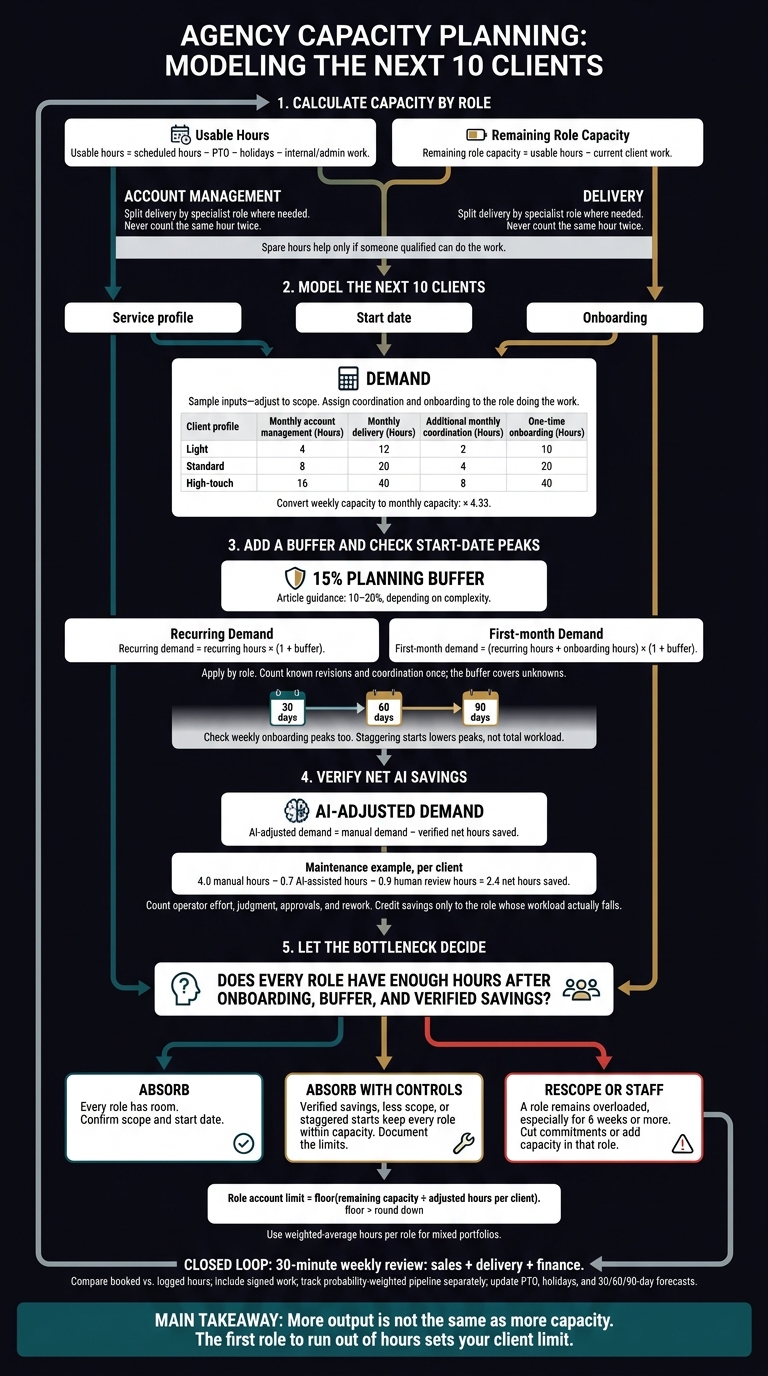
Agency Capacity Planning for Your Next 10 Clients
1. Calculate Available Hours by Role
Subtract Time Off, Internal Work, and Client Commitments
Calculate available hours by role by subtracting time off, internal work, and current client work from scheduled hours. A full team calendar does not tell you how many new clients fit, because spare hours in 1 role cannot always cover work in another.[1][5]
Usable hours = scheduled hours − PTO − holidays − internal/admin work.
Remaining role capacity = usable hours − current client work.[1]
Deduct meetings, training, sales support, and admin time. Deduct senior management time separately. Count client calls, revisions, and approvals as client work, and count each hour only once. Check the load against last quarter’s time logs.[5][6]
These hours give you a baseline for testing new client demand.
Track Account Management and Delivery Separately
Track account management and delivery in separate pools, then check each pool against client demand. If someone works in both, split their hours between the pools. Do not count the same hour twice.[1]
Use this table to assign weekly hours after PTO and internal work.[1]
| Role | Headcount (FTE) | Scheduled hours | Non-client deductions | Usable hours | Current client work | Remaining capacity |
|---|---|---|---|---|---|---|
| Account managers | 2.0 | 80 | 16 | 64 | 50 | 14 |
| Strategists | 1.5 | 60 | 12 | 48 | 40 | 8 |
| Content/design specialists | 3.0 | 120 | 24 | 96 | 85 | 11 |
| Channel specialists | 2.0 | 80 | 16 | 64 | 60 | 4 |
| Operations support | 1.0 | 40 | 10 | 30 | 15 | 15 |
Weekly role-capacity baseline.[1]
Use each role’s remaining hours to test how many new clients fit before you need staffing changes. Base the forecast on current committed hours. Use past utilization only to check your figures.[1][5]
Do not combine all roles into 1 pool. Split content and design when different specialists own those tasks. Spare hours count only when someone qualified can do the work.[1][5]
Use this baseline as the capacity ceiling when testing demand from the next 10 clients.
sbb-itb-9cd970b
5 Steps in Capacity Planning Process Explained in 1 Minute
2. Estimate the Hours Your Next 10 Clients Need
Estimate the monthly hours your next 10 clients need by role, then compare that demand with the hours left in Section 1. Convert weekly capacity to monthly capacity by multiplying by 4.33, and count both monthly service work and the extra hours needed to start each account.[5][4]
Set Hours for Light, Standard, and High-Touch Clients
Use these sample profiles to plan, then adjust them to match each client’s scope. Track coordination time on its own and assign it to the role doing the work. Split delivery hours by role before checking whether the work fits.[5][7]
Client profile Monthly account-management hours Monthly delivery hours Additional monthly coordination time One-time onboarding hours First constraint Light 4 12 2 10 Reporting Standard 8 20 4 20 Revisions High-touch 16 40 8 40 Senior strategy Sample planning inputs. Adjust them to match the service scope. Split onboarding hours by role, too.
Match each of the 10 clients to a profile. Then total the hours by role and compare them with the capacity left in Section 1.
Separate Onboarding Hours from Monthly Work
New-client demand = recurring service + onboarding + contingency.
Onboarding includes kickoff, access collection, reporting setup, context transfer, and handoffs. Regular client updates and approval follow-ups belong in recurring work. Count revisions, approvals, and coordination time only once, even if they appear in more than 1 estimate.[5][7][9]
Recurring demand = recurring hours × (1 + buffer).
First-month demand = (recurring hours + onboarding hours) × (1 + buffer).
Apply both formulas by role. Start with a 10–20% buffer: use the lower end for standard services and the higher end for custom work or complex approvals. This buffer covers unknowns, not revisions you have already counted.[10][8]
Map Client Starts Across 30, 60, and 90 Days
Give each of the 10 clients an expected start date. Each forecast window should include monthly work for active clients plus onboarding for new starts.[9][10][5]
Check weekly peaks, too. A monthly average can hide several kickoffs in the same week. Before accepting the full group, forecast all 10 as committed work at their planned start dates.[9][10][5]
Use this demand baseline to test AI-assisted time savings in the next step.
3. Test Capacity Before and After AI Savings
Test capacity by comparing the next 10 clients’ workload with the hours each role has left, then subtract only verified AI savings. Faster task work does not mean more clients fit: if account managers still lack the context needed to review, approve, and hand off work, their hours remain the limit.
Calculate Capacity for a Mixed Client Portfolio
Run the Section 2 client mix against the team’s current workload.
Hypothetical agency: Three account managers support 15 existing accounts. At 30 usable hours each per week, they have 360 hours over four weeks, with 240 committed and 120 remaining. Delivery has 600 usable hours and 300 remaining[5].
Role Usable hours Existing workload Remaining Account management 360 240 120 Delivery specialists 600 300 300 Total 960 540 420
Account management sets the limit. Test whether a lighter client mix or measured AI savings can reduce that role’s load.
Using the Section 2 mix, the next 10 clients create a first-month spike. In the 5-light, 3-standard, 2-high-touch mix, first-month demand reaches 864 hours, far above the 420 hours remaining[12]. The portfolio does not fit without rescoping, staggering starts, or adding staff.
Compare Client Mixes and Account Limits
Compare each mix by role, not just by total hours. Include time for coordination and onboarding.
Staggering starts lowers the peak, but it does not change the total workload[12].
Use floor(remaining capacity ÷ adjusted hours per client) to set each role’s account limit[3]. Here, floor means round down to a whole account.
For a mixed portfolio, calculate weighted-average hours per client for each role. Then test whether measured AI savings close the gap.
Subtract Only Measured AI and Coordination Savings
AI-adjusted demand = manual demand − verified net hours saved[3].
Keep strategy, judgment, approvals, operator effort, and rework in the math. Faster drafts alone do not free up account management time. Savings increase the account limit only when they reduce the load on the role that sets it.
Count savings only after you check them on live work.
Work Type Manual Hours/Client AI-Assisted Hours Saved Before Review Human Review Time Daily Pacing/Checks 1.25 0.1 1.15 0.25 Reporting/Drafts 2.0 0.5 1.5 0.5 Documentation 0.75 0.1 0.65 0.15 Total Maintenance 4.0 0.7 3.3 0.9 Subtracting review time leaves 2.4 net hours saved per client to apply to the relevant role’s capacity[3].
Test 1 service with human approval in place. Measure net hours saved before you expand the test.
4. Decide What Fits and Where to Add Staff
Choose Whether to Absorb, Rescope, or Staff
The role that fills up first sets your client limit, not total team hours.[13] Start with the bottleneck from Section 3. Then decide whether each new client fits after verified time savings and a buffer for unexpected work.
Give each proposed client an absorb, absorb with controls, or rescope/staff decision.
| Decision | When it fits | Action |
|---|---|---|
| Absorb | Every role has room after a buffer for unexpected work. | Confirm the scope and start date. |
| Absorb with controls | Verified time savings, less scope, or staggered starts keep every role within capacity. | Put those limits in the delivery plan. Treat tight margins as temporary. |
| Rescope or staff | A role stays overloaded after those changes, especially for 6 weeks or more. | Cut commitments or add capacity in that role.[11] |
Before hiring, check whether less scope, standard workflows, or fewer approval steps can ease the load. Use a contractor for a clear skill gap or a short onboarding spike. Consider a permanent hire when repeat work still exceeds capacity.[11]
Track the action each week against the same forecast.
Update the Capacity Forecast Weekly
Hold a 30-minute weekly review with sales, delivery, and finance. Use the same role-by-role forecast to check whether your next 10 clients fit.
- Compare booked hours, logged hours, and gaps between the forecast and actual hours.
- Include all signed work. Track pipeline demand separately, weighted by its chance of closing.
- Subtract upcoming PTO and U.S. holidays from available hours.
- Check each role’s capacity, including time for onboarding.
- Update the rolling 30-, 60-, and 90-day forecast. Check promised start dates again.[14]
Pause new starts when response times slip or reports fall behind. Fix the overload before adding more clients.
FAQs
How do I estimate capacity without reliable time logs?
- Track time for every task for 4 weeks. Include client messages, reports, urgent fixes, and project management. Group clients by the time they need, not the revenue they bring in.
- Subtract 25–35% of working hours for meetings, admin, and switching between tasks. Set aside a 15–20% capacity buffer for urgent work and shifts in demand.
- Compare the hours left with the time needed for current clients and clients in your pipeline. Review this each week to spot where work may get stuck.
How do I account for scope creep in my forecast?
Plan for 70% to 85% of your team’s available hours, not 100%, so unexpected work has room to land [1][2]. A buffer works better than trying to track every task you can’t predict.
The remaining 15% to 30% isn’t idle time. It covers surprise requests, internal issues, and extra rounds of edits, so scope creep doesn’t force nights, weekends, or rushed work that hurts quality [2].
How long should I test AI savings before relying on them?
Validate your AI time savings for at least 4 straight weeks before using them to take on more clients. Compare the new process with the same work done by hand to see which gains hold up and which were just a fluke.
Check that quality holds steady and time spent per client levels off. If you plan around savings that haven’t held up, quality can slip or your team can burn out when the extra capacity fails to show up.