Account Manager Workload: The 5 Tasks That Cap Every AM

I look at account manager workload through 5 tasks: gathering inputs, briefing teams and AI tools, tracking work, checking client needs, and handling approvals and revisions. Before adding accounts, I check which tasks still need the AM to find facts, repeat instructions, or chase decisions, then give that work clear rules and an owner.
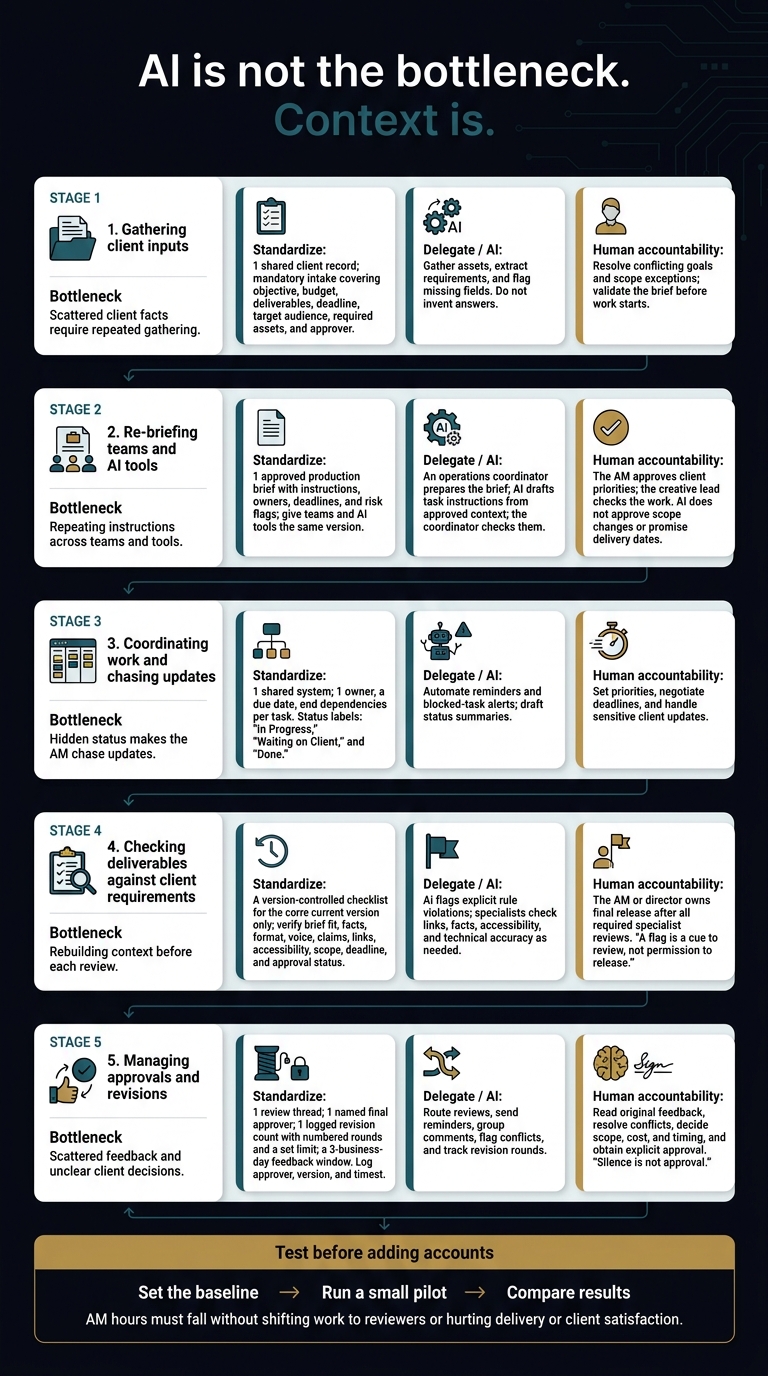
The lesson: AI is not the bottleneck. Context is. More output does not free an AM if each draft needs another explanation or fix.
Here is what I would change first:
- Inputs: Keep client goals, assets, and rules in 1 shared record.
- Briefs: Give teams and AI tools the same approved instructions.
- Tracking: Put owners, dates, and status in 1 place.
- Checks: Use clear review rules and keep a human in charge of release.
- Approvals: Name the approver and log feedback against the right version.
Agile Growth Labs (AGL) uses Portable Delivery Intelligence to connect client context to the AI tools a team already uses. AGL’s target is 18 to 25 accounts per AM, up from 4 to 8. That is a target, not a promise.
<u>I would test the change before adding clients.</u> AM hours must fall without shifting the load to reviewers or hurting delivery.
Next step: Run the free calculator.
Account Manager Workload: 5 Bottlenecks to Fix
Why Client Count Does Not Measure AM Workload
Client count does not measure AM workload because each account brings a different mix of handoffs, decisions, and follow-up. An account with fewer deliverables can still take more AM time if it has more stakeholders, unclear requests, or slow approvals, so output alone does not show the full load.
Constructs defines the AM role as translating vague client requests into internal tasks and technical work back to clients. [5][9]
Custom strategy, more deliverables, more stakeholders, and more revision rounds all add decisions, follow-up, and notes. The 5 tasks below show where that work builds up. [5][9]
A pause in production is not a pause in AM work. While an approval sits, the AM still switches between tasks, adjusts dates, and sends status updates.
StreamWork reports that 74% of marketing and creative professionals say approvals require more effort than the creative work itself, so output volume alone understates AM workload. [1]
Before adding accounts to an AM’s load, track 1 typical account from the first request to final approval. Log each handoff, follow-up, revision, and reopened decision. Keep waiting time separate from active work so a slow approval does not look like hours of AM effort. [5][8]
Then split work that needs client judgment from work that keeps tasks moving. Standard steps, delegation, or AI can reduce that coordination load. [3][7][9] The first limit is gathering client inputs.
sbb-itb-9cd970b
1. Gathering Client Inputs
Client intake limits account manager (AM) capacity when each request forces the AM to piece together facts from scratch. AI can help gather those facts, but the AM still needs a clear brief with agreed goals, budget, and approvals before the team can start work.
Time Drain and Agency Example
Illustrative, not a measured case: A paid-media AM can spend an hour or more combining goals from an email, brand restrictions in Google Drive, and offer details from a kickoff call. The time goes to collecting inputs, not planning the campaign, and missing budget or approval details can trigger another round of questions before work starts. This repeats for every new request, so the hidden time compounds across accounts. [10][12]
The bottleneck is scattered context, not a lack of AI tools. When client facts live in separate places, someone must bring them together for each request.
What to Standardize
Use a mandatory intake form with fields for the objective, budget, deliverables, deadline, target audience, required assets, and approver.
Keep a kickoff record of agreed requirements and approvals. Store brand rules and preferences in a reusable client rules sheet so the AM does not have to rebuild that context each time.
What to Delegate or Assign to AI
Delegate asset gathering. Have AI pull requirements from emails and call notes, sum up brand rules, and flag missing fields against the intake form.
AI can also draft follow-up questions for AM review. It should flag gaps, not invent answers.
Human Judgment and Accountability
A complete form is not always a clear brief.
AI can flag a brand-awareness goal paired with a return on ad spend (ROAS) target; the AM still has to confirm which goal takes priority.
The AM must settle conflicting instructions, unclear requests, and scope exceptions. Only then should the AM validate the brief and start work. [6][8]
Once the brief is validated, the next bottleneck is re-briefing the delivery team and AI tools.
2. Re-Briefing Teams and AI Tools
Time Drain and Agency Example
Re-briefing is a context problem, not an AI problem: teams and tools need the same approved instructions before work starts. A shared production brief gives each task a clear owner, deadline, and set of rules, so the account manager does not have to explain the same client needs again.
A content AM repeats the audience, tone, claim limits, and format instructions in Slack and again in an AI tool.
Research shows that 55% of managers spend 3 to 10+ minutes per session re-explaining information their team already knows[1]. The issue is not a lack of effort. The instructions are split across places.
What to Standardize
Create 1 approved production brief, not another intake form. A production brief turns checked client context into task instructions, owners, deadlines, and risk flags.
Give writers, designers, and AI tools the same version. This cuts repeat briefings before work starts[6][7].
What to Delegate or Assign to AI
An operations coordinator should prepare the production brief. AI can turn approved context into instructions for writers and designers.
Those instructions should cover the audience, tone, claim limits, visual rules, and format limits. The coordinator checks each instruction against the approved brief[6][7].
Human Judgment and Accountability
Name a reviewer before production starts. The AM approves client priorities. The creative lead checks the work.
AI does not approve scope changes or promise delivery dates. Record who approved the instructions so each decision has a clear owner[6][7].
Once the brief is set, the AM’s next bottleneck is coordination and chasing updates.
3. Coordinating Work and Chasing Updates
Time Drain and Agency Example
Coordination slows down when task status stays in messages instead of a shared system. After the brief is set, the account manager (AM) becomes the go-between, chasing updates that should already be visible to the team.[5][6]
A campaign approval should be visible in the project system, not discovered only after the AM chases the copywriter, designer, developer, and client one by one.[5][6]
Hidden status creates more work for the AM. When updates sit in Slack threads, inboxes, and scattered project notes, the AM has to find them. Each hidden dependency adds work and limits how many accounts the AM can carry.[5][6]
What to Standardize
Put task status in 1 shared system so the AM does not have to chase it.
- Record 1 owner, a due date, and dependencies for each task in your project management tool.
- Define “In Progress,” “Waiting on Client,” and “Done.” Link each approval task to the work it blocks.
- Set weekly or biweekly updates, a 3-business-day client feedback deadline, and a rule for when to flag stalled tasks before they delay other work.[5][6][9]
What to Delegate or Assign to AI
Delegate routine follow-up. Use Make, n8n, or Zapier to collect task data, send reminders, and flag blocked tasks in Slack.
AI can draft summaries of finished work, active work, pending decisions, and risks. The AM reviews only blocked or high-risk items.[2][6][12]
Human Judgment and Accountability
The AM still sets new priorities, negotiates deadlines, and sends sensitive client updates.[2][9]
Visible status and automated follow-up reduce the chase. The next task is checking deliverables against client requirements.
4. Checking Deliverables Against Client Requirements
Checking deliverables means comparing the exact file ready for release with the current approved brief, rules, and approvals. The account manager (AM) should not have to rebuild that context before each review: AI can flag clear gaps, specialists can check their areas, and a human must approve the release.
Time Drain and Agency Example
Review slows down when the AM has to piece the brief back together before checking the work. The bottleneck is missing context, not a lack of AI.
A social campaign includes a prohibited phrase or lacks a required CTA from the approved brief.[7]
Version control keeps the review tied to the right rules. The AM checks the current file against the current brief, not the first request.
What to Standardize
Use a version-controlled checklist for the current version only. Cover brief fit, facts, format, voice, claims, links, accessibility, scope, deadline, and approval status.
List prohibited phrases and required CTAs as clear acceptance criteria. Before release, check that every required approval applies to that exact file.
What to Delegate or Assign to AI
Assign link testing, accessibility checks, and fact-checking to specialist reviewers. Use AI for a first pass against the brief. It can flag banned wording, missing CTAs, and other unmet rules, with the related text attached.[7]
A flag is a cue to review, not permission to release. AI checks explicit rules, specialists check their fields, and humans keep final release authority.
Human Judgment and Accountability
Keep disputed facts, sensitive claims, and scope decisions with the people accountable for them. Specialists check technical accuracy and accessibility where needed. Legal risks and risks to the client’s reputation need the right human review.
The AM or director owns final release, after all required specialist reviews are complete.[6][9]
5. Managing Approvals and Revisions
Approvals stall when the account manager (AM) has to piece together client decisions, not when AI takes too long to do the work. Once a deliverable passes review, the last hurdle is clear approval context: who can approve, which version they reviewed, and what still needs to change.
Time Drain and Agency Example
Feedback spread across email, Slack, and shared docs forces the AM to rebuild the approval record.
One launch deck can collect conflicting notes, late edits, and scope creep, turning approvals into rework.[5][11]
The AM is managing approval context, not the work itself. The problem is how feedback arrives, not a lack of effort.
What to Standardize
Once the work meets the brief, use a single approval record with clear rules:
- 1 review thread for all feedback.
- 1 named final approver with the last say.
- 1 logged revision count, with numbered rounds and a set limit.
Set a 3-business-day feedback window. State that late feedback moves the deadline. Label each comment as a correction, preference, or scope change.
Log each approval with a timestamp. If a request reopens, review its effect on scope, cost, and timing before work starts again.[5][6]
What to Delegate or Assign to AI
AI can track approvals and group feedback, but the AM must decide what changes mean for scope, cost, and timing. The AM must read the original comments before making that call.[8][11]
| Task | Automation | Human Decisions |
|---|---|---|
| Review routing | Notify named reviewers; send reminders | Set approval order and exceptions |
| Feedback consolidation | Group comments; flag conflicts | Resolve conflicting or vague instructions |
| Scope assessment | Flag requests outside the brief or estimate | Price, defer, or absorb added work |
| Revision verification | Track rounds; compare edits with feedback | Confirm the revision meets the request |
| Final sign-off | Log approver, version, and timestamp | Named approver gives explicit approval |
Human Judgment and Accountability
A summary is not a client decision. Before sending revisions to delivery, the AM must settle conflicts, clarify vague requests, and agree on any cost or timing changes.
AI may draft the message, but a human must review it. Silence is not approval.[6][11]
The next step is checking what must shrink before an AM can carry more accounts.
Workload Checklist: What Must Shrink Before Adding Accounts?
Manual context sharing, work chasing, and routine approvals must shrink before account managers (AMs) can carry more accounts. Use this checklist to find which of the 5 bottlenecks still limits your team, based on how work runs, not which tools or templates you have.
Score each check separately: Yes means it works without repeated AM help. Partly means it works some of the time. No means it still depends on the AM.[6] The first 5 rows cover the tasks above. The last checks whether work can continue without the AM.
| Workload area | Checks to score separately |
|---|---|
| Client inputs | Are client records stored in a system? Can clients find deliverables and status without asking the AM? Does intake have a named owner who tracks down missing inputs?[5][6][10] |
| Briefs and handoffs | Are briefs built from checked inputs? Does every task have an owner and deadline? Can the team see which tasks depend on others before work gets blocked?[2][3][6][10] |
| Coordination | Do updates come from a shared system? Do reminders run automatically?[3][5][6][10] |
| Quality checks | Are pass-or-fail checks clear and repeatable? Is routine quality assurance (QA) off the AM’s desk? Does AI-assisted review have a named human reviewer?[1][6] |
| Approvals | Is the place for feedback clear? Are approvers named? Are feedback windows enforced? Can the team check approval status without the AM?[5][6] |
| Coverage and exceptions | Is it clear which decisions the team can make and when to ask for help? Can a backup find context, keep routine work moving, and flag problems while the AM is away?[5][6] |
Mostly No: Cut manual coordination first. Put shared records, structured intake, and visible status in place before adding accounts.[6][10]
Mostly Partly: Give the weakest recurring step a named owner. Make that step work each time before adding accounts.[5][6]
Mostly Yes: Measure what still limits capacity before adding accounts. Check work complexity, the people involved, approvals, and support needs.[5]
Next, test whether the team’s current load leaves room for more accounts.
Test Capacity Before Adding Accounts
Test capacity by checking whether a small pilot cuts account manager (AM) hours without hurting delivery or client satisfaction. Start with the bottleneck that causes the most repeat work, then add accounts only if the gains hold and the delivery team has room to take on more work.
After scoring the checklist, compare the 5 bottlenecks by frequency, AM hours, rework, and client risk. Test the biggest source of repeat work, not the task that is easiest to automate. Keep more human review where errors could harm the client relationship.
- Set the baseline. Choose 1 service. Record AM hours per account, manual exceptions, approval delays, revision rounds, on-time delivery, and client satisfaction.
- Run a small pilot. Use a trained operator and human approval checkpoints. Train operators on AI handoff rules and how to review AI output. Require human approval before any AI output is acted on or sent.[3][4]
- Check before adding accounts. Compare pilot results with the baseline. Check that work has dropped, not moved to reviewers or the delivery team.
Agile Growth Labs (AGL) uses Portable Delivery Intelligence to connect client context to the AI tools your team already uses. It maps 1 service and tests live work with a trained operator and human approval.
The 18 to 25 accounts per AM benchmark is a target, not a promise. Whether it fits depends on service complexity, stakeholder count, communication load, and delivery capacity.[1]
| Pilot result | What to do |
|---|---|
| AM work drops and delivery measures improve | Add accounts slowly, while results hold and delivery has room. |
| Work moves to reviewers or the delivery team | Fix the bottleneck before adding accounts. |
| Deadlines slip, revision rounds increase, or client satisfaction falls | Pause account growth and address the cause. |
Use 80% AM capacity as a planning guardrail, not proof that another account fits.[5]
Conclusion: Reduce Repetitive Work Before Adding Clients
The 5 bottlenecks draw from the same pool of account manager (AM) hours. Cut repeat work before adding clients so fewer requests need the AM’s time.
Map 1 account against the checklist. Fix the biggest repeat drain: keep requirements in 1 shared record, use the same handoff steps, and give routine follow-up to a coordinator.
Use AI for small, clear tasks, such as drafting updates from a recorded status. Keep people in charge of scope and sensitive feedback.
FAQs
How do I calculate capacity across accounts of different complexity?
Group accounts by communication load and planning needs, not just account count. A client who needs frequent calls takes more time than 1 who gets reports without a meeting.
| Tier | Type of work | Typical load per manager |
|---|---|---|
| Tier 1 | High-touch work with frequent client contact | 1–2 accounts |
| Tier 2 | Repeatable deliverables | 3–4 accounts |
| Tier 3 | Low-touch performance tracking and reports shared without meetings | Based on workload |
Set clear limits, such as 10 client calls per person per week. Track the time AI saves. Use those hours for client planning.
If work quality or client health drops, change the scope or price before hiring.
How long should I run a workload pilot?
Run a 12-week AI-assisted workload pilot before rolling it out across client accounts [1]. Build the process first, test it alongside manual work, and expand only when the quality holds up.
- Weeks 1–4: Build prompts, standard operating procedures, and QA checklists in-house.
- Weeks 5–8: Run AI workflows alongside manual work on 2–5 stable client accounts.
- Weeks 9–12: Expand only the workflows that consistently match or beat manual quality.
Set a clear stop rule before the pilot starts. For example, return a process to manual work right away if it leads to repeated client complaints [1].
How do I get clients to follow approval rules?
Set approval rules during onboarding. Ask clients to send all feedback through 1 channel. Keep all deliverables in 1 place. For each review, state what the client must check, what decision they need to make, and when feedback is due.
Apply these rules politely but firmly. Make it clear that late feedback may shift project dates. Keep project status visible and log each approval against the right version. Don’t rely on informal email confirmations. A clear approval record helps prevent version mix-ups and keeps work within the agreed scope.