Agency Client Onboarding Process: Capture Client Context Once, Use It Everywhere

I build an agency client onboarding process around 1 approved client record, not a pile of intake notes, so each brief, handoff, and AI task starts with the same facts. I assign an owner, check scope, and set approval rules before work begins because AI is not the bottleneck. Context is.
Intake forms tell me what a client said. They do not tell the team which rules to follow. That gap leaves account managers repeating details and fixing work.
At Agile Growth Labs (AGL), we use Portable Delivery Intelligence: client goals, rules, and approvals kept ready for use across the team’s tools. Our account-capacity target is 18 to 25 accounts per manager, compared with the 4 to 8 account cap. That is a target, not a promised result.
I start small:
- Check client inputs against the signed scope.
- Approve the record and name its owner.
- Reuse only the needed facts in briefs and AI tasks.
- Review changes weekly and require human approval before delivery.
- Test 1 service and track re-briefing, corrections, and account-manager hours.
The test is less repeat work, not more AI output. <u>Fix the source, not just the draft.</u>
Next step: Run the free calculator.
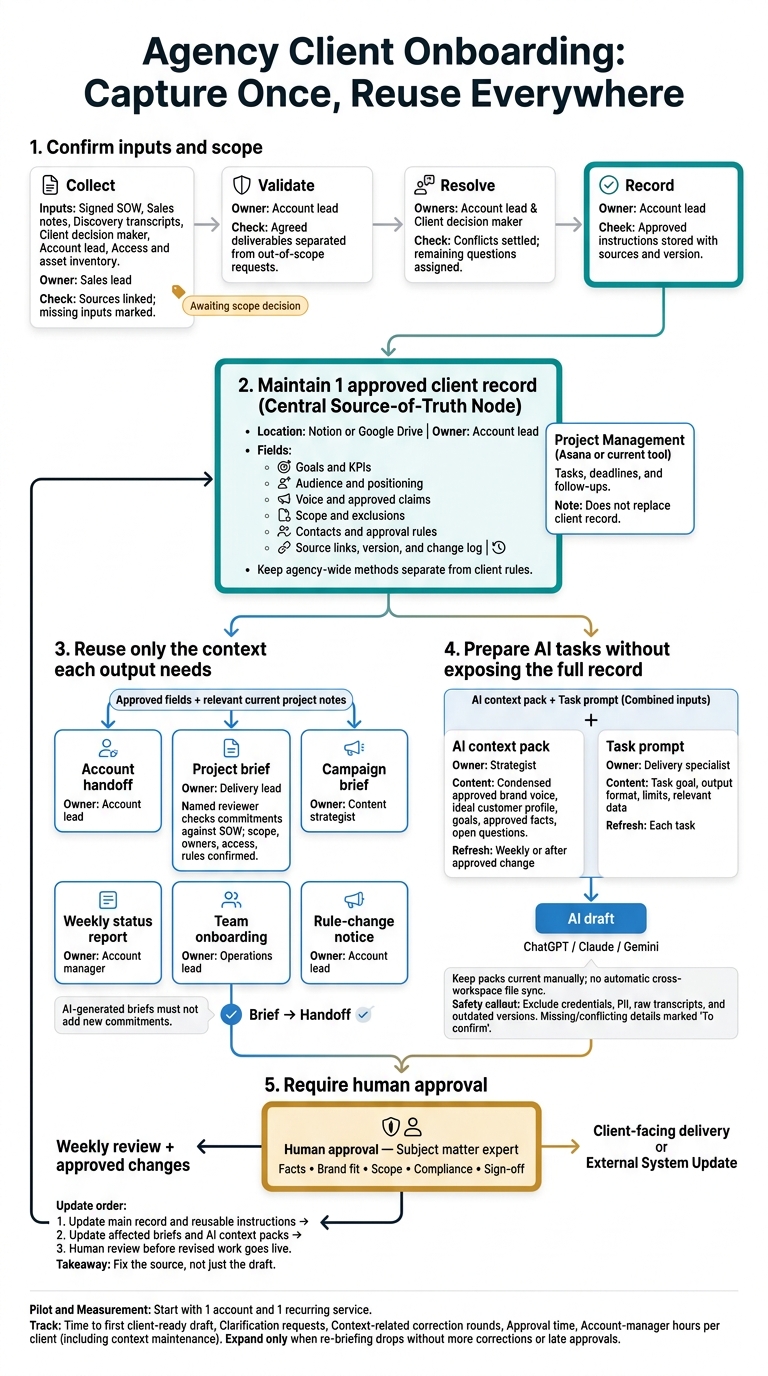
Agency Client Onboarding: Capture Once, Reuse Everywhere
Create the Client-Context Record From Intake to Handoff
Turn approved client context into a working record before handoff. Give each person the same source for scope, rules, and decisions so they do not have to piece together what the client agreed to.
Store the approved client-context record in Notion or Google Drive. Link to the source documents. Keep tasks, deadlines, and follow-ups in Asana or your current project-management tool.
Keep agency-wide methods separate from client rules. A process update should not overwrite a client’s instructions.
Confirm Scope and Collect Client Inputs
Start with the signed SOW, client decision maker, account lead, and access and asset inventory. Fill in the intake from sales notes and discovery transcripts. Then ask the client to confirm or correct it.
Check each commitment against the signed scope. Label new requests “Awaiting scope decision” rather than adding them to the work without approval.
Collect only what you need to approve and use the record:
- Business, goals, audiences, positioning, and voice.
- Deliverables, approvals, access, and communication rules.
Mark each access item as requested, confirmed, or missing.
Use a Copy-Ready Client-Context Template
Copy these fields into the client workspace. Keep standing rules separate from campaign details that change. Link milestones and blockers to project-management tasks, and mark assumptions as assumptions.
CLIENT CONTEXT - [Account name]

CONTROL
Account lead:
Version:
Last reviewed / next review:
Signed SOW and source location:

ACCOUNT
Business and offers:
Primary contact / decision maker / billing contact:
Escalation contact:

GOALS
Business goals:
KPIs / measurement source:
Milestones:

AUDIENCE AND POSITIONING
Priority audiences:
Positioning / approved claims / supporting proof:

VOICE
Voice rules:
Approved writing examples and asset links:
Words, claims, or approaches to avoid:

SCOPE
Included deliverables and quantities:
Exclusions / revision limits:
Access and asset inventory / confirmed status:

APPROVALS AND RULES
Approver by deliverable:
Legal, brand, privacy, and security requirements:
Critical rule | source | confirmed by/date:
Assumptions awaiting confirmation:

WORKING RULES
Channels / response windows / meeting cadence:
Reporting cadence / time zone:

CURRENT WORK - link to project-management tasks
Campaigns / priorities:
Milestones / dependencies / blockers:
Open decisions / assigned decision owner:

CHANGE LOG
Date | Field changed | Source | Owner | Effective date
Use this record as the source for briefs, handoffs, and AI tasks.
Assign Owners and Completion Checks to Each Onboarding Stage
Assign a named person to each role below, not “the team.” Settle conflicting inputs before approving instructions. Check AI drafts against the signed scope.
Review new decisions each week as part of the record’s update cycle.
| Stage | Owner | Input → output | Completion test |
|---|---|---|---|
| Collect | Sales lead | Contract, notes, assets → intake draft | Sources linked; missing inputs marked |
| Validate | Account lead | Draft and SOW → checked scope | Agreed deliverables separated from out-of-scope requests |
| Resolve | Account lead and client decision maker | Conflicts and gaps → written decisions for each | Conflicts settled; remaining questions assigned |
| Record | Account lead | Confirmed decisions → approved record | Approved instructions stored with sources and version |
| Brief | Strategist | Approved record → delivery brief | Named reviewer checks commitments against the SOW |
| Handoff | Delivery lead | Brief and access inventory → ready-to-start work | Scope, owners, access, and approval rules confirmed; recap shared; open questions assigned |
| Review | Account lead | Changes and feedback → updated record | Change log updated; weekly review done; affected briefs and handoffs updated |
Pull approved context from this record when building account handoffs and project briefs.
sbb-itb-9cd970b
Reuse Client Context Across Delivery
Use the approved client record as the source for every delivery document, from account handoffs to weekly reports, so the team works from the same facts. Give each output only the approved fields it needs, plus current project notes, rather than asking AI to rebuild client context each time.
Build Account Handoffs and Project Briefs
Each output needs a different part of the same record. The table below shows which fields to use, who owns the output, and when to update it.
Keep acceptance criteria tied to agreed deliverables. An AI-generated brief must not add new commitments.
| Reuse point | Required context fields | Output owner | Update trigger | Risk if information is missing |
|---|---|---|---|---|
| Account handoff | Goals, scope, deliverables, audiences, priorities, risks, contacts, approvals | Account lead | Signed SOW, completed kickoff, or account reassignment | Asking the client to repeat details; mismatched success metrics |
| Project brief | Goals, scope, audience, deliverables, priorities, voice rules, approved claims, exclusions, acceptance criteria | Delivery lead | New project or scope change | Scope creep; generic work; missed technical limits |
| Campaign brief | Audience, voice rules, approved claims, priorities, deliverables | Content strategist | New campaign or messaging change | Wrong brand voice; legal or compliance rejection |
| Weekly status report | Goals, milestones, blockers, decisions, KPIs, current priorities | Account manager | Each week | Reporting activity instead of results; missed blockers |
| Team onboarding | Client overview, service playbook, approval map, brand voice, non-negotiable rules | Operations lead | New hire or team rotation | Knowledge held by too few people; uneven work quality |
| Rule-change notice | Voice rules, claims, hard rules, approval map, affected outputs | Account lead | Client feedback, brand update, or legal update | Sending work without review or failing legal requirements |
Prepare Status Updates and Team Onboarding Materials
Recurring documents should draw from the approved record, not from memory. For status reports, pair client goals with current project notes on milestones, blockers, and decisions. For team onboarding, pair the agency service playbook with the client’s approval map and non-negotiable rules.
Test handoffs, briefs, and status reports by hand before you automate them.
When a rule changes, follow this order:
- Update the main record and its reusable instructions.
- Update the affected briefs.
- Require human review before the revised work goes live.
Fixing a draft does not fix the source. Change the reusable instructions too, so the next draft follows the new rule.
These same approved fields can later feed task prompts and AI workflows. This approach is central to how AI transforms content creation by replacing manual context-building with automated, expert-level workflows.
Connect Client Context to ChatGPT, Claude, and Gemini
Connect client context to ChatGPT, Claude, and Gemini with an AI context pack, a small copy of the approved facts used for briefs and handoffs. These tools do not sync files across workspaces, so a person must keep each pack current rather than share the full client record. [6]
Separate the Client Record, AI Context Pack, and Task Prompt
Keep the client record, AI context pack, and task prompt separate. Each has a different job.
| Layer | Information included | Owner | Refresh trigger | Information excluded |
|---|---|---|---|---|
| Approved client record | Approved context, history, contracts, source links, and restricted account details | Account lead | Approved client decision or scope change | Temporary drafts or unverified AI guesses |
| AI context pack | Condensed approved brand voice, ideal customer profile, goals, approved facts, and open questions | Strategist | Weekly or after an approved change | Credentials, PII, raw transcripts, and outdated versions |
| Task prompt | Task goal, output format, limits, and relevant data | Delivery specialist | Each task | Unrelated company history |
| Human approval | Fact-check, brand fit, compliance, and sign-off status | Subject matter expert | Before delivery | Unverified AI outputs |
Save the pack in Markdown so it is easy to move and track changes. Use only approved facts. Put missing or conflicting details in To confirm.
The pack gives each AI workspace the context it needs without exposing the full client record.
Store Standing Rules and Update Task Context
Keep standing client rules in the client workspace. Add short-term campaign facts and output needs with each task.
Use a client workspace in Claude Projects, ChatGPT Projects, or Gemini file context for kickoff-context.md, running-notes.md, and open-questions.md. Keep agency SOPs separate from client rules. [2][6]
Update running-notes.md weekly. Update open-questions.md after each milestone or client decision. Refresh affected packs when the client approves a new rule, milestone, or deliverable.
Protect Client Data and Require Human Approval
Share only permitted client data, and require human approval before work reaches a client or changes an external system.
- Remove sensitive data. Leave out personal or confidential details that the task does not need. Exclude passwords, private keys, payment data, medical records, legal case details, and regulated PII.
- Check compliance. Confirm that workspace access and data-use policies allow the remaining material. For high-risk work, have a person check facts, claims, brand fit, scope, compliance, and approval status before delivery.
- Require human approval. Make approval the last step before any client-facing output or system update. Record approved decisions in the client record, then refresh affected packs and outputs. Require human approval before automation changes an external system, such as a CRM. [7][5]
Conclusion: Pilot One Service Before Expanding
Pilot the system on 1 recurring service across a few live accounts once the record, briefs, and AI context packs work. When approved context changes, update the affected briefs and AI context packs before human approval so the team works from the same client facts.
Measure Re-Briefing, Corrections, and Account-Manager Workload
Test the process, not just the templates. Use similar recent work as a baseline. Track time to the first client-ready draft, clarification requests, context-related correction rounds, approval time, and account-manager hours per client. Include time spent keeping context current. [3][8][9][4]
Expand only when re-briefing drops without more corrections or late approvals. That is the signal that the team can serve more clients without new hires.
Implement the Process With Portable Delivery Intelligence
Once the pilot shows less re-briefing and stable approvals, use the same workflow across more accounts. Portable Delivery Intelligence keeps client strategy, rules, priorities, and approvals in the tools the team already uses.
Start with 1 account and 1 recurring service. Map where context lives, who keeps it current, which outputs need it, and where approval must happen. Name an owner to review the approved record weekly and update affected handoffs, briefs, and AI context packs when it changes. You can also use AI prompt repositories to standardize the quality of these outputs.
- Run the free Capacity Leak Calculator to see how many more accounts your team could carry.
- Want help? Bring 1 client account to a free mapping session.
FAQs
How do I move existing clients into this onboarding process?
Gather each client’s brand guides, past briefs, and approved content in a workspace just for that client. Have your AI tool draft a reusable context file with the brand voice, target audiences, and messaging rules.
Review the file before your team uses it. Check subtle details, how to discuss competitors, and who must approve the work.
Save the checked file in the client’s project folder. Update it after each client interaction. Have your team start each AI session in that workspace so the work uses the right client context.
How do I prevent outdated context from reaching AI tools?
Keep 1 version-controlled client context pack as the source for client facts. Don’t rely on chat history or scattered notes. Log each change with a date and a status: approved, pending, or prohibited. Before each task, copy only the fields the brief needs.
Flag conflicts for a person to confirm. Don’t let AI guess. Archive old versions, keep each client’s workspace separate, and review the pack often to remove outdated facts.
How long should I pilot before adding more accounts?
Run a 30-day pilot with 1 current service and 1 client once your context pack, brief, and quality assurance gate are ready [1].
- Week 1: Measure your current workflow [1].
- Week 2: Build your templates [1].
- Week 3: Run the live workflow [1].
- Week 4: Compare the results [1].
Track rework, approval time, and revision rounds. Use these measures to check that the process keeps work consistent before you add more accounts [1].