$82M in Funding Went to Agentic Marketing Startups in 30 Days. Here Is the Buyer's Filter.

I’d read this market one simple way: more funding means more vendor noise, not less risk. And with 42% to 54% of AI projects failing in 2025, mostly from data and integration problems, I would not judge these tools by demos or labels. I would judge them by five buyer checks:
- Automation depth: Can it trigger from a signal and finish 5+ actions across 2+ channels without hand-holding?
- Integration fit: Does it write back to Salesforce or HubSpot fast, and act inside ad, email, and sales tools?
- Pipeline impact: Can it tie actions to meetings, opportunities, and revenue?
- Governance: Can I pause, approve, audit, and roll back actions?
- Time-to-value: Can it go live in days, launch in two weeks, and show a first qualified meeting in 60 days?
The article breaks the market into six startup types: campaign orchestration, autonomous outbound, ABM copilots, ad optimization agents, lifecycle automation, and AI tool directories. The point is simple: pick the category that fixes your bottleneck first, then cut any vendor that cannot answer the hard control, data, and cost questions in the first call.
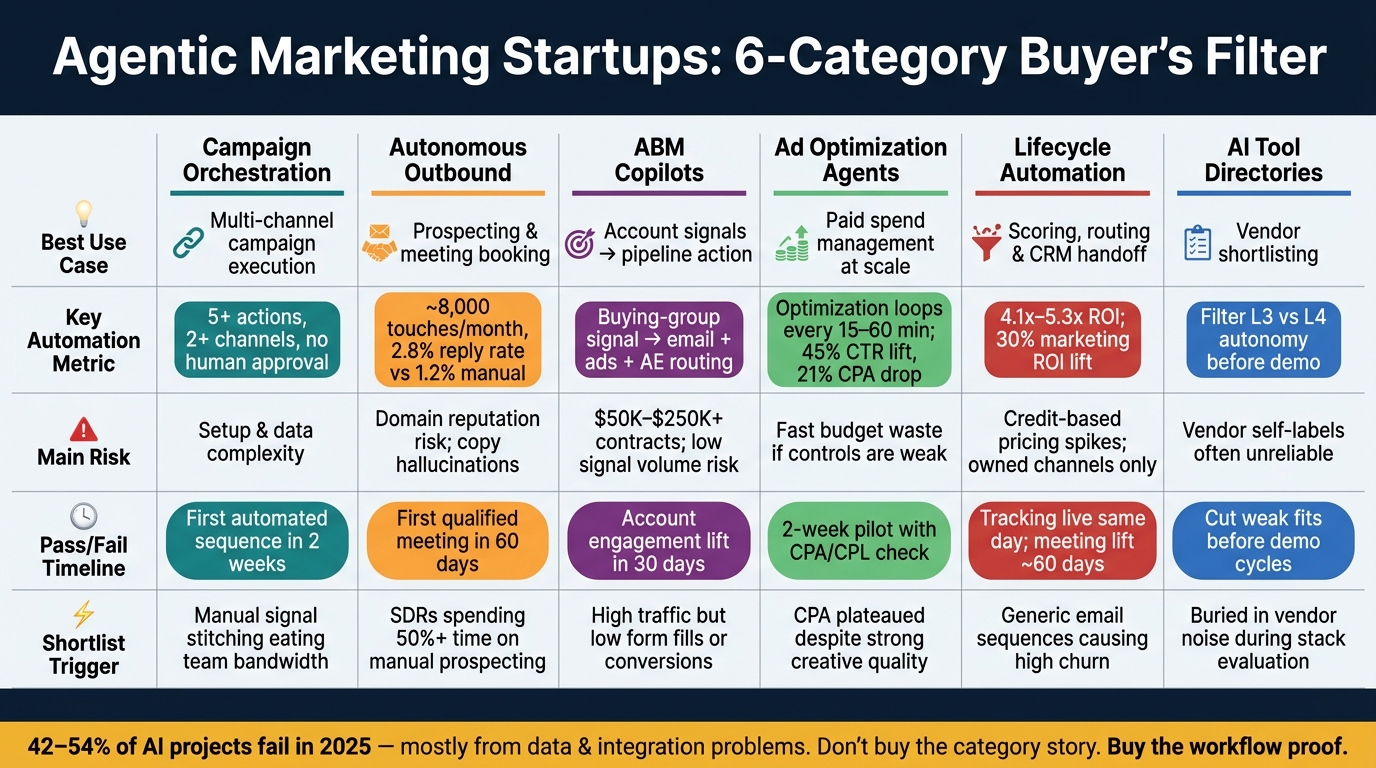
Agentic Marketing Startups: 6-Category Buyer's Filter Comparison
Defining Agentic AI for Marketing Leaders
Quick comparison
| Startup type | Best use | Main buyer check | Main risk | Early pass/fail signal |
|---|---|---|---|---|
| Campaign orchestration | Running multi-channel campaigns with less manual work | Can it run the full loop from signal to publish to learning? | Setup and data complexity | First automated sequence in 2 weeks |
| Autonomous outbound | Scaling prospecting and booking meetings | Can it send, classify replies, and book meetings on its own? | Domain risk and weak personalization | First qualified meeting in 60 days |
| ABM copilots | Turning account signals into action | Can it act on buying-group signals across ads, email, and AE routing? | High contract cost and weak signal volume | Account engagement lift in 30 days |
| Ad optimization agents | Managing paid spend at scale | Can it connect spend changes to pipeline, not just CTR or ROAS? | Fast budget waste if controls are weak | 2-week pilot with CPA/CPL check |
| Lifecycle automation | Routing, nurture, suppression, and handoff inside CRM flows | Can one score change trigger the full follow-up flow? | Cost spikes and channel limits | Tracking live fast; meeting lift in about 60 days |
| AI tool directories | Building a shortlist faster | Do listings show autonomy, integrations, and control depth clearly? | Vendor self-labels can be thin | Cut weak fits before demo cycles |
My takeaway: don’t buy the category story. Buy the workflow proof. If a vendor cannot show execution depth, data fit, revenue impact, control limits, and full cost in plain language, I’d cut it from the shortlist.
1. Campaign Orchestration Platforms
Campaign orchestration platforms say they can plan, launch, adjust, and tune multichannel campaigns with very little human input. Fine. The way to judge that claim is simple: can the platform execute, not just help out? The test starts with one basic question. Can the system run a full campaign loop without someone babysitting it?
Automation Depth
This is about execution, not AI branding.
Test a single workflow that starts with a signal, runs 5+ steps across 2+ channels, and finishes without human approval. A real platform should handle the whole loop: research, creation, publishing, and learning. If a vendor can't show that in a demo, then it isn't an fully autonomous orchestration platform.
Taxfix used an agentic platform to research, write, generate assets, and publish ads on its own, which led to higher CTR and lower CPA. Most agent-generated creatives also moved into production. [4] The lesson for buyers isn't the location. It's the proof that one system can localize, publish, and improve campaigns with very little human input.
Integration Fit
Push for actual execution inside Salesforce or HubSpot, plus native control of Google Ads, LinkedIn Ads, and Meta Ads, not just audience exports. Also ask for sub-5-minute sync for key CRM objects. [1]
If a platform can orchestrate campaigns, the next thing to check is whether it can carry out contact-level outreach too.
Pipeline Impact
Require multi-touch attribution tied to CRM opportunities and closed revenue.
Governance
Autonomy without control is a risk.
A platform needs an override surface. You should be able to pause a workflow, override a single action, or roll back the last 24 hours. Gartner warned in May 2026 that 40% of enterprises could decommission autonomous AI agents by 2027 because of governance gaps. [5]
So risk should be tiered. Low-stakes actions like webinar invites can run on their own. High-touch actions like executive calls should need approval. As customer value goes up and the sales motion gets more complex, the control layer should get tighter too.
Time-to-Value
Set clear targets:
- Signal capture within days
- First automated sequence within two weeks
- First qualified meeting within 60 days [1][6]
If onboarding drags on for months, reject the vendor.
Once orchestration is proven, the next filter is whether the system can run outbound on its own.
2. Autonomous Outbound Systems
Autonomous outbound systems aim to handle prospecting, sequencing, and meeting booking without someone watching every move.
Automation Depth
Orchestration shows whether a platform can run campaigns. Outbound shows whether it can turn that work into meetings without SDR babysitting.
A system with real autonomy doesn't just recommend the next step. It takes the next step. In practice, that means it can trigger off a signal - like a prospect visiting a pricing page - pull in contact data, draft a personalized multi-touch sequence across email and LinkedIn, send it, classify replies, and then either book a meeting or move the contact into nurture. That's the line between automation that builds pipeline and automation that just writes drafts.
Push vendors on hard numbers: about 8,000 touches per month, signal-based triggers, and a 2.8% reply rate versus a 1.2% manual baseline. [3] If the demo still needs you to click the next action by hand, you're not looking at an autonomous system. You're looking at an AI marketing agent add-on. Outbound is the clearest place to test whether autonomy can move pipeline instead of just increasing activity.
Integration Fit
Once a sequence is live, the next test is data flow. What matters is bidirectional CRM writeback, not a read-only sync.
Bi-directional sync with Salesforce or HubSpot should cover accounts, contacts, opportunities, and custom objects, with sub-five-minute latency. Native Gmail and Outlook OAuth also matter because they affect sequence sends and meeting booking. Slack or Teams routing helps AEs jump in the moment a high-intent signal appears.
Outbound breaks down when CRM data and identity data live in separate places. Systems that depend on third-party enrichment instead of direct identification often split contact and account records, and that drags out deployment. Poor data or weak tool access drives 33% of AI agent deployment failures. [12]
Pipeline Impact
Ignore opens and clicks. Ask for closed-loop reporting that ties qualified meetings and opportunity creation to specific agent actions. [1]
Governance
Gartner warns that binary governance - fully locked down or fully trusted - drives failure. [5]
A better approach is risk-tiering. Let low-risk follow-ups run on their own, but keep human approval gates for high-risk outreach, like contacting a CFO at a target account. You also want rollback controls and audit logs for every outreach event. [1][6] Control depth isn't just a compliance issue. It's part of pipeline reliability.
Time-to-Value
A system in this category should have its first sequence live within two weeks and produce its first qualified meeting within 60 days. That's the milestone that counts, not sequence completion. [1][6]
There's also the cost side. LLM and enrichment costs can add $0.15–$0.50 per run. [3] If the platform can't show value within 60 days, it shouldn't make the shortlist.
3. ABM Copilots
ABM copilots should turn account signals into action across the buying group. The buyer test is simple: can the tool do something useful with a known account list fast enough to earn its cost? That's what this category comes down to. It shows whether account intelligence can become account action.
Automation Depth
A useful copilot suggests the next move. An agentic one actually does the work.
Start with a small test: one account signal, one buying group, and one automated sequence that runs across email, ads, and AE routing. If the vendor can't show that flow without stopping for human approval, you're not buying an agent. You're buying a dashboard that makes suggestions. A real agentic platform handles buying group coordination, account suppression, ad changes based on intent signals, and meeting routing straight into AE calendars. [1][2]
Once the system can act on account signals, the next thing to check is where that action happens. Can it work inside your CRM and ad stack, or does it hand things off and stop there?
Integration Fit
ABM needs direct control of ad platforms, not just audience building, across Google, LinkedIn, and Meta. In plain English, the agent should adjust bids and move spend based on intent signals. It shouldn't just push a list into another tool and wait for someone else to take over. [1][6]
The bigger problem is signal fragmentation. If website activity, ad engagement, and email replies all sit in separate records, the copilot can't coordinate across them. Look for a single identity graph that connects web, ad, email, contact, and account data. Platforms like Abmatic AI, which starts at $36,000/year, and Factors.ai, whose growth plans start at about $15,000/year, are built around that setup. [1][2][6]
When signals and execution live in one place, the next test is whether those actions show up in pipeline.
Pipeline Impact
Ask for attribution from account engagement all the way to pipeline creation. Then look at exclusion logic. A strong ABM copilot should automatically suppress active customers, open renewals, and competitors from automated outreach. That kind of guardrail matters more than most teams think. [5]
Governance
Risk-tiered control is the working standard. Webinar invites and content syndication can run on their own. Budget shifts and C-level outreach should have a human checkpoint. The platform also needs a clear override surface, meaning a fast way to pause or roll back actions when something goes sideways. [1][5][6]
Time-to-Value
Signals should start flowing within days. The first automated sequence should be live within two weeks. And the first qualified meeting should happen within 60 days. For ABM, there's another early sign to watch: account engagement lift across your target list in the first 30 days. If that lift doesn't appear, the signal layer is probably too weak to earn the spend. [1][6]
If the tool also controls paid media, you've moved past ABM copilots and into ad optimization.
4. Ad Optimization Agents
Ad optimization agents live in a tricky spot: they move fast, and they can waste money fast too. They can change bids, swap in new creatives, and shift budget in near real time. But if the controls are weak, that same speed can burn through spend before anyone notices.
So the main buyer test is simple. Does the agent close the loop from signal to spend to outcome, or does it just automate the easy stuff? That’s why automation depth is the first thing to check.
Automation Depth
The biggest split in this market comes down to one thing: does the agent run the full cycle itself? That means research, write, generate, publish, and learn.
Agents like Superscale can run optimization loops every 15 to 60 minutes, generate and test ad variants at scale, pause underperformers, and push more budget toward winners based on live CTR and CPA signals. [4][10] Taxfix used Superscale across four countries and three languages, shipping 200+ ads at 15+ per week. The result: a 45% CTR lift on UK Meta ads and a 21% CPA drop on German TikTok campaigns. [4]
That said, agents still have a weak spot. Cross-channel budget shifts usually still need a human strategist or MMM. [4]
Execution alone isn’t enough if the agent can’t work inside the ad stack and CRM.
Integration Fit
Native execution is the bar. The platform should manage spend and bid logic directly inside Google Ads, LinkedIn Ads, Meta Ads, and TikTok Ads, not just build audiences that someone has to activate by hand. [1][6]
It also helps if that native ad execution is tied to bi-directional CRM sync and warehouse exports to Snowflake or BigQuery. Then the agent can connect ad spend to pipeline stages instead of stopping at clicks and ROAS. [1][2][6]
Once that connection is in place, the next test is pretty blunt: does it change pipeline results?
Pipeline Impact
Every budget move should tie back to pipeline and revenue, not just clicks or ROAS. [7] Ask vendors to show attribution that links each spend decision to pipeline or revenue, not just clicks or ROAS.
That kind of budget control needs firm limits.
Governance
Governance matters more here than in most categories because the agent is touching live budget.
A simple risk-tier setup makes sense:
- Low-risk actions, like creative testing and small bid changes, can run on their own.
- High-risk actions, like budget ceiling changes, compliance-sensitive claims, or discount offers, should stop for human review. [1][5][6]
Every platform you review should also include:
- a one-click pause
- a 24-hour rollback option
- hard budget caps at both the agent and campaign level [1][5][6]
Without those controls, budget risk isn’t being managed.
Time-to-Value
Before you commit, run a two-week pilot. Compare identified contacts against CRM records, then measure CPA or CPL lift. [1][6]
That one test will tell you more than any demo.
5. Lifecycle Automation Tools
Lifecycle automation covers a lot of ground: scoring, routing, nurture, re-engagement, and sales handoff. That makes it one of the clearest tests of agentic marketing at the revenue stage. It also makes buying harder. Plenty of vendors say they handle the whole flow, but the part that matters is simple: does the tool do the work, or does it just tell your team what to do next?
If ad agents help create demand, lifecycle tools turn that demand into pipeline.
Automation Depth
Start with one simple stress test. Change a lead score and see whether that one signal triggers routing, nurture enrollment, suppression, and sales handoff without human approval. That’s the line between a tool that acts on its own and one that mostly serves up suggestions.
Platforms like HubSpot Breeze and Salesforce Agentforce usually land at L2–L3, depending on setup, while Agentforce can reach L4 for certain workflows. [5][9] The stronger tools don’t rely only on fixed rules. They adjust when buyer behavior shifts. For example, a contact can move into a different nurture sequence the moment they visit a pricing page. [1][6]
Integration Fit
Once you’ve checked workflow depth, look at data flow. The tool needs to work from clean CRM and warehouse data in near real time. A bi-directional CRM sync with less than five minutes of latency is the baseline. [1]
Past that, check for native connections to your sales engagement platform and data warehouse, including Snowflake, BigQuery, and Redshift. That setup lets the agent enroll contacts in sequences and export enriched records without manual handoffs. [1][2][5]
Pipeline Impact
This is where lifecycle tools either justify the spend or don’t. When a lead score changes, or a high-fit account goes quiet, the agent should react in minutes, not on the next business day.
Teams that get this right report 4.1x to 5.3x ROI on the workflows they automate, and groups using agentic orchestration layers see an estimated 30% lift in marketing ROI. [2][12] The core metric is straightforward: how fast can the tool turn a signal into a qualified meeting?
Governance
This part can’t be an afterthought. You should be able to pause an active nurture sequence, roll back actions from the past 24 hours, and audit every routing decision the agent made. [1]
A good rule of thumb works here:
- Low-risk actions, like sending a webinar invite, can run on their own.
- High-risk actions, like contacting a CFO or changing a budget, should stop at a human check. [1][5]
Gartner predicts that 40% of enterprises will decommission autonomous AI agents by 2027 because governance gaps show up only after production incidents. [5] In plain English: if controls aren’t built in early, problems tend to appear when the stakes are much higher.
Time-to-Value
The early timeline is often faster than people expect. Tracking can go live the same day. [1][6] A first automated sequence can be up and running within two weeks. [1][6]
That said, the business impact usually takes longer to show up. The first attributable qualified meeting often takes about 60 days, and performance tends to need an 8-week learning window after a cold start before it settles down. [3][6] A careful rollout helps here. Start in read-only mode for the first 30 days, then grant write access to execution channels after the system has shown it can behave. [5][12]
After execution is proven, the next buyer task is finding and comparing vendors without noise.
6. AI Tool Directories and Marketplaces for Discovery
After you filter for workflow fit, the next problem is simple: finding the right vendor.
That’s getting harder. More funding means more noise, more lookalike claims, and more tools saying they do the same thing. A directory can help cut through that. Top SaaS & AI Tools Directory (agilegrowthlabs.com) lists SaaS and AI tools across marketing, CRM, and sales, so it can be a fast place to start building a shortlist. Still, don’t stop there. Compare directory results with vendor marketplaces so you can choose the best source for discovery.
Automation Depth
At this stage, automation depth comes down to one point: does the listing say how much the system can do on its own?
Look for profiles that spell out whether the tool operates at L3, where human approval is still needed, or L4, where it can act on its own. Then ask a blunt question: what happens with no human input? If the answer is nothing, it’s a tool, not an agent. [7]
Integration Fit
Most directory profiles don’t show integration depth very well. A badge can look nice, but it doesn’t tell you much.
When you review a listing, check for live, bi-directional sync instead of taking a generic integration label at face value. [1]
Pipeline Impact
Many listings lead with activity metrics because they look good at a glance. But activity isn’t the same as revenue.
Push past opens, clicks, and task counts. Look for a clear tie to pipeline and closed-won revenue.
Governance
This is where glossy listings often get thin.
Scan for direct mentions of override surfaces, audit logs, and risk-tiered approval gates. Those are the kinds of signals a listing should surface. If they’re missing, press harder in the demo. Gartner predicts 40% of enterprises will decommission autonomous AI agents by 2027 due to governance gaps. [5]
Time-to-Value
For shortlist screening, the number that matters is implementation speed.
Your baseline should be tracking live to signal capture within days. If onboarding takes 4–6 months, treat that as a legacy warning sign before you sign. [1][6]
Use these signals to cut the list down before you compare startup type and use case fit.
Pros, Cons, and Shortlist Fit by Startup Type
Once you’ve screened for autonomy, integrations, impact, safeguards, and time-to-value, the next step is simple: match the startup type to the bottleneck it fixes fastest. That’s what this table is for. It’s a shortlist view, not a feature-by-feature breakdown.
| Startup Type | Best For | Tradeoffs | Shortlist Trigger |
|---|---|---|---|
| Campaign Orchestration | Mid-market to enterprise teams running high-volume creative testing and always-on workflows that exceed 20 assets per week [4] | High setup complexity; needs deep CRM and data warehouse sync [1] | Manual signal stitching across channels is eating team bandwidth |
| Autonomous Outbound | Sales teams stuck at low-volume manual prospecting | Domain reputation risk; hallucinations in personalized copy need human review [3] | SDRs are spending more than 50% of their time on manual prospecting tasks |
| ABM Copilots | Sales-led B2B teams with high anonymous site traffic | Annual contracts often run $50,000 to $250,000+; needs enough traffic volume to produce reliable signal [2][3] | High traffic but low form fills or conversions |
| Ad Optimization Agents | Performance teams managing $40,000+ in monthly ad spend | L4 agents can scale errors fast; reasoning can be a black box [9][10] | CPA has plateaued despite strong creative quality |
| Lifecycle Automation | Teams already standardized on HubSpot or Salesforce | Credit-based pricing can spike without much warning; limited to owned channels only [5][11] | Generic one-size-fits-all email sequences are causing high churn |
| AI Tool Directories | Buyers buried in vendor noise during stack evaluation | Vendor self-labels are often unreliable; integration depth is rarely shown in listings [7] | Need to verify autonomy levels before committing to a demo cycle |
There’s a simple way to read this: each category earns a place on the shortlist when a very specific pain point starts slowing the team down.
For example, Campaign Orchestration makes sense when the problem isn’t idea generation but workflow sprawl. If your team is juggling assets, channels, approvals, and reporting across too many systems, replacing 6–12 tools with one workflow can remove a lot of drag [1].
Autonomous Outbound fits when reps are buried in prospecting work instead of selling. The upside is scale. These tools can increase outbound touches and drive higher reply rates than manual outreach [3]. The catch is that they still need oversight, especially when personalized copy can go off the rails.
ABM Copilots are a fit for teams that already get plenty of site traffic but can’t turn anonymous visits into pipeline. That’s the core win here: turning anonymous traffic into account-level action [2][3]. But if traffic volume is thin, the signal won’t be strong enough to trust.
Ad Optimization Agents are built for paid teams where spend is already large enough to matter. They can handle budget shifts, bid changes, and creative rotation across Meta, Google, and TikTok [9][10]. That can save time, but there’s a catch: when an L4 agent makes a bad move, it can burn through budget fast.
Lifecycle Automation tends to be the easiest entry point for teams already deep in HubSpot or Salesforce. It’s low friction because it runs on the CRM setup you already have [5][11]. That said, the scope stays narrow. These tools mostly live inside owned channels, and pricing can jump if usage spikes.
AI Tool Directories help when the market itself is the problem. If every vendor sounds the same, a directory can speed up shortlisting and help filter claims before you book demos [7]. Just don’t treat listings as proof. Many rely on vendor-submitted labels, and they often skip the messy part: how deep the integrations actually go.
| Startup Type | Main Advantages |
|---|---|
| Campaign Orchestration | Replaces 6–12 tools with one workflow [1] |
| Autonomous Outbound | Scales outbound touches significantly at higher reply rates than manual [3] |
| ABM Copilots | Turns anonymous traffic into account-level action [2][3] |
| Ad Optimization Agents | Budget, bid, and creative rotation across Meta, Google, and TikTok [9][10] |
| Lifecycle Automation | Low friction; runs on existing CRM setup [5][11] |
| AI Tool Directories | Fast shortlisting; filters vendor claims [7] |
One practical note before you compare any of these tools: if your CRM has duplicate or inconsistent fields, fix the data layer first. Otherwise, you’re not comparing platforms on a level playing field - you’re comparing how each one handles messy inputs.
Conclusion
The $82M funding surge sends a clear message: filter harder, don't buy faster. While 79% of enterprises use AI agents, only 11% have them in production [8]. That gap isn't about a lack of tools. It's about making better calls.
Focus on tools that can handle work from start to finish, connect cleanly with your stack, show pipeline lift within 60 days, and stay inside approval, rollback, and audit controls.
Price doesn't tell the whole story. The base subscription covers only 30% to 50% of total cost of ownership (TCO) [3]. The rest often comes from tokens, enrichment, and monitoring.
Use the filter below to score each vendor the same way:
- Can the system trigger on a signal, complete 5+ actions across 2+ channels, and run without a human approval gate?
- Where can a marketer pause a live workflow or roll back the last 24 hours of actions?
- How does the system sort actions by risk, and what gates apply to high-risk actions like contacting a CFO?
- What is the all-in cost per outcome, including token and enrichment fees outside the base subscription?
- Can all customer data and campaign history be exported on demand without a support ticket?
If a vendor can't answer those questions in the first conversation, cut it from the shortlist.
FAQs
How do I pick the right startup category first?
Start with the workflow that’s slowing you down and the job you need done. Then pick the category that matches that work:
- account/intent intelligence and attribution
- execution across marketing channels
- workflow/automation infrastructure
The point is to choose based on the actual job, not on generic AI features.
You should also check the product’s agent level. Can it run the workflow from start to finish? Or does it only suggest actions that still need someone to approve them?
That distinction matters more than a flashy feature list. If you can’t clearly spell out the workflow and the approval model, you’re probably looking at the wrong category.
What should I audit before testing an agentic marketing tool?
Start by auditing your data foundation. Check that the tool connects cleanly with your CRM, ad platforms, and analytics. It should improve data quality, not pile on more inconsistency.
Then test it using your own customer lists, pricing, and competitive weak spots. You’ll also want to confirm data portability, permissions, approvals, rollback plans, and whether attribution lines up with actual pipeline and revenue results.
How do I calculate real ROI and total cost?
Look past the subscription fee. In many cases, that line item makes up only 30% to 50% of total cost.
The rest can sneak up on you:
- Infrastructure
- Data enrichment credits
- LLM API token costs
- Human monitoring
- Volume-based pricing
- Implementation time
- Admin time
For ROI, measure results at the workflow level, not by looking at one agent in isolation. That gives you a clearer view of what you're paying for and what you're getting back.
A few metrics tend to tell the real story:
- Cost per qualified meeting
- Conversion speed
- Human hours saved
Before you buy, set your KPIs first. Then run a pilot in observe mode and compare it against your manual baseline. That way, you're judging the system on actual performance, not sales promises.