Write a Definition of Done for Every Agent Before You Turn It On

If an agent can act, it also needs a clear stop point. I’d define that stop point before launch with 5 checks: the business result, the proof, the approval rule, the stop rule, and the human handoff.
Here’s the short version: an agent is not “done” when it writes a polished answer. It’s done when I can verify a business change in a system - like a CRM field saved, a ticket routed, or an email sent - and see the proof. If that proof is missing, the task should stop or go to a person.
The article’s main point is simple:
- Start with the business outcome
- Require proof inside the system of record
- Set approval rules based on risk
- Add stop rules for missing data, policy conflicts, and risky actions
- Define the handoff to a human
- Test in shadow mode before live use
- Track error rate, review time, and blocked tasks
- Update the Definition of Done when failure patterns repeat
A few numbers from the piece make the standard clear: keep error rate below 5%, keep human review under 4 minutes per task, and allow zero out-of-scope field changes across 100 test cases before moving forward.
What I like about this approach is that it separates activity from completion. That’s the whole point. An agent should not keep moving just because it can. It should finish only when the work is checked, logged, and handed off the right way.
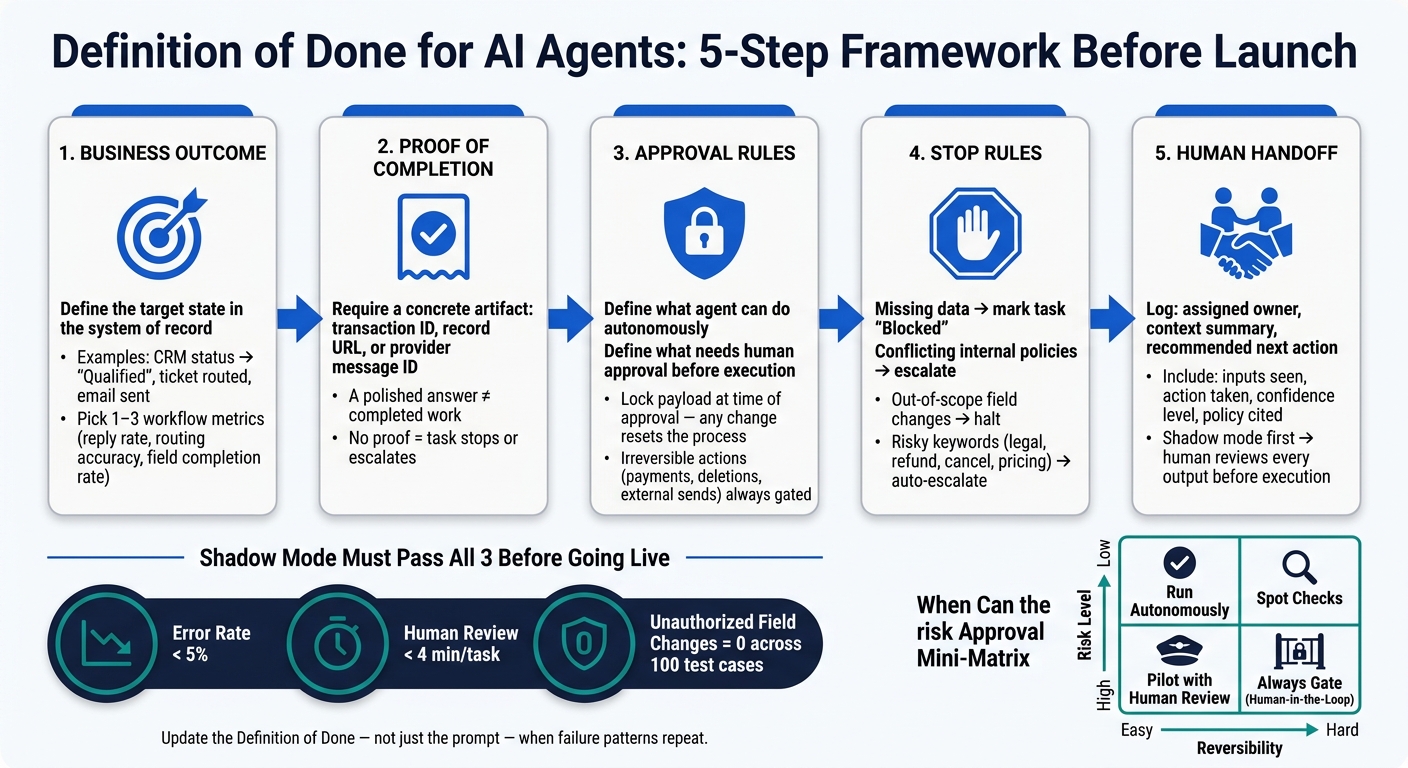
Definition of Done for AI Agents: 5-Step Framework Before Launch
How to build a core Definition of Done for any agent
Start with the business outcome, proof of completion, and success metric
A Definition of Done is a deployment control, not a prompt-writing task. Start with the end result that must exist in the system of record when the agent finishes. That could mean a CRM lead status changed to "Qualified," a support ticket moved to the right queue, or an email showing up in the Sent folder. That end result is your target state [1].
Then add proof. Use something concrete, like a transaction ID, a record URL, or a provider message ID [1][2]. If you skip that part, you're taking the agent at its word. And a polished answer isn't the same thing as completed work [1].
Keep the scorecard tight. Pick 1 to 3 workflow metrics tied to the task, such as:
- Reply rate
- Routing accuracy
- Field completion rate
- Cost per completed action
"If you can't measure it, you can't manage it, and you won't spot drift until it hurts." - Tony Burke, CMO, PrismoCode [5]
Once the finish line is clear, you can turn it into approval rules, exception checks, and scope boundaries.
Add approval rules, edge-case checks, and handoff conditions
The Definition of Done helps protect revenue, customer experience, and compliance by linking each action to its level of risk. Some actions are easy to undo. Others are not. Reading data is one thing; sending money or firing off an external email is another.
Be explicit about three things:
- What the agent can do on its own
- What needs human approval before execution
- What must always go to a person, no matter how sure the agent seems
For actions that can't be undone - payments, deletions, external sends - lock the payload at the time of approval. If anything changes before execution, the approval no longer counts and the process starts over [1].
If data is missing, records don't match, or the agent can't find an approved source, it should stop and mark the task "Blocked" instead of filling in the blanks [1]. The same goes for cases where two internal policies conflict.
Set scope, limits, and audit requirements before granting access
Before you give an agent access to any system, write down exactly what it can and can't touch. That includes the systems it may read, the cap on write actions - say, "issue refunds up to $200; never edit the ledger" - and the actions that are off-limits in every case [3].
"A prompt is an instruction for a single turn. A runbook is how something runs safely on the hundredth turn, the ten-thousandth, and the one that goes sideways at 2 a.m." [3]
Each run should leave a clear log: what inputs the agent saw, what action it took, its confidence level, and the policy it cited. That gives you enough detail to review behavior after rollout [3][5].
Use this simple risk rule to decide when the agent can act alone:
| Risk Level | Easy to Reverse | Hard to Reverse |
|---|---|---|
| Low risk | Run autonomously | Spot checks |
| High risk | Pilot with human review | Always gate (human-in-the-loop) |
You can use this same setup for outbound, CRM, support, and content agents.
sbb-itb-9cd970b
Definition of Done examples for common business agents
The same framework plays out a bit differently depending on the workflow. But the core idea doesn’t change: show that the work is finished, spell out when a human needs to step in, and log a clean handoff.
Outbound prospecting and lead qualification agents
Before an outbound agent reaches out to anyone, a few things need to be in place. It needs verified contact data, an opt-out and compliance check, messaging that fits the approved brand tone, and clear context from the prospect’s profile or recent website activity. On top of that, a human has to approve the message before it goes out.
Lead qualification works the same way. The agent can’t move someone to "Qualified" based on a hunch. It has to point to the exact source that supports the decision, like a CRM note, a call transcript, or website activity. The lead must also pass the team’s AI-powered lead scoring threshold before the CRM status changes. If the proof isn’t there, the buyer’s intent is unclear, or one system says one thing while another says something else, the lead should go straight to a human queue. Reviewing lead scoring case studies can help teams define these thresholds more effectively.
The handoff record also matters. It should include:
- The assigned owner
- A short context summary
- The recommended next action
Any mention of pricing, legal terms, cancellation, or custom requests should trigger an automatic escalation.
CRM updating and support triage agents
A CRM update is done only when the agent checks that the saved value is correct and logs the reason for the change. There also needs to be an audit trail showing why that edit happened.
For support triage, “done” has a clear meaning. The ticket must be classified, the customer’s stated goal, urgency, and key objections must be captured, a severity/impact summary must be attached, and the recommended owner must be assigned. If confidence drops below the team threshold, or if the customer mentions refund requests, legal terms, cancellation, or custom requests, the ticket should escalate automatically [4][7].
Content drafting agents for sales and marketing
A draft isn’t finished just because the words are on the page. Every claim needs to be checked. The agent must link each factual statement to a verified internal source. If a claim can’t be backed up, it should be marked as an assumption, not presented as fact.
Here’s what turns a draft into something a teammate can actually use:
| Requirement | Definition of Done Criterion | Verification Method |
|---|---|---|
| Brand/Tone | Draft matches the audience, tone, and length specified in the AI Style Guide. | Comparison against approved brand voice samples. |
| Factual | Every factual claim links to a verified internal source. | Source-checking against primary documents. |
| Legal | No prohibited claims or sensitive data are included. | Automated scan for restricted keywords and PII. |
| Channel | Output is formatted correctly for the destination system (e.g., Markdown for CMS). | Schema validation before handoff. |
| Handoff | Includes evidence used and a recommended next action. | Review of the handover pack by the human owner. |
If a draft touches legal, financial, or regulated claims, human editorial review is required before release. For external-facing content, human review should stay the default until error rates remain below the team’s acceptable threshold [3].
How to test, monitor, and update the Definition of Done after rollout
Once the Definition of Done is set, test it in shadow mode before the agent touches live data.
Run the agent in shadow mode before it acts on live data
Before an agent touches a real record, message, or customer, run it in read-only draft or recommendation mode. Have a human review each output against the Definition of Done before anything gets executed. That keeps humans as the source of truth while you build confidence in how the agent behaves. [6][1]
During shadow runs, watch how the agent deals with ambiguity. You’re not only checking whether it handles clean inputs well. You also need to see whether it stops when the input is messy, unclear, or risky.
Set promotion thresholds before the pilot begins. For example:
- Error rate below 5%
- Human review time under 4 minutes per task
- Zero unauthorized field changes across 100 consecutive test cases
If the agent misses those numbers, it shouldn’t move to production. [6]
After shadow runs pass, use that same Definition of Done as the baseline for live performance.
Track live performance against business and risk metrics
Once the agent is live, the Definition of Done becomes your scorecard. Every metric you track should tie back to a criterion in that document.
| Metric Category | What to Track | Warning Signal |
|---|---|---|
| Performance | Completion rate (completed vs. partial vs. blocked); median time-to-resolution | High blocked rate signals missing permissions or unclear inputs |
| Quality | Human override/rework rate; incorrect recommendation rate | Fluent but thin evidence: the output looks good but lacks source grounding |
| Compliance | Data hygiene incidents; compliance concern triggers | Agent edits fields or records outside its allowed scope |
| Operational | Reviewer time per task; spend against budget | Review load increases rather than decreasing after rollout |
If reviewer time keeps going up, the agent is pushing work onto humans instead of removing it. [6]
When an agent fails the same test the same way more than once, update the Definition of Done - not just the prompt.
Revise the Definition of Done when failure patterns appear
When failure patterns show up in weekly reviews or postmortems, update the criteria directly instead of only patching the prompt. Use a revision log that records what changed and why. That gives the team a clear record for review.
| Initial DoD Criteria | Observed Failure Mode | Revised DoD Criteria | New Check |
|---|---|---|---|
| Agent drafts a sales-call summary. | Summary is polished but misses specific buying intent or objections. | Summary must include: customer goal, urgency, objections, and promised follow-up. | 95% of drafts must include all 4 required elements in spot checks. |
| Agent updates CRM lead status based on email sentiment. | Agent overwrites manual notes with generic AI summaries. | Protected fields: Agent may only update "Status" field; "Notes" field is read-only. | Zero unauthorized field overwrites during 30-day shadow period. |
| Agent triages support tickets by severity. | Agent misses compliance-related keywords, labeling them as "low priority." | Stop rule: Any ticket containing "legal", "refund", or "cancel" must be flagged for human review. | 100% accuracy on identifying compliance-related keywords. |
One practical rule: sign-off on a revised Definition of Done should not come from the person who built the agent. An independent operations or process owner should validate the new criteria. That separation helps catch blind spots and keeps the revision process honest. [8][3]
Conclusion: Write down success, control, and handoff before you turn any agent on
After laying out the framework and walking through the examples, the last step is simple: write it down before launch. Every agent needs a clear target state, proof, approval rules, stop conditions, and a handoff path [1]. Without that, automation turns into guesswork.
The same rule shows up across outbound, CRM, support, and content workflows: define finish, stop, and handoff before launch. If field boundaries are vague, stop rules are missing, or evidence checks aren’t in place, the result is rework, risk, and lost trust. Write the Definition of Done first. Then validate it, track it, and revise it. That order is what makes automation reliable.
FAQs
How do I write a Definition of Done for my first agent?
Use this checklist for one narrow workflow: issuing a customer refund in the payment platform and updating the CRM as the system of record.
Target state
The refund is submitted in the payment platform, the customer record in the CRM shows the refund status, and any non-reversible step happens only after required human approval.
What must be true
- Workflow: Refund for a single paid invoice or order
- System of record: CRM
- Target state in CRM:
- Refund status = Approved or Completed
- Original order/invoice ID is present
- Refund amount matches the approved amount
- Payment refund ID or receipt number is stored
- Approval record is attached or referenced
- Target state in payment platform:
- Refund exists for the right transaction
- Refund amount matches the approved amount
- Refund ID, receipt number, or processor reference is available
Evidence to verify
Collect and record the following:
| Check | Evidence | Example |
|---|---|---|
| Customer/order match | Customer ID, Order ID, Invoice ID | CUST-1048, ORD-88219 |
| Original payment match | Payment transaction ID | txn_4582019 |
| Refund created | Refund ID or receipt number | rfnd_220184 |
| Amount match | Field value in both systems | $125.00 |
| Status match | CRM status and payment status | Approved, Succeeded |
| Approval proof | Approver name, date, ticket ID | J. Smith, 08/20/2026, FIN-291 |
Human approval before irreversible actions
A human must approve the refund before the refund is submitted if any of these apply:
- Refund is above the set limit
- Refund is outside the posted policy
- Partial refund amount differs from the customer request
- There is a fraud, dispute, or duplicate-payment concern
- The original payment cannot be matched with confidence
Approval evidence should include:
- Approver name
- Approval date and time
- Approval source, such as ticket, email, or case note
- Approved refund amount
State definitions
Accepted
- Refund is created in the payment platform
- CRM is updated as the system of record
- IDs, amount, and status match
- Required approval is on file
Partial
- One part is done, but the workflow is not fully closed
Example: refund created, but CRM not yet updated
Blocked
- The workflow cannot move forward due to a missing dependency
Example: no approval, missing transaction ID, or system outage
Failed
- An attempted action did not complete or completed against the wrong record
Example: refund API error, wrong amount entered, or mismatch between order and payment
What to record for partial, blocked, or failed states
Always log:
-
What was attempted
Example: “Tried to create a $125.00 refund fortxn_4582019.” -
What evidence was produced
Example: error code, pending refund ID, screenshot, audit log entry, or CRM case note -
What remains undecided
Example: whether to retry, cancel, adjust the amount, or wait for manager approval
Escalation and handoff rules
- If approval is missing, hand off to the assigned manager or finance approver
- If payment evidence is missing or mismatched, hand off to billing ops
- If the payment platform returns an error or appears down, hand off to engineering or platform support
- If there is fraud risk or identity doubt, hand off to risk or compliance before any refund is sent
- If a shift change happens before closure, the current owner must leave:
- what was attempted
- all IDs and evidence collected
- current state: partial, blocked, or failed
- next recommended action
- owner of the next step
A handoff note can be as simple as this:
Attempted refund of
$125.00for OrderORD-88219tied to transactiontxn_4582019. No refund submitted yet. Approval not found in caseFIN-291. CRM still showsPaid. Waiting on finance manager decision.
What proof should an agent show before a task is done?
An agent should treat a task as done only when it reaches the stated business end state and can prove that result with independent evidence. That evidence might be a message ID, a public URL, or a uniquely updated record that someone can check.
Approval and verification should stay separate. In plain English: getting permission to do the work is not the same as proving the work finished.
If the final state can't be confirmed in a clear way, the task should remain pending/blocked. The agent should also log the evidence it used and follow any required human review or escalation triggers.
When should an agent stop and hand work to a human?
An agent should stop and hand the task to a person when it can’t identify the destination or target record with certainty, when access or permissions are missing, when required inputs aren’t there, or when the run is unclear. The same applies when confidence is low or validation checks still leave open questions.
Treat these cases as BLOCKED or FAILED - not completed. Don’t retry sends or publications when the destination is still in doubt. Instead, pass along the evidence and clearly note what still needs a human decision.