How to Turn 1 Meeting Transcript Into 5 Pieces of Content Before Lunch
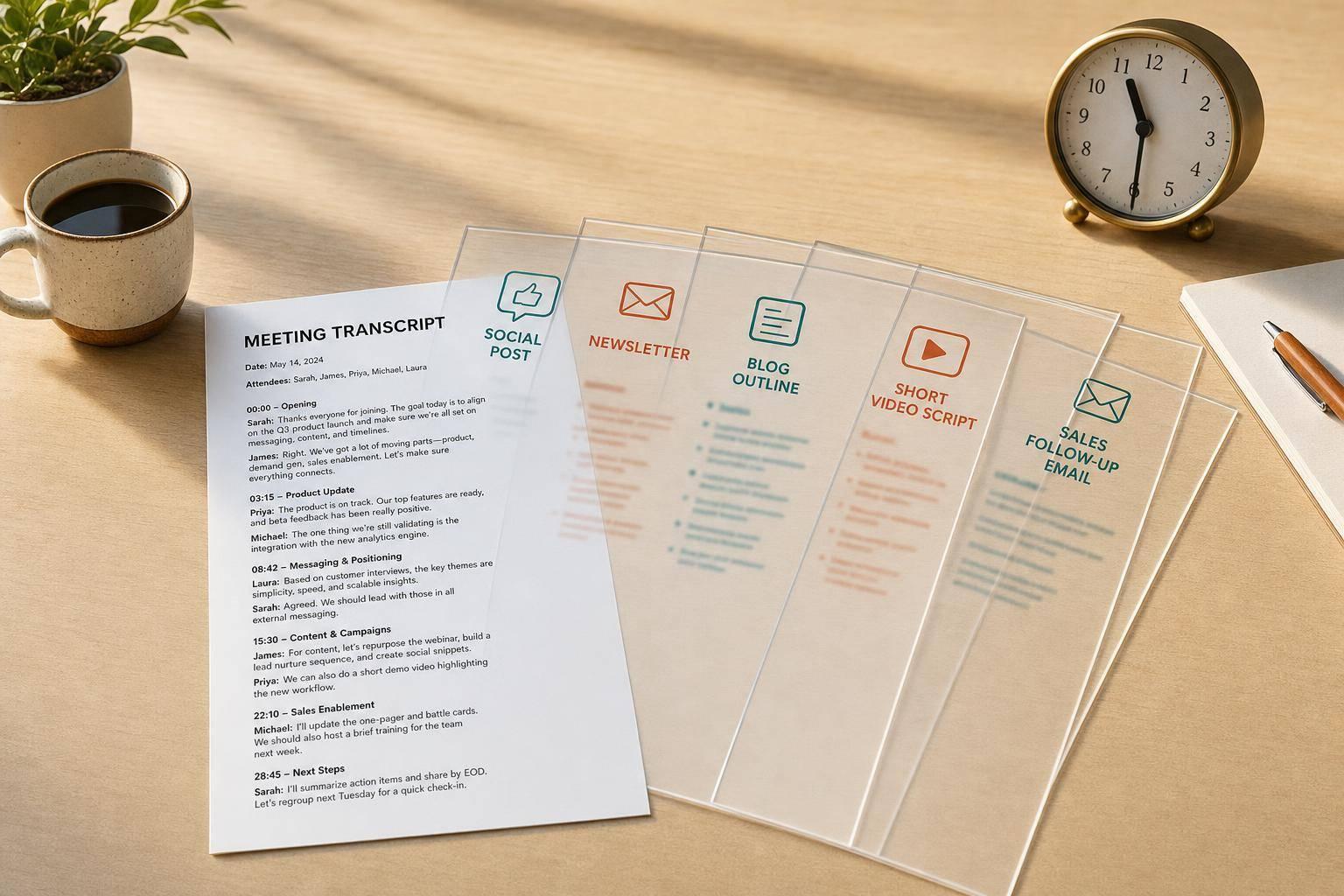
One meeting can give me five usable drafts in one morning. If I start with a 30- to 90-minute call, a clean transcript, and one clear goal, I can turn that single conversation into a LinkedIn post, newsletter section, blog outline, short video script, and sales follow-up email in about 30 to 45 minutes instead of spending 5 to 8 hours writing from scratch.
Here’s the short version:
- I use tools for data-driven content repurposing on meetings that already contain buyer questions, pain points, objections, and results
- I pull only the strongest parts of the transcript, not every line
- I sort what I find into simple buckets like problem, story, outcome, and next step
- I draft each asset from those notes, then do a short human edit for tone, facts, and privacy
- I keep the transcript as the only source of facts to cut errors
A few numbers stand out. A 60-minute customer interview can lead to about 4.2 published pieces. And teams that do post-call content work right away can publish 4 to 6 times more pieces than teams that wait until later in the week.
If I want this process to work, I need four things first:
- a recorded Zoom, Google Meet, or Teams call
- permission to record when required
- a transcript with speaker names
- one business goal for the content
A simple workflow keeps it tight: record, pull key lines, map them to formats, draft, and review. That’s the whole play.
| Input | What I pull from it | What I make |
|---|---|---|
| Sales call | objections, pain points, buyer wording | LinkedIn post, follow-up email |
| Customer interview | results, before/after story, quotes | newsletter section, blog outline |
| Onboarding or demo | steps, repeat questions, use cases | video script, FAQ-style content |
If I treat the transcript as raw material instead of a finished draft, one meeting stops being just a meeting and starts feeding my content pipeline the same day.
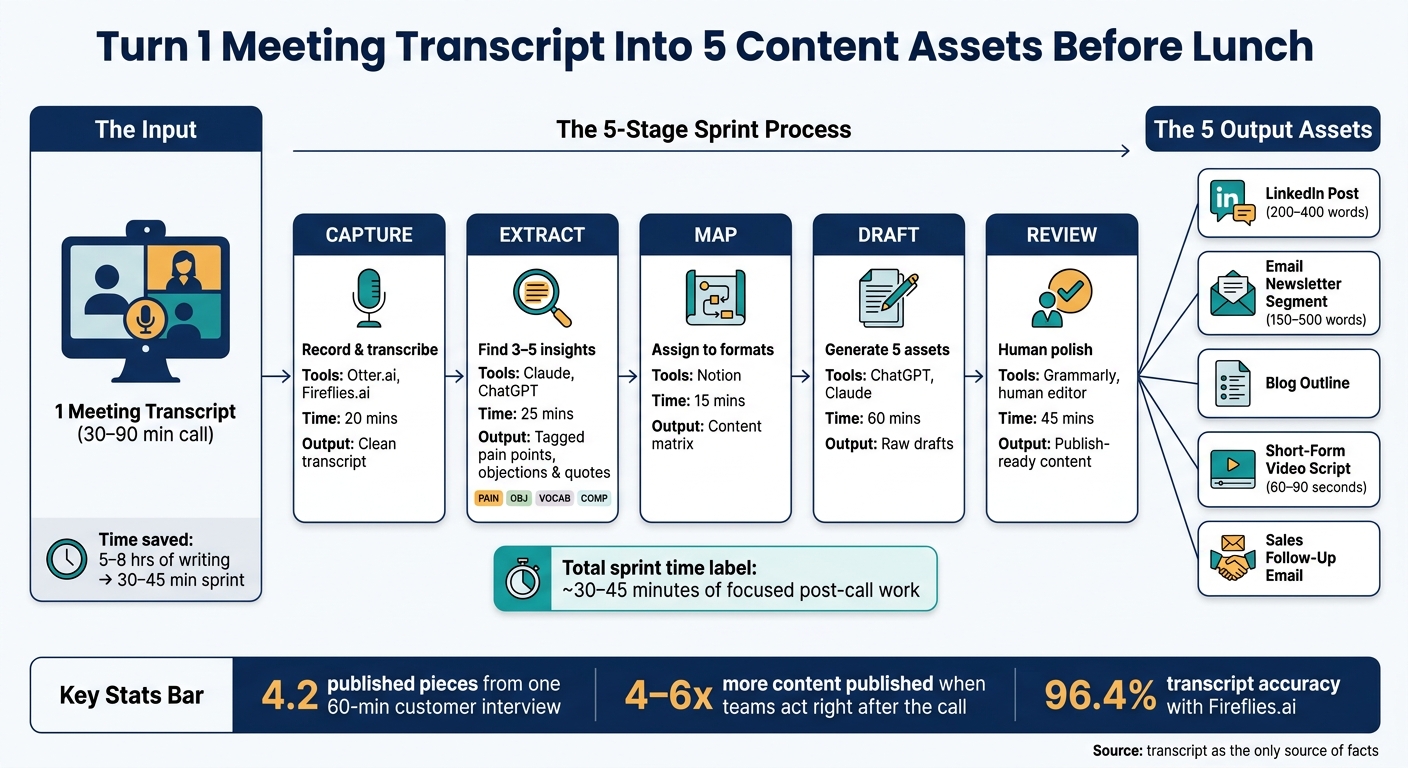
How to Turn 1 Meeting Transcript Into 5 Content Assets Before Lunch
Turn Calls into Content with AI
Step 1: Pull the Best Insights From Your Transcript
A raw transcript can turn into themes, quotes, objections, and action items in 15 to 30 minutes if you use AI to pull out what matters. The first move is simple: find the lines with the strongest customer language.
Use Otter.ai, Fireflies.ai, or Notion AI to Get a Usable Draft
Paste the transcript into ChatGPT, Claude, or Notion AI. Then ask for themes, quotes, objections, and action items. This prompt works well: "Summarize this transcript into themes, verbatim quotes, objections, and action items. Use only the transcript. Keep the original voice."
That last line matters more than it may seem. As Grain's Head of Operations put it:
"AI has a tendency to insert its own voice into the conversation... When you tell it to keep the voice of the conversation, it sounds authentic." [2]
Also, don't feel like you need to feed the AI the entire conversation every time. Mark 3 to 4 timestamps where the call got specific, like a pain point, objection, or result. Send those sections instead of the full transcript. It's faster, and the output is usually sharper.
Sort Your Notes Into Four Content Buckets
Once you have the summary, sort the notes by content angle. Put them into four buckets: Problem, Insight, Story, and Outcome. One bucket holds pain points. One holds sharp takes. One holds wins from the field. One holds next steps.
To move even faster, tag key lines like this:
- [PAIN] for pain points
- [OBJ] for objections
- [VOCAB] for wording the customer keeps using
- [COMP] for competitor mentions
Then take each [PAIN] tag and rewrite it as the question the prospect was asking underneath the surface. That question becomes an instant content brief.
These four buckets can feed a LinkedIn post, newsletter, outline, video script, and follow-up email.
Comparison Table: Picking Your Meeting Capture Tool
Pick the tool that fits how you work. Fireflies.ai reached 96.4% word accuracy in testing, while Otter.ai lands around 90% on solo recordings [3].
| Tool | Core Strengths | Limitations | Best-Fit Scenario |
|---|---|---|---|
| Otter.ai | Strong mobile app; no bot required; workable free tier | Lower accuracy (~90%) compared to specialized bots [3] | Individual creators, in-person or mobile meetings |
| Fireflies.ai | Highest transcript accuracy (96.4%); deep CRM and Slack integrations [3] | Bot must join as a meeting participant | Sales and revenue teams needing verbatim precision |
| Notion AI | Summarizes directly inside your existing Notion workspace | Does not record audio; requires a transcript import | Teams already managing projects in Notion |
Once the transcript is cleaned up and tagged, you can map each note to an asset fast. AI gets you most of the way there [1]. Then do a 15-minute human pass to fix the opening, verify quotes, and bring back the original voice.
Step 2: Turn One Transcript Into Five Content Assets
Once your notes are sorted into [PAIN], [OBJ], [VOCAB], and [COMP], give each bucket a job. One call can feed five different assets if you match the right angle to the right format. Pain points and sharp insights work well for the LinkedIn post and newsletter. Objections fit the sales email. Examples from the call can shape the blog outline and video script.
Assets 1 and 2: LinkedIn Post and Email Newsletter Segment
For the LinkedIn post, pull one sharp insight, one objection, or one surprising quote from the transcript. When possible, use the client's exact words as your hook. That usually gives the post more bite and helps it sound like a person said it, not a content machine.
Keep the paragraphs short. Rewrite the first two lines by hand so they don't have that stiff AI rhythm. Aim for 200 to 400 words. [4][3]
For the email newsletter segment, take that same idea and stretch it a bit. Write 150 to 500 words around one problem from the call. Stay focused on helping the reader. This isn't a summary of the meeting. It's one clear lesson pulled from it. [4][3]
Assets 3 and 4: Blog Outline and Short-Form Video Script
Use ChatGPT, Claude, or Notion AI to build a draft outline around Problem, Approach, Examples, and Takeaways. Stick to facts from the transcript. No padding. No made-up details.
For the video script, pick the strongest moment from the call. In many cases, that's a direct answer to a common objection or a result that makes people stop scrolling. A good shortcut: turn the objection into the title.
Then shape the script like this:
- Hook
- Core point
- Real example from the call
- Close
Keep it to 60 to 90 seconds. [1][5]
Asset 5: Sales Follow-Up Email Built From the Same Call
The follow-up email is often the fastest one to write because the transcript already holds the raw material. You have the back-and-forth, the next steps, and the objections right there on the page.
Use the email to:
- recap the call
- confirm what happens next
- answer objections directly
Then save those objection replies as snippets you can reuse in later outreach.
That same setup can turn into a repeatable morning sprint.
Step 3: Build a Morning Workflow Your Team Can Repeat Every Day
Once the five drafts are mapped, turn the process into a repeatable morning sprint. The goal is simple: take those five assets and move them from raw meeting notes to polished drafts in one focused block of time.
Run a 5-Stage Sprint: Capture, Extract, Map, Draft, Review
Use this five-stage sprint to go from transcript to publish-ready drafts before lunch.
"The bottleneck is rarely the tools. It is whether you commit to the 30-45 minutes of post-meeting work consistently." - Miriam Alonso, CSM [3]
Teams that pull content out of meetings right away ship 4 to 6 times more pieces than teams that wait and do it all at the end of the week.[3]
Keep Prompts, Templates, and Outputs in One Place
Put everything in one shared Notion workspace: your prompt library, tagged transcript summaries, content matrices, and finished drafts.
When a prompt gives you a strong LinkedIn post or a sales email that gets results, keep it. Add a clear label. Then use it again next week with a new transcript. That's how the process gets easier over time.
One rule is worth sticking to: use the transcript as the only source of facts. That keeps the content tied to what was actually said on the call and helps cut down on hallucinations.
You can also tag sourced content with a simple note like "From a customer call last month" to build trust.
Morning Sprint Workflow Table by Stage
Use the stage table below as the repeatable operating system for every call.
| Stage | Goal | Suggested Tools | Time Estimate | Output |
|---|---|---|---|---|
| Capture | Record and transcribe the call | Otter.ai, Fireflies.ai | 20 mins | Clean transcript & auto-summary within 1 to 2 minutes of the call ending [3] |
| Extract | Identify 3–5 high-value insights | Claude, ChatGPT | 25 mins | Tagged pain points, objections & quotes |
| Map | Assign insights to content formats | Notion | 15 mins | Content matrix with channel assignments |
| Draft | Generate first drafts of all 5 assets | ChatGPT, Claude | 60 mins | Raw drafts for LinkedIn, email, blog, video & sales |
| Review | Human polish for voice and accuracy | Grammarly, human editor | 45 mins | Final, publish-ready content |
Conclusion: Publish Faster Without Starting From Scratch
Every recorded meeting gives you raw material to work with. That means every recorded call can feed content, sales follow-up, and thought leadership. A single 30- to 90-minute call can turn into five assets in under 45 minutes.[3]
Before anything goes live, do one last quality pass. Check for consent, remove sensitive details, verify quotes and numbers, and rewrite the opening by hand.[1][3]
Key Takeaways for Founders and Revenue Teams
Knowledge workers spend an average of 21.5 hours per week in meetings.[3] This workflow turns that meeting time into something you can publish. Instead of burning 5 to 8 hours making content from scratch, your team can leave one focused post-call session with five assets ready for content and follow-up.[3]
Real customer language and real objections make the final piece sharper and more believable. Use the transcript as your source of truth. Then keep your prompt library, tagged transcripts, and finished drafts in one shared workspace. That structure is what helps teams publish faster each morning.
FAQs
What meetings work best for this workflow?
Meetings tend to work best when they include rich quotes, expert points of view, and takeaways people can use.
Good examples include:
- Sales calls
- Customer interviews
- Product Q&A sessions
- Podcast-style interviews
- Internal strategy or briefing sessions
- Training, onboarding, or coaching calls
A good target is 30 to 90 minutes. That usually gives you enough depth without dragging on.
Skip HR, legal, or other confidential conversations. And before you publish any client quote, make sure you have permission.
How do I protect privacy when repurposing meeting transcripts?
Get permission to record the call and use what’s shared. Then, before you turn it into public-facing content, anonymize the transcript by removing names and other identifying details.
If you plan to publish a direct quote, ask for separate, explicit permission. If not, paraphrase the main takeaways instead.
Also, steer clear of highly confidential topics. Before anything goes live, review the draft for sensitive details such as client names, financial data, and proprietary information.
What should I do if my transcript is messy or inaccurate?
Start with a 15-minute cleanup pass. Skim the transcript, fix any speaker label mix-ups, and cut filler so the key moments stand out.
Before you publish, check quotes, names, and stats against the original transcript word for word. If you're using AI, treat the transcript as the ONLY source of truth. Keep the client’s exact wording and voice wherever it shows up in the call.