How to Install a Growth OS in 30 Days Without Killing Momentum
How to Install a Growth OS in 30 Days Without Killing Momentum
Most agencies do not need more tools. They need 1 weekly system.
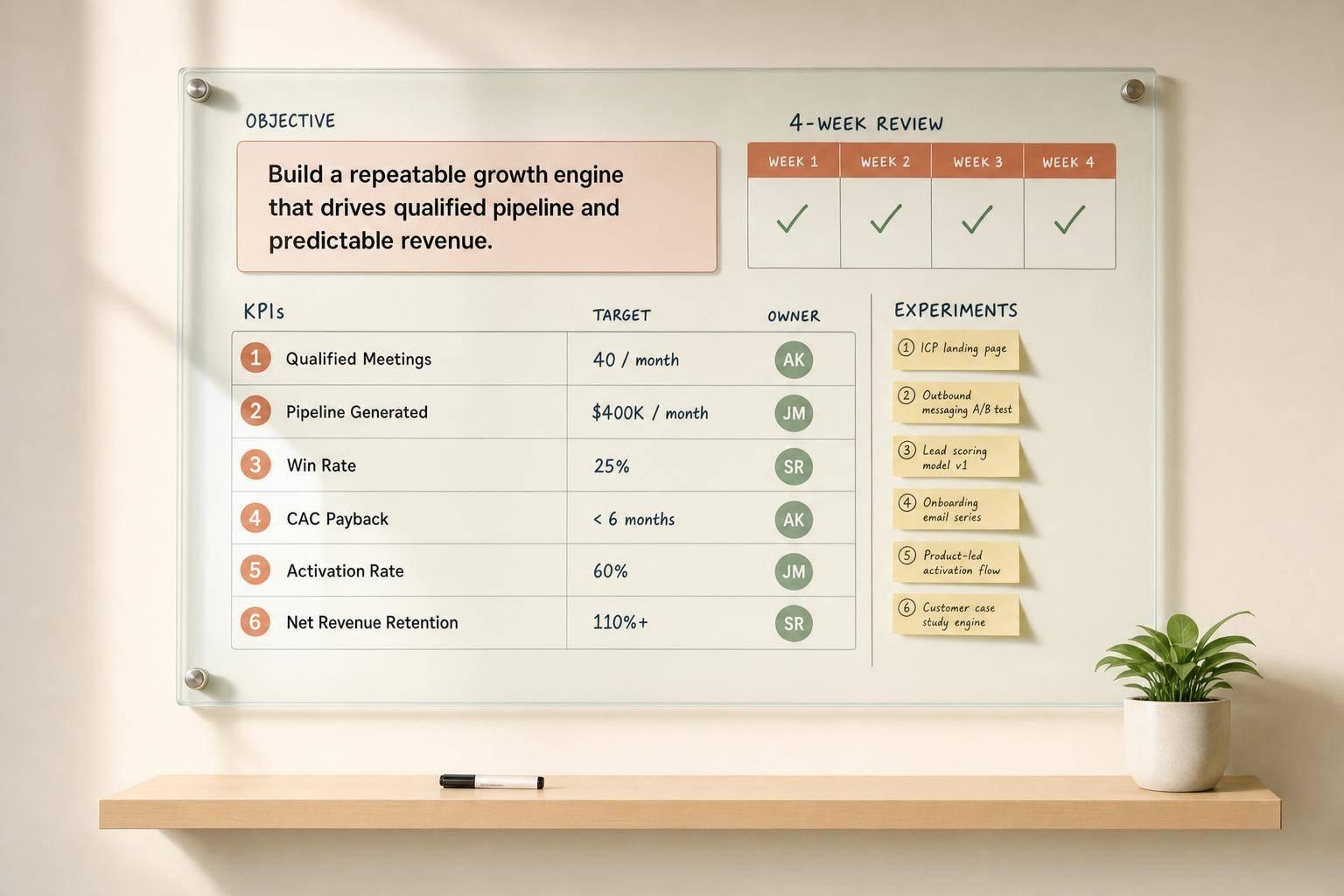
If I had to cut this down to 1 lesson, it is this: keep client work steady, then add a light layer for goals, KPIs, owners, meetings, and tests. That is enough to install a Growth OS in 30 days without slowing revenue work.
Here’s the full idea in plain terms:
- Pick 1 growth goal for the next 90 days
- Track 5 to 8 KPIs
- Give each KPI 1 owner
- Keep revenue work untouched during setup
- Run 1 weekly review and 1 monthly review
- Log tests and decisions in 1 shared place using a tool like FunnelPilot
A useful stat backs this up. McKinsey found that clear meeting rhythms and decision rights link to 1.5x to 2x revenue growth over 5 years.
This is also how AGL runs many marketing departments with a small team using Tango. Humans decide. Machines repeat. Nothing ships without approval. That setup gives the team more output, less tool babysitting, and stronger delivery.
The lesson is simple. A Growth OS is not a rebuild. It is a small weekly system that makes the next move clear.
If I were putting this in place today, I would do 3 things:
- Audit what already drives revenue using GrowthForge
- Build 1 dashboard with named owners
- Put the Weekly Growth Review on the calendar now
That is the whole frame. Start small. Keep current work moving. Then make the system part of every week.
Action: put the Weekly Growth Review on the calendar now, then build the experiment tracker in the same place your team already works.
How to Install a Growth OS in 30 Days
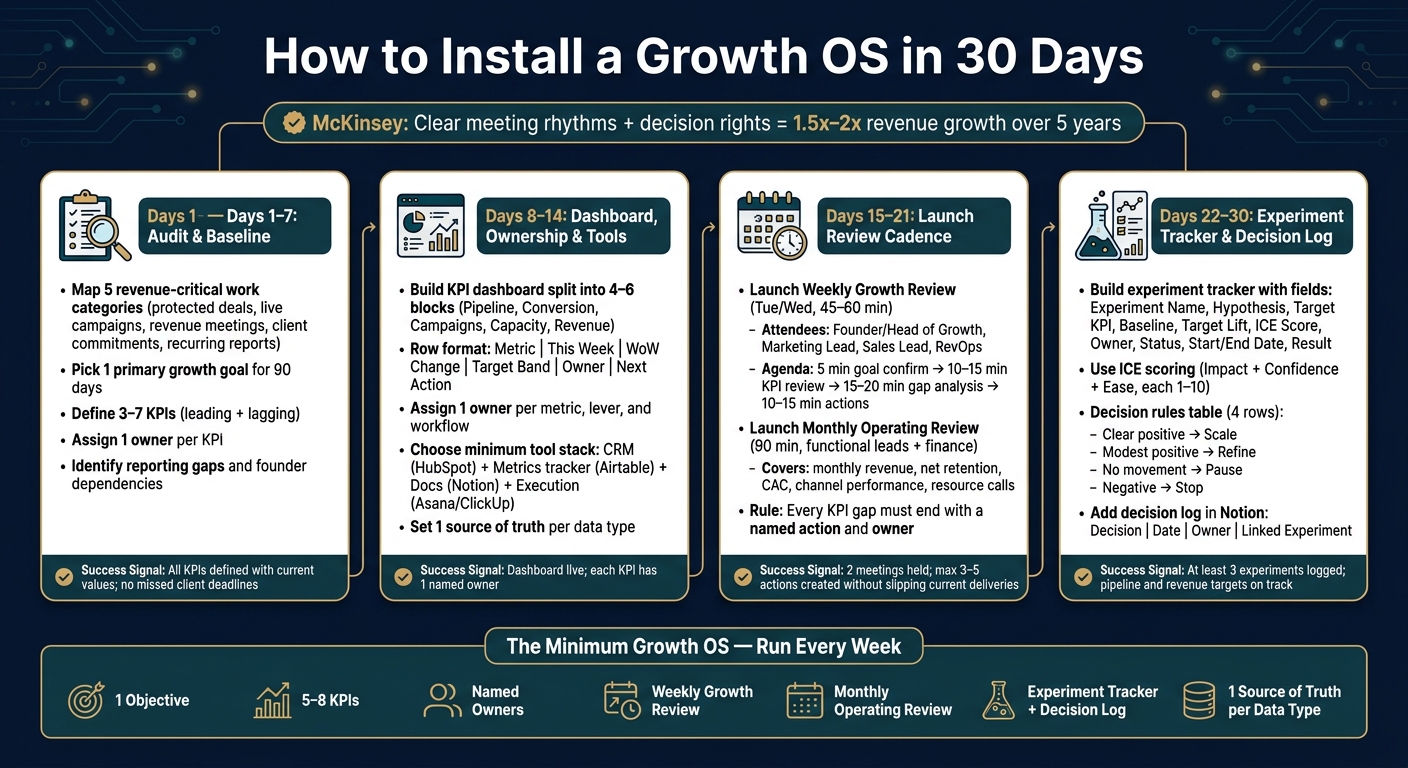
Days 1–7: Audit Your Current Growth Motion and Set the Baseline
Most agencies do not have a growth problem first. They have a visibility problem.
If you run marketing for many clients, this matters fast. You can’t fix what you can’t see. And you should not change a thing before you know what already keeps revenue moving. That is why Week 1 is a baseline audit. You document the current growth motion as it is. No changes yet.
This is the same logic behind Tango. At AGL, humans decide. Machines repeat. Nothing ships without approval. That only works when the team knows what work is safe to standardize and what work must stay protected. The audit gives you that line.
The output from this week becomes the input for Days 8–14. It feeds the dashboard, the ownership map, and the tool stack.
Map the Revenue-Critical Work That Must Keep Running
Start by writing down 5 categories of work:
- protected deals
- live campaigns
- revenue meetings
- client commitments
- recurring reports
Use a simple rule. Work is protected if it has 1 of 3 traits:
- near-term revenue
- an external commitment
- a meaningful relationship risk
If work fits that test, do not touch it.
That matters more than most teams think. A lot of ops cleanups fail because they try to fix everything at once. Then they slow down the very work that pays the bills. Protected work stays in place. Everything else can move into a more standard process in the next phase.
Pick One Primary Growth Goal and a Small KPI Set
Next, choose 1 main growth goal for the next 90 days.
Keep it commercial. Keep it narrow. For a B2B SaaS team, that could be net new ARR closed. For an agency, it could be new retainers signed. The key is simple: you must be able to measure it every week using tools you already use.
Then build a KPI set with no more than 3–7 metrics. Split them between leading and lagging indicators.
A good filter helps here. Cut any metric you cannot pull weekly from current tools. Cut any metric you cannot tie to the main goal within 60 days. If a number looks nice but does not help a weekly decision, leave it out.
These are the only metrics the dashboard needs to support in the next step.
Find Reporting Gaps, Ownership Gaps, and Founder Dependencies
Now test each metric.
For every KPI, write down the data source, update frequency, and 1 accountable owner. This is where the cracks show. If the answer lives across many disconnected tools, you have a reporting gap. If leaders ask for pipeline updates in Slack, the dashboard is not ready.
Ownership gaps show up just as fast. If a KPI or workflow has no single owner, that is a problem. If 2 people both think they own it, that is also a problem.
Build a simple table and map each metric and workflow to 1 owner.
| Item | Data source | Update frequency | Owner |
|---|---|---|---|
| Pipeline by stage | CRM | Weekly | [Name] |
| Client reporting | Reporting tool | Weekly | [Name] |
| Proposal follow-up | CRM + inbox | Daily | [Name] |
Look for blanks. Look for duplicates.
Founder dependence shows up the same way. If something needs founder approval or founder action to move forward, that is a bottleneck. The system cannot run cleanly if every next step waits on 1 person.
This is where small teams get more output without adding a messy AI stack to babysit. AGL uses Tango to spot those repeat bottlenecks, assign clear ownership, and keep human approval in the loop. That is how a lean team can run many marketing departments and still keep delivery tight.
For this week, do 1 thing. Finish the baseline audit and name 1 owner for every KPI and workflow that matters.
sbb-itb-9cd970b
Days 8–14: Build the Dashboard, Ownership Model, and Tool Stack
Most agency teams do not need more data. They need one clear place where the right numbers lead to a weekly call.
That is how AGL runs many marketing departments with a small team using Tango. The system is simple. Humans decide. Machines repeat. Nothing ships without approval. The result is more output without a messy AI stack to manage.
Your Week 1 audit gave you the inputs. Now turn them into a weekly operating view your team can use right away. Give each metric a home, an owner, and a review rhythm.
Set Up a KPI Dashboard That Shows Leading and Lagging Indicators
Split your metrics into 4 to 6 blocks such as Pipeline, Conversion, Campaigns, Capacity, and Revenue.
Track leading indicators every week and lagging indicators every month. That helps the team act on what it can still change this week [3].
Use this row format: Metric | This Week | WoW Change | Target Band | Owner | Next Action [4].
The dashboard should help the team make calls. It should not turn into one more reporting chore. Keep it tight. If a metric does not help someone make a choice this week or next week, cut it.
Use HubSpot reports to pull pipeline, stage conversion, and deal data. Build a Growth OS Weekly dashboard in HubSpot. Filter it to the current quarter and the deal types that matter most. Set reports to refresh daily. Have each metric owner update any manual numbers every Monday by 10:00 AM [6].
This is the kind of setup AGL uses with Tango. The machine work repeats on schedule using an AI growth platform. The team steps in to review, decide, and approve.
Assign One Owner Per Metric, Lever, and Workflow
Once the dashboard is set, lock ownership before the first weekly review.
The audit showed where things were fuzzy. This step clears that up. Assign 1 owner to every KPI, lever, and workflow [1][2][5].
For example:
- The Head of Sales owns win rate and pipeline coverage
- The Head of Marketing owns automated lead scoring, MQL volume, and CAC
- RevOps owns data quality and SLA adherence [2]
If 2 people both think they own a metric, fix that before the dashboard goes live.
One owner per KPI is not optional. The same rule applies to growth levers and workflows. A lever owner needs clear power to start, pause, or stop an initiative inside set guardrails [2].
Give each owner room to pause, continue, or shift work inside those limits. If the founder still acts as the hidden approver on every small move, the whole system slows down. Set a default autonomy rule for experiments. Then ask for a short weekly summary in the growth review [2].
This is one reason Tango works inside AGL. The system handles repeat work. But decisions still sit with named people, not a vague team.
Choose the Minimum Tool Stack and Name the Source of Truth
Keep the stack light.
You need 1 system for pipeline, 1 for documentation, and 1 for execution. Those 3 layers cover what you need now: CRM for pipeline and revenue data, a structured tracking tool for documentation and metrics, and an execution tool for tasks and projects [6].
Choose tools only if they support visibility, documentation, or execution.
| Tool | Primary Role | Key Data Stored | Source of Truth For | Notes |
|---|---|---|---|---|
| HubSpot | CRM and pipeline visibility | Contacts, deals, pipeline stages, conversion rates | Pipeline, revenue reporting | Pipeline data only |
| Airtable | Metrics registry and experiment tracking | KPI definitions, owners, update frequency, experiment status | KPI definitions, experiment log | Not for CRM revenue data |
| Notion | Documentation and process | Playbooks, meeting notes, decision logs, narratives | Process documentation, weekly commentary | Embed dashboard links |
| Asana / ClickUp | Execution management | Tasks, deadlines, project timelines, initiative ownership | Execution status, task completion | Tag by metric or experiment ID |
Use tools your team already knows when you can. The main test is simple: does the team already use it, and does it own just 1 type of data [6]?
Set 1 hard rule: each data type has exactly 1 home [6].
If you want to run more client work with a small team, start here. Build the dashboard. Name the owner. Cut the stack down to the few tools your team will use every week.
Days 15–30: Install the Cadence, Track Experiments, and Protect Momentum
Here’s the shift: a dashboard does not run your agency. A cadence does.
That’s the part many teams miss. They build the view. They name owners. Then the whole thing stalls because no one turns numbers into calls. At AGL, Tango fixes that gap. Humans decide. Machines repeat. Nothing ships without approval. That is how a small team can run many marketing departments without losing control.
The lesson in this phase is simple. Set a fixed review rhythm. Then make each test lead to a clear call.
Days 15–21: Launch a Weekly Growth Review and Monthly Operating Review
Use the baseline and ownership map from Days 1–14 to turn the dashboard into a weekly operating rhythm.
Run the Weekly Growth Review every Tuesday or Wednesday for 45 to 60 minutes. Keep the room small. Keep it focused on calls, not updates. The group should include the founder or head of growth, marketing lead, sales lead, and RevOps or operations owner. This meeting covers new actions only. It does not restart work that is already live.
Agenda:
- 5 min: Confirm the week’s main growth goal
- 10–15 min: Review leading KPIs like qualified opportunities, demo bookings, and campaign launches, plus lagging KPIs like pipeline value in USD, new ARR, and churn
- 15–20 min: Review the top 3 to 5 gaps vs. target and the latest test results
- 10–15 min: Capture learnings, flag blockers, and assign actions with owners and due dates [7][12]
Each KPI gap should end with a call or a named action.
Example: Marketing Lead to launch a LinkedIn campaign for ICP segment A by 09/30.[7][10][13]
That one rule matters a lot. If a number has no next step, the meeting turns into noise.
Use the weekly meeting for decisions. Use the monthly review for budget and staffing calls.
The Monthly Operating Review is a separate 90-minute session with functional leads and finance.[8][9][11] It covers monthly revenue, net retention, CAC, channel performance, test decisions, and resource calls. It does not cover day-to-day campaign status. That split keeps random strategy debates from eating the week.[9][10]
This is one place where AGL gets more output with less drag. Tango keeps repeat work moving in the background, so the team can spend meeting time on judgment, not status chasing.
Days 22–30: Add an Experiment Tracker and Decision Log
Now give the team a simple way to track tests.
Build your experiment tracker in the same source of truth you already use. Add these fields: Experiment Name, Hypothesis, Target KPI, Baseline, Target Lift, ICE Score, Owner, Status, Start/End Date (MM/DD/YYYY), and Result.[14][19][22]
Keep each test tight. One hypothesis. One main KPI. One owner.
Owners should update status once a week in under 5 minutes.[19][22] That matters more than people think. If updates take too long, they stop happening.
Use ICE scoring to decide what runs next. That means Impact, Confidence, and Ease, each rated 1 to 10.[15][16][17][18] It is not fancy. That is why it works.
Once a test is live, use a simple rule for the next call:
| Result vs. Baseline | Decision | Example Next Action |
|---|---|---|
| Clear positive movement | Scale | Roll out winning email sequence to all outbound |
| Modest positive movement | Refine | Extend test 2 more weeks, tighten targeting |
| No clear movement | Pause | Check tracking, segment data, and qualitative feedback |
| Negative movement | Stop | Revert landing page copy to the previous version |
Add a decision log in Notion that records the decision, date, owner, and linked experiment.[20][21] Link each entry to the test that led to it. That way the team does not waste time arguing old calls again.
This is a big part of the Tango system. The machine side keeps the record straight. The human side makes the call. That is how AGL keeps delivery strong across many accounts without adding an AI stack to babysit.
Use a 30-Day Checkpoint Plan to Keep Current Work Moving
A rollout should not slow client work. If it does, the system is wrong.
Set 1 deliverable, 1 owner, and 1 success signal each week. Build each checkpoint from the week before so the work stays tied to live operations.
| Week | Main Deliverable | Accountable Owner | Success Signal |
|---|---|---|---|
| Week 1 (Days 1–7) | Baseline KPI set and current pipeline map | Founder or Head of Growth | No missed client deadlines; all KPIs defined with current values |
| Week 2 (Days 8–14) | KPI dashboard and ownership model live | RevOps or Ops Lead | Dashboard live; each KPI has 1 named owner |
| Week 3 (Days 15–21) | Weekly Growth Review and Monthly Operating Review launched | Founder or Head of Growth | 2 meetings held; max 3–5 actions created without slipping current deliveries |
| Week 4 (Days 22–30) | Experiment tracker and decision log in place | Growth PM or Ops Lead | At least 3 experiments logged; pipeline and revenue targets still on track vs. plan |
Watch momentum with leading indicators like on-time delivery rate, sales calls completed, and campaign launch dates. Then compare that with lagging indicators like MRR in USD. Track the plan in Notion or Asana using MM/DD/YYYY dates.[7][10][13]
AGL uses this kind of cadence because it keeps work moving while the system gets tighter. That is the win. More output. No extra tool chaos. Better delivery. More room to hold higher retainers.
Action: put the Weekly Growth Review on the calendar now, then build the experiment tracker in the same place your team already works.
Conclusion: The Minimum Growth OS You Need to Run Every Week
Here’s the big shift: growth usually slows down not because an agency lacks ideas, but because too many things move at once with no fixed weekly rhythm.
That is why a Growth OS matters.
It is not a big change project. It is a light operating layer that helps your team run the work you already do. The point is simple. Make priorities easy to see. Give each number an owner. Turn weekly numbers into clear calls.
At AGL, this is how Tango helps a small team run many marketing departments at once. Humans decide. Machines repeat. Nothing ships without approval. That is what keeps output high without adding more tools to manage.
The minimum weekly system is small by design:
- 1 objective
- 5 to 8 KPIs
- named owners
- a weekly growth review
- a monthly operating review
- an experiment tracker with a decision log
- 1 source of truth for each data type
Why keep it this tight?
Because fewer metrics lead to faster calls.
5 to 8 predictive metrics are enough to spot issues early, as long as each one has a clear owner and gets reviewed every week.
The weekly review is where decisions get made. The monthly review sets direction and resource calls. The tracker and decision log stop teams from arguing over the same choices again and again. That rhythm turns setup into habit.
Start with the smallest version.
1 objective.
A small set of KPIs.
Named owners.
A fixed weekly meeting.
A shared Notion or Airtable doc for each data type.
That is enough to give your team visibility, accountability, and repeatable execution.
If you want the same kind of system AGL uses with Tango to run more client work with a small team, start there this week.
FAQs
What is a Growth OS?
A Growth OS is the part most teams miss.
It is the repeatable system a B2B SaaS company or agency uses to turn goals into work that gets done and measured.
At AGL, this is how a small team runs many marketing departments with Tango. Humans decide. Machines repeat. Nothing ships without approval.
A Growth OS sets clear goals and key KPIs. It puts KPI dashboards and visual reports in place. It sets who owns what, when the team meets, and how results get reviewed.
It also tracks tests and performance against baselines. That matters because teams do not need more activity. They need a way to see what changed, what worked, and what to do next.
That is the lesson. Growth does not come from more tools. It comes from a system people can run every week.
If you want stronger delivery without adding more AI tools to manage, look at the Tango system AGL uses and see where your team needs more structure first.
How do we install this without slowing revenue?
You don’t need to rebuild your agency to add AI. The better move is smaller than that.
At AGL, we keep revenue work moving by using Tango in phases. Humans decide. Machines repeat. Nothing ships without approval. That’s how a small team can run many marketing departments without adding a messy AI stack to manage.
Start with a simple audit. Look at your data and your current workflows. Find the jobs that take time, follow clear rules, and carry low risk. Think lead qualification. Think manual reporting. Those are often the best places to start.
Then test it in a tight pilot. Run a 30-day pilot on 1 channel or 1 segment. Keep the setup plain. Use the tools you already have, like HubSpot, Notion, or ClickUp. That cuts extra work and keeps your team focused on delivery.
Watch the numbers that matter:
- conversion rates
- deal velocity
That is the Tango system in practice. Small test. Clear guardrails. Human approval at each step.
If you want more output without more overhead, start with 1 workflow this month and pilot it for 30 days.
Which KPIs should we track first?
Start with a simple shift: a dashboard should help you decide, not just report.
If you run marketing for many clients, this matters fast. A crowded dashboard looks busy. But it does not help your team act. At AGL, we keep the view tight inside Tango. Humans decide. Machines repeat. Nothing ships without approval. That is how a small team can run many marketing departments without drowning in tabs and tools.
Focus on 5 to 7 KPIs that steer choices. Then baseline those numbers across the full funnel so you can spot change early.
Set up the dashboard in 3 layers:
- Top: revenue and growth
- Middle: acquisition and retention
- Bottom: team and process speed
Track the numbers that shape the next move, not the ones that just look nice in a client call.
That usually includes MRR, NRR, CAC, LTV, churn, early product engagement in the first 30 days, the Rule of 40, and lead quality signals like PQLs.
This is the lesson. Fewer KPIs lead to better calls. More clutter leads to slower teams.