How to Share AI Context Across Your Agency Team
I share AI context across an agency team through 1 approved client file, not old chat logs, so each teammate starts with the same facts and rules. I keep that file in a shared folder, name an owner, and load the current version into each AI tool before work starts.
AI is not the bottleneck. Context is. A chat log shows what people said. It does not tell the next teammate which decisions still apply.
Agile Growth Labs (AGL) calls this Portable Delivery Intelligence: a setup that brings client rules, goals, and approvals into the AI tools a team already uses.
I would start with 1 service for 1 client:
- Save approved facts, voice rules, and claim limits in the client file.
- Keep task details separate and check that each tool can read both files.
- Require human approval before delivery.
- Track briefing time, handoffs, and rework before adding more accounts.
AGL’s target is 18–25 accounts per account manager, compared with 4–8. That is a target, not a promise. <u>Measured results should decide when to expand.</u>
Next step: Run the free calculator.
How to Share AI Context Across Your Agency Team
How to Use AI as a Team: Setting Up a Shared AI Workspace
sbb-itb-9cd970b
Create a Shared Client Context Template
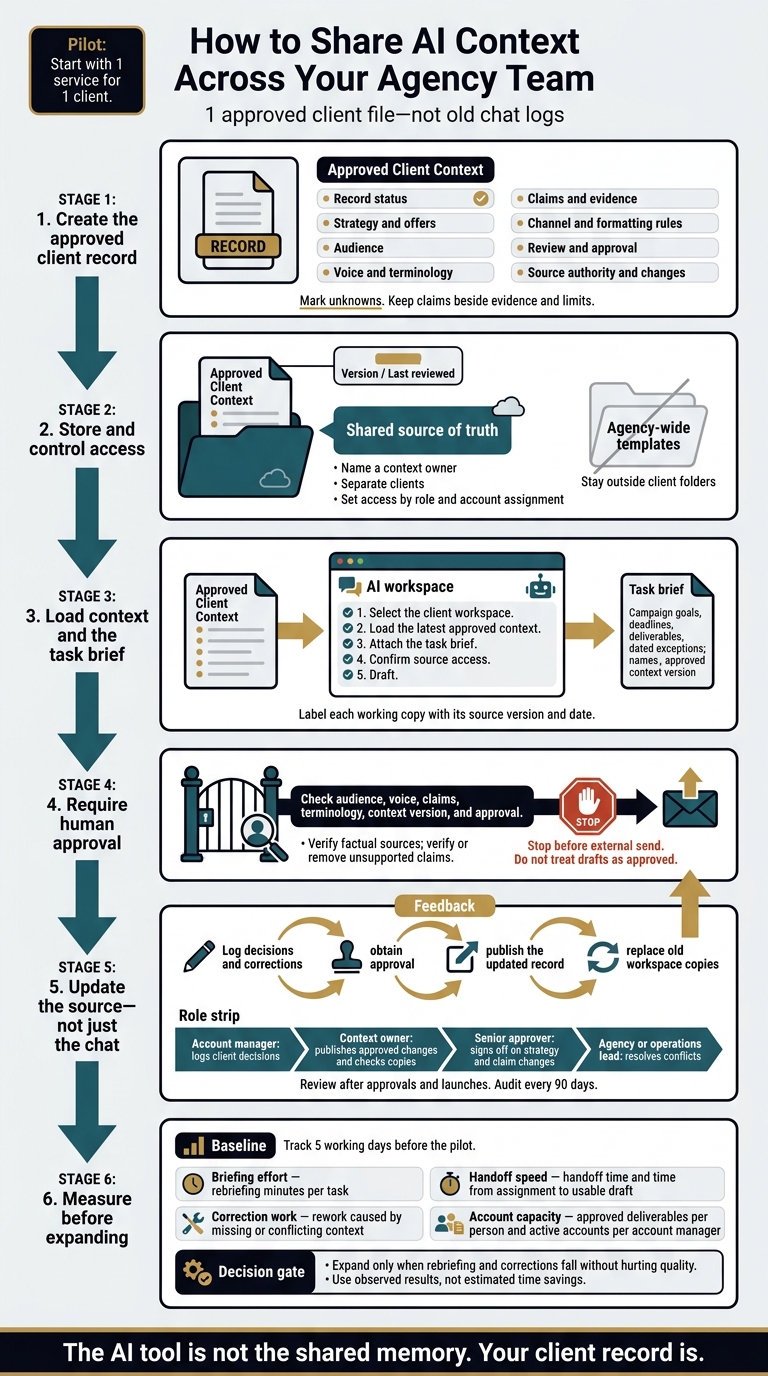
Create a shared client context template by using the same fields for every account and saving the file at the root of each client folder. Fill each field with approved facts, mark unknowns clearly, and name the person who can resolve gaps or conflicts.
Document Strategy, Voice, Claims, and Approvals
Use this template as the single source of truth for each client context file. Keep strategy, voice, claims, and approval rules together so the team knows what it can use.
Copy-ready client context template
# Approved Client Context

## Record Status
Client / Industry / Market: [Name, category, geography]
Context owner: [Name and role]
Version / Last reviewed: [Version; MM/DD/YYYY]
Approval status: [Draft or approved; approver; approval date]

## Strategy and Offers
Mission and values: [Approved statements]
Offers and positioning: [Products, pricing, intended buyer, value]
Goals and success metrics: [Priorities, metric definitions, source]
Differentiators: [Supported differences]
Competitive boundaries: [Permitted comparisons; prohibited claims]

## Audience
Segments and decision-makers: [Who buys and who influences]
Pains and objections: [Documented needs and concerns]
Buyer language: [Verified phrases; source links]

## Voice and Terminology
Do: [Specific writing behaviors and approved phrases]
Do not: [Prohibited wording and tone]
Words to use / avoid: [Approved vocabulary]
Brand terminology and capitalization: [Exact spellings]

## Claims and Evidence
Approved claims: [Exact wording; evidence link; approval date]
Restrictions: [Required qualifiers, permitted channels, expiration]
Do not make unsupported performance claims or invent data.

## Channel and Formatting Rules
Channel requirements: [Length, structure, CTA, search targets]
Formatting: [Headings, punctuation, links, required disclosures]

## Review and Approval
Reviewers: [Name and responsibility]
Approval thresholds: [What each reviewer must approve]
Turnaround expectations: [Review window and escalation contact]
Stop before external send. Do not treat drafts as approved.

## Source Authority and Changes
Authoritative sources: [Source of truth for each type of fact]
Conflict contact: [Person who resolves disagreements]
Change log: [Date; change; source; approver; version]
Write rules reviewers can check. List the exact words, banned phrases, and format rules they should check. Keep each approved claim beside its evidence and limits so the team does not copy the claim without them.
Keep Client Rules Separate From Campaign Briefs
Keep long-term strategy, voice, and claim limits in the client record. Put campaign goals, deadlines, deliverables, and dated exceptions in a separate task brief. Each brief must name the approved context version it uses.
Every exception needs an approver, a scope, and an end date. It must not become a standing rule. Name the source of truth for each fact, and send unresolved conflicts to the named contact.
Include this instruction with every task:
Use the approved client context and task brief; identify missing information; do not invent claims or evidence; flag conflicting instructions and request clarification; mark work requiring human approval, and do not treat drafts as approved.
Store Client Context and Load It Into AI Tools
Store approved client context in a shared source, then load it into each AI workspace before work starts. Use Notion, Google Drive, or your documentation hub as the source of record, and label each AI working copy with the source version and date so teammates know which copy to trust. [2][6]
The AI tool is not the shared memory. Your client record is. Once the AI prompt template is built, keep it where teammates can find and reuse it without searching old chats or pasting the same context for every task.
Separate Clients and Set Access Permissions
Give each client a folder or project with a stable client ID. Use the same folder structure each time: deliverables/, reports/data/, meetings/, and archive/.
Keep agency-wide templates and methods outside client folders. Set access by role and account assignment so teammates see only the clients they support. [4][5]
This setup makes context easier to load. It also keeps account managers and delivery staff working from the same approved source across tools.
Load Approved Context Into Each AI Workspace
Load the approved context through each tool’s workspace, file, or instruction features. Choose the context needed for the task. If the tool supports folder-based access, start in the client folder so the context file is available.
Check access before drafting. A new chat may not retain past instructions, and a pasted link may not grant access to the source. Confirm that the workspace can open the approved record. [2][4]
Label each uploaded copy with its approved source version. When a decision or voice correction gets approved, update the client record, replace old workspace copies, and check that teammates use the current version.
Follow the Same Handoff Steps for Every Task
Use the same handoff steps for each task:
- Select the client workspace.
- Load the latest approved context.
- Attach the task brief.
- Confirm source access.
- Draft.
During internal review, ask the AI to cite sources for factual claims. Check those sources, then verify or remove claims that lack support.
At handoff, save approved decisions back to the client record, not just the chat. The next teammate can then pick up the work without rebuilding the context. [1][4]
Assign Owners and Keep Context Current
Shared context stays useful only when someone owns its upkeep. Once teams load the same context into each workspace, a named owner keeps copies aligned across ChatGPT, Claude, Gemini, Grok, and Perplexity.
Make context updates part of delivery, not cleanup. Log decisions and corrections in the same session. Publish changes only after approval. [2][6]
Define Who Updates, Approves, and Resolves Conflicts
Assign a context owner to publish approved changes and check copies in active workspaces. The account manager logs client decisions. delivery staff and contractors using Copy.ai flag gaps but do not edit the approved record.
A senior approver signs off on strategy and claim changes. An agency or operations lead settles conflicts. Each role needs a clear boundary so updates do not turn into competing versions. [3][6][9]
Track the owner, approver, effective date, source, and what each update replaces. If source files disagree, follow the documented source order. Send unresolved issues to the assigned lead rather than guessing.
Review context after approvals and launches. Audit the library every 90 days. [2][9]
Check Every Deliverable Before It Ships
The human reviewer checks audience, voice, claims, terminology, context version, and approval before work ships. Look for drift, including another client’s terms or tone. Send claims, strategy changes, and conflicting instructions to the assigned approver. [2][6][9]
If an error points to an old rule, submit a context correction, not just a copy edit. The next handoff should use the corrected, approved context without reopening past decisions. [2][6][9]
Workflow check: Confirm that client work stays separate, permissions match assignments, the template is complete, and active workspaces use the latest approved context.
Record who approves changes, who publishes them, and who owns the next review. Put these duties in the delivery workflow with an owner and a deadline. [2][6][9]
Conclusion: Measure Capacity Before Expanding
Measure capacity before expanding by checking whether live work needs less briefing, fewer handoffs, and fewer corrections. A stable workflow is not proof of more capacity: the team must show it can handle more work without lower quality or more hires. [3]
Treat the pilot as a capacity test. Use 1 approved client record, approved instructions in each AI tool, a named owner, and human approval before delivery. [3][5][8] Expand only when rebriefing and corrections fall without hurting quality. [3]
Measure Handoff Time, Rework, and Account Capacity
Track 5 working days before the pilot to set a baseline. Then compare similar tasks during live client work. [3]
| Metric | What to measure | Evidence for expansion |
|---|---|---|
| Briefing effort | Rebriefing minutes per task | Less time pasting or explaining client rules again |
| Handoff speed | Handoff time and time from assignment to usable draft | Faster handoffs, with work resuming from approved context |
| Correction work | Rework caused by missing or conflicting context | Fewer corrections without lower quality |
| Account capacity | Approved deliverables per person and active accounts per account manager | More output and accounts without more rework |
Use observed results, not estimated time savings, to judge whether the team can carry more accounts without hiring. [3]
Extend Portable Delivery Intelligence Across Accounts
If the pilot works across repeated tasks, use the same setup on more accounts.
Agile Growth Labs (AGL) calls this Portable Delivery Intelligence: a setup that connects client strategy, rules, priorities, and approvals to existing AI tools so approved context can move across handoffs, cut rework, and support more accounts. A trained operator runs it, often using specialized AI agents, with human approval before delivery. [3][8]
Follow Land, Expand, Scale: [7]
- Map 1 service for 1 client.
- Run live work.
- Check speed and quality.
- Extend the setup across accounts.
Use the metrics above to track progress toward AGL’s target: 18–25 accounts per account manager, compared with 4–8 today. This is a target, not a guarantee. [3]
- Run the free Capacity Leak Calculator to see how many more accounts your team could carry.
- Want help? Bring 1 client account to a free mapping session.
FAQs
How can we protect sensitive client data in shared AI context?
Protect client data by keeping each client’s work separate, not just by setting prompt rules or checking access later. Store each client’s files, research, and deliverables in an isolated workspace, and connect AI tools only to the sources that client’s project needs.
Before adding content to your shared agency methods library, remove sensitive details. That includes internal strategy and examples you don’t have permission to share.
During internal audits, test that tasks cannot pull data from another client’s workspace.
What if our client context exceeds an AI tool’s file limits?
Load what the task needs, not the whole client archive. Split your master client pack into files by topic. Upload only the files needed for the task.
Keep 1 source of truth in agency-owned storage, such as Notion or Google Drive. Treat each tool upload as a short-term copy with a clear version label. Check and update those copies often so teammates don't use old client details.
How long should we test before adding more accounts?
Start with 1 client and 1 recurring service. By week 2, aim to have an approved client context pack and a test draft. Compare that draft with work made by a person. Track briefing minutes, revision rounds, and account manager hours.
Add accounts only after several jobs show steady time savings without a drop in quality. If reviews still take too long, improve the client context packs before you produce more work.