What Is Context Engineering? A Guide for Marketing Agencies

Context engineering is how I give AI the approved client facts, rules, and sources it needs for agency work. I start with 1 client pack, name an owner, and keep it current so each task uses checked facts instead of relying on another briefing call or a longer prompt.
The lesson: AI is not the bottleneck. Missing context is. A prompt tells AI what to do. Maintained context gives it the facts to do that work.
I use this approach to:
- Keep client facts separate from campaign notes.
- Share approved context across tools.
- Check claims, access, and human approval.
- Measure time saved after setup, upkeep, and review.
At Agile Growth Labs (AGL), Portable Delivery Intelligence carries client rules and approvals across tools. AGL’s target is 18 to 25 accounts per account manager, compared with the stated baseline of 4 to 8. That is a target, not a promised result.
<u>I would test 1 client before expanding.</u>
Next step: Run the free calculator.
Context Engineering for Agents
sbb-itb-9cd970b
Build a Reusable Client Context Package
Build a reusable client pack before drafting so each AI tool works from the same approved facts, rules, and examples. The bottleneck is not which AI tool your agency uses, but whether the client context moves with the work instead of staying in chats or an account manager’s head.
Turn the intake brief, kickoff materials, approved work, and checked account facts into 1 shared source. Keep permanent client rules, campaign instructions, and work status separate. A short-term promotion should not become a lasting brand rule.
Set up those rules once. Use them in every draft.
Document the Client's Business, Audience, and Messaging
Record what the client sells, what it costs, and who buys it. Include goals, positioning, points of difference, buyer roles, pain points, and objections.
Add approved language, banned phrases, offers, and channel rules. Store voice samples and marked-up examples beside the rules they explain.
Include customer language and limits on competitor claims. Note each channel’s rules for format, accessibility, and calls to action.
Client Context Checklist: Required, Approved, Restricted, and Unconfirmed
Use this checklist in each client pack. For every entry, record status, source link, owner, and last-checked date.
These categories are labels, not approval statuses. A required input can still be missing. Pause affected work if an open question could change the offer, claim, audience, or legal meaning.
| Category | Copyable checklist |
|---|---|
| Required | ☐ Task brief and inputs ☐ Task owner |
| Approved | ☐ Positioning ☐ Audience ☐ Voice samples and annotated examples ☐ Verified claims ☐ Product and pricing facts ☐ Offers and calls to action |
| Restricted | ☐ Forbidden phrases ☐ Rejected angles ☐ Competitive constraints ☐ Legal boundaries |
| Unconfirmed | ☐ Unmapped claims or statistics ☐ Conflicting instructions ☐ Any item without an approved source |
Keep product facts, prices, guarantees, and active offers in an Offer Truth Table. Link each claim to its proof and approval for use. Proof alone is not approval.
Keep the pack up to date to reduce repeat briefs, mixed messages, and account-manager cleanup.
Use the Same Client Context Across AI Tools
Keep the main client pack in agency-owned Notion or Google Drive. Export a Markdown copy, such as client.md, so the context can move with the work rather than sit inside 1 prompt.
Load the needed sections into ChatGPT, Claude, Gemini, Grok, or Perplexity through uploads or connectors. Change the prompt to fit the tool, not the client strategy.
Check access rights, connector support, and context limits. Treat uploaded copies as out of date until you check them against the source and replace them as needed.
Create Campaign Work With Client Context
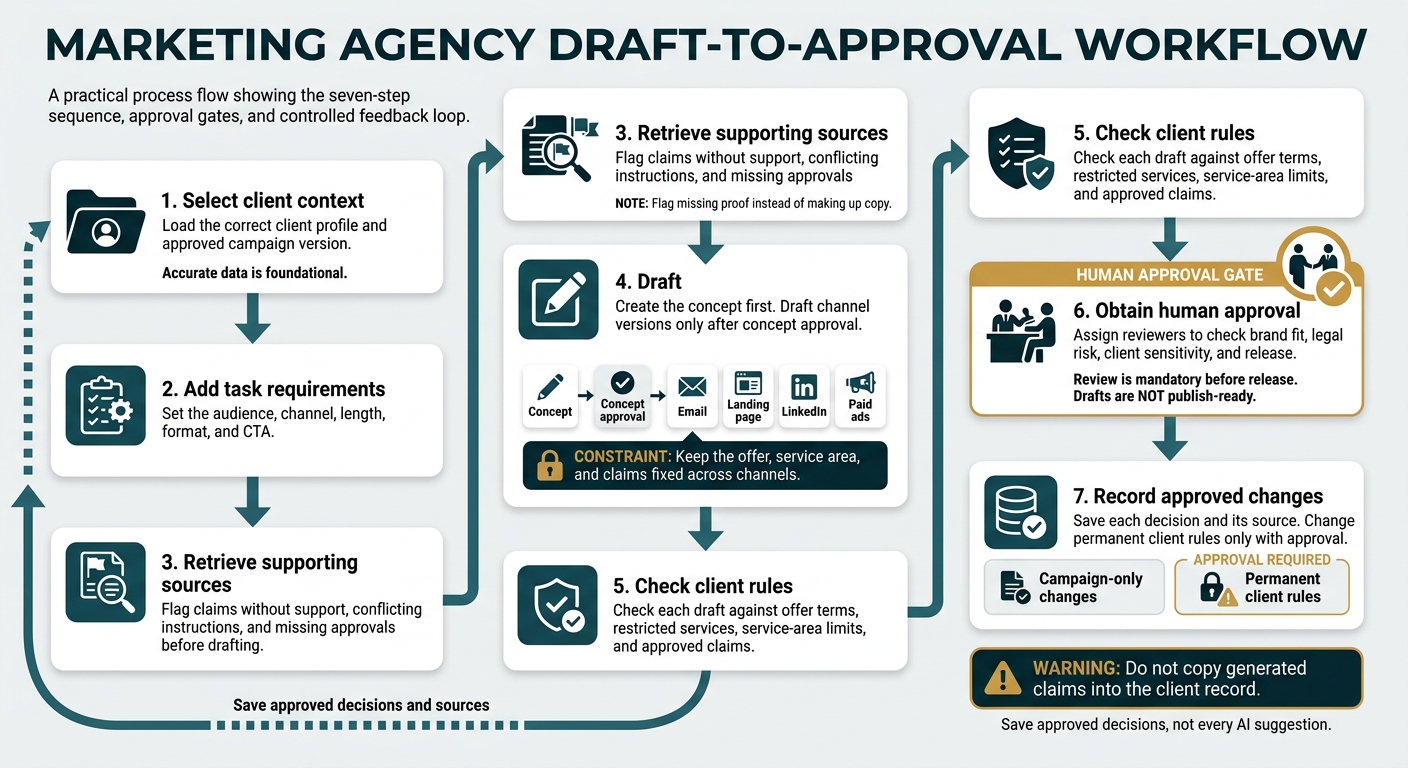
Context Engineering: 7 Steps From Draft to Approval
Turn the loaded client pack into a campaign concept, then draft channel copy using only approved facts, offers, and rules. Keep that same context in place through review so AI does not change the offer, stretch the service area, or invent claims as the work moves between channels.
For example, a home-services campaign could promote a free water-heater inspection in ZIP codes 19101, 19102, and 19103. Use approved positioning, voice, exclusions, and current claims only. This is an example, not a real client. [6]
The gain comes from reusing approved context, not asking AI to guess again. The same facts guide the concept, each version, and the review.
Create a Campaign Concept and Channel Versions
Build the concept from the loaded client pack, not a new reading of the kickoff brief. Use the approved audience, inspection offer, and service limits.
Avoid fear-based urgency. Keep promises within the listed ZIP codes. Use supported points that set the client apart. Flag missing proof instead of making up copy. [6]
After concept approval, shape the copy for each channel using top AI tools for marketers.
| Channel | What the draft needs |
|---|---|
| Explain the offer and invite existing contacts to request an inspection. | |
| Landing page | State who qualifies, list offer terms, and include a request form. |
| Use short copy, a clear CTA, and matching geographic targeting. | |
| Paid ads | Use short copy, a clear CTA, and matching geographic targeting. |
Keep the offer, service area, and claims fixed across channels. Do not add savings or performance promises without support. [1][7]
Follow a 7-Step Draft-to-Approval Workflow
Use the same path for every campaign. It keeps the concept, drafts, and approval tied to the same client rules.
- Select client context: Load the correct client profile and approved campaign version.
- Add task requirements: Set the audience, channel, length, format, and CTA.
- Retrieve supporting sources: Flag claims without support, conflicting instructions, and missing approvals before drafting.
- Draft: Create the concept first. Draft channel versions only after concept approval.
- Check client rules: Check each draft against offer terms, restricted services, service-area limits, and approved claims.
- Obtain human approval: Assign reviewers to check brand fit, legal risk, client sensitivity, and release.
- Record approved changes: Save each decision and its source. Change permanent client rules only with approval. [1][6][7]
Do not copy generated claims into the client record. If AI invents a discount and someone saves it there, later drafts may repeat it as fact.
Save approved decisions, not every AI suggestion. Keep campaign-only changes separate from permanent client rules. [6]
Keep Client Context Current and Secure
Keep client context current and secure by naming an owner, tracking approved changes, and limiting access to each client’s sources. A client pack is not a live feed: connected AI tools need controlled updates so old facts do not keep driving drafts, revisions, and account-manager cleanup. [1][8][9]
Assign Context Owners and Track Changes
Give each client 1 accountable owner to cut repeat briefs and rework. Strategists own voice and ideal customer profiles (ICPs). Account leads own offer facts. SEO leads own search engine results page (SERP) context, while ops owns governance and approval rules. [1][8]
For each rule or source, record its owner, approval status, version ID, and changelog link. Keep drafts and assumptions apart from approved facts. [1][8]
Audit each quarter. Update pricing as soon as it changes, and update SEO/SERP context for each content cluster. Log client decisions and why they were made. Remove replaced material from active retrieval so AI tools stop pulling it into new work. [1][3][9]
After major changes, rerun sample tasks across connected AI tools to check that the updates work. Clear ownership also needs clear access limits. [1]
Separate Client Access and Check Sources
Keep client packs apart with separate workspaces, storage paths, and connection permissions. Give each person and integration access ONLY to the sources they need. Use 1 client per AI session, and leave out sensitive data the task does not need. [1][8][9]
Before drafting, check retrieved sources for errors, dates or claims that conflict, and another account’s names, products, or URLs. [8]
If AI repeats an old claim, remove the outdated source before generating the work again. A new prompt does not remove the source of the error. [1][8]
Static Briefs vs. Maintained Client Context
Maintained client context pairs regular upkeep with the right facts for each task. That turns a brief into a working system. [1][9]
A pack alone does not update every tool. Cross-tool updates still need a controlled connection or a clear update process. [1][9]
| Approach | Update process | Cross-tool reuse | Approval visibility | Outdated-information risk | Repeated briefing |
|---|---|---|---|---|---|
| Static brief | Revise by hand | Copy and attach | Often kept apart from the brief | High without review | Usually required |
| Shared folder | Replace or revise files | Reconnect or select files | Depends on file controls | High if old versions stay active | Requires source selection |
| Prompt library | Edit each template | Copy templates between tools | Often not tracked | High when facts sit inside prompts | Client facts still needed |
| Maintained context | Scheduled updates and updates when facts change | Versioned packs or controlled connections | Clear owner and status | Reduced through audits and removal of old sources | Reduced by sending the context each task needs |
Put Context Engineering to Work and Measure Capacity
Context engineering creates capacity when it cuts time spent on briefs, fixes, and handoffs, not just when AI transforms content creation at scale. Once your context pack is built and kept up to date, measure those time savings to see whether your team can carry more client work. [4][8]
Track briefing time, draft errors, senior-team fixes, and handoff delays. More information alone does not free up your team. Reusable context must reduce the work needed to get each draft approved. [4][8]
Test 1 Service Before Expanding
Test 1 client and 1 recurring service before you roll it out. Social media repurposing is 1 option. [10]
- Map the work from intake to handoff. Load approved context into 1 tool you already use, and keep human approval in place. [10][8][5]
- Aim for a signed-off context pack and 1 test draft by week 2. Compare that draft with human work. [1]
- Record briefing minutes, revision rounds, approval time, and account-manager hours per client before the test. Compare the same types of work during the test. [4]
- Subtract setup, upkeep, and human QA time from the time saved. Expand only when both time savings and quality hold across several jobs.
Where Portable Delivery Intelligence Fits
Portable Delivery Intelligence is the layer that carries strategy, rules, priorities, and approvals across the tools an agency already uses. That gives the test a way to keep the same context across tools. [1][4][8]
It does not replace your tools or final human approval. Less repeat briefing and rework can help your team serve more clients without new hires. [1][4][8]
If the test holds, save approved fixes back into the reusable context.
Conclusion: Maintain Context and Approve the Work
Approved context and task instructions produce drafts, not approved work. Keep the context up to date and approve the work before scaling.
FAQs
How do I choose which client context to give AI?
Give AI the client context it needs for the task, not every file you have. Build a reusable context pack with checked rules, positioning, audience definitions, brand voice guidelines, and approved offer details.
For each task, pull only the guidelines, approved claims, and source passages that apply. Keep each client’s data in a separate session. Then have a person check the output against the context you chose.
What should I do when approved sources conflict?
Do not guess or fill in gaps. Leave the fact unresolved and flag it for client confirmation [1].
Treat the conflict as a sign of old or missing information, not an AI error. Update your proof library or client context pack. Record the source and date of the latest verified facts [1][2].
Use human judgment to resolve every conflict before sending the work to the client [1].
How do I know my pilot is ready to scale?
Your pilot is ready to scale when each client has a dedicated workspace with client files, clear delivery steps, and up-to-date context. Named reviewers check every deliverable for brand fit, accuracy, and claims backed by evidence. The workflow must also cut rework and approval delays.
If reviews are still slow, fix the client context packs before you increase output. Scale by running work in batches, not by making more drafts. Keep client context at the center of each batch.