Why Most AI Automation Fails at Day 60 (And the 3 Rules That Prevent It)

Most AI automation does not fail because the tool breaks. It fails because the business changes and the workflow stays the same.
If you run marketing for several clients, that shift hits fast. By day 60, fields drift, rules get old, and no one owns the fix. The result is simple: more cleanup, slower follow-up, and less trust from your team.
Here’s the lesson I’d keep:
- Pick 1 stable workflow
- Give it 1 owner
- Tie it to 1 KPI
- Review it every week, month, and quarter
The article backs that up with clear proof. 52% of teams say data quality is their biggest automation issue. 41% say weak workflow connections create waste. And in one audit of 1,000+ B2B companies, 63.5% never responded to inbound leads at all.
I’ve seen the same pattern in agency work. At AGL, we run many marketing departments with a small team using Tango. The rule is simple: humans decide, machines repeat, nothing ships without approval. That is what keeps output high without a pile of tools to babysit.
The takeaway is clear: do not judge automation by how busy it looks. Judge it by what it changes, who owns it, and how often it gets checked.
If you want that kind of system inside your agency, look at how Tango works today.
Why AI Automation Fails (And What To Fix First)
sbb-itb-9cd970b
Why most AI automations fail after launch
Here’s the big thing most agencies miss: AI automations do not fail because the model is bad. They fail because the workflow around the model stops matching how the business runs.
That is why so many day-60 failures look the same. The process shifts. The rules change. The data gets messy. No one owns the fix. The automation keeps firing anyway.
At AGL, this is why Tango matters. Humans decide. Machines repeat. Nothing ships without approval. That setup helps a small team run many marketing departments without building a giant AI stack to babysit.
Weak process design and no clear owner
Start with the process.
Sales reps use CRM stages in different ways. Support agents do not escalate at the same point. Routing rules often depend on side notes, edge cases, and stuff no one wrote down.
If you automate that mess, you do not remove the mess. You spread it faster.
Then ownership gets fuzzy. When no one owns the workflow, no one fixes it when it slips. One study found that 96% of organizations say changing or rebuilding automation is hard because systems and business needs change.[4][5] That is not a model issue. It is a process issue.
Tango is built for this. It gives agencies a clear system for review, approval, and handoff. That means the workflow can change when the client changes.
Bad inputs, drift, and no maintenance
Now look at what happens after launch.
Fields get skipped. Duplicate records stack up. Territory rules change. Routing logic does not. A schema update breaks a weekly revenue report, and no one sees it until the numbers look off.
This is silent drift.
The automation still runs. No alarm goes off. But by day 60, leads land in the wrong queue. Support tickets get sorted by old labels. The exec dashboard shows pipeline data that no longer matches the sales process.
That is why data quality keeps wrecking automation. 52% of organizations say it is their biggest challenge, and 41% say weak workflow connections create waste.[3][2] You may not see that in the logs. You see it in missed follow-up, bad reporting, and slow delivery.
This is one reason AGL can run more client work with a small team. Tango gives the team one operating system for repeated work, with checks before anything goes live.
No clear business result tied to the workflow
This is the last trap. Teams track activity instead of outcome.
The dashboard says emails sent went up. Tickets tagged went up. Reports refreshed went up. Fine. But did the business move?
An AI follow-up system can send 10,000 emails a month and still hurt reply rates if the timing is wrong. A support triage bot can sort more tickets and still make handle time worse if agents have to fix bad routing by hand.
So track what the client cares about. Not volume. Results.
| Vanity Metric | Business Outcome Metric |
|---|---|
| Emails sent | Reply rate, meetings booked per rep |
| Leads touched | SQL conversion rate, speed-to-lead (minutes) |
| Tickets routed | Average handle time, first-response time, CSAT |
| Reports generated | Hours saved per month, forecast accuracy |
| Tasks automated | Pipeline velocity, revenue influenced |
That is the lesson. Do not judge an automation by how busy it looks. Judge it by what it changes.
This is also the core of Tango. AGL uses it to help a small team produce more, keep delivery tight, and avoid a pile of tools that need constant watching. If you want automations that last past launch, tie each one to 1 business result and give 1 person clear ownership.
Go into the next section with that filter in mind.
3 rules that stop the day-60 breakdown
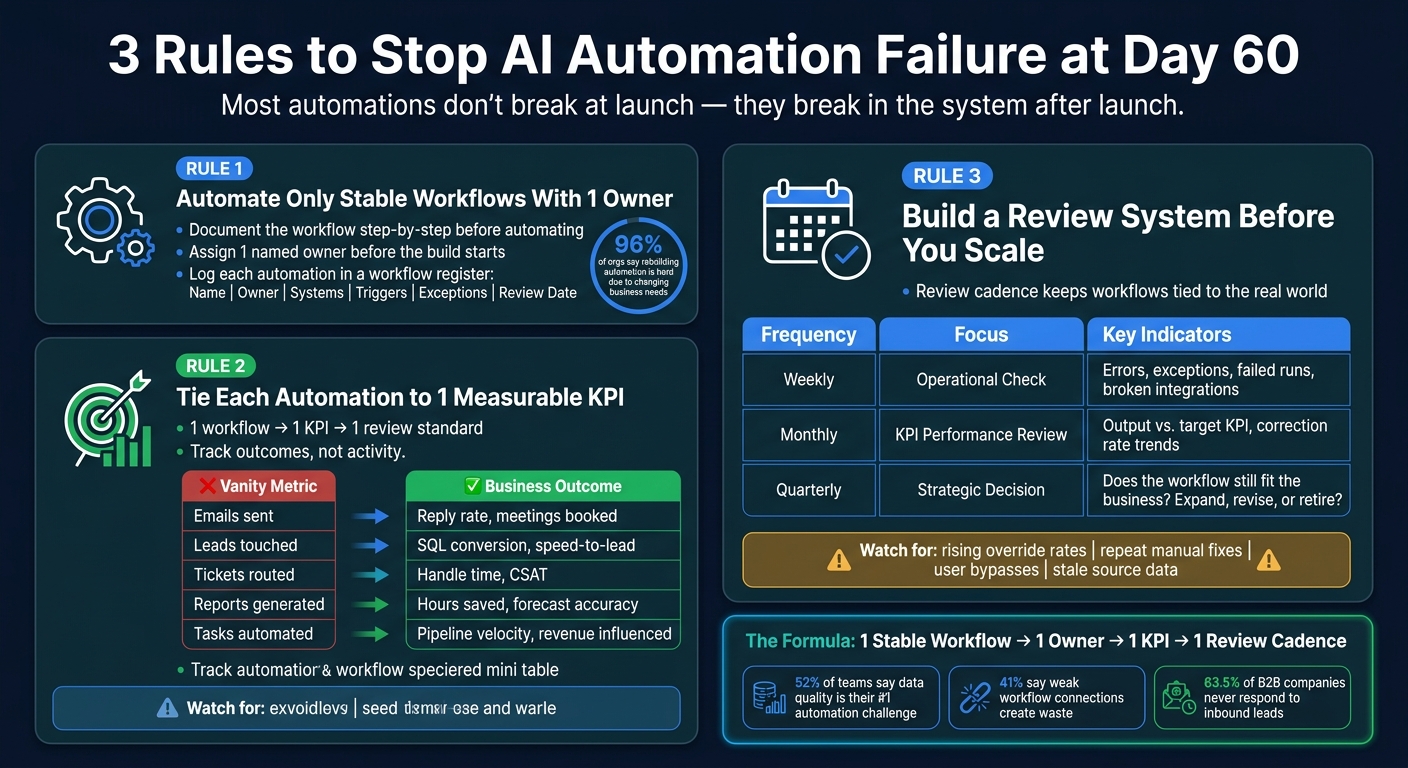
3 Rules to Stop AI Automation Failure at Day 60
Here’s the big shift: most automation problems do not start with the model. They start with loose ops.
That matters for agency owners. When you run marketing for many clients, one shaky workflow can spread mess fast. At AGL, the win came from the same simple idea inside Tango: humans decide, machines repeat, nothing ships without approval. That’s how a small team keeps output high without a pile of tools to manage.
The lesson is simple. Do not scale chaos. Filter every automation before it goes live.
Rule 1: Automate only stable workflows with one owner
Start with a workflow that already works.
If your team cannot explain the workflow step by step, write it down first before you automate it.[6][7][10] Use this for repeat tasks like CRM follow-ups, lead routing, support triage, automated lead engagement, and reporting.
Then name 1 owner before the build starts. Do not split that job across vendors, admins, and users.[1][13][14] When no 1 person owns it, the workflow keeps running even after it starts to fail.
Track each automation in a workflow register. Keep the basics in one place:
- Name
- Owner
- Systems
- Triggers
- Exceptions
- Review date
That’s the kind of control Tango gives AGL. A small team can run a lot of moving parts because each workflow has a clear job and a clear owner.[12][13][15]
Rule 2: Tie each automation to 1 measurable KPI
Every automation needs 1 job to do, and 1 number to prove it.[8][9]
Good examples are simple. Cut lead response time. Reduce reporting hours. Improve first-pass routing accuracy.
Use 1 workflow, 1 KPI, 1 review standard.[9][11] That makes drift easy to spot. If the KPI stops moving or goes the wrong way, the workflow needs a fix.
| Vanity Metric | Business Outcome Metric |
|---|---|
| Emails sent | Reply rate, meetings booked per rep |
| Leads touched | SQL conversion rate, speed-to-lead (minutes) |
| Tickets routed | Average handle time, first-response time, CSAT |
| Reports generated | Hours saved per month, forecast accuracy |
| Tasks automated | Pipeline velocity, revenue influenced |
This is where a lot of teams slip. They track activity, not outcome. A workflow that does more work is not always doing better work.
Rule 3: Build a review system before you scale
A clean launch means very little if nobody checks what happens after.[6][7][8]
The review cadence is what keeps the workflow tied to the real world. At AGL, this is a core part of Tango. The system is not “set it and forget it.” It is review, approve, adjust, then scale.
Once the workflow is live, review it on a fixed schedule. Use these 3 review layers:[11][16][17]
| Review Layer | Frequency | What to Inspect |
|---|---|---|
| Operational check | Weekly | Errors, exceptions, override spikes, failed runs, broken integrations |
| KPI performance review | Monthly | Output quality vs. target KPI, exception volume trends, human correction rate |
| Strategic decision | Quarterly | Does the workflow still fit the business? Expand, revise, or retire? |
The workflow owner should run the weekly and monthly reviews. The quarterly review should also include the person closest to the work, like a team lead, delivery manager, or RevOps analyst.[7][8]
Watch for the same warning signs each time: rising override rates, repeat manual fixes, user bypasses, and stale source data. If those show up, stop the rollout and refresh the logic first.[7][8][10]
If you want automation that lasts past day 60, start here: pick 1 workflow, give it 1 owner, tie it to 1 KPI, and set the review cadence before rollout.
How to use the 3 rules in common revenue workflows
Most agency ops do not break because the work is hard.
They break because small rule errors spread across many client accounts. That is why AGL built Tango around a simple idea: humans decide, machines repeat, and nothing ships without approval.
Use that frame where automations fail first: lead flow, ticket handling, and client delivery.
CRM follow-up and lead routing
Lead routing looks easy on paper.
Then one stale field, one old rep, or one bad status slows the whole system down. A 2024 audit of more than 1,000 B2B companies by RevenueHero found that 63.5% never responded to inbound leads at all, and the average response time among those that did was 29 hours.[18]
That kind of miss usually comes from basic setup drift. A default field gets set wrong. A deactivated rep stays inside a routing rule. A follow-up trigger never fires because the lead status was set the wrong way.
In one B2B IT services team, 18 lead routing errors per week came straight from inconsistent data integration and missing data contracts. The fix was not fancy. It was strict required fields, deduplication based on domain-plus-phone, and one system of record per field.[20]
This is the lesson.
Do not treat routing like a one-time setup. Treat it like a managed system with one owner, one KPI, and a weekly exception review. For most teams, that KPI should be median response time or lead-owner assignment within 5 minutes.[18][20]
That is how Tango runs inside AGL. One owner. One path. One approval chain. More output, fewer silent misses.
Support triage and reporting automation
Support breaks in a quieter way.
The workflow still runs, but the labels drift. Product changes. Policy changes. The model keeps sorting tickets, but now the data starts to slide.
The safer move is simple. Send low-confidence tickets to humans. Log the reason every time. MSPs using AI for ticket triage report 90% of tickets auto-triaged with 98% accuracy when low-confidence tickets go to human dispatchers with explanation logs instead of letting the model decide alone.[19]
That matters for agencies too.
If your support automation feeds reports, one bad label can roll into bad account updates and bad client calls. So the reporting layer needs checks too. Audit AI-generated metrics each month against a reconciled internal report to catch mapping changes and missing fields.[21][22]
AGL uses Tango the same way. Machines handle repeat work. People check the edge cases. That keeps the system moving without letting bad data pass as truth.
Agency delivery systems with human approval
Agency delivery rarely fails because one tool stops working.
It fails because handoffs get messy. One strategist makes their own prompt flow. Another builds a different one. Quality starts to drift across accounts. Then strategy, copy, and delivery stop lining up, and no one sees it until the client does.
The answer is not more tools.
The answer is one shared delivery system for repeat services, with clear roles and human approval at each handoff. Each workflow should map to one service KPI, like on-time delivery or revision rate. Then review exceptions on a set schedule before small misses turn into account problems.
This is the core of Tango.
AGL runs many marketing departments with a small team by centralizing repeat work, keeping approvals with humans, and giving each workflow a clear owner. That is how you get more output without adding an AI stack to babysit.
If you run marketing for several clients, start with 1 workflow this week. Pick the one tied closest to revenue or delivery. Give it 1 owner, 1 KPI, and 1 approval point.
Conclusion: AI automation needs a working system, not just a launch
Here’s the shift. AI automation does not fail at launch. It fails in the system after launch.
That is the part many agencies miss. The tech is often not the main problem. The workflow breaks because no one set the process, the owner, or the review loop in place [23].
By day 60, things start to slip. Small drift turns into messy handoffs. Ownership gets fuzzy. Reviews stop. And the value starts to leak out.
That is why the fix is not technical. It is operational.
At AGL, this is the point behind Tango. Humans decide. Machines repeat. Nothing ships without approval. That is how a small team can run many marketing departments without adding an AI stack to babysit.
The lesson is simple. Do not scale automation that cannot survive change.
Use 3 rules:
- Automate only stable workflows with 1 named owner
- Tie each workflow to 1 measurable KPI, such as AI-powered lead scoring
- Run recurring reviews before you scale
That is how automation keeps working past day 60. 1 owner. 1 KPI. 1 review cadence from day 1.
If you want that kind of system inside your agency, look at how Tango works today.
FAQs
Why do AI automations often fail around day 60?
A lot of AI automations do not fail on day 1. They fail around day 60.
That tells you something important. The weak spot is not the build. It is the operation behind the build.
At AGL, that is why Tango is not just about getting an automation live. It is the system that keeps it working inside a real marketing department. Humans decide. Machines repeat. Nothing ships without approval. That is how a small team can run many client accounts without adding a messy AI stack to manage.
Here is the lesson: an automation lasts only if the ops around it last.
When teams launch fast but skip the boring parts, problems pile up. The automation starts pulling from old or messy data. No one watches it against clear KPIs. No one checks if it still saves time or drives the business result it was meant to drive.
Then the slide begins.
Without set performance targets and regular reviews, output gets worse over time. Accuracy drops. Impact drops too. And because there is no maintenance loop, the system keeps running even as client needs, inputs, and patterns shift.
Tango fixes that by turning automation into a managed process, not a one-time setup. That is the part many agencies miss. The win is not just more output. The win is more output you can trust, with stronger delivery and no extra AI pile to babysit.
If you want AI that still works after day 60, build the review loop first. Then automate around it.
What workflow should I automate first?
Here’s the shift: agencies don’t get stuck because they lack tools. They get stuck because the team spends too much time on repeat work.
That’s where automation should start.
Begin with high-impact, repeat tasks that lead to clear results. Think manual data entry, missed follow-ups, or lead qualification. Don’t try to automate the whole system in 1 shot. Pick the biggest bottleneck first.
That’s how AGL runs many marketing departments with a small team using Tango. Humans decide. Machines repeat. Nothing goes live without approval.
A small pilot is the best first move. You might start with:
- Email follow-ups
- Lead scoring
This gives you a clean way to track results, train your team, and check that your tools connect the right way before you roll it out to harder workflows.
That matters because more output does not come from more software. It comes from a system your team can trust and use every day.
How often should I review an AI automation?
Review it on a set rhythm.
Use weekly check-ins to track KPIs like response rates, conversion rates, and system latency. That gives your team a clear view of what’s working and what needs a fix.
Then do quarterly reviews of your full stack health. This is how AGL keeps Tango tight across many client accounts. Humans decide. Machines repeat. Nothing ships without approval.
That steady review cycle helps you fine-tune workflows, improve AI agents, and keep automation tied to business goals.