Buyback Rate for the AI Age: What Your Hour Is Worth When Agents Do the Work

If AI can do a task for less than 25% of your hourly rate, that task should usually leave your calendar. That’s the core idea. I’d use a simple rule: find my hourly rate, set my buyback rate at one-fourth of it, then move repeatable work to tools or agents when the math works.
Here’s the article in plain English:
- I price my time by output, not just income
- I estimate my hourly rate from annual pay or revenue
- I set my buyback rate at 25% of that number
- I audit my week in 30-minute blocks for 5 days
- I automate rule-based tasks first: inbox triage, CRM updates, reporting, prospecting
- I keep judgment-heavy work: sales calls, contracts, board updates, pricing calls
- I measure true cost, not just the software fee
- I only scale what gives me a clear return, with a target of at least 5x net gain
A few numbers stand out:
- A $200/month tool that saves 10 hours costs $20/hour
- AI-supported prospecting can save about 38.5 hours per month
- CRM automation can save 5–12 hours per week
- Inbox triage can save 5–10 hours per week
- Many teams miss setup, review, and maintenance costs, which can change the math fast
Here’s the simple test I’d use: Does this task need my judgment, trust, or relationships? If yes, I stay involved. If not, and the cost lands below my buyback rate, I hand it off.
| What I keep | What I hand off |
|---|---|
| Sales calls | CRM updates |
| Pricing decisions | Inbox sorting |
| Contract negotiation | Reporting |
| Board updates | AI sales tools for prospecting prep |
| Hiring decisions | Content repurposing |
The article’s main point is simple: AI is not about doing more tasks. It’s about buying back hours and moving those hours into work that makes more money.
Calculate Your Hourly Value and Identify What to Automate First
The Effective Hourly Rate and Buyback Rate Formulas
Start by putting a dollar figure on your time.
Use your total annual compensation, not just salary. That means salary, benefits, distributions, and perks. For many knowledge workers, total compensation comes out to about 1.3x to 1.4x base salary [6].
From there, divide that number by 2,000 work hours to get your Effective Hourly Rate (EHR). Then take 25% of your EHR to find your buyback rate. That’s the most you should pay to outsource or automate a task [6].
| Annual Compensation (Fully Loaded) | EHR (÷ 2,000 hrs) | Buyback Rate (× 25%) |
|---|---|---|
| $150,000 | $75.00/hr | $18.75/hr |
| $300,000 | $150.00/hr | $37.50/hr |
| $600,000 | $300.00/hr | $75.00/hr |
| $1,000,000 | $500.00/hr | $125.00/hr |
This gives you a simple way to think about AI spend and building your AI tool stack. If a task costs less than your buyback rate and saves you time you’d otherwise spend yourself, it’s probably worth a close look.
Run a Weekly Time Audit by Value Tier
Before you automate anything, track your work in 30-minute blocks for five consecutive working days. That gives you a much clearer view of where your week actually goes [3].
Then sort each task using one test: Does this need your judgment, relationships, or taste? Or is it rule-based and repeatable?
| Value Tier | Task Examples | Characteristics |
|---|---|---|
| High Value | Strategy, hiring, key sales calls, pricing, investor relations | Requires judgment, trust, and human relationships |
| Mid Value | Content drafting, complex reporting, contract redlining | Needs human review before finalizing |
| Low Value | CRM hygiene, inbox triage, list building, basic data entry | Repetitive, rule-based, and highly suitable for AI agents |
What you’re looking for is your biggest repeatable time drain: the recurring task that eats up 5–8 hours per week. That’s usually the best place to build your first agent [3].
The audit shows where the time goes. After that, you can decide which workflows should move first.
Build a Keep vs. Automate Decision Table
Use the audit to separate work that should stay with a person from work that can move to an agent [3].
| Task | Owner | Est. Hourly Value | Automatable | Risk Notes |
|---|---|---|---|---|
| Outbound Prospecting | SDR / Agent | Mid ($50–100) | Yes | High volume; low risk with review |
| CRM Updates | Ops / Agent | Low ($15–30) | Yes | Low risk; rule-based |
| Inbox Triage | Admin / Agent | Low ($20–40) | Yes | Medium risk; needs clear escalation rules |
| Content Repurposing | Marketing / Agent | Mid ($75–150) | Yes | Medium risk; needs human review before publishing |
| Board Updates | Founder | High ($500+) | Partial | High stakes; AI can draft, founder must approve |
| Contract Negotiation | Founder / Legal | High ($300+) | No | High risk; requires nuance and trust |
| Key Sales Calls | Founder / VP Sales | High ($200+) | No | High risk; relationship and deal integrity depend on human presence |
A clear pattern shows up fast. Low-value, rule-based work is usually the safest place to start. High-value work tied to judgment, legal risk, or relationships should stay human-owned. The middle tier tends to work best with a review step: the agent drafts, the person approves [3].
One more filter matters here: only automate workflows that have stayed stable for at least three months. If the process keeps changing, automation usually creates cleanup instead of leverage [2].
That gives you a short, usable list of what to automate first.
sbb-itb-9cd970b
AI Workflows That Buy Back Hours Fast
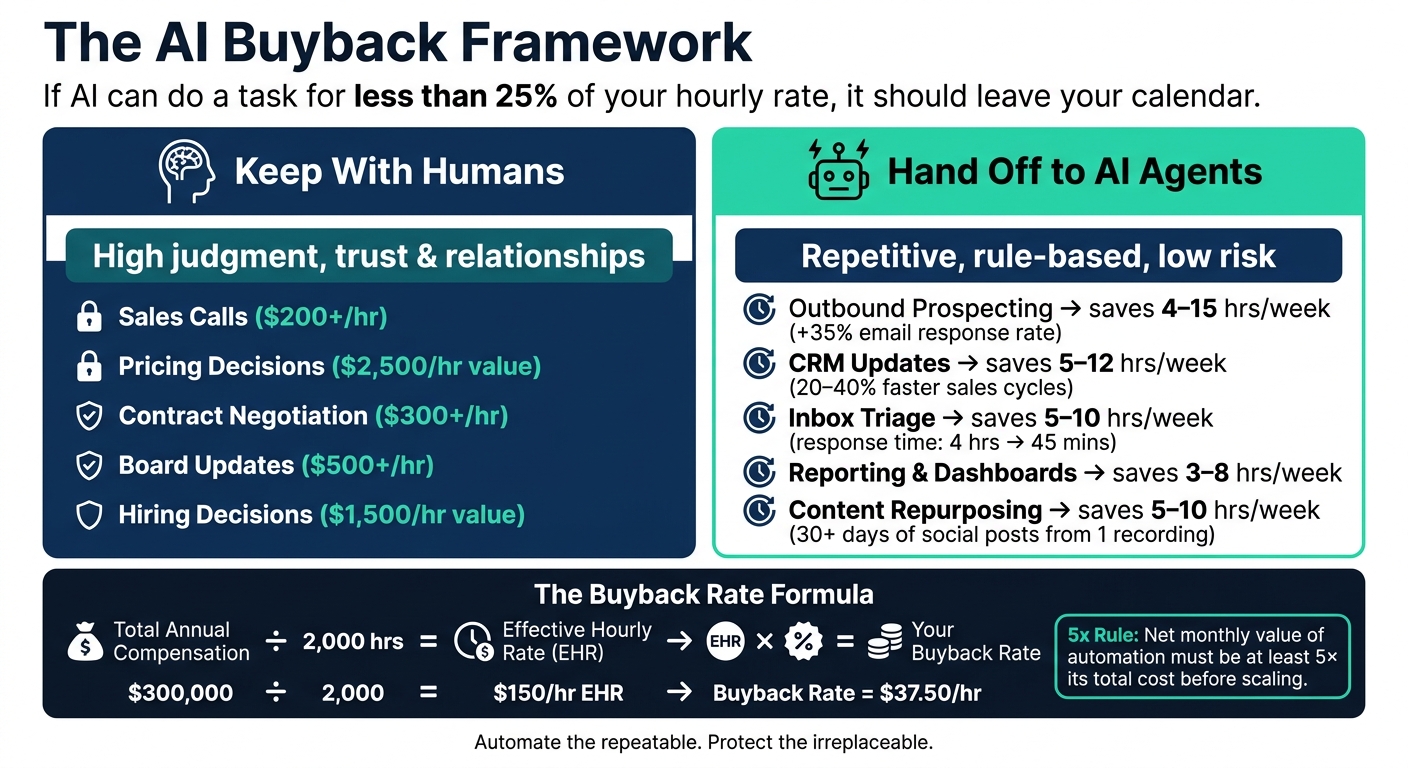
AI Buyback Rate: What to Keep vs. Automate & Hours Saved
Outbound Prospecting, CRM Updates, and Inbox Triage
Start with the workflows that save the most time and stay under your buyback rate. Once your audit is done, move the highest-return workflows to agents first. Put the lowest cost-per-hour wins at the top of the list. Those usually pay back the fastest.
Outbound prospecting is a strong place to begin. AI agents can research your ideal customer profile, draft personalized first-touch emails, and run follow-up sequences on autopilot. That saves sales reps an average of 38.5 hours per month on email research, meeting prep, and follow-up writing [4]. AI-assisted outreach has also led to a 35% increase in email response rates compared with fully manual sequences [4]. The line is pretty clear, though: let AI handle prep and repetition, but keep negotiation and relationship work with people.
CRM updates are another quiet time sink in most sales teams. AI can summarize calls, sync notes into CRM fields, and trigger next-step tasks without the usual copy-paste grind. Teams often save 5–12 hours per week this way, while also shortening sales cycle length by 20–40% [1][8].
Inbox triage is one of those jobs that eats time in small bites all day long. AI can sort emails by urgency, draft replies for low-stakes messages, and flag the ones that need a human look. For founders, that can mean 5–10 hours per week saved, with response times dropping from about 4 hours to 45 minutes [1][4].
Reporting, Dashboards, and Content Repurposing
Reporting is another easy win. Instead of exporting data into spreadsheets and writing weekly summaries by hand, AI can pull live data from the tools you already use and generate KPI summaries and dashboards on a set schedule. That usually saves 3–8 hours per week and gives leadership faster decision-making [1].
Content repurposing is where the leverage starts to stack up. One recorded webinar or founder memo can turn into blog drafts, email copy, and 30+ days of social posts. Some teams call this a "Content Refinery" model [8]. A good example came from SaaStr in 2026: its AI agent "10K" (AI VP of Marketing) handled a one-hour work session with 125 distinct actions and 2,463 lines of context for a total cost of $13.42 [5]. The trick isn’t removing people from the process. It’s keeping a human in the review step, not the production step.
Manual vs. AI-Augmented Workflows: A Side-by-Side Comparison
The table below shows where teams usually win back the most time, and what that can do for pipeline and output.
| Task Category | Manual Workflow | AI-Augmented Workflow | Est. Hours Saved/Week | Revenue or Lead Impact |
|---|---|---|---|---|
| Outbound Prospecting | Manual LinkedIn research, individual email drafting, manual follow-up tracking | AI researches ICP, drafts personalized outreach, automates follow-up sequences | 4–15 hours [1] | 35% increase in email response rates [4] |
| CRM Updates | Manual data entry after calls, manual deal-stage updates, manual task creation | AI summarizes calls, auto-syncs CRM fields, triggers next-step tasks | 5–12 hours [1] | 20–40% sales cycle compression [8] |
| Inbox Triage | Reading every email, manual labeling, drafting routine replies | AI categorizes by urgency, drafts low-stakes replies, flags high-priority items | 5–10 hours [1] | Response time drops from 4 hrs to 45 mins [4] |
| Reporting | Exporting data to Excel, manual chart creation, writing weekly summaries | AI pulls live data, generates KPI summaries and dashboards automatically | 3–8 hours [1] | Faster decision-making [1] |
| Content Repurposing | Writing blogs from scratch, manually clipping webinars for social media | AI turns one recording into blog drafts, email copy, and 30+ days of social posts | 5–10 hours [8] | Always-on demand generation [8] |
A simple way to sequence this work:
- Start with operations and delivery
- Then move to sales admin
- Then tackle lead generation
Automate the most stable, repeatable workflows first. That cuts cleanup work and keeps your team focused on the jobs that need judgment, context, and trust.
Next, test whether the time recovered is worth the tool cost.
How to Measure Whether AI Buyback Pays Off
Convert AI Tool Costs Into a Cost Per Bought-Back Hour
Don’t judge an AI tool by the monthly subscription alone. That’s the easy number, and it’s often the one that misleads people.
What matters is total cost of ownership. In plain English, that means adding up all the costs tied to the workflow: monthly software, API and hosting, setup spread across time, and the human time spent checking the output.
The formula that gives you a more honest number looks like this:
Effective Cost per Bought-Back Hour = [Monthly Software + API and Hosting + (One-time Setup ÷ Amortization Months) + (Monthly Review Hours × Hourly Rate)] ÷ [Gross Hours Saved − Monthly Review Hours]
Here’s what that looks like with real numbers. Say you spend $150/month on LLM and platform fees, plus $125/month on hosting. You also have a $1,200 setup cost, spread over 6 months, which adds $200/month. Then add review time: if a founder spends 5 hours per week checking outputs at $125/hour, that adds $625/month in oversight.
That puts your total true monthly cost at $1,100.
Now say the tool saves 20 gross hours per month, but 5 hours of that goes back into review. Your net bought-back time is 15 hours. So your effective cost per bought-back hour is about $73.
That’s where the buyback rate matters. If your buyback rate is $200/hour, this works. If it’s $80/hour, you’re close to break-even.
There’s one more trap here: maintenance. Budget 20% to 40% of build cost per year for maintenance, prompt updates, and model drift. Add more if you use a second model to verify the first. Teams that skip these costs often end up with automations that fail quietly, then cost more to repair than they ever saved. [7][10]
Model the Net Gain From Reallocating Saved Time
Time saved is only useful if it gets moved into work that makes money. If it doesn’t, the “gain” is mostly a nice story.
That’s why the first step should happen before rollout: write down exactly where the bought-back time will go, perhaps using AI systems that automate growth. Sales calls. Pricing work. Partnerships. Hiring. Pick the destination first.
For example, if a sales leader gets back 10 hours per week, those hours should map to something concrete, like more demos, partnership outreach, or pricing strategy. If you can’t name that destination, the ROI math falls apart.
The main metrics to watch are:
- Hours saved versus hours redeployed
- Error rate before and after
- Cycle time
- Cost per accepted task
- Qualified pipeline created
The big one is cost per accepted task. That number includes model calls, review time, rework, and the cost of mistakes. In other words, it shows what the work actually costs once it’s usable. [11]
Use a Revenue Leverage Matrix Before Scaling AI Spend
Before you approve more AI spend, map where the freed-up time will land. That’s how you find out whether the tool is adding sales capacity and operating leverage, or just making dashboards look busy.
| High-Value Activity | Extra Hours Unlocked | Avg. Revenue per Hour | Incremental Monthly Revenue | AI Cost | Net Gain |
|---|---|---|---|---|---|
| Sales Demos | 40 hrs/mo | $500 | $20,000 | $1,500 | $18,500 |
| Partnership Outreach | 20 hrs/mo | $1,000 | $20,000 | $800 | $19,200 |
| Pricing Strategy | 10 hrs/mo | $2,500 | $25,000 | $500 | $24,500 |
| High-Level Hiring | 15 hrs/mo | $1,500 | $22,500 | $1,200 | $21,300 |
Monthly revenue assumes 4.33 weeks per month. [10][4]
A handy filter here is the 5x rule: the net monthly value of an automation should be at least 5 times its total cost before you scale it [9].
Why use that much cushion? Because teams often overstate time savings, miss cleanup work, and need a calibration period that tends to last until about the 6-month mark. The 5x bar helps you sort the workflows that deserve more build time from the ones that still need work.
Build an AI Buyback System and Apply the Core Rules
Use Most Companies Never Become Valuable to Find the Right Tools
Once a workflow clears your buyback threshold, the next move is simple: pick a tool that fits that job and nothing more. A short, curated list helps you move fast without getting pulled into extra features you don't need.
Match tools to the low-value tasks you flagged in your audit, like:
- CRM hygiene
- Inbox triage
- Outbound sequencing
That tight match matters. If the task is narrow, the tool should be narrow too.
With one workflow selected, run a 30-day test before you expand.
A 30-Day Plan to Put This Into Practice
Week 1: Pick one workflow from your audit that has stayed stable for at least three months, and set your baseline hours.
Week 2: Set up the workflow in human review mode, with a person approving outputs before anything goes live.
Week 3: Write the process rules, exceptions, and escalation path in one place.
Week 4: Measure hours saved against hours redeployed, and make sure the saved time actually moved into higher-value work.
Once the pilot proves the math, scale ONLY the workflows that keep paying back.
Conclusion: The Rules for Pricing Your Time in the AI Age
The core idea behind the buyback rate is straightforward: your time has a dollar value, and automation should replace work only when the savings cover the full cost. That means including software, setup, review time, and roughly a 20% maintenance tax [2].
A few rules apply in every case. Start with repetitive, high-frequency tasks, especially the ones with payback periods under six months [2]. Keep relationship-tier accounts, pricing exceptions, custom scope, and other judgment-heavy work with people. And judge AI by net gain, not by how slick the demo looked or how many tasks it finished. As Chris Peterson of Pickaxe put it:
"Completion rate is a vanity metric for agents. Always measure outcome rate." [10]
Done with discipline, buying back time with AI can be one of the highest-leverage moves available to founders and operators right now. The average return across AI agent deployments in 2026 is 171% [10]. The companies that get that return are not the ones that automate the most. They're the ones that automate the right things and put the freed-up time to work.
FAQs
What if my hourly rate is hard to estimate?
Use your annual income divided by 2,000 as a starting point for your hourly rate.
If you're a founder or operator, don't treat your time as $0. Use your target consulting rate instead, or go with the opportunity cost of your time. That gives you a much more honest baseline.
You can also use a market-based baseline. In plain English, ask: What would it cost to hire someone to do this same task? Include the full cost, not just salary:
- Salary
- Benefits
- Overhead
How do I know if an AI task really saves money?
Compare the net value created with the total cost of ownership.
Start with the upside. Multiply the hours saved each year by your fully loaded hourly rate. Then add the money you save from fewer errors, plus any extra revenue the project brings in.
Next, subtract the yearly costs:
- Build and integration
- Platform or API usage
- Ongoing maintenance
If the net gain is positive and the payback period matches your criteria, it saves money.
Before you run the numbers, measure the current process for 4 to 8 weeks first. That gives you a baseline you can trust instead of a rough guess.
Which task should I automate first?
Start with a two-week time and energy audit. Track your work in 15-minute blocks, then flag the tasks that drain you. As you review the log, separate low-value work from high-impact work.
From there, automate the tasks that are both low-value and energy-draining first. The best place to start is with structured, repeatable work. Think lead qualification, support ticket triage, CRM updates, or weekly KPI rollups. Those jobs usually give you the fastest payback.