If you haven't seen the numbers yet, PwC surveyed 308 US executives and 79% said their companies are already using AI agents. Only 42% said they're redesigning their workflows around them. Gartner went further and predicted that over 40% of agentic AI projects will be canceled by the end of 2027, because of rising costs, unclear value and weak risk controls.
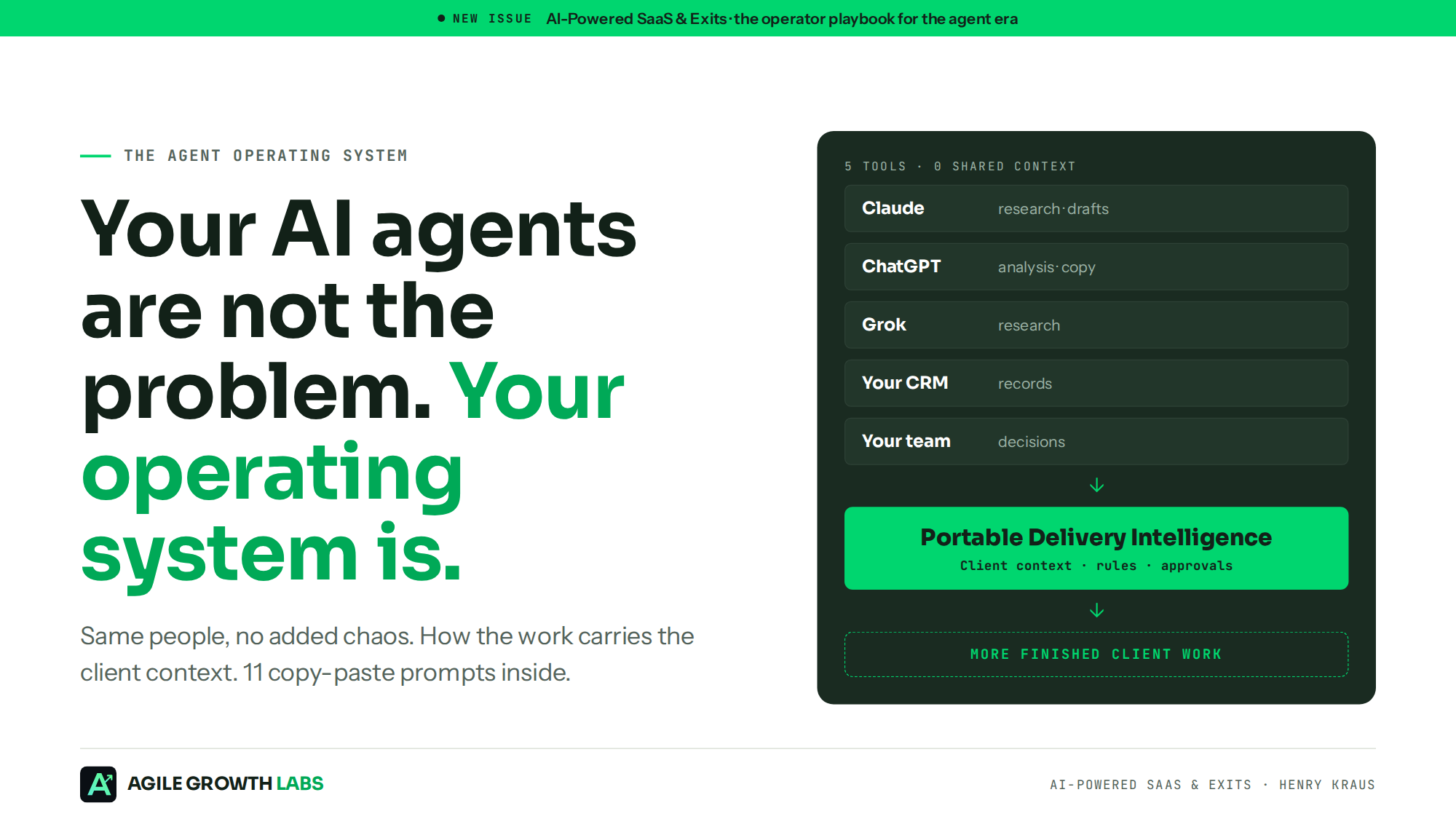
Let me get something straight. Your AI agents are not the problem. Your operating system is.
Your team already has the AI. ChatGPT, Claude, Gemini, a tool for every step. And they're still chasing work: too many tools, constant updates, and work that gets stuck. The AI can write the draft. What it doesn't have is the client context, meaning the strategy, the rules and the approvals. So somebody re-briefs it. Every time.
In my last newsletter issue I wrote that the toll booth is moving, and that your AI will broker the deal instead of Google. This is the other side of that coin. If agents are going to do more of the work, something has to hold the context, the rules and the sign-off. Otherwise you end up holding it yourself.
What I Am Seeing on the Ground
Every person on a team who knows how to use AI has become their own AI engineer. If 5 people on the same team each have a Claude account, they can't share what they've built on a project. Your AI environment is only trained on what you feed it, so nothing cross-references and it all gets lost in translation.
I describe it like calling a customer service rep at a bank. You get on the phone, you give them your account information, they verify your identity, you explain the problem, and then they say, great, I'm going to move you to the next rep. And all of that context is gone. Now imagine that times 1,000 when you're dealing with AI.
The platforms want it this way. Claude doesn't want you to leave their environment. Grok doesn't want you to leave their environment. It's like social media, where a link out to another platform gets pushed down. So at the end of the day, every company is going to have a context problem. If you've heard it called an SOP or documentation, those are just older words for the same thing.
I Was the Human API of the Company
I learned this the hard way. About 10 years ago I started a video conferencing company. I was number 2, in charge of sales and revenue, and our clients kept asking for help getting traffic to their events. I call it my accidental marketing agency, because over time it grew to 25 people handling everything soup to nuts.
That 25-person team nearly broke our own agency. The more I scaled it, the less profitable it got. Everyone got more expensive, 30-day projects turned into 90-day projects, and cash wasn't getting collected nearly as fast. I had to make a very hard decision. I was either going to shut down the company or let everyone go.
When ChatGPT launched, I documented what all 25 people were doing. What I found was that most of it was just them sharing information back and forth. So I rebuilt each job as AI. Today, one operator plus the system carries the work that 25-person marketing team used to carry.
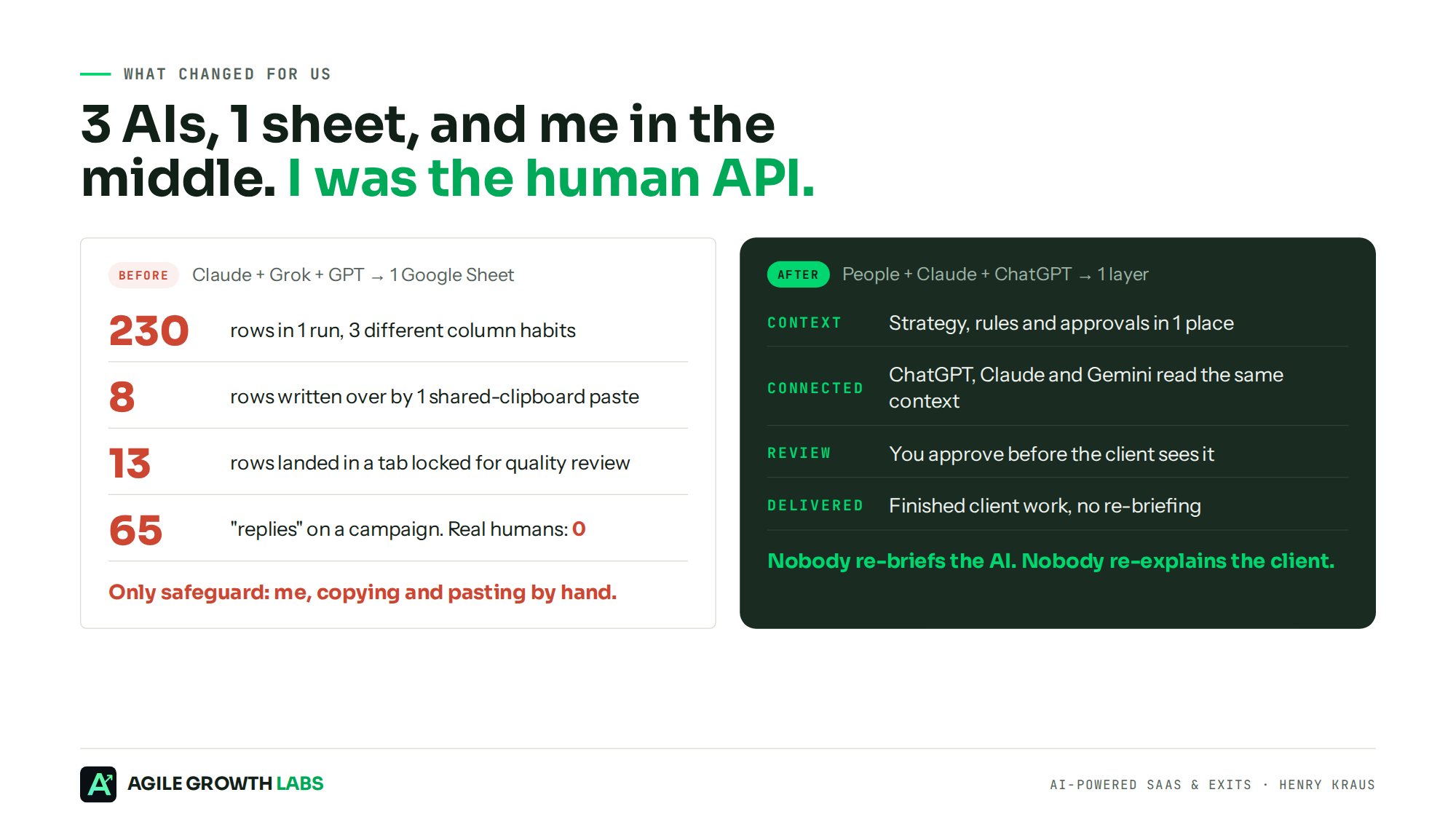
Then came the part nobody warns you about. The agents only ran if I babysat them. If there was a task, I had to click the button to be sure it was going, and I spent my days copying and pasting between Claude, Grok and GPT. I was getting so much done, but I was attached to my computer all the time. I wasn't running the company. I was the copy-paste master and the human API of the company.
3 AIs, 1 Spreadsheet, 0 Control
The cold email engine is where it broke. Claude researched prospects, Grok researched prospects, GPT researched prospects, and all 3 wrote into the same Google Sheet. In 1 run it went from 0 rows to 230. Grok put the record type in 1 column, GPT put it in another, and GPT started writing notes inside cells another agent had already filled.
They shared 1 clipboard, so 1 paste wrote over 8 rows, another dropped a link into the wrong cell, and 13 rows landed in a tab that was supposed to stay locked until quality review. I caught it and undid it. Nobody was wrong. Every agent did the job it was given. That's kind of the issue.
Before that, one campaign showed 65 replies and it looked like a win. Every single one was an auto-reply or an out-of-office. Real human replies: 0. Activity looked great, the outcome was zero, and no system flagged it. I found it by hand.
Activity is not progress. Finished client work is.
The Market Already Bought the Agents
Here's the shift nobody is pricing in yet.
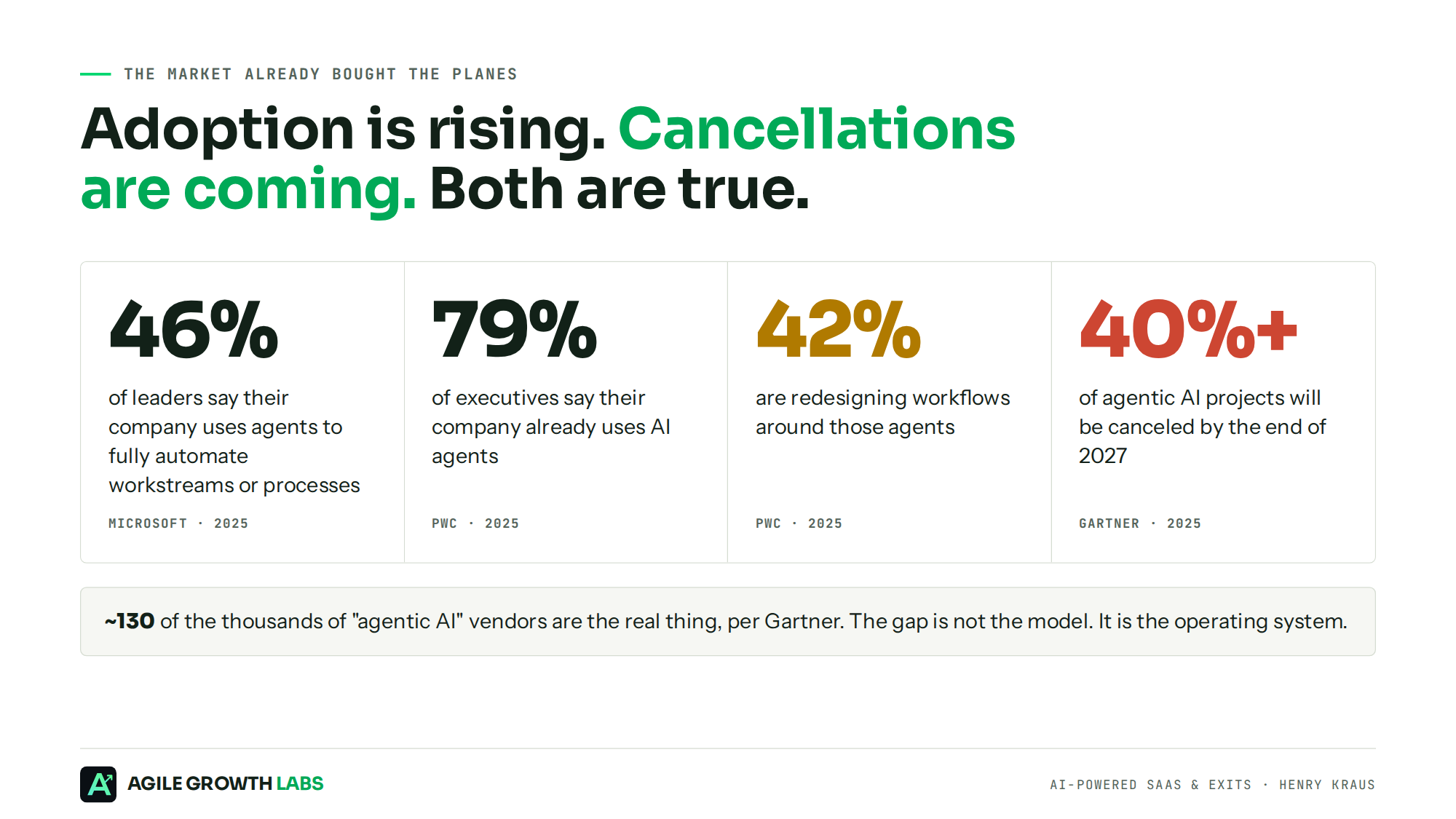
Microsoft found that 46% of leaders say their company already uses agents to fully automate workstreams or business processes. Gartner estimates that only about 130 of the thousands of vendors selling "agentic AI" are the real thing. So adoption is rising and cancellations are coming, and both are true at the same time.
The projects that die won't die because the model was dumb. They'll die because nobody can say who owns the work, what the agent is allowed to touch, or whether it made money. People are very good at vibe coding and creating to oblivion. What they don't have is a path to take the finished work, put their name behind it and ship it. They can't bring that last 10% to the finish line, so it sits on the shelf.
And here's the other thing I keep seeing. Teams using AI are engineering more stuff. They're not using it for distribution. That's backwards.
The Work Carries the Client Context
What fixed it for me was a layer that lives underneath all the AI platforms and shares the context, so nobody has to copy and paste. We call it Portable Delivery Intelligence. It keeps each client's strategy, rules, priorities and approvals in 1 place and connects it to the AI tools your team already uses, like ChatGPT, Claude and Gemini. The work carries the client context, so nobody re-briefs the AI or re-explains the client.
The day-to-day looks simple:
- AI completes the work. Landing pages, email sequences, client reports, social content.
- You review. Nothing goes to a client until a person approves it.
- The client receives it. Finished work, without your team re-explaining the client or redoing the work.
Same people, no added chaos.
Am I going to tell you to rip out your tools? No. No rip-and-replace. At the end of the day the tool matters less than the design. You can't just automate something that's not working. The hard part is figuring out what works first, so you know what to document.
The Map: 5 Steps
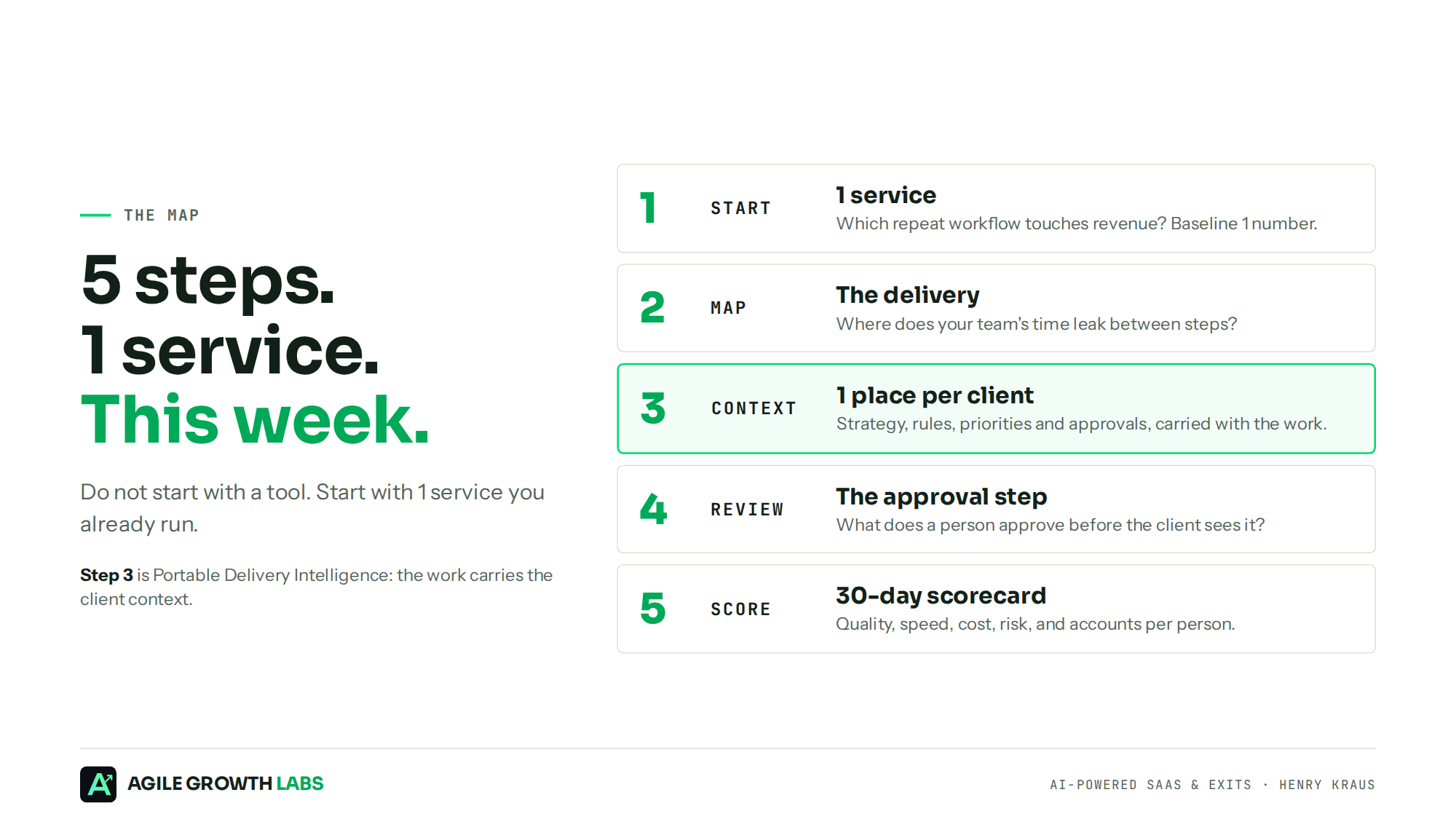
Let me find a simple way to explain this. Don't start with a tool. Start with 1 service you already run, and walk it through these 5 steps this week.
Step 1. Start With 1 Service
Pick a workflow that repeats and touches revenue: lead to booked meeting, campaign to pipeline, renewal notice to renewed contract, proposal request to sent proposal, or customer escalation to resolved issue.
Then write down 1 number before you change anything, whether that's cycle time, reply rate, cost per outcome, pipeline created or gross retention. No baseline, no proof. No proof, no budget next quarter.
Find your first money workflow
Goal: Find the 1 workflow worth fixing first, ranked by money.
- Write 5 to 10 lines on how your week runs and who does what.
- Paste it into the prompt below.
- Take the top pick and write down its baseline number today.
You are my operations analyst.

Here is how my team works today: [paste a plain description of your week, your tools, and who does what].

List the 5 workflows that repeat most often AND touch revenue. For each one, give me:
1. Trigger (what starts it)
2. Outcome (what "done" means in dollars, deals, retention, or margin)
3. Current owner
4. How long it takes today
5. Where it breaks most often
6. 1 number I should baseline this week

Rank them by revenue impact divided by effort to fix. Put the top pick first and explain why in 3 sentences.

Do not recommend a tool yet.
Step 2. Map the Delivery
Draw the workflow before you pick a model. This is where you see where your team's time leaks. Every step gets 5 boxes: the trigger that starts it, the agent action, the human decision, the system of record where the truth lives, and the exception path for when it breaks.
Here's lead to meeting: form fill or intent signal → research and enrich → qualify → human approves high-value accounts → write to CRM → outreach → sort replies → meeting booked → pipeline.
My old email engine skipped the sort replies box. That's how 65 auto-replies turned into a fake win.
Map the workflow
Goal: See every handoff where context gets lost, before you pick a model.
- Name the workflow, its trigger, and its money outcome.
- Run the prompt and answer any questions it lists.
- Circle the 3 riskiest handoffs. Those are your first fixes.
Map this workflow step by step: [workflow name]. It starts at [trigger] and ends at [revenue outcome].

For each step, give me a table with these columns:
Step | Who does it (agent or human) | Input | Output | System of record | What can go wrong | What happens when it does

Then flag every handoff where context could get lost. Mark the 3 riskiest handoffs and tell me why.

Do not invent systems or steps I did not describe. If information is missing, list the questions I need to answer.
Step 3. Put the Client Context in 1 Place
An agent doesn't know the goal. It just knows it needs to do better. So how intelligent can it be if you give it all the context it needs? That's what the context contract is for, and it's the heart of Portable Delivery Intelligence. Strategy, rules, priorities and approvals, written once and carried with the work.
Your context contract answers 5 questions:
- What is the source of truth for every fact?
- What can never be said, used or changed?
- Who updates the record, and how often?
- What carries between steps, and what resets?
- What happens when data is missing or conflicts?
This is the layer that fixed the 3-agent sheet. Same columns, same rules, 1 place to read from.
Write the context contract
Goal: Give every person and agent the same 1-page source of truth.
- Run the prompt and answer its questions.
- Confirm only the claims and proof you can stand behind.
- Paste the finished contract at the top of every task for this workflow.
Help me write a context contract for [workflow].

Ask me up to 10 questions first. Wait for my answers.

Then write a 1-page contract with these sections:
- Source of truth (where each fact lives)
- Approved claims and proof points (only ones I confirm)
- Never say / never use
- Who owns updates, and how often
- What carries over between steps vs what resets
- Rules for missing or conflicting data (default: stop and ask a human)

Keep it under 400 words so any AI tool can load it at the start of every task.
Step 4. Add the Approval Step
My first instinct was to gate everything. Every draft, every post, every task came to me. At one point I had hundreds of pieces of content sitting in my portal waiting for my approval. The agents were producing. Nothing was shipping, because I was the only gate and I didn't have the time to read it all.
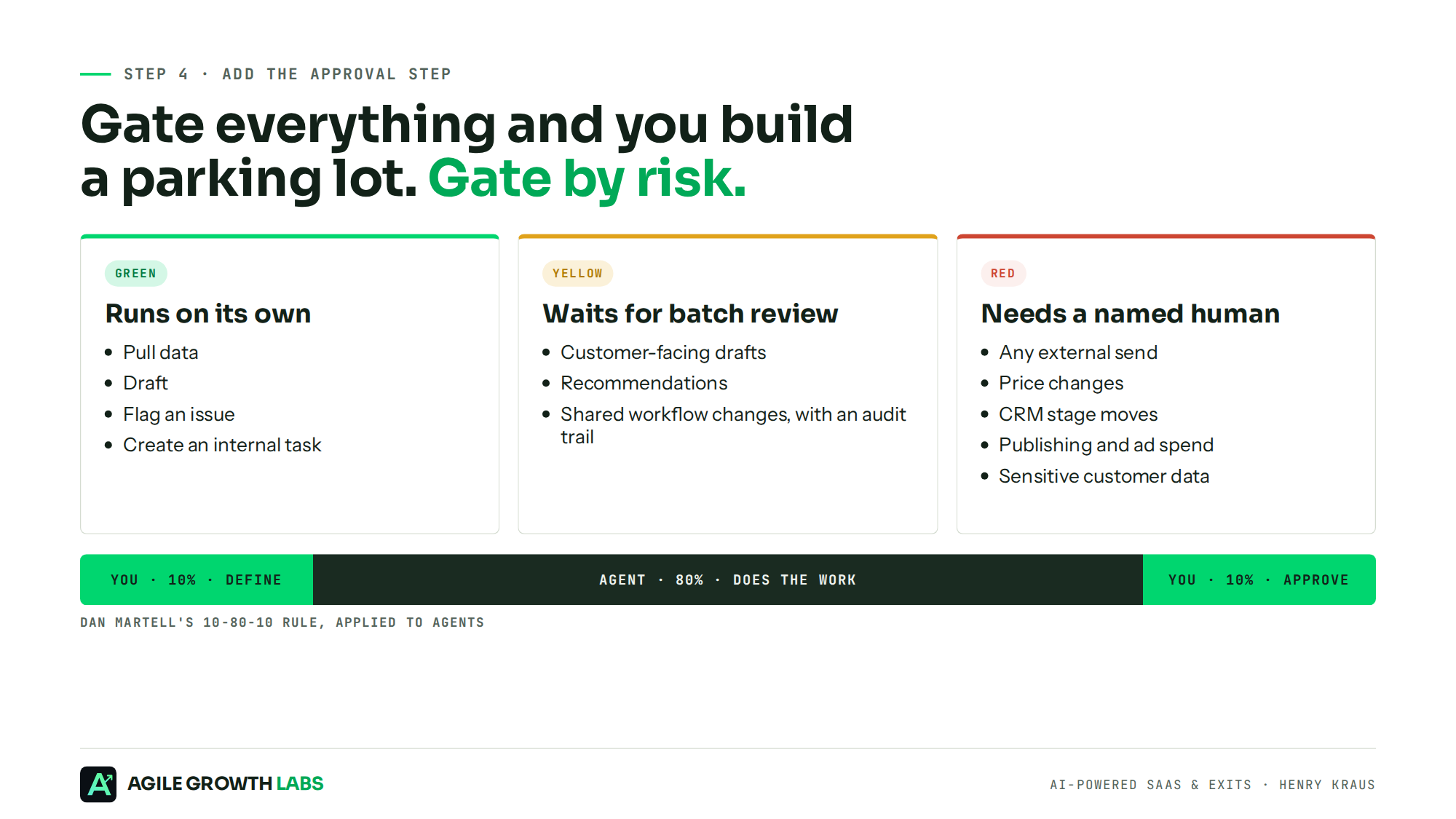
- Green runs on its own. Pull data, draft, flag an issue, create an internal task.
- Yellow waits for batch review. Customer-facing drafts, recommendations, and changes to a shared workflow, with an audit trail.
- Red needs a named human. Sending external messages, changing price, moving a CRM stage, publishing, touching ad spend, or using sensitive customer data.
This is Dan Martell's 10-80-10 rule applied to agents. You do the first 10% and define the job, the agent does the middle 80%, and you do the last 10% and approve what carries risk. Human plus AI is the answer, because you can't hold a computer accountable for delivering crap work.
Gate everything and you build a parking lot. Gate by risk and you build a system.
Sort every action into gates
Goal: Decide what runs alone, what waits for review, and what needs a named human.
- Paste in the map from Step 2.
- Run the prompt.
- Assign an approver and a max wait time to every Yellow and Red step.
Here is my workflow map: [paste the map from the last prompt].

Sort every action into Green, Yellow, or Red:
- Green = runs with no review (reversible, internal)
- Yellow = queues for batch review (customer-facing drafts, recommendations)
- Red = needs a named person's approval (sends, pricing, CRM stage changes, publishing, ad spend, sensitive data)

For each Yellow and Red item, name the approver role and a max wait time. If a gate would slow the workflow by more than 24 hours, show me how to shrink it without removing the control.
Step 5. Score It in 30 Days
Put 1 scorecard on the workflow with 6 lines: quality, speed, cost, risk, adoption and money. If you run client work, the money line is accounts per person. Most account managers cap at 4 to 8 accounts. 18 to 25 is the per-operator target each of our installs is scoped to. Quality is acceptance rate and rework. Speed is cycle time and time to first response. Cost is hours removed and cost per outcome. Risk is rollbacks and exceptions. Adoption is the share of eligible work actually running through the system. Money is pipeline, conversion, retention, revenue and accounts per person.
Every time I talk to a company, I ask how comfortable they are when I say I want to fail as fast as possible. A 30-day scorecard is how you fail fast on purpose. If the loop can't move 1 of those lines in 30 days, fix it or kill it. Hype is not a plan. Data is.
Build the 30-day scorecard
Goal: Know in 30 days whether to scale, fix, or kill the workflow.
- Enter your baseline, or write unknown.
- Run the prompt.
- Review the table every Friday with the owner it names.
Build a 30-day scorecard for [workflow].

My baseline today: [your number, or "unknown"].

Make a weekly table with 6 rows: Quality, Speed, Cost, Risk, Adoption, Money. For each row give me:
1. The exact metric
2. Where I pull it from
3. The target by day 30
4. The owner who reviews it

End with a clear rule: on day 30, what result means scale, what means fix, and what means kill.

Use only what I give you. List missing data instead of guessing.
What It Looks Like When It Works
Here's what that loop looks like on the ground. You can see the proof here.
- 25 to 1. One operator plus the system carries the work a 25-person marketing team used to carry, by our internal mapping.
- $7M in client revenue supported by the same delivery system.
- 42 verified Upwork reviews, 5.0, Top 1% Expert-Vetted.
- Clients include Bowen eBikes and Kajeet.
None of that came from a smarter model. Once I find something that's working, I document it, and then I train a system on that 1 task and that 1 KPI, because I know it's generating the results. Do the work, prove what works, teach the machine to repeat it, then go find the next thing.
1 agent. 1 KPI. 1 deliverable. Pick the number, point 1 agent at it, and let it get better every day. Then build the next one.
Blueprint 1: The Marketing Department
Workflow: campaign to pipeline.
I talked to a training company that had paid an agency $60,000 for ads and a new landing page. Thousands of people visited. 3 filled out the form. Nobody called them back, and the agency called it a success. That's what happens when you run ads with no oversight on the other parts of the system.
This system measures pipeline created per week, not posts shipped or emails sent. And for any go-to-market play, I'd rather not have you or me decide the winner. I'd rather have the market tell us. 1 ad to 1 audience is not a data point. 3 audiences, 4 messages and 4 creatives is.
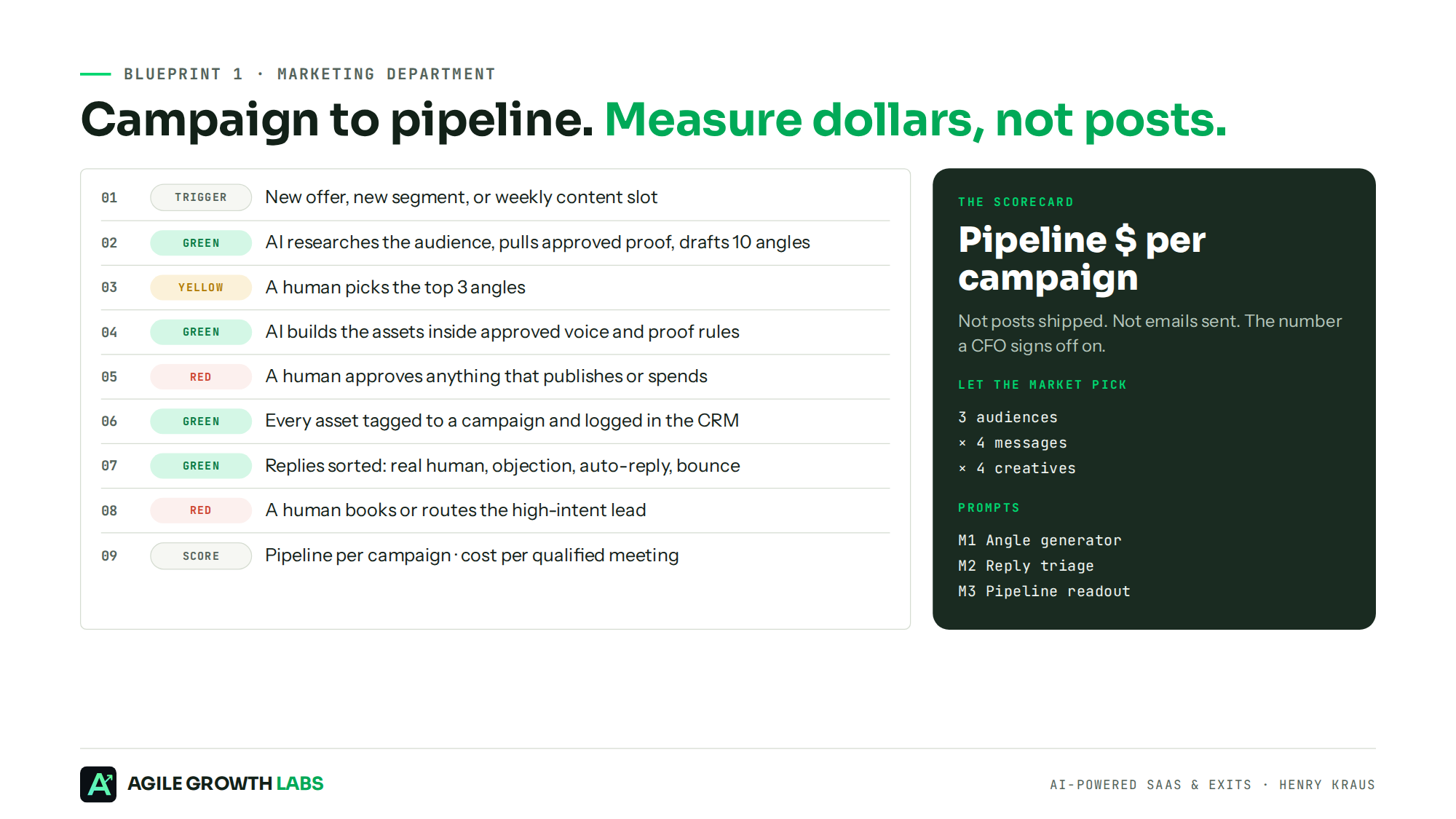
- Trigger: a new offer, a new segment, or a weekly content slot.
- Green: AI researches the audience, pulls approved proof, and drafts 10 angles.
- Yellow: a human picks the top 3 angles.
- Green: AI builds the assets inside your approved voice and proof rules.
- Red: a human approves anything that publishes or spends.
- Green: every asset gets tagged to a campaign and logged in the CRM.
- Green: replies and form fills get sorted into real human, objection, referral, not now, unsubscribe, auto-reply or bounce.
- Red: a human books or routes the high-intent lead.
- Scorecard: pipeline per campaign and cost per qualified meeting.
M1. The angle generator
Goal: Get 10 tested angles and a test grid, built only from proof you already have.
- Fill in your offer, buyer, and 3 real results.
- Run the prompt.
- Launch the top 3 angles into the 3 x 4 x 4 grid and let the market pick.
You are a direct-response strategist.

Our offer: [offer].
Our buyer: [role, company size, main pain].
Our proof: [paste 3 real results with numbers].

Give me 10 angles. For each one: the realization it creates, a 1-line hook, the proof it uses, and the objection it answers. Use only the proof I gave you. Do not invent numbers.

Then rank the top 3 by how likely a cold buyer is to stop scrolling. Explain each rank in 1 line.

Then build me a test grid: 3 audiences x 4 messages x 4 creatives, so the market picks the winner, not us.
M2. Reply triage, the one that would have saved me
Goal: Separate real buyers from auto-replies before anyone celebrates a number.
- Export this week's replies.
- Paste them into the prompt.
- Approve each RED draft before it sends.
Sort each reply below into 1 bucket: Real interest, Real objection, Referral, Not now, Unsubscribe, Auto-reply or out-of-office, Bounce.

For every Real interest and Real objection, draft a 3-sentence response and label it RED: needs human approval before send.

Return a table with: sender, bucket, 1-line reason, next step. Then give me totals by bucket.

Replies:
[paste replies]
M3. The weekly pipeline readout
Goal: Turn campaign activity into a pipeline number a CFO would sign off on.
- Pull sends, replies by bucket, meetings, and pipeline by campaign ID.
- Run the prompt.
- Act on the scale, fix, or kill call the same day.
Here is this week's campaign data: [paste sends, replies by bucket, meetings booked, and pipeline $ by campaign ID].

Tell me:
1. Pipeline $ per campaign
2. Cost per qualified meeting
3. Which campaign to scale, fix, or kill, and why in 1 line each

Use only these numbers. If data is missing, tell me what is missing instead of guessing.
Blueprint 2: The Renewal Department
Workflow: renewal notice to renewed contract.
Renewals are the quietest money in the business, and they're where handoffs break the most. The account manager changed. Usage dropped. The champion left. A support ticket has been sitting open for 3 weeks, and nobody notices until 30 days out.
I was on a call with a founder selling AI agents that work renewals, with thousands of renewals in the pipeline. To save on storage, they delete the call data every 30 days. My question was simple. How do you share the context if you keep deleting your data? Every account gets relearned from scratch, because nothing is stored in the brain so it can get better over time.
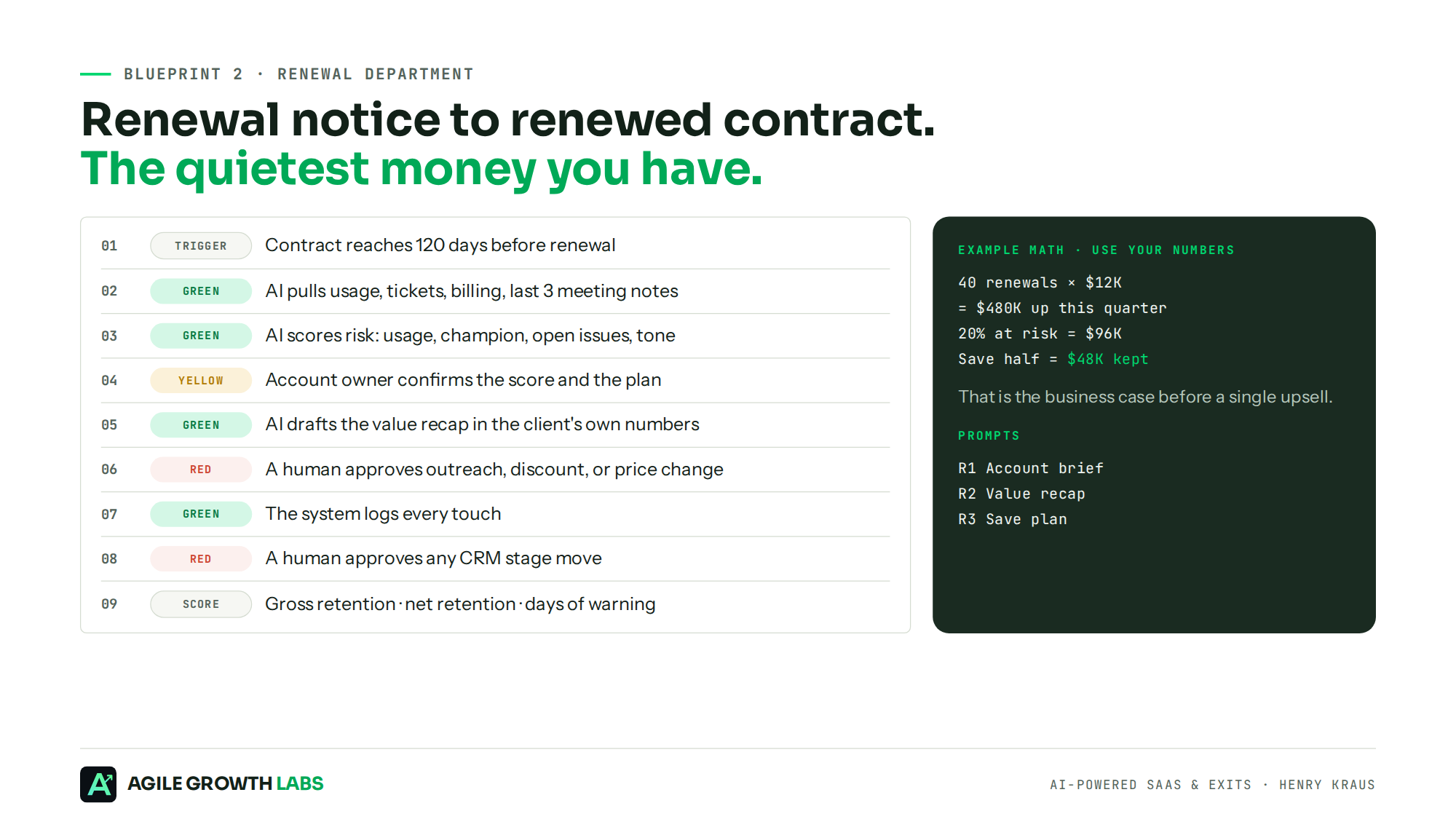
- Trigger: a contract reaches 120 days before renewal.
- Green: AI pulls usage, support tickets, billing and the last 3 meeting notes into 1 account brief.
- Green: AI scores the risk on usage trend, champion status, open issues and customer tone.
- Yellow: the account owner confirms the score and the plan.
- Green: AI drafts the value recap in the customer's own approved numbers.
- Red: a human approves any outreach, discount or price change.
- Green: the system logs every touch.
- Red: a human approves any CRM stage move.
- Scorecard: gross retention, net retention, and days of warning on at-risk accounts.
Run the math on your own book, because I won't invent it for you. As an example only, 40 renewals this quarter at $12K each is $480K. If 20% are at risk, that's $96K, and saving half of them keeps $48K before you count a single upsell.
R1. The renewal account brief
Goal: See every renewal's real risk 120 days out, not 30.
- Pull usage, tickets, billing, and the last 3 meeting notes.
- Run the prompt once per account.
- Send the brief to the account owner to confirm.
Build a renewal brief for [account]. Renewal date: [date]. Contract value: [$].

Use only this data: [paste usage, support tickets, billing, and meeting notes].

Give me:
- A 3-line account summary
- Usage trend (up, flat, or down, with numbers)
- Champion status (still there, changed, or gone)
- Open issues
- A risk score of Low, Medium, or High, with the 3 reasons behind it

If data is missing, list what is missing. Do not fill gaps with guesses.
R2. The value recap email
Goal: Remind the champion what they got, in their own numbers.
- Fill in their original goals and the results you can prove.
- Run the prompt.
- Account owner approves before it sends.
Draft a renewal value recap for [champion name] at [account].

Their goals when they bought: [goals].
What they got: [results with numbers].

Rules: under 150 words. Their numbers first. No discount language. 1 clear ask for a 20-minute review call.

Label it RED: needs account owner approval before send.
R3. The at-risk save plan
Goal: Turn a High-risk score into a plan with owners and a deadline.
- Paste the risk reasons from the brief.
- Run the prompt.
- Put the 3 actions on this week's board with names on them.
This account is High risk for these reasons: [reasons]. Renewal is in [X] days. Value: [$].

Give me a save plan:
- 3 actions for this week, with an owner for each
- The proof we need to show them
- The 1 question to ask the champion on the call

Then tell me what signal would mean we should plan for churn instead of fighting it.
The Walk-Away Test
Microsoft found the average worker is interrupted 275 times a day, about once every 2 minutes. AI was supposed to buy that time back. For a lot of teams it did the opposite, and now they babysit 5 tools instead of 5 tabs.
Everyone I talk to is realizing they need their processes dialed in without being married to their computer. If you're running agents, you need a structure and a system so you don't have a human locked to the computer, clicking continue, continue. Ironically, the efficiency that will separate us is building the systems that give us permission to walk away from our computers, without sacrificing the amount of work getting done.
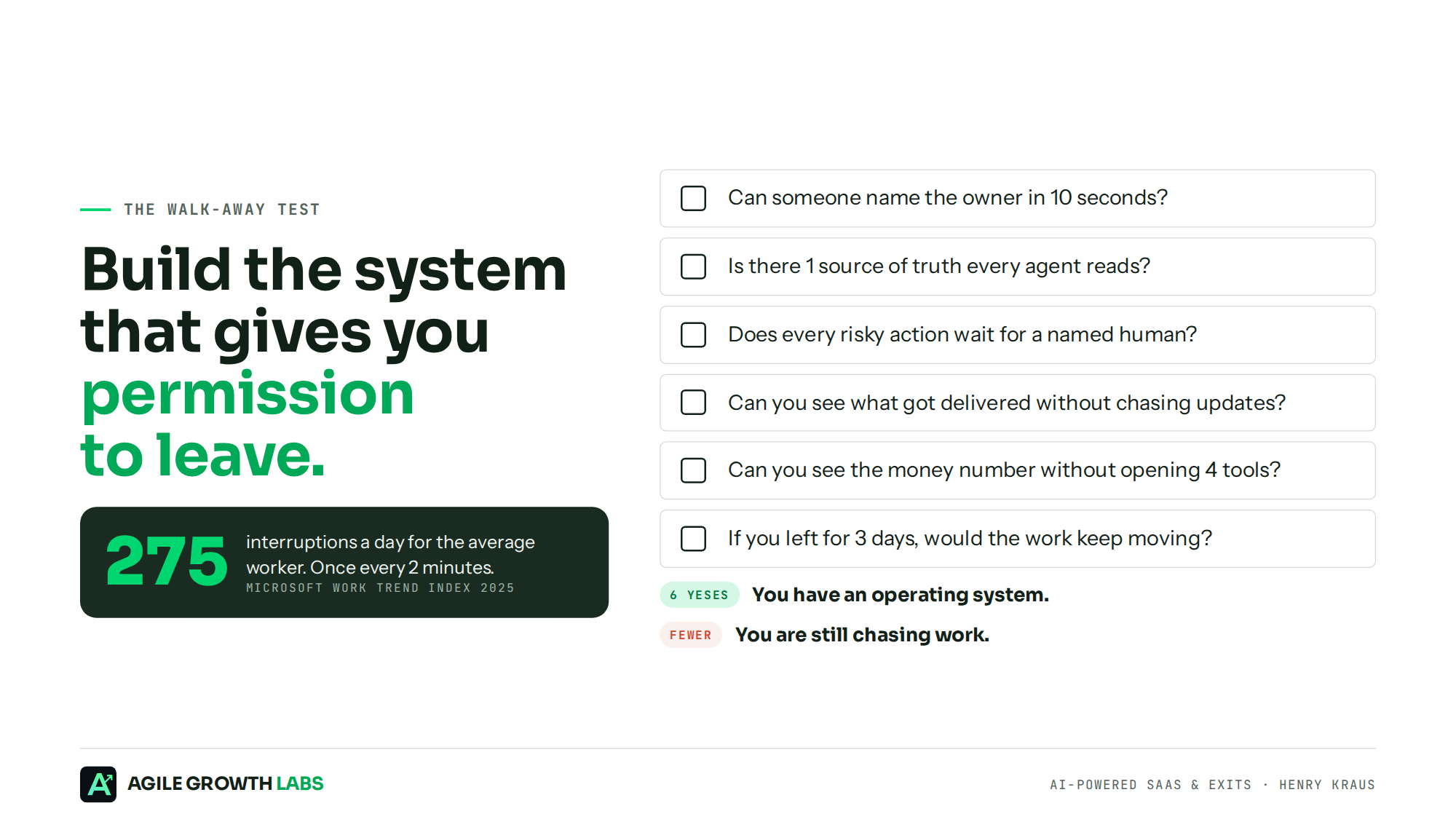
Grade 1 workflow on these 6 questions. Give yourself 1 point for every yes.
- Can someone name the owner in 10 seconds?
- Is there 1 source of truth every agent reads?
- Does every risky action wait for a named human?
- Can you see what got delivered without chasing updates?
- Can you see the money number without opening 4 tools?
- If you left for 3 days, would the work keep moving, and would you trust what it did?
6 points means you have an operating system. Anything less means you're still chasing work.
Why This Shows Up in Your Valuation
My newsletter is about exits, so here's the exit angle. A buyer doesn't pay a premium for a founder who is the shared memory, the exception handler and the human API of the company. They pay for a business that runs without heroic effort.
The systems I build aren't meant to keep the business tied to me. If you wanted to replace me down the road, it should be easy to do. That's what a buyer is paying for: owners named, client context written down, an approval step that's clear, finished work on every task and a scorecard on every revenue workflow. The Operator Playbook exists for the same reason, so delivery never lives in one person's head. ARR gets you the meeting. Durability gets you the multiple.
The Question Every Operator Must Face
Gartner predicts that at least 15% of day-to-day work decisions will be made by agentic AI by 2028, up from 0% in 2024. Software is not dead. You're just swapping software for agents. You stop charging for seats and start charging for deliverables.
So ask yourself. Is your team finishing client work, or chasing it? Are you running the company, or are you the human API? Does your next client add capacity, or does it land back on your best people? If you walked away for 3 days, would the work keep moving, or would it be sitting in a tab when you got back?
Agents will do more of the work every quarter. Only the teams whose work carries the client context will get to walk away from their desks. Your next client should not create a new problem.
FAQ
What is an agent operating system?
It is the layer around your AI tools that keeps each client's context in 1 place, adds an approval step before work reaches the client, and scores the result. AI completes the work, a person reviews it, and the client receives it.
Where should a team start?
Pick 1 workflow that repeats and touches revenue, write down 1 baseline number, and map it from trigger to money before you choose any tool.
How many clients can one account manager handle?
Most account managers cap at 4 to 8 accounts before quality slips. With Portable Delivery Intelligence and a trained operator, 18 to 25 is the per-operator target each install is scoped to.
Do we need to replace our AI tools?
No. Keep ChatGPT, Claude or Gemini, whichever your team uses. Connect them to the same context so every tool works from the same rules.
What does Portable Delivery Intelligence add?
It keeps each client's strategy, rules, priorities and approvals in 1 place and connects them to your tools. Nobody re-briefs the AI or re-explains the client.
Bring one client account. Leave with the map. We map where your team's time leaks and how many more accounts each person could carry. You keep the map either way. Book your map here.
Sources
- Microsoft, 2025 Work Trend Index: The Frontier Firm Is Born, April 2025, and the Work Trend Index one-pager.
- PwC, AI Agent Survey, May 2025. 308 US executives.
- Gartner, Over 40% of Agentic AI Projects Will Be Canceled by End of 2027, June 2025.